
Where to Find the Form I-9 Online
What is the Official Form I-9 and Why is it Required?
Finding the form I-9 online is straightforward, but using it correctly is what matters most for your business.
Here’s the quick answer:
- Official source: Download the current Form I-9 directly from uscis.gov/i-9
- Current edition: 01/20/25, valid through 05/31/2027
- File format: Fillable PDF (511 KB)
- Cost: Free, always
- Filing: Do NOT submit to USCIS or ICE. You keep it on file.
Every U.S. employer is required by federal law to complete Form I-9, Employment Eligibility Verification, for every new hire, whether they are a U.S. citizen or not. There are no exceptions.
For busy HR teams, the paperwork can pile up fast. A single Form I-9 has over 300 possible errors, and mistakes can trigger ICE audits or significant fines. Knowing where to get the right form, and how to complete it correctly, is the first step toward staying compliant without the headache.
Key terms for form i 9 online:
The Immigration Reform and Control Act of 1986, often called IRCA, made it illegal for U.S. employers to knowingly hire or continue to employ individuals who are not authorized to work in the United States. To enforce this, the federal government created Form I-9.
If you are running a business in the United States, whether you are based in Maryland or anywhere else across the country, you must complete this form for every single person you put on your payroll. This requirement applies to U.S. citizens, non-citizen nationals, lawful permanent residents, and aliens authorized to work.
The core purpose of the form is twofold. First, it establishes the identity of the person you are hiring. Second, it proves that they have the legal right to work in the United States.
Failing to complete this form is not just a minor administrative oversight. It is a direct violation of federal law. If you want to understand the foundational elements of this requirement, you can read our detailed breakdown of what is I-9 Form to get a clear picture of how this impacts your onboarding.
Where to Access and Complete the Form I-9 Online
When you are looking for the official form i 9 online, you will find plenty of third-party websites offering downloads. However, you should always go straight to the source to avoid outdated versions or potentially malicious downloads.
The official government repository is managed by U.S. Citizenship and Immigration Services, which is a division of the Department of Homeland Security. You can access the official page directly via the Employment Eligibility Verification | USCIS information portal.

While downloading a static PDF is the traditional route, many modern businesses are shifting toward comprehensive digital systems. Using standalone PDFs can be risky because they do not guide the user through the form or prevent simple input errors. If you are looking to modernize your onboarding, exploring Electronic I-9 Solutions is a smart way to automate the process while keeping your records secure and compliant with federal standards.
Downloading the Official Form I-9 Online PDF
If you decide to stick with the standard PDF route, you must ensure you are using the correct version. The current edition of Form I-9 is the 01/20/25 edition, which carries an expiration date of 05/31/2027. You can identify this version by looking at the bottom of the form page where the edition date is printed, as well as the OMB control number 1615-0047 shown at the top.
You can download the official document directly by accessing the [PDF] Form I-9, Employment Eligibility Verification – USCIS file.
There is also an alternative blank version hosted on the ADP Blank PDF server if you need a quick backup link.
That while USCIS publishes a Spanish-language version of Form I-9, federal rules state that only employers in Puerto Rico are allowed to fill out the Spanish version for official recordkeeping. For employers operating in Maryland or other U.S. states, the Spanish version may only be used as a translation aid. The official signed form kept on file must be the English version.
Completing the Form I-9 Online via Electronic Systems
If you are tired of printing, scanning, and filing paper documents, you can legally complete and store your I-9 forms electronically. However, you cannot just use any basic digital signature tool. The Department of Homeland Security has strict regulations regarding electronic I-9 systems.
To be compliant, your electronic system must include:
- An secure, indexable database that prevents unauthorized access.
- A clear and unalterable audit trail that records every time a form is created, completed, viewed, or modified.
- An electronic signature process that meets federal standards, including a system to verify the identity of the person signing.
- The ability to easily retrieve and present the forms to government inspectors if requested.
Using a dedicated onboarding platform helps you avoid the common pitfalls of manual completion. For a deeper look at keeping your digital onboarding systems compliant with the latest regulations, check out our I-9 Compliance Guide 2025.
Key Deadlines and Requirements for Sections 1 and 2
Timing is everything when it comes to I-9 compliance. The federal government does not give employers a grace period to catch up on paperwork weeks after a new hire starts.
Here are the strict deadlines you must follow:
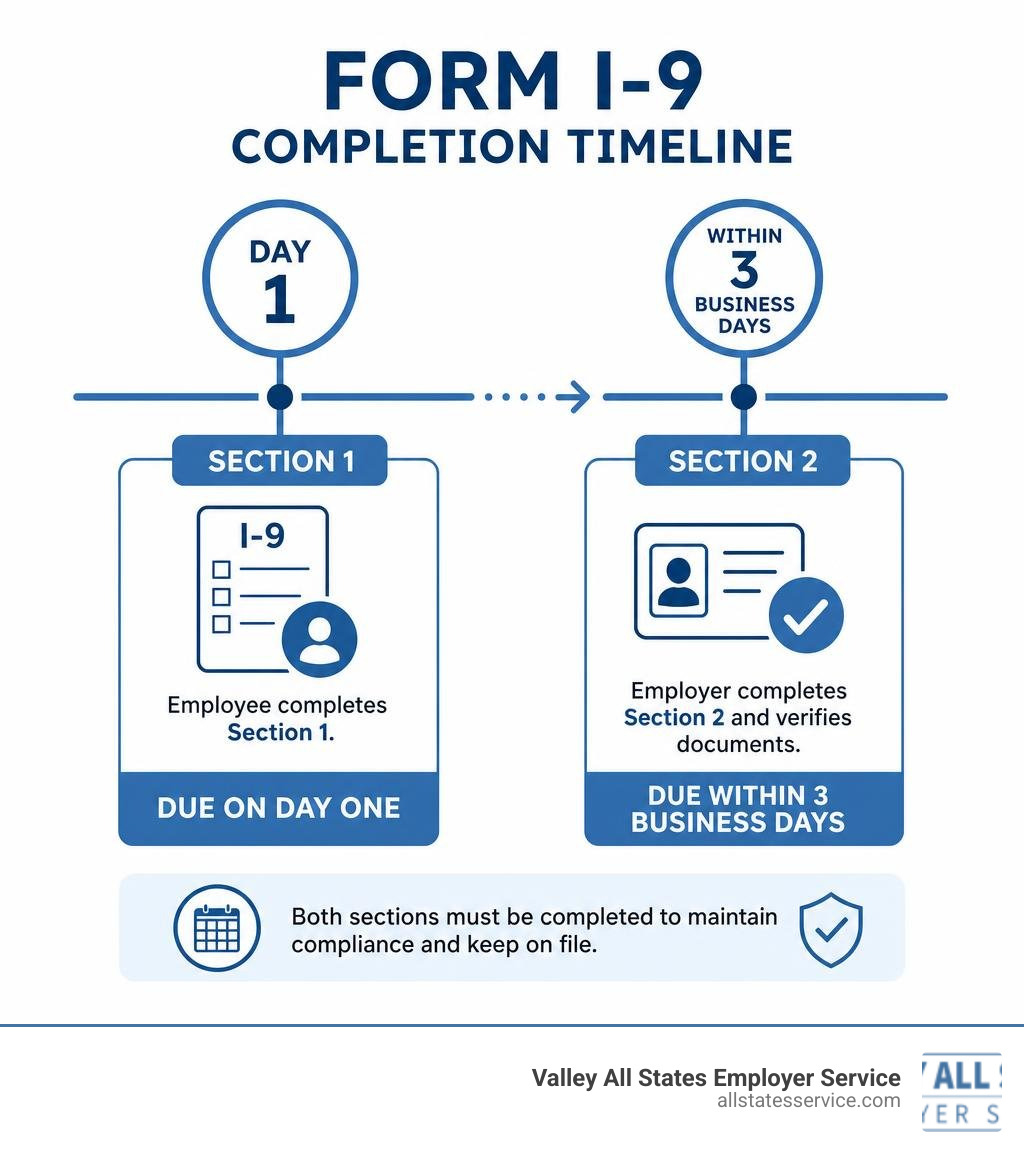
- Section 1 (Employee Information and Attestation): The employee must complete and sign this section no later than their first day of employment. They cannot complete it before they have accepted a job offer, but they can complete it as soon as the offer is accepted.
- Section 2 (Employer Review and Verification): You, the employer, must complete this section within three business days of the employee’s first day of work. For example, if your new hire starts working on a Monday, you must physically examine their documents and sign Section 2 by Thursday.
- Supplement A (Preparer and/or Translator Certification): This section must be completed if the employee used a helper, such as a translator or preparer, to fill out Section 1.
- Supplement B (Reverification and Rehire): This section is used when you need to reverify an employee’s work authorization before it expires, or when you rehire a former employee within three years of their original form completion.
To make these rules easier to visualize, let’s look at a simple breakdown:
| Requirement | Section 1: Employee | Section 2: Employer |
|---|---|---|
| Who Completes It? | The new employee (with help from a translator if needed). | The employer or an authorized representative. |
| Deadline | No later than the first day of paid work. | Within three business days of the start date. |
| Core Task | Provide personal details and attest to citizenship or immigration status. | Physically inspect original documents and record the details. |
| Common Mistake | Forgetting to sign or enter the correct date. | Accepting expired documents or photocopies. |
If you need a step-by-step walkthrough of what to look for when filling out the employer portion, our I-9 Section 2 Requirements Complete Guide covers everything you need to know.
Acceptable Documents for Identity and Work Authorization
When completing Section 2, your new hire must present original, unexpired documents that prove who they are and that they are allowed to work in the United States. As an employer, you cannot tell the employee which documents they must bring. Doing so is considered document abuse and can lead to discrimination lawsuits.
Instead, you must provide them with the official List of Acceptable Documents and let them choose what to present. The documents are divided into three lists:
- List A (Identity and Employment Authorization): Presenting one document from this list is all that is required because it establishes both identity and work authorization. Examples include a U.S. Passport, Permanent Resident Card (Green Card), or an Employment Authorization Document (Form I-766).
- List B (Identity Only): If the employee does not have a List A document, they must present a List B document to prove their identity. Examples include a State-issued Driver’s License or an ID card with a photograph.
- List C (Employment Authorization Only): If using a List B document, the employee must also present a List C document to prove they are legally allowed to work. Examples include an unrestricted Social Security Card or a certified Birth Certificate.
All documents must be unexpired. If a document contains an expiration date, it must be valid on the day you inspect it. The only exceptions are documents that have been officially extended by the issuing authority, such as certain automatic extensions for work permits.
Sometimes, an employee might not have their original document because it was lost, stolen, or damaged. In these specific cases, they can present an official receipt showing they have applied for a replacement. This receipt is valid for 90 days, after which they must present the actual replacement document.
For a complete checklist of what counts as a valid document under each list, you can read our I-9 Acceptable Documents Ultimate Guide.
Handling Remote and Virtual I-9 Verifications
With the rise of remote work, physically examining a new hire’s documents can be a logistical challenge. Fortunately, the Department of Homeland Security has introduced an alternative procedure that allows for virtual document verification.
However, there is a catch. The DHS Alternative Procedure is only available to employers who are enrolled in and in good standing with E-Verify.
If you are enrolled in E-Verify, you can perform virtual verifications by following these steps:
- The employee completes Section 1 of the form i 9 online and transmits a clear copy of their acceptable documents to you.
- You conduct a live video call with the employee while examining the copies of the documents they sent to ensure they appear genuine and relate to the person on the screen.
- You complete Section 2 and check the box indicating that you used the DHS Alternative Procedure to examine the documents.
If you are not enrolled in E-Verify, you cannot use video calls to verify documents. Instead, you must use the physical examination method. For remote employees, this means you must designate an authorized representative, such as a notary, a local HR professional, or even a trusted third party, to meet with the employee in person, physically inspect the documents, and sign Section 2 on your behalf. As the employer, you remain legally liable for any mistakes made by your authorized representative.
To learn more about setting up a secure workflow for your distributed team, take a look at our comprehensive I-9 Remote Verification Guide.
Frequently Asked Questions about Form I-9 Compliance
Managing employment eligibility can raise a lot of questions. Here are some of the most common questions we hear from employers trying to stay compliant.
How long must employers retain completed Form I-9 records?
You must keep a completed Form I-9 on file for every active employee. Once an employee leaves your company, you are still required to retain their form for a specific period.
The retention rule is simple but requires a quick calculation. You must keep the form for whichever period is longer:
- Three years from the employee’s date of hire, or
- One year after the date their employment was terminated.
Do not send these forms to the government. Keep them stored securely in a physical filing cabinet or a compliant electronic storage system. They must be easily accessible so that you can produce them within three business days if you receive a formal inspection notice from Immigration and Customs Enforcement, the Department of Labor, or the Department of Justice.
What are the penalties for non-compliance and form errors?
Failing to properly manage your I-9 process can be incredibly expensive. ICE regularly audits businesses to ensure compliance, and even simple paperwork errors can lead to heavy fines.
Penalties are generally broken down into two categories:
- Technical or Paperwork Violations: These are mistakes like missing signatures, incorrect dates, or failing to check the right boxes. Fines for these administrative errors can range from hundreds to thousands of dollars per form.
- Knowing Hire or Continuing to Employ Violations: If you knowingly hire an unauthorized worker or continue to employ someone after learning they do not have the right to work in the U.S., the fines are significantly higher and can even lead to criminal prosecution.
Using a digital system with clear audit trails and automated error detection is the best way to protect your business from these compliance risks.
How does E-Verify integrate with the Form I-9 process?
While Form I-9 is mandatory for all U.S. employers, E-Verify is a voluntary web-based system for most businesses, though it is mandatory for federal contractors and employers in certain states.
E-Verify does not replace Form I-9. Instead, it acts as an extra layer of security. Once you complete the Form I-9, you enter the information into E-Verify, which electronically compares the data against records from the Social Security Administration and the Department of Homeland Security to confirm work authorization.
There are a few key differences to keep in mind when using E-Verify:
- E-Verify requires the employee to provide their Social Security number in Section 1, whereas this is optional on a standard Form I-9.
- If the employee presents a List B document, it must contain a photograph.
- Unlike Form I-9, E-Verify cannot be used to reverify expired work authorization. For reverifications, you must use Supplement B on the physical or electronic Form I-9.
Summary of Online I-9 Compliance
Keeping up with federal employment regulations can feel like a full-time job. Between managing strict deadlines, verifying complex documents, and ensuring your remote hiring processes are compliant, it is easy for busy HR teams to feel overwhelmed.
At Valley All States Employer Service, we take the stress out of workforce eligibility. We provide outsourced E-Verify and compliance services designed to minimize errors, eliminate paperwork headaches, and ensure your business remains fully compliant with federal standards. Whether you are operating in Lutherville, Maryland, or managing a growing team across the United States, we are here to help you simplify your onboarding.
Ready to simplify compliance? Check out our I-9 Compliance Services Complete Guide to see how we can support your business today.