
The Permanent Resident’s Guide to Completing I-9 Form Documentation
Why Getting the I-9 Right for Green Card Holders Matters More Than You Think
Completing the I-9 form for a permanent resident card is one of the most error-prone steps in the entire onboarding process, and those errors can be expensive.
Here’s a quick answer if you need it fast:
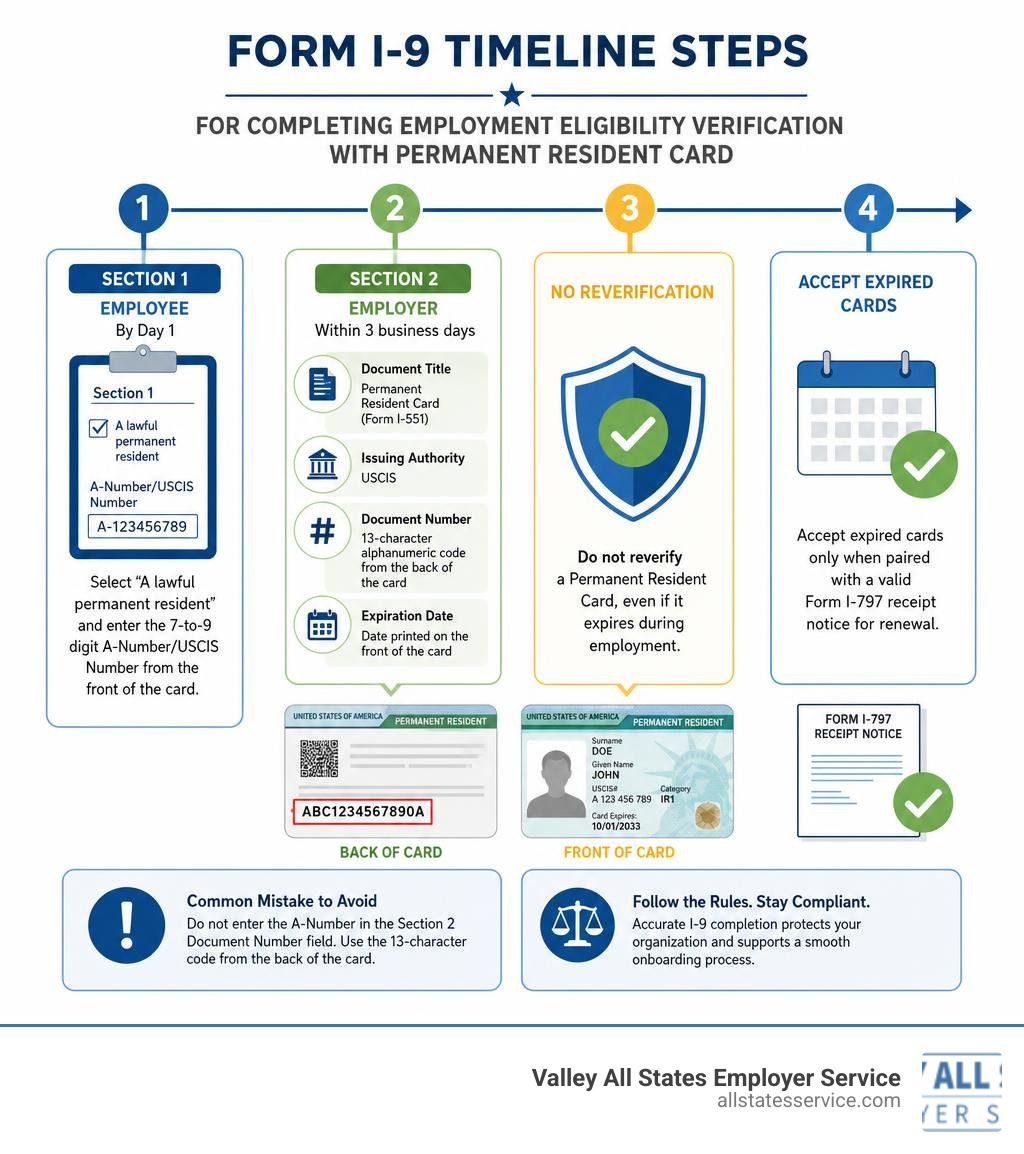
How to complete Form I-9 for a Permanent Resident Card:
- Section 1 (employee completes by Day 1): Select “A lawful permanent resident” and enter the 7-to-9 digit A-Number/USCIS Number from the front of the card.
- Section 2 (employer completes within 3 business days): Record the document as follows:
- Document Title: Permanent Resident Card (Form I-551)
- Issuing Authority: USCIS
- Document Number: The 13-character alphanumeric code from the back of the card
- Expiration Date: The date printed on the front of the card
- Do not reverify a Permanent Resident Card, even if it expires during employment.
- Accept expired cards only when paired with a valid Form I-797 receipt notice for renewal.
Most I-9 errors on green cards come down to one mistake: entering the A-Number in the Section 2 Document Number field instead of the 13-character code from the back of the card. It feels like the right thing to do. It isn’t.
One audit of a 75-employee company found 18 forms with exactly that error, resulting in over $16,200 in paperwork fines. Combined with missing Issuing Authority entries, the total can climb to $30,000 to $60,000 fast.
HR managers juggling dozens of new hires don’t always have time to cross-check every field. But with a Permanent Resident Card, the details are precise and the stakes are real.
This guide walks you through every step, including how to handle expired cards, lost cards, and when reverification is required (and when it’s actually prohibited by law).
Easy completing i 9 form for permanent resident card word list:
- handbook for employers guidance for completing form i 9
- i9 list b and c
- permanent resident card i9 example
What is Form I-9 and Why is it Required?
Every single time your business welcomes a new team member, federal law requires you to complete Form I-9, Employment Eligibility Verification. Mandated by the Immigration Reform and Control Act of 1986, this form is how employers verify both the identity and the legal work authorization of everyone they hire in the United States.
The process is not optional. Whether your new hire is a U.S. citizen, a noncitizen national, a lawful permanent resident, or an alien authorized to work, they must document their status. The law places the burden of verification directly on the employer. You must ensure that every section is completed accurately and within strict federal timelines. For a detailed breakdown of these legal requirements, you can review the official USCIS Form I-9 Instructions.
When dealing with lawful permanent residents, the onboarding process is highly structured. These individuals have been granted the right to live and work in the United States indefinitely. However, to satisfy the Form I-9 requirements, they must still present valid documentation. Understanding how to handle these specific documents is the key to maintaining compliance and passing any unexpected government audits.
Completing I-9 Form for Permanent Resident Card: Section 1 Requirements
Section 1 of Form I-9 is the employee’s responsibility. Your new hire must complete, sign, and date this section no later than their very first day of employment for pay. As an employer, you are responsible for reviewing Section 1 to ensure the employee has filled out all required fields, selected their correct status, and signed the form.
On the form, the employee must select the box indicating they are “A lawful permanent resident.” Along with checking this box, they are required to enter their 7-to-9 digit Alien Registration Number, also known as the A-Number or USCIS Number. For complete step-by-step instructions on guiding your employee through this part of the form, consult the USCIS Form I-9 PDF Instructions.
It is also important to note that while providing a Social Security number in Section 1 is generally voluntary for employees, it is mandatory if your business is enrolled in E-Verify. If your new hire is still waiting for their Social Security number to be issued, they can still begin working as long as they satisfy all other Form I-9 requirements.
Entering the USCIS Number When Completing I-9 Form for Permanent Resident Card
When your new hire selects the lawful permanent resident status, they must write down their USCIS Number. This is a unique 7-to-9 digit identifier assigned to them by the Department of Homeland Security. You can easily find this number on the front of their physical Permanent Resident Card, where it is clearly labeled as the “USCIS#” or “USCIS Number.”
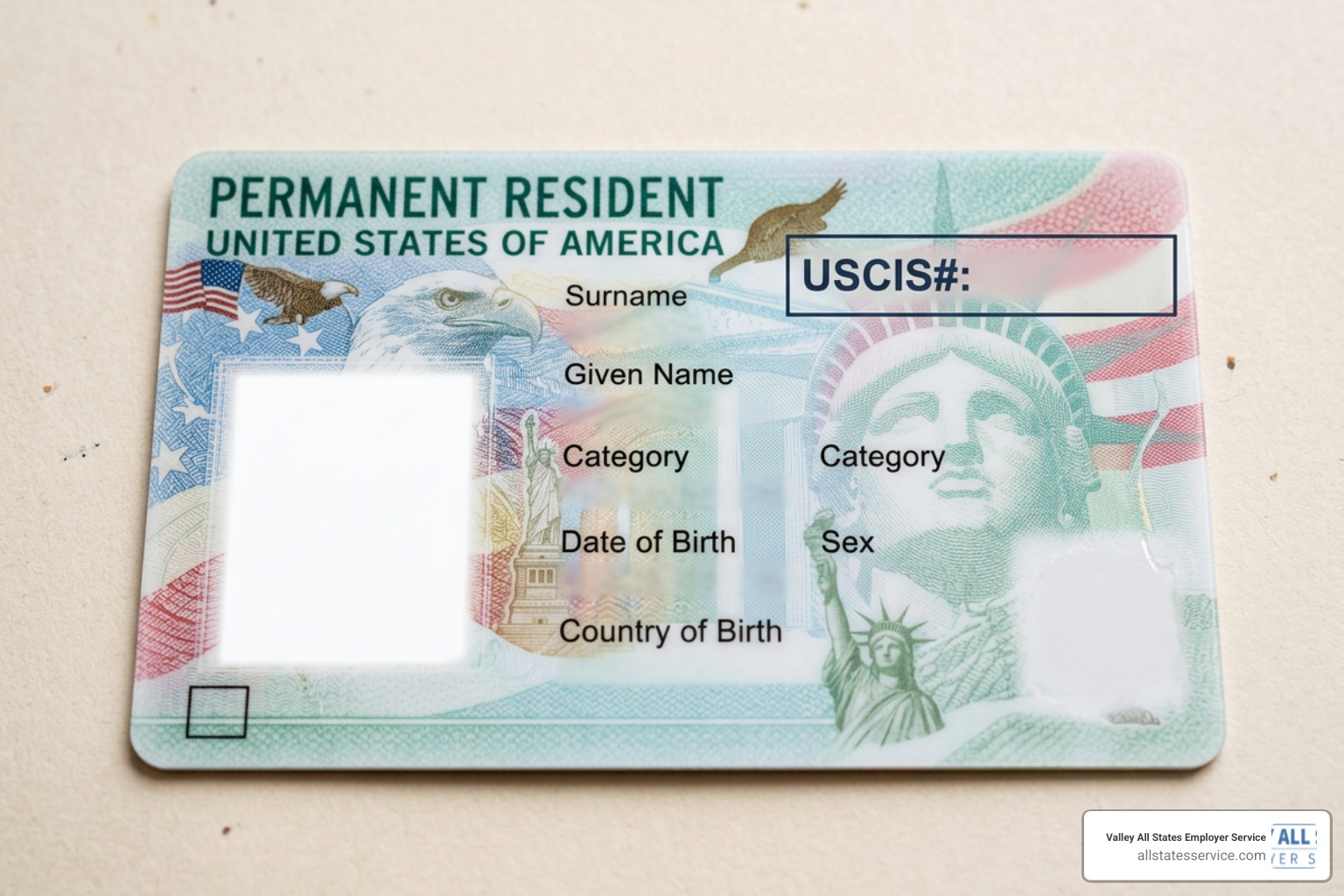
A common point of confusion is whether the USCIS Number is different from the A-Number. They are actually the exact same identifier, the only difference is whether the “A” prefix is formatted before the digits. When completing i 9 form for permanent resident card fields in Section 1, the employee should input these digits carefully.
For a visual walkthrough of this process, you can refer to the USCIS Section 1 Guide. Employers should also check out our detailed guide on Filling Out I9 With Permanent Resident Card to ensure Section 1 is completed flawlessly before moving on to the employer’s portion.
Section 2 Verification: Recording the Permanent Resident Card
Once Section 1 is complete, the employer must step in to complete Section 2 within three business days of the employee’s first day of work. This section requires you to physically examine the original documents presented by the employee. You cannot accept photocopies, faxes, or scans, unless you are using specific, DHS-authorized remote verification procedures.
The Permanent Resident Card, also known as Form I-551 or a green card, is a List A document. This means it establishes both identity and employment authorization at the same time. If your employee presents a valid, unexpired green card, they do not need to show any other documents. You must not ask for a driver’s license or a Social Security card if they have already provided a valid List A document.
When recording the card in Section 2, you must enter the information exactly as it appears on the physical document:
- Document Title: Permanent Resident Card (Form I-551)
- Issuing Authority: United States Citizenship and Immigration Services (USCIS)
- Document Number: The 13-character alphanumeric code
- Expiration Date: The date printed on the front of the card
For official guidance on navigating this step, refer to the USCIS Completing Form I-9 Guide.
Locating the Document Number When Completing I-9 Form for Permanent Resident Card
This is where many employers run into trouble and face costly audit penalties. The Document Number is not the same as the USCIS Number you recorded in Section 1. While the USCIS Number identifies the individual, the Document Number identifies the physical card itself.
On all current versions of the Permanent Resident Card, which USCIS redesigns every three to five years to prevent fraud, the Document Number is located on the back of the card. It is a 13-character alphanumeric code that typically begins with three letters, such as SRC, LIN, EAC, WAC, or NBC, followed by 10 numbers.
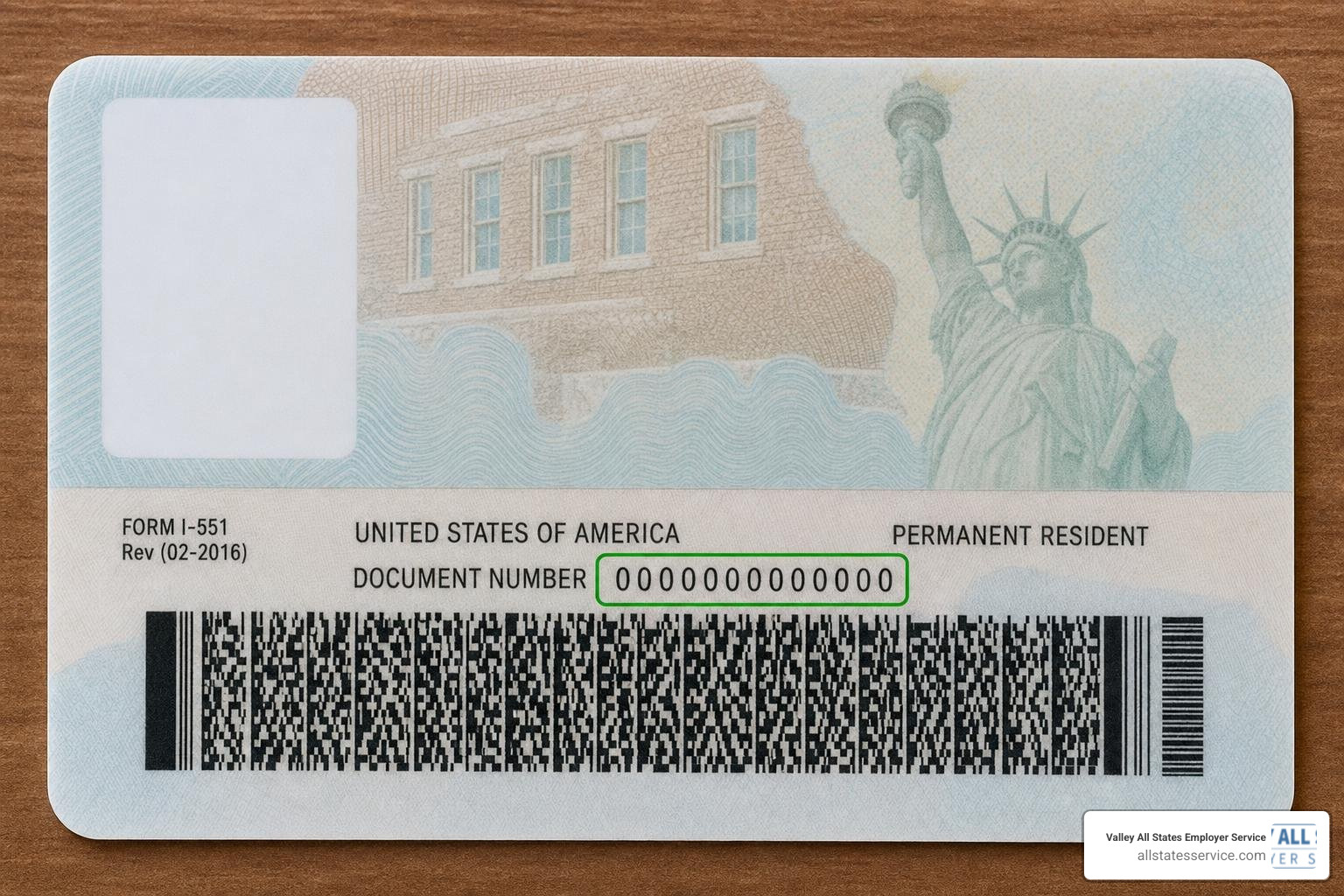
If you enter the 9-digit USCIS Number from the front of the card into the Section 2 Document Number field, you have committed a substantive paperwork violation. To avoid this common pitfall, you can read the Green Card Number Guide or view our visual examples at See A Real Permanent Resident Card I9 Example Today.
Handling Expired Cards, Receipts, and Temporary Evidence
While we generally expect documents to be unexpired, there are several unique exceptions when it comes to permanent residents. Lawful permanent resident status itself does not expire, even if the physical card does. Because of this, the government allows several forms of temporary evidence or receipts to be used for Form I-9 verification.
If an employee’s green card has expired, it cannot be accepted as a standalone List A document. However, if they present their expired card alongside a valid Form I-797, Notice of Action, which shows that USCIS has approved or is processing an extension, you must accept this combination. This combined documentation is treated as a valid List C document that proves work authorization, and the employee must also present a List B document to establish identity.
There are also instances where an employee may have lost their card or is awaiting a replacement. In these cases, specific receipts or temporary stamps can be accepted. The table below outlines these acceptable alternatives and their validity periods:
| Document Type / Temporary Evidence | List Category | Validity Period | Action Required |
|---|---|---|---|
| Form I-94 with temporary I-551 stamp and photograph | List A | Until the expiration date on the stamp, or 1 year from issuance if no date is listed | Reverify upon expiration |
| Foreign passport with a temporary I-551 stamp or MRIV | List A | Until the expiration date on the stamp, or 1 year from the endorsement date | Reverify upon expiration |
| Receipt for a lost, stolen, or damaged card | Receipt | 90 days from the first day of employment or the date reverification is due | Employee must present the actual replacement card by the end of the 90 days |
| Expired green card with Form I-797 extension notice | List C | For the duration specified in the Form I-797 notice | Reverify at the end of the extension period |
To make sure you are following these guidelines perfectly, consult the USCIS Acceptable Documents page and check out our I-9 Document Requirements Complete Guide.
Frequently Asked Questions About Permanent Resident I-9 Verification
Do employers need to reverify an expired Permanent Resident Card?
No. This is one of the absolute golden rules of Form I-9 compliance. You must never reverify a lawful permanent resident who presented a valid, unexpired Permanent Resident Card, even if that card expires while they are working for you.
This rule also applies to conditional permanent residents who initially present a 2-year expiration card. If the card was valid at the time of hire, no further action is required as long as their employment remains continuous. Attempting to reverify these employees can actually expose your business to severe penalties for document abuse and discrimination.
For official clarification on this policy, you can read the E-Verify LPR Verification guidelines. You can also explore our resources on I-9 Section 2 Acceptable Documents to learn more about which documents are exempt from reverification.
What are the penalties for incorrect Form I-9 completion?
Making mistakes on Form I-9 is not just an administrative headache, it can be incredibly expensive. Under federal guidelines, each substantive paperwork violation on a Form I-9 carries a civil penalty ranging from $288 to $2,861 per form. If an audit reveals a pattern of incorrect entries, such as consistently mixing up the USCIS Number and the Document Number, those fines add up rapidly.
Furthermore, if your business is found to have intentionally requested specific documents or rejected valid expired cards with official extensions, you could face discrimination charges from the Department of Justice’s Immigrant and Employee Rights Section (IER). For a deeper look into these penalties and how to protect your organization, consult the LegalClarity I-9 Guide.
Can employers use remote document examination for green cards?
Yes, but only under very specific conditions. The Department of Homeland Security has authorized an alternative procedure for remote document examination, but this option is only available to employers who are enrolled in and actively using E-Verify in good standing.
If you qualify to use the remote option, you must still conduct a live video interaction with the employee while examining their documents. You must also retain clear, legible copies of all documents presented. If you are not enrolled in E-Verify, you must perform a physical, in-person examination of the documents. To stay updated on the latest rules regarding remote onboarding, read our article on I-9 Form Updates.
Conclusion
Navigating the complexities of Form I-9 compliance does not have to be a stressful, error-prone process for your HR team. When it comes to completing i 9 form for permanent resident card entries, the margin for error is razor-thin, and the financial consequences of mistakes are far too high to ignore.
At Valley All States Employer Service, we provide outsourced E-Verify workforce eligibility verification designed to take the guesswork out of onboarding. Operating right here in Lutherville, Maryland, we help businesses across the United States streamline their hiring processes, eliminate administrative errors, and maintain flawless compliance.
Ready to simplify your compliance and protect your business from costly audit fines? Explore our I-9 Compliance Services Complete Guide or contact our expert team today to get started.