
See a Real Permanent Resident Card I9 Example Today
What a Permanent Resident Card I9 Example Actually Shows You
A permanent resident card i9 example is one of the most searched topics by HR professionals, and for good reason. The green card (officially Form I-551) is one of the most common List A documents you’ll see during new hire onboarding, and getting the details wrong is easier than you’d think.
Here’s a quick-reference summary before we go deeper:
What to record in Form I-9 Section 2 for a Permanent Resident Card:
| I-9 Field | What to Enter |
|---|---|
| Document Title | U.S. Permanent Resident Card or Form I-551 |
| Issuing Authority | USCIS |
| Document Number | 13-character alphanumeric code from the back of the card |
| Expiration Date | Date printed on the card (10-year or 2-year) |
Key facts to know right now:
- Form I-551 is a List A document, meaning it establishes both identity and employment authorization on its own
- Section 2 must be completed within three business days of the employee’s start date
- An expired Permanent Resident Card can still be valid for I-9 purposes in certain situations
- Never enter the A-Number from the front of the card as the document number. That is one of the most common errors flagged in I-9 audits
The card has gone through multiple redesigns, the most recent starting January 30, 2023. Each version looks different, but the same I-9 rules apply across all of them.
If you’re an HR manager processing a new hire who hands you a green card, the steps below will walk you through exactly what to check, what to record, and what to avoid.
Permanent resident card i9 example further reading:
Identifying the Correct Permanent Resident Card I9 Example
When an employee presents a Permanent Resident Card (Form I-551), the first thing we need to do is ensure we are looking at a genuine document. USCIS redesigns these cards every three to five years to stay ahead of counterfeiters, which means you might see three or four different versions in a single week of hiring.
The most recent redesign was launched on January 30, 2023. This version is a high-tech marvel, featuring detailed artwork of the Statue of Liberty, holographic images, and highly secure ink. One of the coolest features is the “layer-reveal,” where certain images are only visible from specific angles. It also includes photos of the bearer on both the front and the back, along with laser-engraved fingerprints.
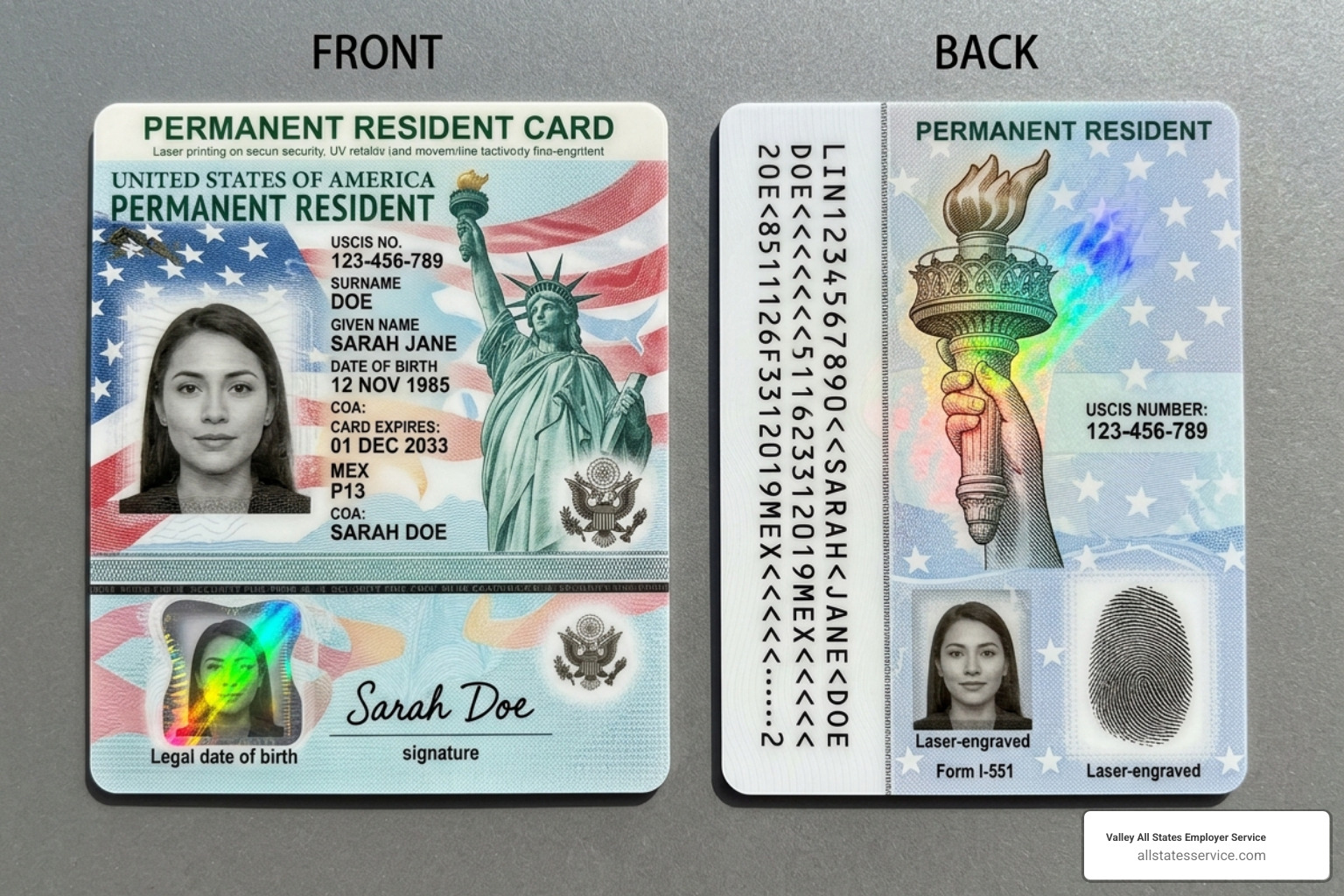
Even if an employee brings in an older version, such as the one issued starting May 1, 2017, or even the green-tinted version from May 2010, they are still valid as long as they haven’t expired. Some older cards might not even have a signature, or they might say “Signature Waived,” which is perfectly acceptable for I-9 purposes.
Recording the Document Number from a Permanent Resident Card I9 Example
This is where most people trip up. If you look at the front of a Permanent Resident Card, you will see a nine-digit number labeled “USCIS#” or “A#.” This is the Alien Registration Number. While the employee needs this for Section 1, you should not use this as the Document Number in Section 2.
The actual document number is a 13-character alphanumeric code, usually found on the back of the card. It typically starts with three letters (like MSC, LIN, or SRC) followed by ten digits. Entering the A-Number instead of the 13-character document number is one of the most frequent mistakes found during government audits. According to industry statistics, this specific error is a leading cause of technical violations that can lead to fines.
To get it right, we recommend following the steps in our guide on filling out I9 with permanent resident card. The front number identifies the person, but the back number identifies the specific card.
Valid Card Versions and Design Changes
As we mentioned, USCIS keeps things interesting by changing the design frequently. If you are looking for a permanent resident card i9 example, you need to be aware of the “legacy” cards.
For instance, did you know there are peach-colored “Resident Alien” cards issued between January 1977 and August 1989? These cards actually have no expiration date. Even though they look like they belong in a museum, they are still valid indefinitely for Form I-9. You don’t ever need to reverify these.
On the other hand, the 2010 version is famously green, while the 2017 and 2023 versions moved toward a white and blue palette with pink accents. Regardless of the color, if it says “Form I-551” on it, you are likely looking at a valid List A document. For a deeper dive into all the variations, check out our I 9 acceptable documents ultimate guide.
How to Complete Section 2 for Lawful Permanent Residents
Completing Section 2 is our responsibility as employers. Once the employee has selected “A lawful permanent resident” in Section 1 and provided their A-Number, we must physically examine the original card. We cannot accept a photocopy or a digital image on a phone.
In Section 2, under List A, you will enter the following:
- Document Title: Permanent Resident Card (Form I-551)
- Issuing Authority: USCIS (or U.S. Department of Homeland Security)
- Document Number: That 13-character code from the back!
- Expiration Date: The date the card expires (if applicable)
It is vital to be precise here. If you are feeling unsure, our federal I9 document complete guide provides a line-by-line walkthrough. You can also consult the USCIS Handbook for Employers for official regulatory guidance. We always tell our clients: “Measure twice, cut once.” Taking an extra thirty seconds to double-check that 13-character code can save hours of headache during a future audit.
Entering Expiration Dates for a Permanent Resident Card I9 Example
Most Permanent Resident Cards are valid for ten years. However, some residents are “Conditional Permanent Residents,” and their cards expire after only two years.
Here is a pro-tip that surprises many HR managers: even though the card has an expiration date, you generally do not reverify a Lawful Permanent Resident when their card expires. Their status as a permanent resident does not expire just because the plastic card did.
However, there is a catch. If the employee presented a temporary proof of status (like a stamp in a passport), that’s a different story. For a standard 10-year or 2-year card, you record the expiration date in Section 2, but you don’t need to circle back to it later. For more on this, read our article on cracking the code understanding I 9 list A documents.
Comparing I-551 Cards and Employment Authorization Documents (EAD)
It is easy to confuse the Permanent Resident Card (I-551) with the Employment Authorization Document (I-766), often called an EAD or a “work permit.” While both are List A documents, they represent very different things.
| Feature | Permanent Resident Card (I-551) | Employment Authorization Document (I-766) |
|---|---|---|
| Who gets it? | Lawful Permanent Residents (Green Card holders) | Temporary residents, students, asylum seekers |
| Duration | Usually 10 years (or 2 years conditional) | Usually 1 to 5 years |
| Reverification | Not required for standard cards | Required before the card expires |
| Status | Permanent | Temporary |
If you see a card that looks like a green card but says “Employment Authorization Card” at the top, you are looking at an I-766. You must reverify an EAD, but you usually don’t reverify an I-551. Keeping these straight is a core part of being an I 9 section 2 acceptable documents guide expert.
Handling Expired Cards and Temporary I-551 Stamps
What happens if an employee shows up with an expired green card? Surprisingly, you can often accept it! If the employee has a Form I-797 (Notice of Action) that says their card’s validity has been extended, the expired card plus that notice together count as a valid List A document.
USCIS has been issuing these extensions frequently due to processing backlogs. Some extensions last for 24 or even 48 months. In these cases, you would record the expired card information and note the extension in the “Additional Information” box in Section 2.
When to Reverify Lawful Permanent Residents
While standard cards don’t need reverification, temporary evidence does. This usually comes in two forms:
- ADIT Stamp: This is a “temporary I-551” stamp placed in a foreign passport. It usually has a photo and is valid for one year.
- MRIV (Machine-Readable Immigrant Visa): This is a visa inside a passport that contains the notation “UPON ENDORSEMENT SERVES AS TEMPORARY I-551 EVIDENCING PERMANENT RESIDENCE FOR 1 YEAR.”
If an employee presents one of these, you must reverify them using Supplement B (formerly Section 3) when the stamp or the one-year period expires. At that point, the employee must show you either a new Permanent Resident Card or any other document from List A or List C. The official USCIS guidance on LPRs and our I 9 document requirements complete guide cover exactly how to handle these temporary situations without breaking a sweat.
Avoiding Common Errors and Discrimination
One of the biggest mistakes an employer can make is telling an employee, “You’re a permanent resident, so I need to see your green card.” This is actually a violation of anti-discrimination laws.
Even if an employee tells you they are a permanent resident, they have the right to choose which documents to present. They could choose to show a driver’s license (List B) and an unrestricted Social Security card (List C) instead of their green card. If you insist on the green card, you could face significant fines from the Department of Justice.
Always let the employee choose from the List of Acceptable Documents. Your job is simply to ensure that whatever they provide appears to be genuine and relates to them. For more tips on staying out of legal hot water, check out our navigating I 9 a comprehensive guide to acceptable documents.
Frequently Asked Questions about Permanent Resident Cards
Can I accept an expired Green Card?
Yes, but only if it is accompanied by a valid Form I-797 Notice of Action that specifically extends the validity of the card. Without that extension notice, an expired card is generally not acceptable for a new hire, though it may be acceptable for existing employees in very specific audit situations.
Where is the document number located?
On almost all modern cards (issued after 2010), the document number is on the back. It is 13 characters long, starting with three letters. Don’t use the 9-digit number on the front!
Do I need to reverify a 10-year Permanent Resident Card?
No. Once you have verified a standard 10-year Permanent Resident Card, you do not need to reverify the employee’s work authorization, even when that card eventually expires.
Ready to Simplify Your Hiring?
Managing I-9 compliance doesn’t have to be a full-time job. At Valley All States Employer Service, we specialize in taking the weight off your shoulders. We provide expert, impartial, and efficient E-Verify processing that helps you minimize errors and avoid those scary government audits.
Whether you’re dealing with a complex permanent resident card i9 example or just want to make sure your everyday hiring is up to snuff, we are here to help. Our team has decades of experience navigating the ever-changing landscape of HR compliance, specifically for businesses in Maryland and across the United States.
Ready to simplify your hiring process? Explore our I-9 Compliance Services Complete Guide and see how we can make your onboarding process faster, safer, and much more efficient. Contact us today to learn more about our outsourced E-Verify solutions!