
What You Need to Know About Completing I-9 Form Examples
Completing I-9 form examples is one of the most searched topics by HR managers, and for good reason. Every U.S. employer must complete Form I-9 for every new hire, and even small mistakes can trigger fines ranging from $272 to $2,701 per violation.
Here is a quick overview of what completing Form I-9 involves:
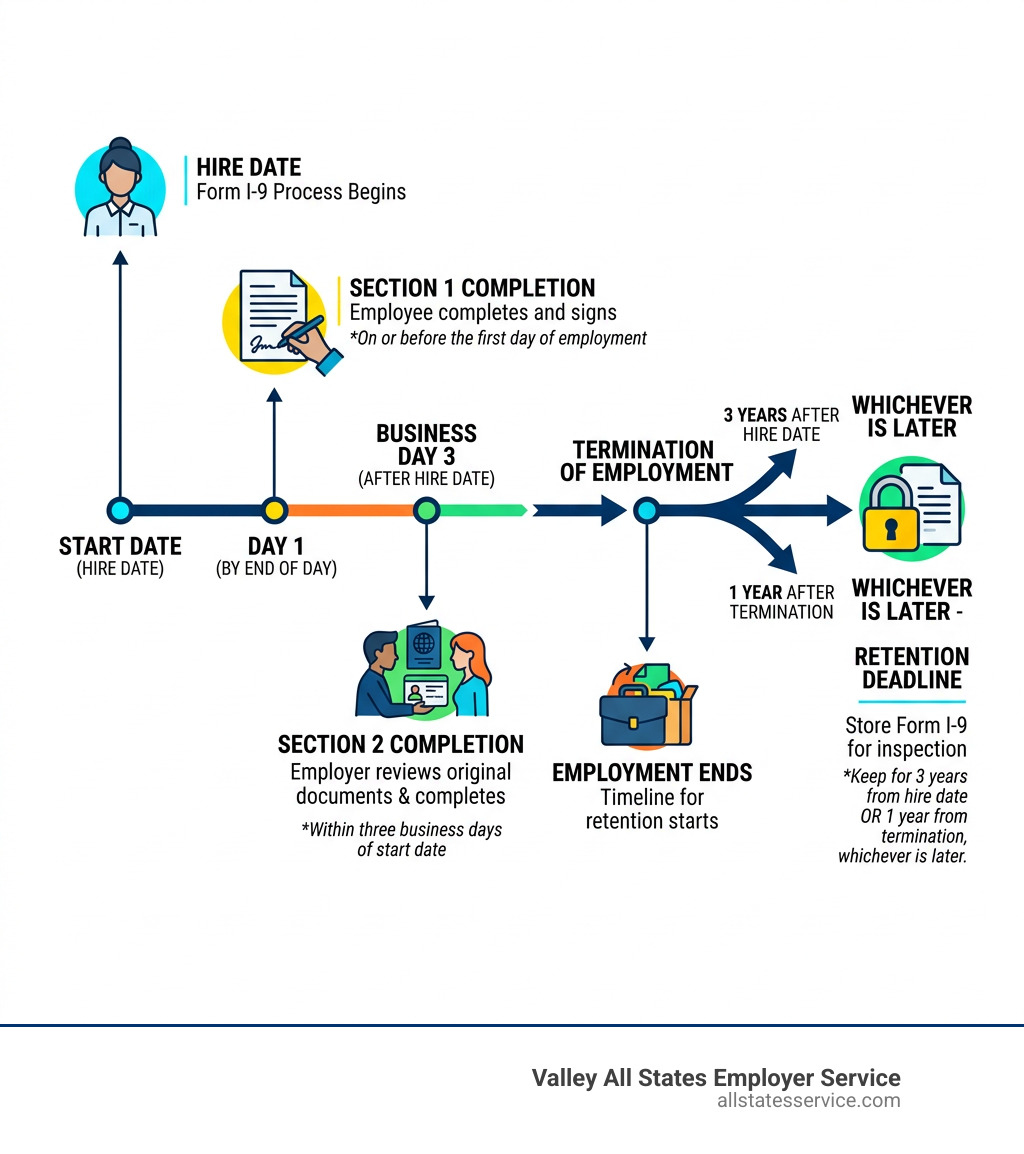
- Section 1 – The employee fills this out on or before their first day of work
- Section 2 – The employer reviews original documents and completes this within three business days of the employee’s start date
- Supplement A – Used only if a preparer or translator helped the employee complete Section 1
- Supplement B – Used for rehires or when work authorization needs to be reverified
The form applies to every person hired after November 6, 1986, including U.S. citizens, permanent residents, and nonimmigrant visa holders like F-1, J-1, and H-1B workers.
Different work statuses require different documents. A U.S. citizen might show a driver’s license and Social Security card. An F-1 student would typically show a foreign passport, Form I-94, and Form I-20. Getting this right matters, because the Department of Homeland Security and ICE actively enforce compliance.
This guide walks you through real-world examples for each situation so your team can complete Form I-9 accurately, every time.
Completing Section 1 and Section 2 Correctly
Navigating the what-is-an-i9 process starts with understanding the two primary sections of the form. While it might seem like a simple data entry task, the timing is everything. Federal law is quite strict about when these fields must be filled.
Section 1 is the employee’s responsibility. They must provide their full legal name, including any other last names used, their current address, and date of birth. One common area of confusion is the Social Security Number field. Unless your business participates in E-Verify, providing a Social Security Number in Section 1 is actually optional for the employee. They also must attest to their citizenship or immigration status by checking the appropriate box and signing the form.
Section 2 is where we, as employers, take the lead. This section must be completed within three business days of the employee’s first day of employment. This is often called the “Three-Day Rule.” For example, if an employee starts on a Monday, you must complete Section 2 by Thursday. If they are hired for fewer than three days, you must complete it on their very first day.
When completing i 9 form examples for Section 2, you must physically examine original, unexpired documents. You are looking to see if the documents reasonably appear to be genuine and relate to the person standing in front of you. You then record the document title, issuing authority, number, and expiration date. For more details on these specific steps, you can visit the Completing Form I-9 | USCIS page or check out our i-9-section-2-requirements-complete-guide.
Avoiding Common Errors and Compliance Penalties
The stakes for i-9-form-processing are high. Civil penalties for paperwork errors can range from $272 to $2,701 per form. If an employer is found to be knowingly hiring unauthorized workers, those fines can skyrocket to over $20,000 per violation.
Beyond simple typos, we must be careful about anti-discrimination laws. The Immigrant and Employee Rights Section (IER) Handbook makes it clear that we cannot tell an employee which documents to bring. If a new hire wants to show a U.S. Passport (List A), we cannot demand a Driver’s License and Social Security Card instead. Asking for “more or different” documents than what is required is known as “document abuse” and can lead to legal action.
Common errors to watch out for include:
- Using highlighters or correction fluid on the form.
- Leaving the “First Day of Employment” field blank in Section 2.
- Accepting photocopies instead of original documents (except for certified copies of birth certificates).
- Forgetting to sign or date the employer attestation.
Completing I-9 Form Examples for Different Work Statuses
The documents you will see depend entirely on the person’s status. The USCIS divides these into three categories: List A (identity and work authorization), List B (identity only), and List C (work authorization only).
| Status | Common List A Document | Common List B + List C Combination |
|---|---|---|
| U.S. Citizen | U.S. Passport or Passport Card | Driver’s License + Social Security Card |
| Permanent Resident | Permanent Resident Card (Green Card) | State ID + Unrestricted Social Security Card |
| Nonimmigrant | Foreign Passport with I-94 | N/A (Usually requires List A) |
For U.S. Citizens, the process is usually straightforward. Most will present a driver’s license and a Social Security card. However, be careful with Social Security cards that have notations like “Valid for work only with DHS authorization.” These are NOT acceptable List C documents for citizens and usually belong to nonimmigrants. You can find a full list of acceptable-i-9-documents on our site to help you distinguish between them.
Completing I-9 form examples for F-1 and J-1 Visas
When you are hiring international students, the paperwork gets a bit more complex. For an F-1 student, you are generally looking for a “List A” combination that includes:
- An unexpired foreign passport.
- Form I-94 (Arrival/Departure Record).
- Form I-20 (Certificate of Eligibility for Nonimmigrant Student Status).
For J-1 scholars, the Form I-20 is replaced by the DS-2019. In Section 1, these employees should check the box for “An alien authorized to work until” and enter the expiration date found on their I-20 or DS-2019. It is important to note that F-1 students working on-campus do not need a separate Employment Authorization Document (EAD) card, as their status allows for on-campus work automatically. Understanding these nuances is key to cracking-the-code-understanding-i-9-list-a-documents and staying compliant.
Completing I-9 form examples for H-1B and O-1 Extensions
What happens when an employee’s work authorization is about to expire, but their extension is still pending with the government? This is a common scenario for H-1B and O-1 visa holders.
Under the “240-day rule,” if an employer timely files an extension for an H-1B worker, that employee is authorized to continue working for up to 240 days while the application is pending. In this case, you would use the I-797C Receipt Notice as proof of the filing.
When completing i 9 form examples for extensions, you should update the “Additional Information” box in Section 2 with the receipt number and the date the 240-day extension expires. For a deeper dive into handling these tricky situations, our expired-i-9-documents-complete-guide is a great resource.
Managing Reverification, Supplement B, and Retention
The I-9 process doesn’t end after the first week of work. We must keep track of expiring documents and rehires. This is where Supplement B (formerly Section 3) comes into play.
You must use Supplement B for:
- Reverification: When an employee’s temporary work authorization (like an EAD card) is about to expire. You must do this no later than the date the authorization expires.
- Rehires: If you rehire an employee within three years of the date their original Form I-9 was completed, you can use Supplement B instead of starting a new form.
- Name Changes: While not strictly required by law, the USCIS recommends using Supplement B to record legal name changes to keep your records accurate.
Retention is another critical “must-do.” We are required to keep a Form I-9 for as long as the employee works for us. Once they leave, we must keep the form for either three years after their hire date or one year after their termination date, whichever is later. Check out our i-9-process-for-rehires guide for more on managing these long-term records.
Frequently Asked Questions about Completing Form I-9
What are the one-day and three-day rules?
The “One-Day Rule” applies to the employee. They must complete Section 1 of the Form I-9 by the end of their first day of work for pay. They can even complete it as soon as they accept a job offer, but never before.
The “Three-Day Rule” applies to us, the employer. We must complete Section 2 within three business days of the employee’s start date. If an employee starts on Monday, the “three days” are Tuesday, Wednesday, and Thursday. You can read more about these timelines in our guide on i-9-processing-times-and-procedures-what-every-employer-needs-to-know.
Can I specify which documents an employee must show?
No. This is a common mistake that can lead to “unfair immigration-related employment practices.” The law gives the employee the right to choose which documents to present from the Lists of Acceptable Documents. As long as the documents are on the list, are original, and appear genuine, we must accept them. If you’re wondering what-i-9-documents-do-i-need to keep on hand for reference, always keep the official USCIS list nearby.
How long must I retain completed I-9 forms?
The retention rule is often simplified as the “3-year/1-year rule.” You must keep the form for 3 years after the date of hire or 1 year after the date employment ended, whichever is later. We recommend storing these forms in a dedicated I-9 folder, separate from general personnel files. This makes it much easier to stay organized if you are ever audited by ICE. Our form-i9-ultimate-guide has more tips on secure storage.
Final Thoughts on I-9 Compliance
Maintaining compliance doesn’t have to be a source of stress for your HR team. By understanding the timing rules and following the right completing i 9 form examples, you can protect your business from costly fines and legal headaches.
At Valley All States Employer Service, we specialize in taking the administrative burden off your shoulders. We provide expert, impartial, and efficient E-Verify workforce eligibility verification for employers across the United States. Whether you are dealing with complex H-1B extensions or high-volume seasonal hiring in Maryland, our team ensures your process is error-free and fully compliant with federal law.
Ready to simplify compliance? Explore our E-Verify and I-9 services today.