
How to Properly Close Every E-Verify Case Without Breaking a Sweat
Why Closing Every E-Verify Case Is a Must for Employer Compliance
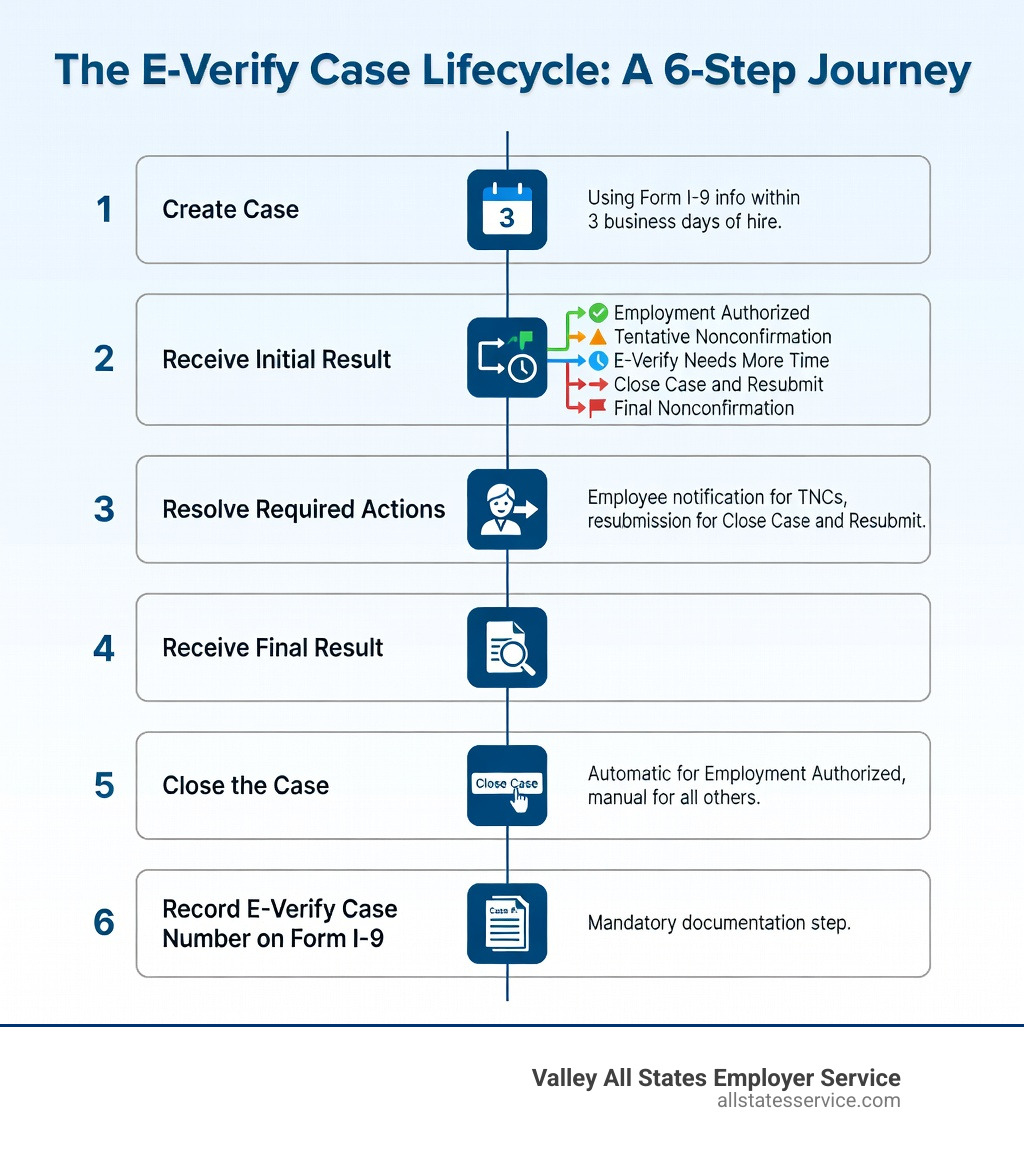
Are employers required to close every E-Verify case they create? Yes, and it’s not optional. Here’s the short answer:
- Employment Authorized cases are closed automatically by E-Verify. You still need to record the case number on Form I-9.
- Final Nonconfirmation cases require you to manually click “Close Case,” select a reason, and document the outcome.
- Close Case and Resubmit cases require you to click “Close and Create a New Case” so E-Verify can process a fresh submission.
Every other case you open, you are responsible for closing.
The E-Verify process isn’t finished when you get a result. It’s finished when the case is closed and documented. That distinction matters more than most HR teams realize.
For busy HR managers juggling onboarding, compliance deadlines, and a stack of Form I-9s, this step is easy to miss. But skipping it means your verification workflow is technically incomplete, which can create problems during an audit.
The good news? Once you understand the rules, closing cases correctly takes just a few clicks.
Are employers required to close every e verify case word guide:
Are employers required to close every E-Verify case?
When we talk about the Verification Process, we often focus on the “Submit” button. However, the Department of Homeland Security (DHS) is very clear: every case created in the system must reach a final resolution. To properly complete the process, you must receive a final case result and then close the case.
Think of it like a library book. You haven’t really finished the “transaction” until the book is scanned back into the system and the record is cleared. In employment eligibility, leaving a case open is like leaving that book in the trunk of your car. It might seem harmless, but the system still sees it as an active, unresolved item.
There is one major exception to the manual workload. If a case result comes back as “Employment Authorized,” the system does the heavy lifting for you. In these instances, E-Verify automatically closes the case. For every other scenario, including mismatches that lead to a final nonconfirmation, the ball is in your court.
Failing to follow through on these E-Verify employer responsibilities can lead to administrative headaches. It can also make your company look disorganized during a government inspection. If an auditor sees hundreds of open cases from three years ago, they might start wondering what else is being missed.
Why are employers required to close every E-Verify case for compliance?
Compliance isn’t just about following rules for the sake of it. When you enrolled in E-Verify, your company signed a Memorandum of Understanding (MOU). This is a legal agreement between your business, the SSA, and DHS. One of the core requirements in that MOU is the proper closure of cases.
Closing a case signifies that the verification process is complete. It tells the government that you have either confirmed the employee is authorized to work or that you have taken the necessary steps following a nonconfirmation. This helps maintain the integrity of the entire system. If thousands of cases were left open indefinitely, the data would become unreliable.
From a security standpoint, keeping cases closed also aligns with modern Privacy Policy standards. You are handling sensitive employee data, including Social Security numbers and document images. Closing cases ensures that the lifecycle of that specific data point has a clear end, reducing the window of time that a case is “active” and potentially subject to unnecessary edits or errors.
Are employers required to close every E-Verify case manually?
Fortunately, the system is smarter than it used to be. For the vast majority of your hires, you won’t have to click a “Close” button. When E-Verify checks the records and immediately finds a match, it displays “Employment Authorized.” At that exact moment, the system triggers an automatic closure.
According to the official 4.1 Close Case guidelines, you don’t need to take any further action within the E-Verify portal for these authorized cases. You just need to focus on your paperwork (more on that later).
However, if the case requires human intervention, such as a Tentative Nonconfirmation (TNC) that the employee chooses not to contest, or a case where you entered the wrong information, manual closure is mandatory. The system needs you to tell it why the case is being closed. Did the employee quit? Did you realize you made a typo? Was the final result a nonconfirmation? By selecting the right reason, you provide the necessary “paper trail” in the digital world.
Understanding Case Results and Automatic Closures
To keep your sanity, it helps to know which results require you to grab your mouse and which ones let you walk away. The system is designed to be efficient, but it relies on you to handle the outliers.
When you see “Employment Authorized,” you can breathe a sigh of relief. The system has verified the data against SSA and DHS records, and the loop is closed. This is the most common result, and it’s designed to be seamless.
If you are ever unsure about what a specific status means, you can learn more about E-Verify case status to ensure you aren’t leaving a case hanging. Sometimes a case might say “E-Verify Needs More Time” or “Case in Continuance.” These are not final results, and you cannot close them yet. You must wait for the system to update before you can fulfill your closure obligations.
Step-by-Step: How to Close a Final Nonconfirmation Case
Receiving a “Final Nonconfirmation” (FNC) can be stressful, but the closure process is straightforward. An FNC means that E-Verify cannot confirm the employee’s work eligibility after they have had a chance to resolve a mismatch.
Here is exactly how to handle it:
- Review the Result: Once the FNC is issued, navigate to the case details.
- Click “Close Case”: You will see this button at the bottom of the screen.
- Select the Closure Statement: E-Verify will present you with a few options. You must choose the one that most accurately describes the situation. For an FNC, you will typically indicate whether you are continuing to employ this individual or if they have been terminated.
- Provide a Reason (If Applicable): If you decide to continue employing someone after an FNC, the system will require you to explain why. Be aware that continuing to employ someone after an FNC can carry legal risks, so many employers choose to follow the standard termination procedures outlined in the 5.1 Close Case reference.
- Submit and Record: Once you click the final “Close Case” button, the status will update.
If this feels like a lot of administrative weight, you aren’t alone. Many businesses use a guide to E-Verify services to help manage these trickier resolutions. Our team at Valley All States Employer Service often handles these specific workflows for our clients, ensuring that every FNC is closed with the correct legal justification.
Handling the Close Case and Resubmit Result
Sometimes, the system just needs a do-over. You might receive a result that says “Close Case and Resubmit.” This usually happens when DHS or SSA identifies a technical error or a data entry mistake that prevents them from processing the case further.
Unlike a standard closure, this result is a two-step process:
First, you must click the button that says “Close and Create a New Case.” This is a clever feature that handles two tasks at once. It closes the “bad” case with the correct administrative reason and immediately opens a new case creation screen.
Second, the system will often pre-fill the information from the original Form I-9. You should carefully review the data to see if you made a typo in the Social Security number, name, or birth date. Once you’ve fixed the error, you submit the new case.
According to the 3.5 Close Case And Resubmit manual, the goal is to get a clean submission. Even though the system “automates” the start of the new case, the old case is only considered properly closed once you complete this specific workflow.
Recording Information on Form I-9 After Closure
Closing the case in the E-Verify portal is only half the battle. To be fully compliant, you must bring that information back to the physical or digital Form I-9. The government needs to see a connection between your I-9 records and the E-Verify system.
For every case, you must record the E-Verify case number. You have two ways to do this:
- Write it down: You can manually write the 15-digit case number in the designated space on the Form I-9.
- Attach it: You can print the “Case Details” page and physically attach it to the Form I-9.
If you are using an electronic I-9 system, this is usually handled automatically, but it’s always good to double-check. The Form I-9 Central website emphasizes that the E-Verify process is a supplement to the I-9, not a replacement.
Keeping these records organized is vital for your E-Verify and I-9 compliance guide strategy. During an audit, an officer will look at the hire date on the I-9, check that a case was created within three business days, and then look for that case number to prove the verification was completed and closed. If the case number is missing, it’s as if the verification never happened.
Frequently Asked Questions about E-Verify Closure
We hear a lot of questions from HR professionals who are worried about the “Open” status on their dashboard. Here are the most common ones we encounter.
What happens if I forget to close a case?
If you forget to close a case, it remains in “Open” status indefinitely. While there isn’t an immediate “fine” for a single open case, a pattern of unclosed cases is a red flag. It suggests to DHS that your company is not following the agreed-upon procedures in the MOU. If you are ever audited, you will likely be instructed to go back and close every single one of them, which is a tedious task you’d probably rather avoid.
Can I close a case if the employee quits?
Yes, and you should. If an employee leaves the company before you receive a final result (for example, while a TNC is still pending), you must close the case. When the system asks for a reason, you simply select “The employee is no longer employed with the company.” This stops the clock on the verification process and lets the government know why no further action was taken.
Does closing a case change the eligibility result?
No. Closing a case is an administrative action. It does not “override” an authorization or a nonconfirmation. If a case is “Employment Authorized,” closing it manually (if the system didn’t do it) just archives that result. If you close a case because of an error, it doesn’t mean the employee is authorized, it just means that specific case record is finished. You would still need to open a new, correct case to get a valid result.
Finalizing Your Verification Workflow
Managing E-Verify can feel like a full-time job, especially when you are trying to grow a business. Between tracking the three-day deadline, notifying employees of mismatches, and ensuring every case is properly closed, the administrative burden adds up quickly.
At Valley All States Employer Service, we specialize in taking that weight off your shoulders. We provide expert, impartial, and efficient E-Verify processing for employers who want to ensure they are 100% compliant without the stress. We know the ins and outs of the system, so you never have to wonder if a case was left open or if a form was filled out incorrectly.
Our goal is to help you create a streamlined office environment where you can focus on your people, not your paperwork. By outsourcing your verification needs to us, you get the peace of mind that comes with expert oversight.
Are employers required to close every e verify case? Now you know the answer is a resounding yes. Whether it happens automatically or requires a few manual clicks, closure is the final piece of the compliance puzzle.
Ready to simplify your compliance? Explore E-Verify employer requirements today. and see how we can help you stay audit-ready every single day.