
Stop Guessing and Start Tracking Your E-Verify Status
Why Staying on Top of E-Verify Status Updates Can Make or Break Your Compliance
E-Verify status updates are real-time signals that tell you whether a new hire is authorized to work in the United States, and missing them can put your business at serious legal risk.
Here’s a quick breakdown of how to track your E-Verify case progress:
- Log into your E-Verify account and check the “Cases with Updates” quick link for any changed results.
- Pull the Status Change Report every two weeks to catch any Employment Authorization Documents (EADs) that have been revoked by DHS.
- Use the E-Verify Case Tracker with your employee’s 15-digit case number to check real-time case status, no account required.
- Watch for key status types like Employment Authorized, Tentative Nonconfirmation (TNC), Case in Continuance, and Final Nonconfirmation, as each requires a different response.
- Act promptly on any flagged cases, especially revoked EADs, by reverifying employees using Form I-9, Supplement B.
For most HR managers, E-Verify feels like one more system to babysit on top of an already packed workload. You’re managing onboarding, juggling deadlines, and trying to stay compliant with rules that seem to change every few months.
And they do change. USCIS deployed the Status Change Report in June 2025, updated it again in July 2025 to add a “Revoked Document Number” field, and has rolled out multiple policy shifts tied to Temporary Protected Status (TPS) terminations, citizenship status terminology, and system outages.
Staying current isn’t optional. It’s how you protect your business.
This guide walks you through exactly how to track, interpret, and act on E-Verify status updates so nothing falls through the cracks.
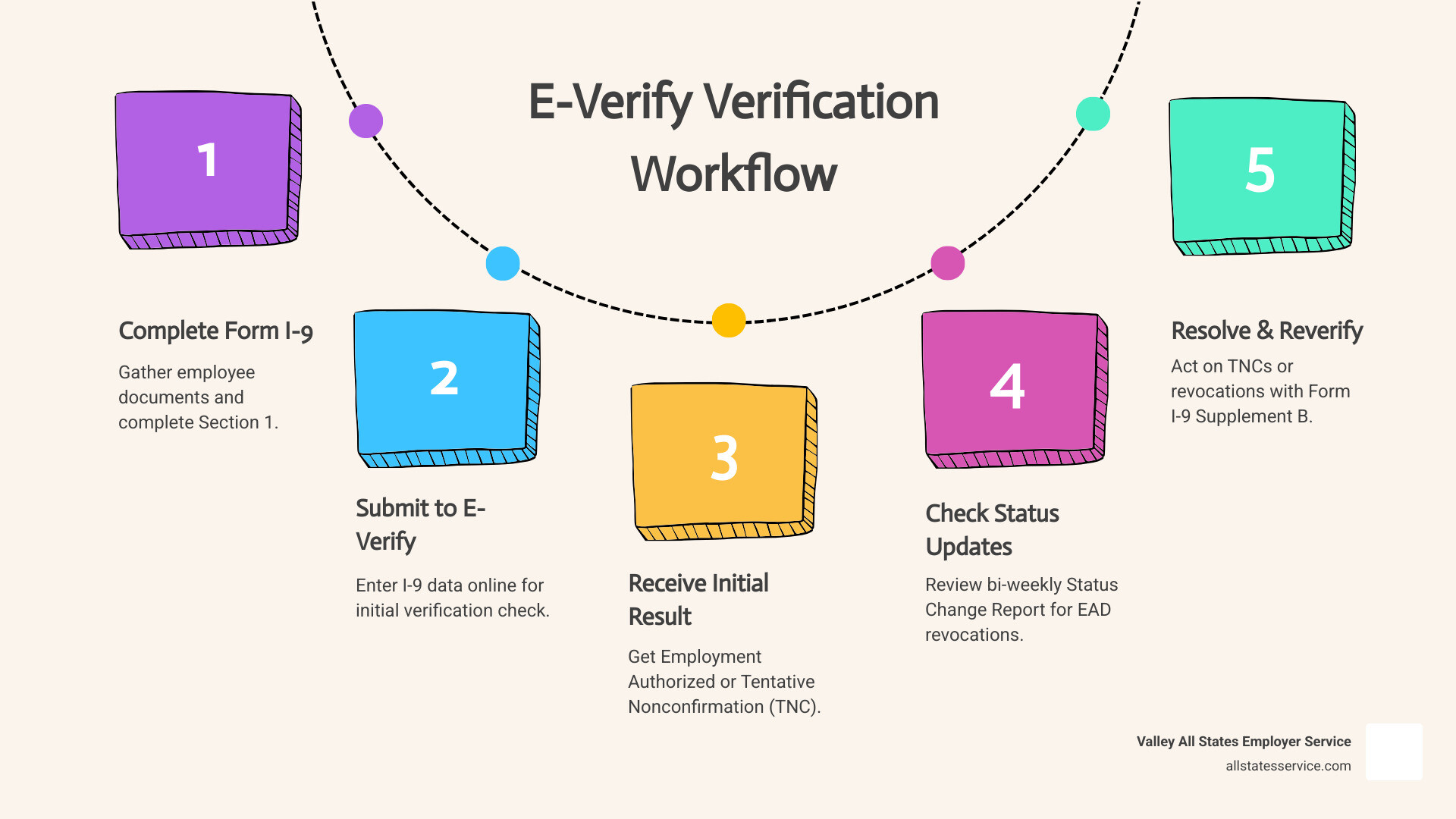
Mastering the E-Verify Status Change Report
The Status Change Report is one of the most critical tools in your compliance arsenal. Introduced by DHS to help employers identify cases created with an Employment Authorization Document (EAD) that has since been revoked, it serves as a proactive warning system.
DHS typically revokes EADs for specific reasons, such as when an individual’s parole has been terminated. Because these changes happen after the initial E-Verify “Employment Authorized” result, you won’t see them in your standard daily dashboard. You have to go looking for them.
According to the Status Change Report Updated to include Document Number guidance, this report is the only way to identify these specific revocations. If you aren’t checking it, you might unknowingly have an employee on staff whose work authorization is no longer valid.
Accessing Your E-Verify Status Updates
Getting your hands on this data is a manual process, so we recommend putting a recurring reminder on your calendar. To access the report, log into your E-Verify account, navigate to the “Reports” tab, and select “Status Change Report.”
You should perform an E Verify Status Check by downloading this report at least every two weeks. USCIS pushes updates to this system on a bi-weekly schedule. When you download the file, review it for any current employees. If a name pops up, it means their EAD status has changed, and you need to take immediate action.
The Importance of the Revoked Document Number Field
On July 15, 2025, USCIS added a specific “Revoked Document Number” field to the report. This was a game-changer for data accuracy. Before this update, it was sometimes difficult to tell exactly which document was the problem if an employee had multiple filings.
Now, you can take the EAD card number from the employee’s original Form I-9 and compare it directly to the number in the report. If they match, the document is officially revoked. This precision helps you avoid unnecessary conversations with employees whose documents are actually still valid. It ensures that your E-Verify status updates are based on hard data rather than guesswork.
Action Steps for Revoked Employment Authorization Documents
What happens when you find a match? First, don’t panic, but don’t ignore it either. If an employee’s EAD matches a revoked number in the report, you must reverify them.
You should use Form I-9, Supplement B (formerly Section 3) for this process. It is important to note that you should not create a new E-Verify case. The original case is already closed; you are simply updating the existing Form I-9 to reflect new, valid authorization.
The employee must present a different acceptable document from List A or List C. You cannot accept the revoked EAD, even if the expiration date on the card hasn’t passed yet.
| If the EAD Number… | Then… | And… |
|---|---|---|
| Matches the Revoked Document Number | Reverify the employee immediately | Use Form I-9 Supplement B |
| Does NOT match the Revoked Document Number | No action is required | Continue monitoring bi-weekly |
| Belongs to a former employee | No action is required | Keep the report for your records |
Handling CHNV Employee Verifications
Special rules often apply to employees from Cuba, Haiti, Nicaragua, and Venezuela (CHNV). Many of these individuals are in the U.S. under parole programs that may receive automatic extensions.
If you have a CHNV employee who does not appear on the Status Change Report, you should generally not reverify them based on rumors of parole changes. USCIS guidance is clear: only reverify those who actually appear on the report or whose documents have reached their face-value expiration date. This prevents discriminatory practices and keeps your workflow efficient.
Managing Former Employees on the Report
One quirk of the E-Verify system is that you cannot remove former employees from the Status Change Report. If someone left your company months ago but their EAD was recently revoked, they will still show up on your list.
We suggest cross-referencing the report with your active payroll list. If the person no longer works for you, you can simply ignore that entry. There is no requirement to track down or reverify someone who is no longer on your payroll. Just keep your termination records handy to show why no action was taken if you are ever audited.
Tracking Case Progress with the E-Verify Case Tracker
While employers use the main E-Verify portal, employees have their own tool: the E-Verify Case Tracker. This is a public-facing tool that allows anyone to check their own E-Verify status updates using a 15-digit case number.
As an employer, you provide this case number to the employee if they receive a Tentative Nonconfirmation (TNC). The E-Verify Case Status page allows them to see exactly where their case stands with the Social Security Administration (SSA) or the Department of Homeland Security (DHS).
Interpreting E-Verify Status Updates
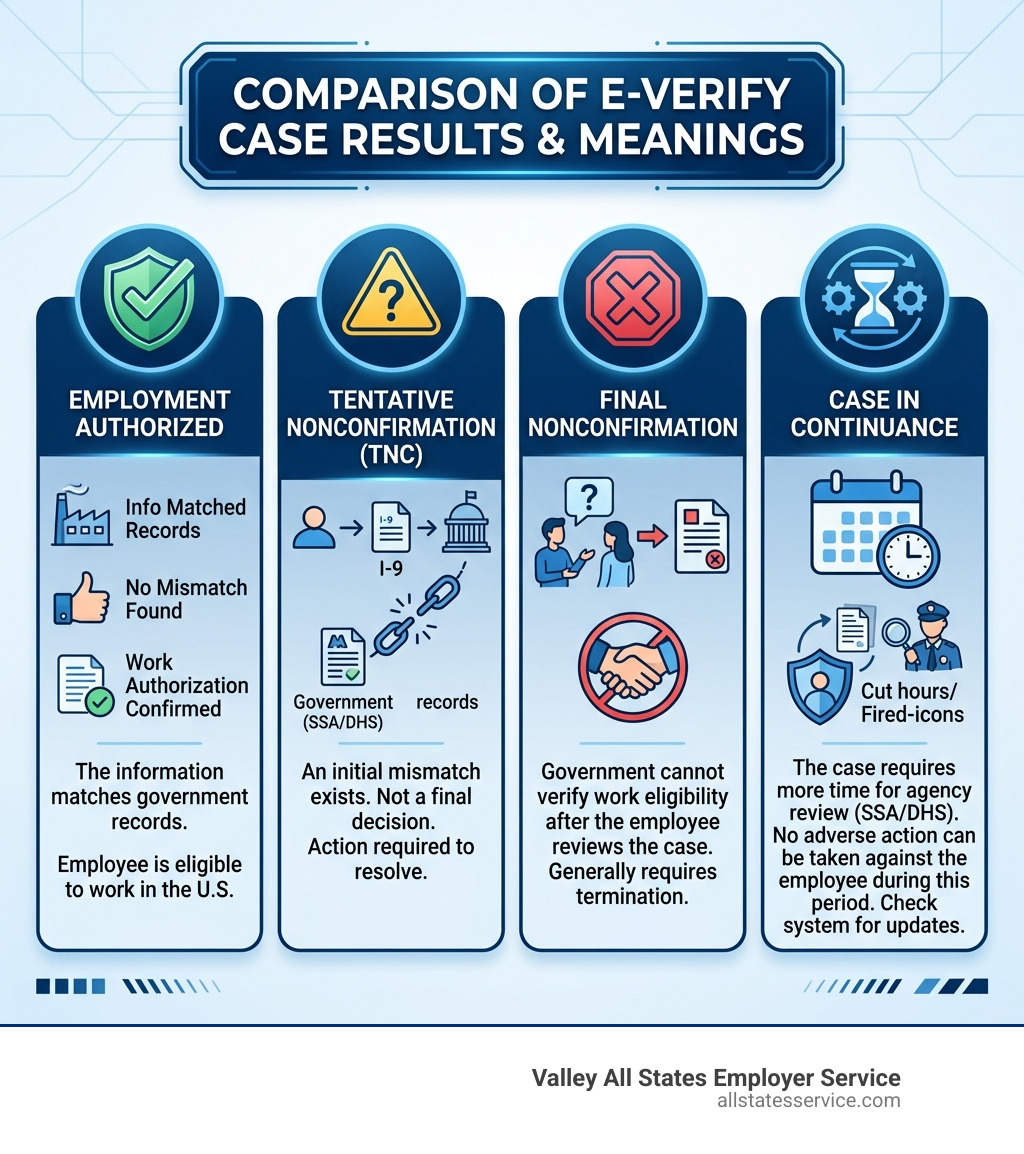
Understanding the “alphabet soup” of E-Verify results is half the battle. Here are the most common statuses you will encounter:
- Employment Authorized: The best-case scenario. The info matched, and you’re good to go.
- Tentative Nonconfirmation (TNC): There is a mismatch between the Form I-9 and government records. This isn’t a “fireable” offense; it just means more work is needed. Learn more about handling an E Verify Tentative Nonconfirmation.
- Final Nonconfirmation: The government could not verify eligibility after the employee exhausted their options. At this point, you are generally required to terminate employment.
Dealing with Case in Continuance
Sometimes, you’ll see a status called “Case in Continuance.” This usually happens after an employee has contacted the SSA or DHS to resolve a mismatch, but the agency needs more time to review the documents.
During a 3.4 Case In Continuance period, you cannot take any adverse action against the employee. You can’t cut their hours, delay training, or fire them. You simply have to wait. Check the system periodically for updates, as these cases eventually resolve into either “Employment Authorized” or “Final Nonconfirmation.”
Handling System Outages and Policy Changes
The E-Verify system isn’t invincible. Because it relies on federal funding, it can go dark during government shutdowns. When this happens, the “three-day rule” for creating cases is usually suspended.
During an outage, your primary responsibility is to keep your Form I-9s perfect. As noted in the E-Verify Updates on Referred Mismatches and Open Cases report, you must still complete Section 1 and Section 2 of the I-9 on time. Once the system comes back online, the government typically provides a grace period to enter the backlog of cases.
Recent Citizenship Status Attestation Changes
In October 2023, E-Verify updated its terminology to align with the new version of Form I-9. The term “Alien authorized to work” was replaced with “Noncitizen authorized to work.”
If you are still using the 2019 version of Form I-9 (which was allowed through late 2023), you might see the old term on the paper form. When entering that data into E-Verify, you should select the “Noncitizen” option to ensure the system processes the case correctly. Keeping up with these small terminology shifts prevents data entry errors that could trigger a TNC.
TPS Terminations and Historical Records
Temporary Protected Status (TPS) designations for countries like Somalia, Syria, and Burma change frequently. When a TPS designation is terminated, the EADs associated with it may expire earlier than the date printed on the card. We recommend checking the What’s New page regularly for these updates.
Also, be aware of the 10-year disposal rule. E-Verify deletes records that are more than a decade old to protect privacy. If you need historical data for your own audits, you must download your Historical Records Report before the annual deletion deadline (usually in late January).
Frequently Asked Questions About E-Verify Status Updates
How often is the Status Change Report updated?
USCIS typically pushes new data to the Status Change Report every two weeks. Because the system does not send you an email alert when a document is revoked, we suggest making it a part of your bi-weekly HR routine to log in and pull the report manually.
What should I do if the E-Verify system is down?
If E-Verify is unavailable due to a technical glitch or a government shutdown, you must still prioritize Form I-9 compliance. Complete the I-9s as usual and keep them in your files. Once the system is back up, create the cases and use the “Other” reason for delay, noting “E-Verify not available” in the comments.
Can I remove former employees from my status reports?
Currently, there is no way to filter out or delete former employees from the Status Change Report. While it can be annoying to see old names on the list, you have no legal obligation to act on those entries. Simply ignore them and focus on your active workforce.
Streamlining Your Compliance Workflow
Managing E-Verify status updates doesn’t have to be a source of stress. At Valley All States Employer Service, we specialize in taking the administrative burden off your shoulders. We provide expert, outsourced E-Verify management that ensures every case is tracked, every report is reviewed, and every deadline is met.
By partnering with us, you minimize the risk of errors and free up your HR team to focus on what they do best: growing your business and supporting your people. We handle the technicalities of E-Verify processing with an impartial and efficient approach that keeps you compliant and audit-ready.
Ready to simplify your compliance? Learn more about our E-Verify services and let us help you stop guessing and start tracking with confidence.