Why Your E-Verify Status Check Matters More Than You Think
An E-Verify status check is your way to confirm whether the government has verified your eligibility to work in the United States. Whether you’re starting a new job or want peace of mind about your employment status, checking your E-Verify case can prevent delays and resolve issues before they become problems.
Quick Answer: How to Check Your E-Verify Status
- Get your 15-digit case number from your employer’s Further Action Notice
- Visit the myE-Verify Case Tracker at myeverify.uscis.gov
- Enter your case number and click search
- Review your status – most cases show “Employment Authorized” within seconds
- Take action if needed – follow specific steps for any mismatches
Most E-Verify cases get approved instantly, but when they don’t, knowing how to check and fix your status can save your job. The system processes millions of cases each year, and understanding your status puts you in control of your employment verification process.
You don’t need a special account to check your status. The government provides free tools that work 24/7, and you have legal rights throughout the entire process. Whether you’re dealing with a name change, data entry error, or need to update your immigration records, the right steps can resolve most issues within days.
What is E-Verify and Why Does Your Status Matter?
Let’s talk about E-Verify, a smart, web-based system designed to help employers confirm that their team members are authorized to work in the United States. It’s a vital tool for ensuring a legal workforce and plays a big part in keeping employment compliant across the nation.
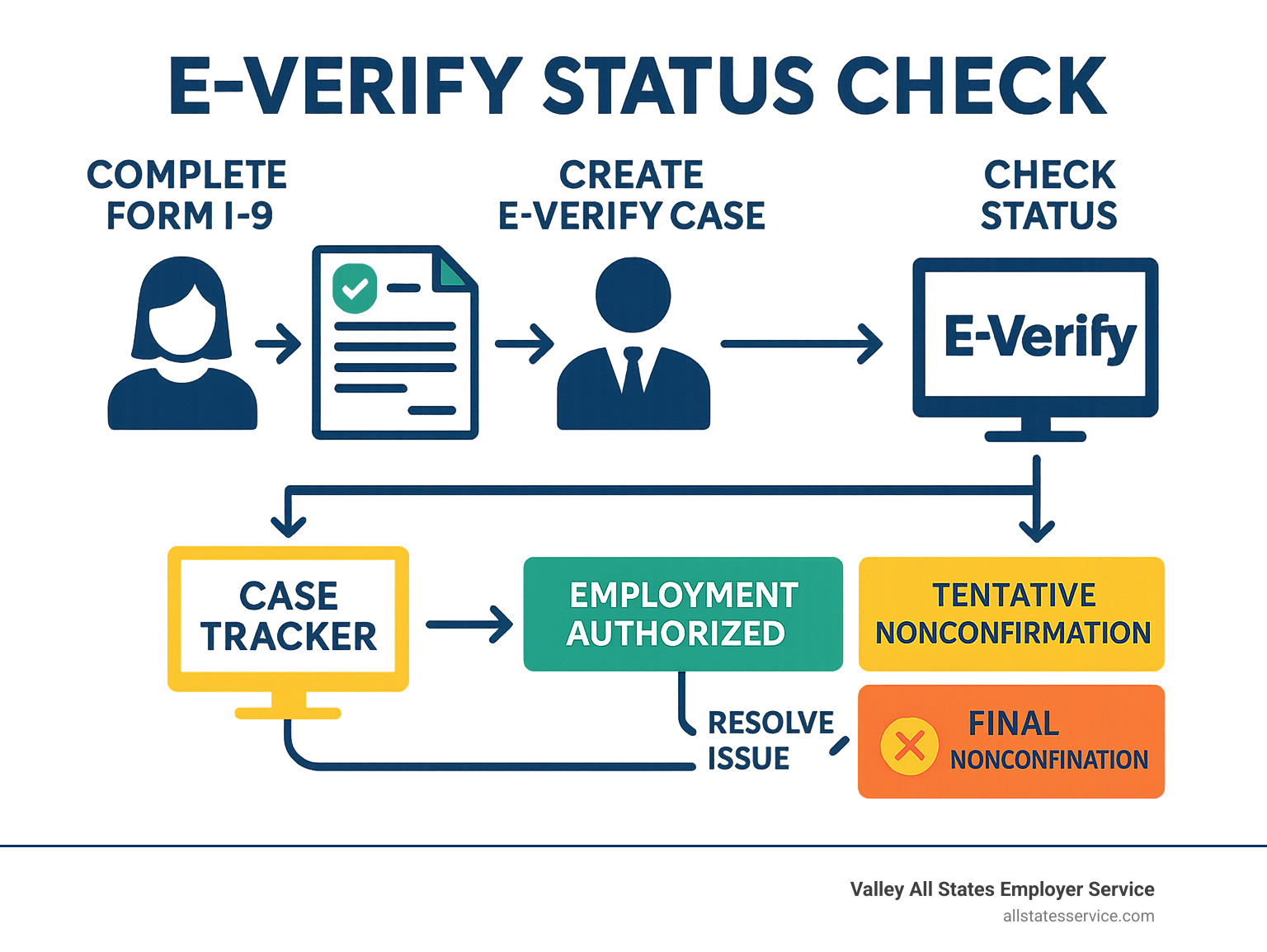
At its heart, E-Verify works by electronically checking the information you provide on your Form I-9, the Employment Eligibility Verification form. It matches this data against official records held by the U.S. Department of Homeland Security (DHS) and the Social Security Administration (SSA). This quick process helps to swiftly confirm your employment eligibility. In most cases, E-Verify gives an “Employment Authorized” response within seconds, making the process smooth and efficient!
While E-Verify is generally a voluntary program for employers, it’s mandatory for some. For example, federal contractors often need to use it, as do employers in certain states or those under specific legal rulings. No matter where you are, from all 50 states to Puerto Rico and the U.S. Virgin Islands, E-Verify is available. Want to dive deeper? You can find More info about E-Verify and I-9.
The Importance of an E-Verify Status Check for Employees
As an employee, understanding your E-Verify status is incredibly important. It’s not just about your employer staying compliant; it’s about your own peace of mind and job security. A smooth E-Verify process means your employment authorization is confirmed, letting you focus on your new role without any unnecessary delays or complications.
Think of checking your E-Verify status check as a personal employment health check. By proactively looking at it, you can identify and proactively solve issues before they become big headaches. If there’s ever a mismatch or a Tentative Nonconfirmation (TNC), knowing how to address it quickly can protect your employment. It empowers you to take control of your employment verification, ensuring your records are accurate and up-to-date with the government agencies involved. You also get to understand your rights throughout this process, which is empowering.
For employers, managing E-Verify can get a bit complex. That’s where we come in! At Valley All States Employer Service, we specialize in outsourced E-Verify workforce eligibility verification. Our expert, impartial, and efficient processing helps minimize errors and administrative burden for our clients, ensuring their compliance while supporting their employees through verification. We aim to make this part of the hiring process as seamless as possible for everyone.
Who Can Check an E-Verify Case?
Both employees and employers have ways to check the status of an E-Verify case. It’s all about transparency and making sure everyone is on the same page.
For employees and job seekers, you have some great tools:
- The E-Verify Case Tracker: This is a public tool where, if you have your 15-digit E-Verify case number, you can easily check the status. No need to create an account for this quick check!
- myE-Verify Portal: This free online service offers even more comprehensive features for individuals. While the Case Tracker gives you a quick update, myE-Verify lets you view your E-Verify case history, work to resolve cases, and even lock your Social Security Number (SSN) to prevent unauthorized use. It’s a powerful way to confirm your employment eligibility proactively.
Employers are the ones who start the E-Verify case, and they’re responsible for managing it within the E-Verify system. They get direct notifications and updates about the case status. Our role at Valley All States Employer Service is to assist employers with this entire process, from creating the case to helping resolve any issues, ensuring all steps are followed correctly and efficiently.
How to Perform an E-Verify Status Check: A Step-by-Step Guide
Wondering about your E-Verify status check? It’s much simpler than you might imagine, especially once you know where to look and what information you need. The quickest and most common way for you, as an employee, to check your status is through the E-Verify Case Tracker. It’s a free, easy-to-use tool provided by the government, designed to give you peace of mind.
What Information Do You Need for an E-Verify Status Check?
To perform your E-Verify status check using the Case Tracker, there’s one super important piece of information you’ll need: your 15-digit E-Verify case number. This unique number is created and assigned when your employer first starts your E-Verify case.
If everything goes smoothly, you might not even notice this number. But if your case receives a Tentative Nonconfirmation (TNC), which is basically a heads-up that there’s a mismatch, your employer is required to give you a “Further Action Notice.” This notice is your golden ticket! It contains that crucial 15-digit E-Verify case number you need. It also explains why there was a mismatch and guides you on how to resolve it. Sometimes, if you’re working to fix a TNC, you might also get a “Referral Date Confirmation,” which is another key document for resolving the issue.
Without that specific 15-digit case number, the public E-Verify Case Tracker won’t be able to find your information. So, if you’re concerned about your status or have received a TNC, make sure to get this number from your employer. It puts the power to check your status right in your hands!
Using the myE-Verify Case Tracker
Once you have your 15-digit E-Verify case number in hand, checking your status is a breeze. Think of it like looking up a package tracking number, since it is straightforward and quick!
First, head over to the official myE-Verify website. Once you’re there, you’ll want to look for the Case Tracker section. It’s designed to be user-friendly, so it should be easy to spot.
Then, simply enter your 15-digit E-Verify case number into the designated field. Take an extra second to double-check that every digit is correct, because even a tiny typo can prevent the system from finding your case. Hit the search button, and just like that, you’ll see your current E-Verify status displayed on the screen.
The best part? You do not need a myE-Verify account to use this specific Case Tracker feature. It’s built for quick access, so anyone with a case number can check their status anytime. Ready to find out yours? You can Track your case here right now.
Understanding Your E-Verify Case Status Results
When you take the step to perform an E-Verify status check, the system gives you a response. Think of it like a report card for your employment eligibility! Each response tells you something important about where your verification stands. Knowing what each one means is super helpful, especially if you need to take action.

The E-Verify Case Tracker can show you eight different outcomes for your case. Let’s break down what each means for you.
When you see Employment Authorization Confirmed, that’s fantastic news! This means E-Verify has successfully confirmed your authorization to work in the U.S. Your employment verification process is complete, and you’re all set. Often, this happy message appears just seconds after your employer submits your information.
Sometimes, the system might show E-Verify Needs More Time. Don’t fret! This isn’t a bad sign. It simply means the automated check couldn’t give an instant answer. The system might be looking into your information a bit more deeply. Just be patient, and check back later.
Now, if you see SSA Tentative Nonconfirmation (mismatch) or DHS Tentative Nonconfirmation (mismatch), these are what we call TNCs, or Tentative Nonconfirmations. This means the information from your Form I-9 didn’t quite match records with the Social Security Administration (SSA) or the Department of Homeland Security (DHS). It’s a “mismatch,” but remember, it’s tentative!
If the status is Employer Action Required, it means your employer has a task to complete within the E-Verify system. They might need to review something, answer a question, or add more details to move your case forward.
On the more serious side, Employment Authorization Not Confirmed is a Final Nonconfirmation (FNC). This happens if a TNC couldn’t be resolved. It typically means your eligibility to work in the U.S. could not be confirmed.
Finally, if you’ve decided to contest a TNC, you might see Case Referred to SSA or Case Referred to DHS. This indicates that your case has officially been sent to the relevant agency (SSA or DHS) for you to work directly with them to fix the mismatch.
What a Tentative Nonconfirmation (TNC) Really Means
Getting a Tentative Nonconfirmation (TNC) can feel unsettling, whether it’s from the SSA or DHS. But here’s the really important part: a TNC is not a final decision that you can’t work. It’s more like a heads-up that the information from your Form I-9 didn’t instantly line up with government records. It’s a chance to clear things up!
So, why do TNCs happen? There are many common reasons, and most are easily fixed:
- Name changes: Did you recently get married, divorced, or change your name for another reason? If your records with SSA or DHS haven’t caught up, it could cause a mismatch.
- Data entry errors: Sometimes, simple typos happen! Your employer might have accidentally typed a wrong letter in your name, a number in your Social Security Number, or your date of birth when entering it into E-Verify.
- Outdated records: Your government records might just need an update. This could be due to old information, or even a clerical error on the government’s side.
- Changes in status: If your citizenship or immigration status has changed, but the agencies haven’t updated their databases yet, that can cause a TNC.
- Expired work authorization: If your work authorization document has expired and hasn’t been renewed, that would also lead to a TNC.
The good news is you have the right to contest a TNC! Your employer is required to give you a “Further Action Notice.” This notice is key because it explains why there was a mismatch and tells you exactly what steps you need to take to resolve it.
For employers, managing these situations can be tricky. That’s where Valley All States Employer Service steps in. We help businesses steer the E-Verify process, ensuring they follow all the right steps to support their employees through verification. We want to make sure the process is smooth for everyone! To dive deeper into how we assist with employment eligibility, check out More info about Workforce Eligibility Verification.
What to Do if You Get a Tentative Nonconfirmation (TNC)
If your E-Verify status check comes back with a Tentative Nonconfirmation, or TNC, it’s completely understandable to feel a little worried. But take a deep breath! This isn’t a final decision about your work eligibility. Instead, it’s a signal that something needs a closer look, and you have clear rights and steps to follow to sort it out. Think of it as a speed bump, not a brick wall.
The most important thing to remember is that time is of the essence. You have a crucial deadline: 8 Federal Government working days from when your employer refers your case. This is your window to visit an SSA field office or contact DHS to resolve the mismatch. Acting quickly is key to a smooth resolution. Your employer will provide you with two very important documents: a Further Action Notice and a Referral Date Confirmation. Keep these handy, as they’re essential for getting things back on track.
Steps to Resolve an SSA Mismatch
If your TNC points to a mismatch with the Social Security Administration (SSA), here’s what you need to do. First, your employer will hand you that Further Action Notice. Take a moment to review it carefully, comparing the information it shows with your own documents, like your Social Security card and driver’s license. Sometimes, it’s a simple typo from your employer when they entered your details into E-Verify. If that’s the case, they should correct it and resubmit the case.
If the information seems correct on their end, your next step is to physically visit an SSA field office within that 8-working-day timeframe. Don’t forget to bring your SSA Further Action Notice and your Referral Date Confirmation with you, along with any other identification documents SSA might request. The friendly staff there will help you understand why the mismatch occurred and guide you through updating or correcting your records. This is your chance to clear things up directly. For an even deeper dive into your rights during this process, you can watch this helpful video: Learn about your rights in this video.
Steps to Resolve a DHS Mismatch
Should your TNC be a mismatch with the Department of Homeland Security (DHS), the process is similar but with a different contact point. Just like with an SSA TNC, your employer will provide you with the Further Action Notice, detailing the discrepancy related to DHS records. Again, double-check to make sure your employer didn’t make a simple data entry error. If they did, they can correct and resubmit the case.
If everything looks right on their side, your task is to contact DHS directly within those same 8 Federal Government working days. The Further Action Notice will give you all the contact information and instructions you need. When you call, have your DHS Further Action Notice and any relevant immigration or identity documents ready. DHS will guide you through the necessary steps to resolve the mismatch, which might involve updating your immigration records or providing additional documentation to confirm your eligibility.
Resolving a TNC is truly a time-sensitive matter, and having your proper documentation in order is absolutely key. At Valley All States Employer Service, we understand the ins and outs of this process, and we know it can be a lot for employers to manage while also guiding their new hires. Our expertise in Get I-9 Verification Assistance means we’re here to help employers ensure their employees receive the correct notices and guidance, making the entire resolution process much smoother for everyone involved.
Proactive Tools: myE-Verify and Self Check
We’ve talked about how important it is to keep an eye on your E-Verify status check when your employer initiates it. But did you know there are also amazing tools designed for you to take charge proactively? These services, myE-Verify and Self Check, empower you to manage your employment eligibility and even protect your identity before any employer even comes into the picture.
myE-Verify
Think of myE-Verify as your personal dashboard for all things E-Verify. It’s a free online portal offered by USCIS, giving you a ton of control and peace of mind. Instead of just waiting for updates, you can use it to view your entire E-Verify case history, seeing every case ever associated with your Social Security Number (SSN).
Got a Tentative Nonconfirmation (TNC) you need to sort out? myE-Verify can actually help you resolve cases directly. It guides you through the steps and sometimes even lets you upload documents right there. One of its coolest features is the SSN Lock. This is a powerful identity protection tool that lets you “lock” your SSN in E-Verify. If someone tries to use your SSN for an E-Verify case without your permission, the system will flag it, giving you a heads-up. You can easily open up it when you start a new job. MyE-Verify helps you confirm your employment eligibility and ensures your records are in tip-top shape. To create your own myE-Verify account, you’ll simply do it through a myUSCIS account.
myE-Verify vs. Self Check
While both myE-Verify and Self Check put control in your hands, they serve slightly different purposes. Understanding the difference can help you pick the right tool for your needs.
myE-Verify is primarily about managing active E-Verify cases that an employer has already started. It’s fantastic for reviewing your case history, resolving TNCs, and using that important SSN Lock feature for ongoing identity protection. It’s your go-to for monitoring and fixing issues related to a current or past E-Verify process.
On the other hand, Self Check is all about being proactive. This free and voluntary service lets you verify your own work authorization against the same government databases that employers use for E-Verify. The big difference? You initiate it yourself, before any employer even asks! This is a game-changer for job seekers. You can confirm your work authorization or identify potential record mismatches before applying for a job. Imagine finding and fixing an issue with the SSA or DHS before it causes a delay or a TNC with a new employer. It truly puts you in control, giving you the chance to make sure your records are accurate and up-to-date. Employers can’t make you use Self Check, it’s completely voluntary and totally free.
Self Check won’t change your citizenship or immigration status. But if it spots a mismatch, it will clearly tell you how to contact the right agency to get your records corrected. By using these tools, you’re embracing the best practices for E-Verify from your side, helping to make your employment journey as smooth as possible. You can check out the Self Check service directly here. For more great tips, explore E-Verify Best Practices.
Take Control of Your E-Verify Compliance
Navigating the complexities of employment eligibility can feel daunting, but understanding and actively engaging with your E-Verify status check is a powerful way to put yourself in control. From knowing what E-Verify is and why it matters, to understanding the different status outcomes and how to resolve a Tentative Nonconfirmation, being informed is your best defense against employment problems.
Taking proactive steps, whether through the myE-Verify portal or using the Self Check service, ensures that your records are accurate and that you’re prepared for any employment verification process. This level of preparedness offers peace of mind and can significantly smooth your transition into a new role.
For employers, managing E-Verify and I-9 compliance is a critical responsibility that carries significant legal weight. The process can be time-consuming and prone to errors if not handled correctly. That’s precisely why Valley All States Employer Service exists. We provide outsourced E-Verify workforce eligibility verification, offering expert, impartial, and efficient processing that minimizes errors and administrative burden for businesses of all sizes. Our goal is to streamline your compliance, allowing you to focus on your core business operations while we handle the intricacies of employment verification.
Don’t leave your employment eligibility to chance. Empower yourself with knowledge and use the available tools. And for employers seeking to steer these requirements with confidence and ease, we’re here to help. Learn more about employer HR compliance services and find how we can be your trusted partner in employment verification.