
I-9 verification services for remote employees: Why they matter now
Hiring remotely? I-9 verification services for remote employees have transformed from a nice-to-have into a business necessity. With remote work becoming permanent for many organizations, HR managers face a critical challenge: how do you legally verify employment eligibility when you never meet your new hires face to face?
Top I-9 verification services for remote employees include:
- DHS Alternative Procedure: Live video verification for E-Verify enrolled employers
- Authorized Representative Services: Third-party agents conduct in-person verification
- Automated I-9 Software: Digital platforms with guided workflows and compliance checking
- Full-Service Providers: Complete outsourcing of the entire I-9 process
The stakes couldn’t be higher. Every U.S. employer must complete Form I-9 for every hire within three business days. Fail to do this correctly, and you’re looking at fines ranging from hundreds to thousands of dollars per violation under the Immigration and Nationality Act.
Here’s the good news: the Department of Homeland Security (DHS) permanently changed the rules on August 1, 2023. Employers enrolled in E-Verify can now legally examine I-9 documents through live video calls. This means you can hire that perfect candidate in Seattle while sitting in your Miami office, all while staying completely compliant.
But navigating these new rules isn’t simple. You need to understand E-Verify enrollment, maintain “good standing” status, follow specific video verification procedures, and know exactly which documents are acceptable. One mistake can trigger costly penalties or failed government audits.
The remote hiring landscape has fundamentally shifted. Companies that master compliant remote I-9 verification gain access to talent nationwide, while those stuck in old processes lose great candidates to bureaucratic delays.
Understanding Form I-9 and Its Remote Work Challenges
Form I-9 isn’t just another piece of paperwork cluttering your HR files. It’s the legal backbone of employment verification in America, and getting it wrong can cost your business thousands of dollars in penalties.
Think of Form I-9 as your company’s promise to the government that you’ve checked every new hire’s right to work in the United States. Whether you’re hiring a lifelong citizen from Iowa or a recent immigrant with a work visa, everyone gets the same treatment: complete the form, show the documents, get verified.
What is Form I-9 and Why Is It Crucial?
Employment Eligibility Verification sounds fancy, but Form I-9 is really about two simple questions: Who are you? and Can you legally work here?
Here’s how it works in the traditional world. Your new employee fills out Section 1, declaring their work authorization status. Then comes the tricky part: they must present acceptable documents proving both their identity and work eligibility. You, as the employer, physically examine these documents and complete Section 2, certifying they look genuine and belong to the person standing in front of you.
The three-day rule keeps everyone honest. You have exactly three business days from your employee’s start date to complete this entire process. Miss that deadline? You’re looking at I-9 Compliance Penalties that start in the hundreds and climb into the thousands per violation.
The Immigration and Nationality Act doesn’t mess around with these requirements. Every U.S. employer must verify every hire, whether you’re running a corner coffee shop or a Fortune 500 company. The penalties for non-compliance can shut down small businesses and create serious headaches for larger ones.
The Core Problem: Verifying Documents for Remote Employees
Now imagine trying to physically examine a driver’s license when your new hire is sitting in their kitchen in Portland and you’re in your office in Atlanta. That’s the challenge that’s been keeping HR managers awake at night.
Traditional I-9 verification was built for handshakes and conference rooms, not video calls and digital workspaces. The law required that physical document inspection, which created a massive roadblock for companies embracing remote work.
Before the new rules, businesses faced an impossible choice. They could fly new hires to headquarters for document verification (expensive and ridiculous). They could find authorized representatives in every city where they hired (complicated and inconsistent). Or they could simply avoid hiring remotely altogether (limiting their talent pool dramatically).
These logistical nightmares led to inconsistent processes across different locations, increased risk of errors, and frankly, a terrible experience for new employees. Nothing says “welcome to the team” quite like asking someone to drive three hours to a notary public just to show their passport to a stranger.
The compliance risks were real too. Companies trying to work around the system often ended up with incomplete forms, missed deadlines, or documentation that wouldn’t pass a government audit. Employee Onboarding Compliance became a minefield for remote-first organizations.
Many businesses simply threw up their hands and decided remote hiring wasn’t worth the hassle. They missed out on incredible talent because of a paperwork process designed in a different era.
The New Era: DHS Rules and E-Verify for Remote Verification
The COVID-19 pandemic forced a temporary flexibility in I-9 verification that many employers desperately needed. For the first time, companies could examine documents remotely without breaking federal law. But like all good things during the pandemic, this flexibility had an expiration date.
On July 31, 2023, those temporary measures officially ended. Many HR managers held their breath, wondering if they’d be forced back into the old days of flying new hires to headquarters just to look at their driver’s license.
Fortunately, the Department of Homeland Security recognized that remote work wasn’t just a pandemic trend. It was the new reality. On August 1, 2023, permanent remote I-9 verification became possible through the DHS-authorized alternative procedure. This was a game-changer for i-9 verification services for remote employees.
But there’s a catch. Not every employer can use this new procedure. You need to be enrolled in E-Verify and maintain good standing with the program.
The DHS Alternative Procedure Explained
The new DHS alternative procedure isn’t just “hop on a video call and wave your ID around.” There are specific steps you must follow, and the government takes compliance seriously.
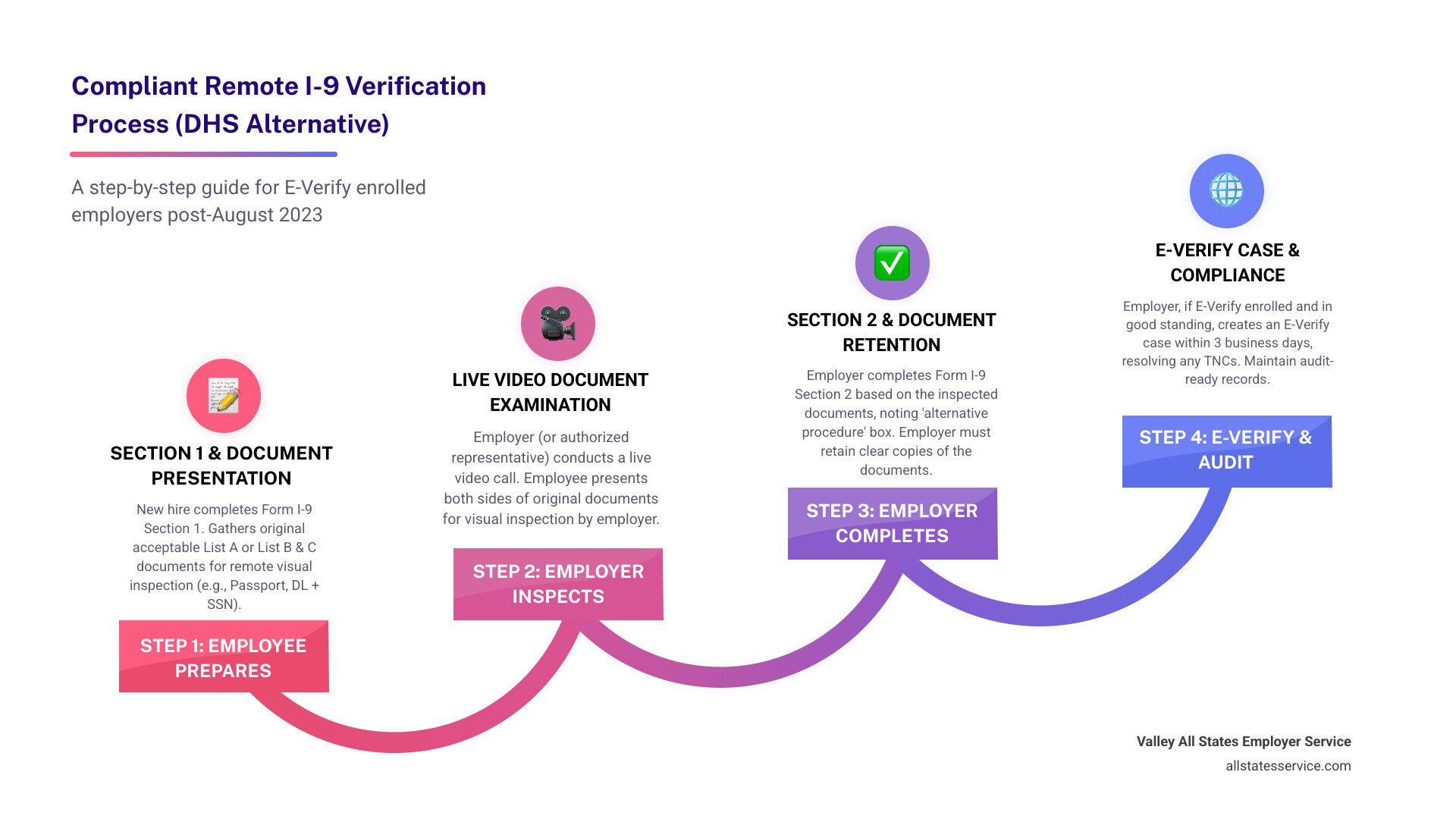
Here’s how the process works in practice. Your new hire first transmits clear copies of both the front and back of their acceptable I-9 documents to you. Think of this as the preview before the main event.
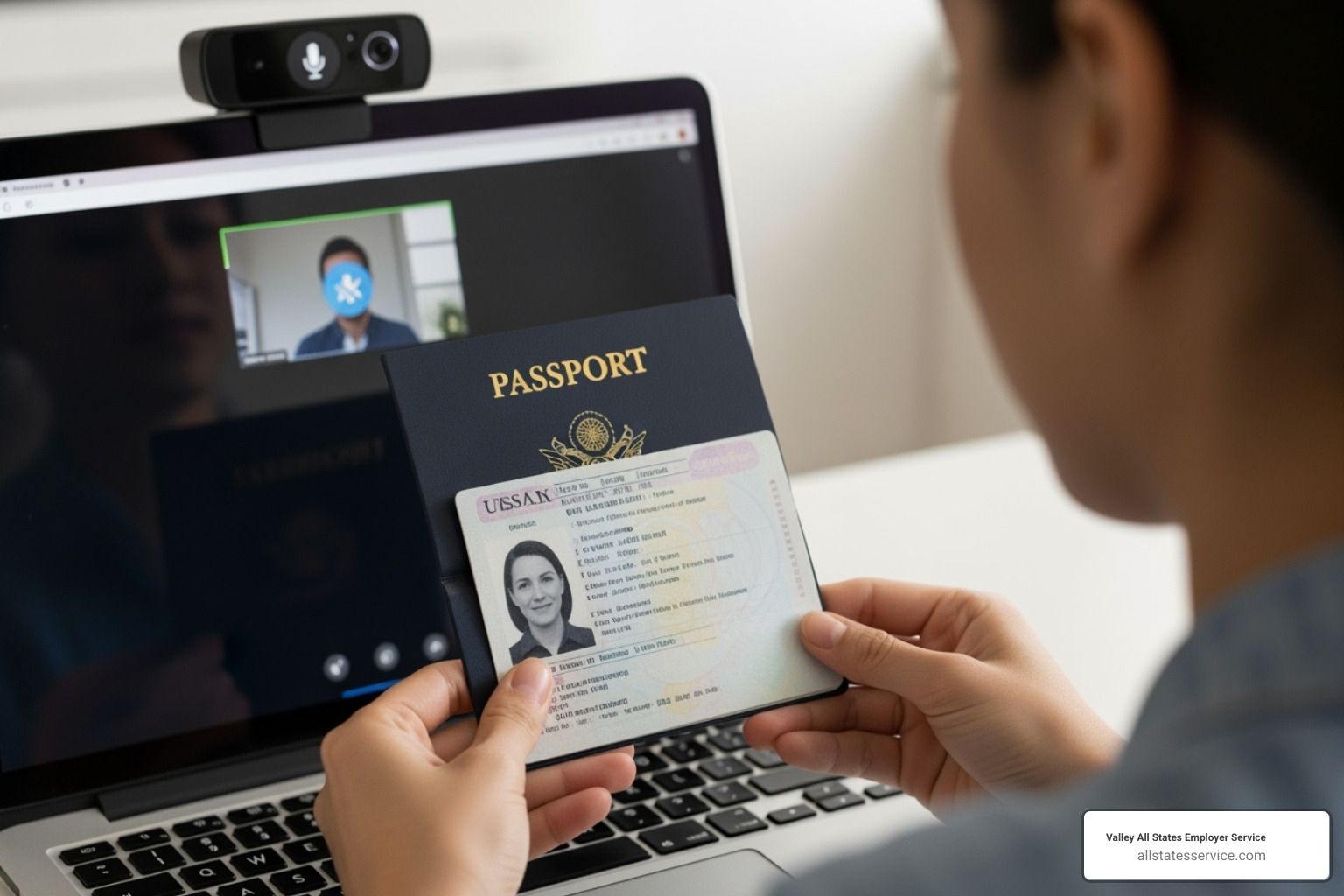
Next comes the live video interaction. This isn’t a recording or a series of photos. You need real-time video where you can see the employee holding up the same documents they sent copies of earlier. During this call, you’re inspecting for genuineness, comparing what you see on video to the copies you received.
The employee must present the exact same documents during the video call. If they sent you a copy of their passport and driver’s license, they need to show you those same documents live on camera. You’re looking for security features, checking that the information matches, and ensuring the documents appear legitimate.
After the video verification, you retain copies of all documents examined. These copies become part of your I-9 records and must be stored according to federal retention requirements.
Finally, when completing Section 2 of Form I-9, you must check the “alternative procedure” box. This tells government auditors that you used the DHS-authorized remote verification method. You’ll need the updated Form I-9 dated “08/01/23” to have this option available.
The Critical Role of E-Verify
Here’s where many employers hit a roadblock. To use remote I-9 verification, E-Verify enrollment is mandatory. You can’t pick and choose. No E-Verify enrollment means no remote document examination, period.
E-Verify serves as your gateway to remote verification because it adds an extra layer of security to the process. This internet-based system, operated by DHS in partnership with the Social Security Administration, verifies information against government databases. It cross-references the details from Form I-9 with both SSA and DHS records to confirm employment eligibility.
But enrollment alone isn’t enough. You must maintain good standing with the E-Verify program. This means following all program requirements, completing the mandatory E-Verify tutorial, and staying current with your compliance obligations. Think of good standing as your license to use remote verification. Lose it, and you’re back to in-person document examination.
One of the most valuable features for remote verification is photo matching. When an employee presents a document with a photograph, like a U.S. passport or permanent resident card, E-Verify displays a photo from government records. You compare the photo on the employee’s document with the government photo displayed in E-Verify. This comparison happens during your E-Verify case creation, adding another layer of security to the remote process.
For companies already enrolled in E-Verify, this new procedure represents freedom to hire talent anywhere. For those not yet enrolled, it’s time to seriously consider the benefits of joining the program. The combination of E-Verify and I-9 compliance opens doors that traditional verification methods simply can’t match.
How to Conduct Compliant Remote I-9 Verification
Getting remote I-9 verification right isn’t rocket science, but it does require following a precise step-by-step process. Think of it like a carefully choreographed dance between you and your new hire. Both parties have important roles to play, and timing matters.
The good news? Once you understand the process, i-9 verification services for remote employees become much more manageable. You’ll wonder why you ever worried about hiring that perfect candidate who lives three states away.
Employee and Employer Responsibilities
Let’s start with what your new employee needs to do. Your employee must complete Section 1 of Form I-9 no later than their first day of work. This section asks for basic personal information and requires them to attest to their citizenship or immigration status under penalty of perjury.
Here’s where the timing gets critical. Within three business days after their first day, your employee needs to present their original documents during a live video call. But before that video call happens, they must send you clear, legible copies of both the front and back of their documents.
Now for your part as the employer. During that live video interaction, you’ll inspect the employee’s original documents to make sure they appear genuine and actually belong to the person on screen. You’re essentially comparing the real documents you see on video with the copies they sent you earlier.
Your biggest responsibility is completing Section 2 within those same three business days. This involves recording the document information and certifying that you’ve examined everything properly. Don’t forget the crucial step of checking that new box indicating you used the alternative procedure.
If you’re using the DHS alternative procedure, you must create an E-Verify case using the information from the employee’s I-9. This includes inputting their data and, when applicable, performing photo matching to verify document authenticity.
Document retention rules remain the same whether you’re working remotely or in person. You need to keep copies of all documents you examined remotely, plus the completed Form I-9, for three years after hire or one year after termination, whichever comes later. Trust us, you don’t want to scramble looking for these during a government audit.
What happens if things go wrong? If your employee can’t present acceptable documentation within three business days, you may need to terminate their employment. On the flip side, if you fail to complete the Form I-9 within three days, you could face civil monetary penalties under the Immigration and Nationality Act.
Handling Acceptable I-9 Documents Remotely
The beauty of the new system is that acceptable documents remain exactly the same for remote verification. You’re still working with the familiar three categories from the List A, B, and C documents.
List A documents are your one-stop shop. A U.S. Passport or Permanent Resident Card establishes both identity and work authorization. Your employee only needs to present one of these, making the process straightforward.
List B documents prove identity only. Think driver’s licenses, state ID cards, or military ID cards. List C documents establish work authorization only, like Social Security cards or birth certificates. If your employee goes the List B route, they must also present a List C document.
The key to remote success lies in that live video interaction. Your employee needs to hold up their original documents to the camera so you can examine them clearly. This isn’t just a quick flash, you need enough time to check security features and verify the documents appear genuine.
Make sure you examine both the front and back of documents where applicable. Driver’s licenses, Permanent Resident Cards, and many other documents have important information and security features on both sides.
While your employee sends copies beforehand, the live video inspection of the original documents is what makes this process legally compliant. You’re not just checking boxes here, you’re ensuring workforce eligibility verification meets federal standards.
The entire process becomes much smoother when you understand these fundamentals. Your remote hires get a professional onboarding experience, and you stay completely compliant with federal requirements.
Exploring I-9 verification services for remote employees
When it comes to managing remote I-9 verification, you have three main paths. Choose based on your company size, E-Verify status, and comfort with compliance.
- DHS Alternative Procedure, live video verification for E-Verify enrolled employers
- Authorized Representative Services, trusted third parties complete in-person review
- Third-Party Software Solutions, automated platforms with guided workflows and alerts
Let’s explore which option fits your team in the section below.
Exploring I-9 Verification Services for Remote Employees
The landscape of i-9 verification services for remote employees has evolved dramatically, giving you multiple pathways to stay compliant while building your distributed team. Think of it like choosing the right tool for a specific job, since each method has its sweet spot depending on your company’s size, tech comfort level, and E-Verify status.
| Method | Description | Best For |
|---|---|---|
| DHS Alternative Procedure | Live video verification using E-Verify | E-Verify enrolled companies comfortable with technology |
| Authorized Representative | Third-party conducts in-person verification | Non-E-Verify employers or one-off remote hires |
| Third-Party Software Solutions | Automated platforms with guided workflows | Companies wanting streamlined, error-free processes |
Let’s break down your options so you can pick the approach that fits your business like a glove.
Method 1: The DHS Alternative Procedure (with E-Verify)
This is the government’s official solution for remote I-9 verification, but it comes with a catch. You must be enrolled in E-Verify and maintain good standing. It’s like having a VIP pass that comes with responsibilities.
The process involves conducting live video calls where you examine documents in real-time, just like you would in person. Your HR team handles everything internally, which gives you complete control over the process. This approach works beautifully for companies that are already comfortable with compliance technology and have established E-Verify workflows.
The biggest advantage? You’re following the exact procedure the government designed for remote work. The downside? If you’re not already using E-Verify for Small Businesses, you’ll need to get enrolled and trained first.
Method 2: Using an Authorized Representative
Sometimes the simplest solution is having someone else handle the in-person part for you. An authorized representative can be a notary public, HR consultant, or even a trusted friend or family member of your new hire.
Here’s the reality check: while this method works for any employer (E-Verify or not), you remain fully liable for any mistakes. It’s like lending someone your car; you’re still responsible if something goes wrong. This approach shines for companies that only hire remote employees occasionally or haven’t made the jump to E-Verify yet.
The authorized representative meets with your employee, examines their documents, and completes Section 2 of the I-9 form on your behalf. Just make sure they understand the process thoroughly. A well-meaning friend who doesn’t know the difference between acceptable documents could create compliance headaches down the road.
Method 3: Choosing the right I-9 verification services for remote employees
Professional i-9 verification services for remote employees take the guesswork out of compliance. These software solutions offer guided workflows, built-in error-checking, E-Verify integration, and secure document management all wrapped up in user-friendly packages.
When evaluating service providers, focus on three key areas. Security should be your top priority, since you’re dealing with sensitive employee information that needs enterprise-level protection. Support matters too, especially when you’re learning a new system or facing tight deadlines. Finally, pricing should make sense for your hiring volume and budget.
The best services integrate seamlessly with your existing HR systems and provide Compliance Management Solutions that grow with your business. They handle the technical complexities while you focus on what matters most: finding great people for your team.
Think of these services as having a compliance expert sitting right next to your HR team, catching potential issues before they become expensive problems. For growing companies that want to hire remotely without becoming I-9 experts overnight, this approach often provides the best return on investment.
Ready to simplify remote I-9 compliance? Contact our team to learn how our services can help you hire talent from anywhere with confidence.
Key components and how they work together
A smooth process for i-9 verification services for remote employees comes down to a few essentials working in sync.
- E-Verify enrollment and good standing, your ticket to the DHS alternative procedure. Learn more about our E-Verify services at E-Verify and I-9.
- Clear workflows and timelines, Section 1 by day 1, Section 2 within three business days, then open the E-Verify case.
- Document capture and storage, secure upload of front and back images, encryption in transit and at rest, consistent file naming.
- Live video document inspection, real-time review of originals that match uploaded copies, use photo matching when available.
- Audit trail and compliance logs, who reviewed what and when, timestamps, version history, and notes for reverification.
- Retention and purge rules, follow the three-years-after-hire or one-year-after-termination requirement.
- Role-based access and security, least privilege, MFA, and strong vendor controls like SOC 2 or ISO 27001 where possible.
- Training and job aids, quick checklists and short scripts on acceptable documents for HR teams and authorized reps.
- Authorized representative network, pre-vetted partners for locations where you are not using the alternative procedure.
- Integrations, connect HRIS and ATS to reduce rekeying, prevent typos, and speed up onboarding.
- Monitoring and quality control, periodic self-audits with remediation to catch errors before an official review.
Quick example, your new hire uploads document images on day 1, HR schedules a same-day video call, completes Section 2 during the call, and opens the E-Verify case right after. The system saves copies, logs actions, and sets a reminder for any future reverification.
Ready to simplify compliance? Contact our team today.