
Don’t Get Denied: A Guide to I-9 Verification Documents
What Are I-9 Form Verification Documents? (Quick Answer)
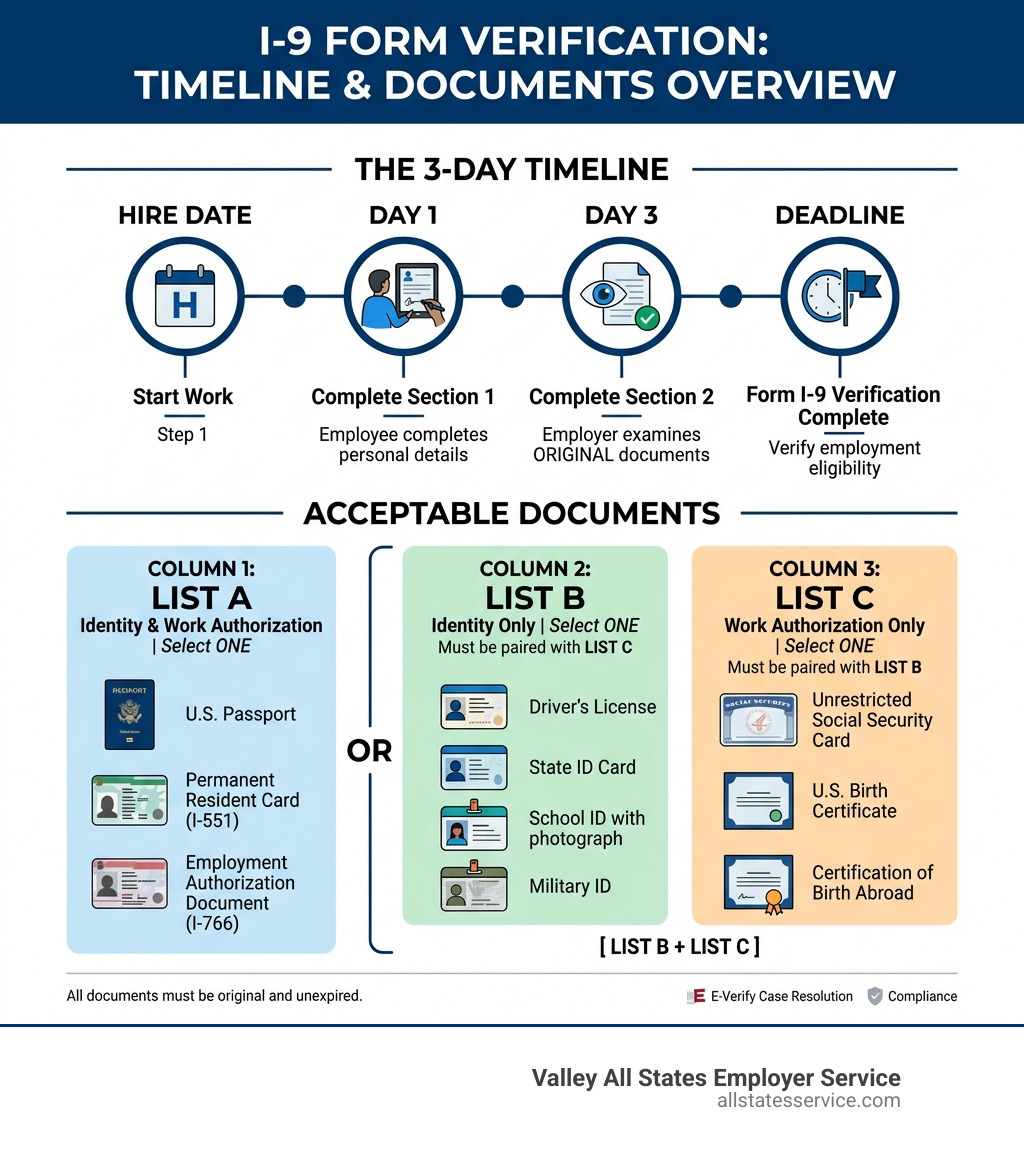
I-9 form verification documents are the official identity and work authorization records every U.S. employer must review during the hiring process. Here’s a fast breakdown of what employees can present:
| List | What It Proves | Examples |
|---|---|---|
| List A | Identity AND work authorization (one document only) | U.S. Passport, Permanent Resident Card (I-551), Employment Authorization Document (I-766) |
| List B | Identity only (must be paired with List C) | Driver’s license, State ID, School ID, Military ID |
| List C | Work authorization only (must be paired with List B) | Unrestricted Social Security card, U.S. birth certificate, Certification of Birth Abroad |
The rule is simple: employees present either one List A document, or one List B document plus one List C document.
All documents must be original and unexpired (with limited exceptions for automatic extensions and acceptable receipts).
Every business that hires in the United States is required by federal law to complete Form I-9 for every new employee, including U.S. citizens. No exceptions.
That means your HR team is on the hook for verifying the right documents, hitting the right deadlines, and keeping records inspection-ready, for every single hire.
It sounds straightforward. But in practice, the details trip up even experienced HR managers. Which documents qualify? What if a document looks slightly off? Can you ask for a specific one? What happens when work authorization expires?
Getting it wrong isn’t just an administrative headache. It can mean civil penalties, government audits, and serious legal exposure. Getting it right starts with knowing exactly which documents count and why.
This guide walks you through everything you need to know about I-9 form verification documents, from the three lists of acceptable documents to deadlines, remote verification, reverification, and anti-discrimination rules.
Key terms for i 9 form verification documents:
Navigating the Three Lists of i 9 form verification documents
When it comes to the Form I-9, the Department of Homeland Security (DHS) and U.S. Citizenship and Immigration Services (USCIS) have organized everything into three distinct buckets. Understanding these lists is the first step toward a compliant onboarding process.
The goal of these documents is to establish two things: who the person is (identity) and whether they are legally allowed to work in the U.S. (employment authorization). If you want to dive deeper into the specifics, check out our I-9 Acceptable Documents Ultimate Guide.
According to Form I-9 Acceptable Documents | USCIS, the golden rule for employers is that you must accept any document from the official list that reasonably appears to be genuine and relates to the person presenting it. You cannot demand a specific document, like a passport, if the employee prefers to provide a driver’s license and Social Security card.
List A: Documents That Prove Both Identity and Work Eligibility
List A documents are often called the “gold standard” of i 9 form verification documents because they do all the heavy lifting in one go. If an employee presents a valid List A document, you don’t need anything else from them.
Common examples of List A documents include:
- U.S. Passport or U.S. Passport Card: This is the most common List A document for citizens.
- Permanent Resident Card (Form I-551): Also known as a “Green Card.” Even if the design changes (which USCIS does every 3 to 5 years), older versions remain valid until their expiration date.
- Employment Authorization Document (Form I-766): Commonly called an EAD. It is important to note that some EADs have automatic extensions, meaning they might look expired but are legally valid for a specific period beyond the printed date.
- Foreign Passport with Form I-94: This combination is used by nonimmigrants authorized to work for a specific employer because of their status (like H-1B or L-1 visas).
If you are looking for more clarity on these “all-in-one” documents, we’ve put together a guide on Cracking the Code Understanding I-9 List A Documents.
List B and C: The Power of Pairing i 9 form verification documents
If an employee doesn’t have or doesn’t want to use a List A document, they must provide one document from List B (Identity) and one from List C (Work Authorization). This is where most errors occur, as managers sometimes forget to ask for the second document. You can learn more about these combinations in our guide on Mixing and Matching Your Way to I-9 Compliance.
List B (Identity):
- Driver’s license or ID card issued by a State or outlying possession of the U.S.
- ID card issued by federal, state, or local government agencies.
- School ID card with a photograph.
- Voter registration card.
- U.S. Military card or draft record.
- Native American tribal document.
List C (Work Authorization):
- Social Security Account Number Card: This must be “unrestricted.” If the card says “NOT VALID FOR EMPLOYMENT” or “VALID FOR WORK ONLY WITH DHS AUTHORIZATION,” it is not an acceptable List C document.
- Birth Certificate: An original or certified copy issued by a state, county, municipal authority, or territory of the U.S. bearing an official seal.
- Certification of Birth Abroad (Form FS-545 or DS-1350).
- Native American tribal document.
You must see the original documents. Photocopies are not acceptable for the physical examination process, with the sole exception of certified copies of birth certificates.
Deadlines and Employer Responsibilities for Section 2
Compliance isn’t just about what documents you see, but when you see them. The clock starts ticking the moment a job offer is accepted.
For a deep dive into these requirements, see our I-9 Section 2 Requirements Complete Guide. Here is the breakdown of the mandatory timeline as of April 2026:
- Section 1 (Employee): The employee must complete Section 1 of the Form I-9 no later than their first day of employment. They can complete it as soon as they accept the job offer, but never before.
- Section 2 (Employer): You, the employer, must complete Section 2 within three business days of the employee’s first day of work. For example, if an employee starts on Monday, you must finish Section 2 by Thursday. If they are hired for less than three days, you must complete it on the very first day.
During the Section 2 process, you must physically examine the i 9 form verification documents. You aren’t expected to be a forensic document expert. The standard is “reasonableness.” If the document looks genuine and belongs to the person standing in front of you, you should accept it. If it clearly looks like a fake or doesn’t match the person, you must reject it and ask for another document from the list.
For more technical details on this step, refer to 4.0 Completing Section 2: Employer Review and Verification | USCIS.
Remote Verification and E-Verify Rules for Modern Workplaces

The world of work has changed, and so has the I-9 process. For years, employers were required to be in the same room as the employee to examine documents. Today, things are a bit more flexible for certain employers.
If you are enrolled in E-Verify and in good standing, you may be eligible to use the DHS-authorized “alternative procedure” for remote document examination. This allows you to skip the physical, in-person meeting and instead conduct a live video interaction.
Here is how the remote process works:
- The employee sends a copy (front and back) of their i 9 form verification documents to the employer.
- The employer examines the copies to ensure they appear genuine.
- The employer conducts a live video call with the employee, where the employee holds up the original documents to the camera.
- The employer checks the box on Form I-9 indicating that an alternative procedure was used.
This is a huge win for remote-first companies, but remember: you must be using E-Verify to take advantage of this. You also must retain clear copies of all documents examined remotely. For more on these rules, check our I-9 Verification Requirements Guide and the USCIS page on Examining Documents.
Retention and Reverification Procedures for Long-Term Compliance
Completing the form is just the beginning. You also have to keep it. The law requires you to retain a Form I-9 for every current employee. For former employees, you must keep the form for either three years after the date of hire or one year after employment ends, whichever date is later.
Keeping your files organized is vital for government inspections. We recommend keeping I-9s in a separate folder or digital system, rather than tucked away in individual personnel files. This makes it much easier to hand them over if DHS or the Department of Labor (DOL) comes knocking. Our Internal I-9 Audit Complete Guide can help you set up a bulletproof system.
What about expiring work authorization? Some documents, like a U.S. Passport or a Green Card, do not require reverification when they expire. However, if an employee has temporary work authorization (like an EAD), you must reverify their eligibility before the document expires. You do this using Supplement B (formerly Section 3).
Fail to reverify on time, and you are technically employing someone without authorization, which carries heavy fines.
Anti-Discrimination and Compliance Best Practices
When handling i 9 form verification documents, your “helpfulness” can sometimes cross the line into discrimination. The Immigration and Employee Rights (IER) division of the Department of Justice is very strict about this.
To stay safe, follow these best practices found in our I-9 Compliance Guide 2025:
- Let the employee choose: Never tell an employee “Bring your passport.” Instead, give them the full Lists of Acceptable Documents and let them decide what to bring.
- The “Reasonableness” Standard: If a document looks okay and relates to the person, accept it. Don’t ask for “more” proof just because someone has a foreign accent or was born outside the U.S.
- Avoid Over-documentation: If an employee gives you a List A document, do not ask for a Social Security card “just for the file.” Accepting more documents than required is a compliance error.
- Handle Name Discrepancies Carefully: If an employee’s name is spelled differently on their ID than on their Social Security card (common after marriage), ask for the reason. If it’s reasonable, accept the documents and attach a memo explaining the difference.
Common Mistakes When Reviewing i 9 form verification documents
Even the best HR teams make mistakes. Here are the most common ones we see:
- Accepting expired documents: All documents must be unexpired. The only exception is if the document was automatically extended by DHS (common with certain EADs). Check our Expired I-9 Documents Complete Guide for details.
- Accepting photocopies: Unless you are using the remote E-Verify procedure, you must see the physical, original document.
- Missing signatures or dates: This is the #1 reason for fines during audits. Ensure every box is filled and every signature is present.
- Laminated Social Security cards: If a Social Security card is laminated and the lamination makes it impossible to tell if it’s genuine, or if the card specifically says “not valid if laminated,” you should ask for another document.
- Puerto Rico Birth Certificates: Any birth certificate from Puerto Rico issued before July 1, 2010, is invalid for I-9 purposes.
Frequently Asked Questions about I-9 Paperwork
Can I accept a photocopy of a document?
No. For the standard in-person verification, you must examine the original document. The only exception is a certified copy of a birth certificate. If you are using the E-Verify remote alternative procedure, you still must eventually verify the document’s details via a live video call, even though you start with a copy.
What should I do if a document is expired?
Generally, you cannot accept an expired document. However, some documents have automatic extensions. For example, some Employment Authorization Documents (EADs) are extended for up to 540 days if a renewal was filed on time. Also, the “Receipt Rule” allows an employee to present a receipt for a lost, stolen, or damaged document. This receipt is valid for 90 days, after which they must show the replacement original.
Can I tell an employee which documents to bring?
Absolutely not. This is considered a discriminatory practice. You must provide the employee with the official Lists of Acceptable Documents and allow them to choose which ones to present. Whether they bring a passport (List A) or a combination of a school ID (List B) and a birth certificate (List C), it is their choice.
Conclusion
Managing i 9 form verification documents is a high-stakes balancing act. You have to be fast enough to get people working, thorough enough to catch errors, and careful enough to avoid discrimination claims.
At Valley All States Employer Service, we know that HR teams are already stretched thin. That is why we offer outsourced E-Verify and workforce eligibility verification. We act as your expert partner, handling the technical details of E-Verify processing and helping you minimize the administrative burden. Our goal is to make sure your workforce is compliant, so you can focus on growing your business without the fear of a surprise audit.
Ready to simplify your compliance and protect your business? Explore our I-9 Compliance Services Complete Guide or reach out to our team today for expert assistance.