
How to Find Your E-Verify Login for Employers Without the Stress
Why Getting Your E-Verify Login for Employers Right Matters From Day One
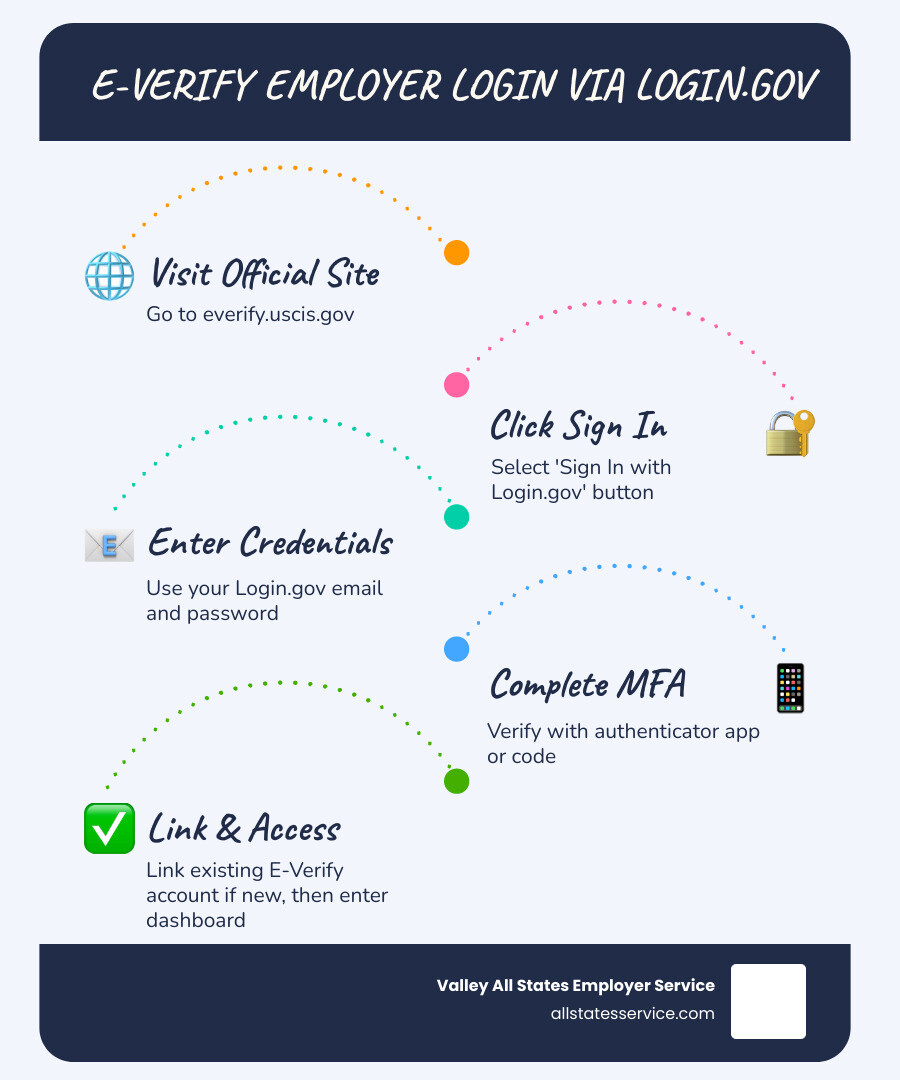
The e verify login for employers process is simpler than most HR managers expect, but only if you know the exact steps.
Here’s the quick answer:
- Go to everify.uscis.gov
- Click “Sign In with Login.gov”
- Enter your Login.gov email and password
- Complete Multi-Factor Authentication (MFA)
- Link your existing E-Verify account (first-time Login.gov users only)
- Access your E-Verify dashboard
New to E-Verify? You’ll need to enroll first, then activate your account via email before you can sign in.
If you manage hiring at a mid-sized business, you’ve probably felt the pressure. New employees start on Monday. Paperwork piles up. And somewhere in the mix, you need to verify work eligibility through E-Verify, without making a costly mistake.
The good news? The login process itself takes just a few minutes once you’re set up. But the setup has changed.
E-Verify now requires all browser-based users to sign in through Login.gov, a secure federal identity platform. That means a new email, a password, and Multi-Factor Authentication (MFA) every time you log in. If you haven’t made that switch yet, you may find yourself locked out when you need access most.
This guide walks you through every step, from first-time setup to troubleshooting common issues, so your team can get in, verify, and move on.
E verify login for employers glossary:
Understanding the E-Verify Login for Employers and Login.gov Integration
Navigating the e verify login for employers means getting comfortable with Login.gov. This platform acts as a secure “front door” for many federal agencies. Instead of having dozens of different usernames for various government websites, Login.gov provides a single, highly secure set of credentials.
The Department of Homeland Security (DHS) and the Social Security Administration (SSA) use this integration to ensure that only authorized personnel can access sensitive employee data. Think of it as a digital vault. When you use everify-sign-in, you aren’t just logging into a website, you are entering a protected environment designed to keep your company’s information safe from hackers.
Why the Switch to Login.gov?
You might wonder why the government added this extra layer. The primary reason is e-verify-employer-requirements regarding data privacy and security. By following NIST (National Institute of Standards and Technology) standards, Login.gov provides a level of identity protection that standard password systems simply can’t match.
In an era where identity theft is a constant threat, this centralized access prevents unauthorized users from compromising the system. It also means that if you use other federal services, you can often use the same secure credentials, reducing the “password fatigue” we all feel.
Activating Your New E-Verify Login for Employers Account
If you are a new user, your journey begins with an activation email. This email contains a unique link that connects your professional identity to the E-Verify system. It is important to remember that this link is time-sensitive.
The entire e-verify-account-setup process usually takes less than 10 minutes. You will need a unique email address that you alone control. During setup, you’ll create your user profile and establish your connection to your company’s E-Verify account. Once that link is clicked and your profile is saved, you are ready to move to the official login page.
Step-by-Step Guide to Accessing Your Account
Ready to get to work? Before you start, ensure your browser is up to date. Most modern browsers like Chrome, Edge, or Safari work perfectly, but using an outdated version can cause the security features to glitch. Always ensure the URL in your browser ends in “.gov” to confirm you are on an official site.
To begin, visit the Login EnrollLogin page. This is the official starting point for all E-Verify transactions. For a deeper dive into the nuances of the portal, you can check out our e-verify-employer-login-complete-guide.
Linking Existing User IDs
If you used E-Verify before the Login.gov mandate, you likely have “legacy credentials.” Don’t worry, you won’t lose your data. During your first login with Login.gov, the system will ask if you have an existing E-Verify account.
This e-verify-registration-process involves synchronizing your old profile with your new secure login. You will enter your old E-Verify username and password one last time to “handshake” the accounts. Once linked, you’ll only ever need your Login.gov credentials moving forward.
Managing Multiple Employer Accounts
For those who manage hiring for multiple branches or distinct legal entities, the e verify login for employers allows for corporate administrators to switch between accounts easily. If you are an e-verify-employer-agent, you can manage numerous client companies under one master login.
You don’t need a separate Login.gov account for every company you represent. Instead, your single secure ID can be granted permissions for multiple E-Verify accounts. Once you log in, you can simply select the specific employer account you need to work on from a dropdown menu or dashboard. This is a huge time-saver for HR professionals handling e-verify-employer-agent-account-guide duties.
Mastering Multi-Factor Authentication (MFA) for Secure Access
Multi-Factor Authentication, or MFA, is no longer optional. It is a mandatory requirement for the e verify login for employers. MFA works by requiring two things: something you know (your password) and something you have (like your phone or a physical security key).
This authentication method MFA adds an extra layer of security that makes it nearly impossible for a hacker to get in, even if they somehow steal your password. For many, this is the most “stressful” part of the login, but once you pick a method you like, it becomes second nature. To learn more about how this fits into your overall portal security, see how to secure-your-access-to-the-e-verify-employer-portal.
Choosing Your Authentication Method
You have several choices when it comes to MFA. The most common methods include:
- Authenticator Apps: Apps like Google Authenticator or Authy generate a code on your phone that changes every 30 seconds.
- Phone Codes: Receiving a text message (SMS) or a phone call with a one-time code.
- Security Keys: A physical USB device you plug into your computer.
- Backup Codes: A list of one-time-use codes you can print and keep in a safe place.
It is part of your e-verify-employer-responsibilities to ensure your login remains secure, so choose the method that best fits your daily workflow.
Preventing Account Lockouts
The biggest headache for employers is getting locked out of their accounts. This usually happens when someone gets a new phone and forgets to transfer their authenticator app. To avoid this, we strongly recommend setting up at least two different MFA methods.
For example, you could use an authenticator app as your primary method and a phone number for text codes as your backup. Also, never use a shared email address. Each user must have an unshared, individual email to maintain the integrity of the MFA process. If you do run into trouble, you might need an e-verify-password-reset, but E-Verify support cannot reset your Login.gov password, you have to do that through the Login.gov help center.
Troubleshooting and System Outages
Even the best systems have hiccups. When you can’t get in, the first step is identifying where the problem lies. Is it a Login.gov issue or an E-Verify system issue?
| Issue Type | Who Manages It? | How to Fix It |
|---|---|---|
| Forgotten Password | Login.gov | Use the “Forgot Password” link on the Login.gov screen. |
| MFA Code Not Working | Login.gov | Use a backup method or contact Login.gov support. |
| Account Not Linked | E-Verify | Contact E-Verify support at 888-464-4218. |
| System Maintenance | E-Verify/DHS | Check the E-Verify “What’s New” page for status updates. |
It is important to remember that Forgot your Password E-Verify does not manage your Login.gov account. If you need more specific help with the portal itself, check our e-verify-login-help resource.
Troubleshooting Your E-Verify Login for Employers Portal
If you are entering the correct credentials but still can’t get in, check for these common culprits:
- Incorrect Email: Ensure you are using the exact email address associated with your Login.gov account.
- Expired Activation Link: If you are a new user and waited too long to click the link in your email, you will need to request a new one.
- Browser Cache: Sometimes your browser “remembers” an old error. Try clearing your cache or opening the site in an “Incognito” or “Private” window.
- Authentication Method Issues: If your phone isn’t receiving codes, you may need to visit the Issues with authentication methods page on the Login.gov site.
Handling System Disruptions and Maintenance
Sometimes the system is down for everyone. This can happen during scheduled maintenance or, in rare cases, during federal government shutdowns. During these times, the “three-day rule” for creating cases is usually suspended.
For instance, if you were Affected by Hurricanes Helene or Milton? Form I-9 and E-Verify Guidance is available to help you navigate compliance during emergencies. The government typically provides a grace period once the system returns to online status, so keep an eye on official announcements.
Frequently Asked Questions
Can I use a shared company email for my login?
No. For security reasons, every person who accesses E-Verify must have their own unique Login.gov account tied to an individual email address. Shared accounts, such as “HR@company.com,” are not allowed because they bypass the personal accountability required by federal security standards. For more on the signup rules, see our everify-sign-up-complete-guide.
What happens if I delete my Login.gov account?
If you delete your Login.gov account, you will immediately lose access to E-Verify. You would then have to create a brand-new Login.gov account and go through the linking process all over again. It is much better to simply update your email address or MFA methods within your existing account than to delete it. If you accidentally did this, you can learn more about e-verify-employer-login recovery steps.
How does E-Verify+ change the login process?
E-Verify+ is the next generation of employment verification. It streamlines the process by allowing employees to take a more active role in entering their own data and uploading documents. While the Introducing E-Verify+ login still uses Login.gov, the workflow inside the portal is much more modernized and user-friendly, reducing the administrative burden on your HR team.
Ready to Simplify Your E-Verify Compliance?
Managing the e verify login for employers and staying on top of ever-changing federal regulations can be a full-time job. At Valley All States Employer Service, we understand that your focus should be on growing your business, not wrestling with government portals.
We provide expert, outsourced E-Verify workforce eligibility verification for employers across the United States. Our team handles the heavy lifting, from initial case creation to resolving complex mismatches, ensuring your company stays compliant without the administrative headache. By partnering with us, you minimize the risk of costly errors and ensure that your hiring process remains fast and efficient.
Ready to take the stress out of employment eligibility? Contact our team today to learn how we can manage your E-Verify needs with precision and care.