
E-Verify account setup: Unlock Easy Setup 2025
Before You Begin: Your E-Verify Enrollment Checklist
Getting your E-Verify account setup right is a critical step in confirming your team’s legal eligibility to work in the United States. While the process might seem daunting, it doesn’t have to be.
E-Verify is a federal program that checks your employees’ Form I-9 information against government records. It works with Form I-9, not as a replacement, and is used by nearly 1 million employers to quickly confirm work authorization. Understanding this process saves time and helps avoid costly mistakes. Want to know more? Learn about What is E-Verify?.
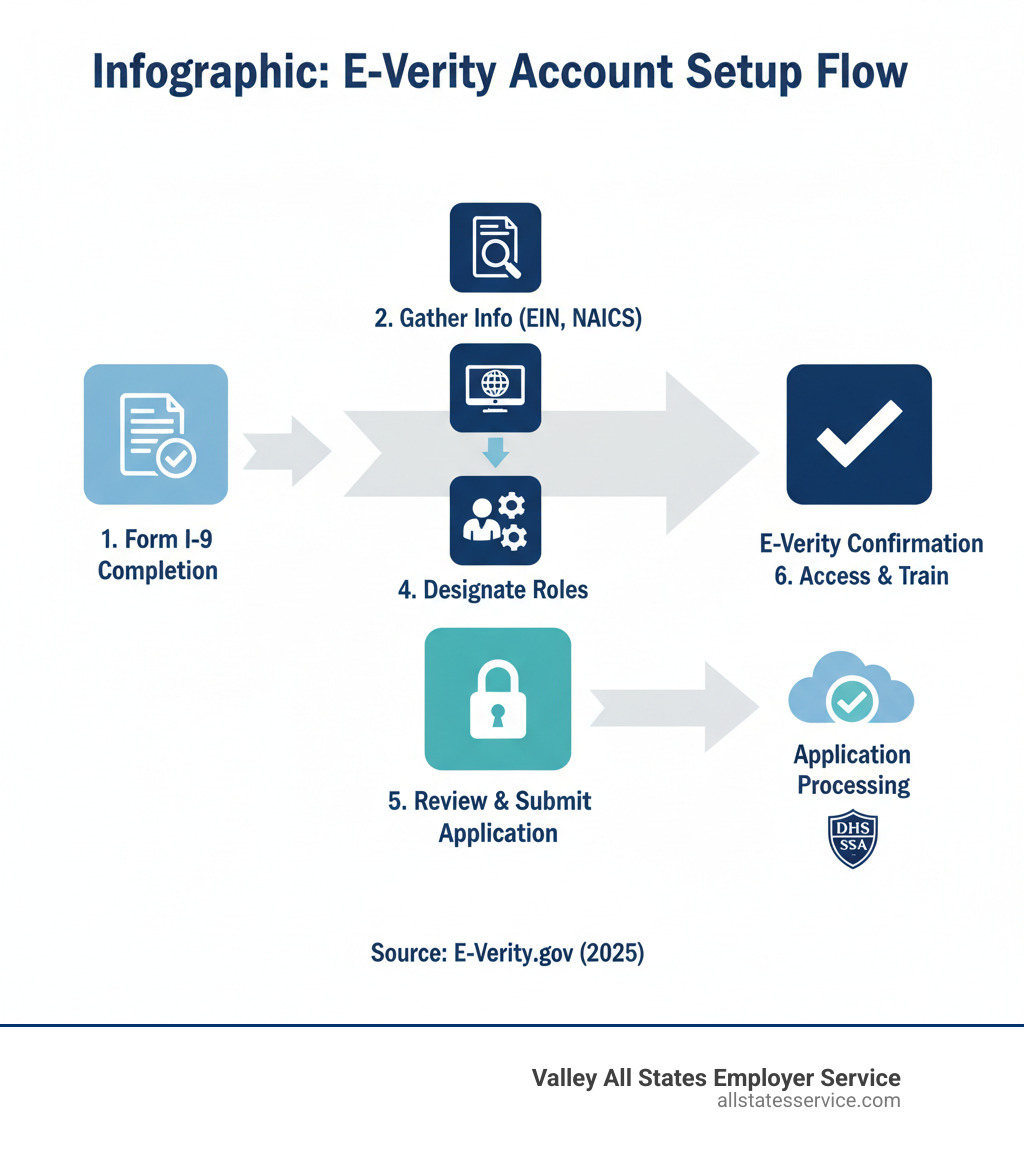
A smooth E-Verify account setup starts with preparation. Gathering the right information beforehand is crucial to prevent delays. Here’s what you’ll need:
- Company Legal Name and Employer Identification Number (EIN)
- Primary Physical Address and Mailing Address
- Hiring Site Locations: Every physical location where you will use E-Verify.
- Total Number of Current Employees
- North American Industry Classification System (NAICS) Code
- Contact Information: Details for your Signatory and Program Administrator.
For more technical requirements, see our E-Verify System Requirements Guide.
Preparing Key Roles and Information
You must identify a Signatory, who legally agrees to the E-Verify terms, and a Program Administrator, who manages users and cases. These roles can be held by the same person. Federal contractors also need their Unique Entity Identifier (UEI), a specific ID for those subject to the FAR E-Verify Clause. For more on this, see our E-Verify for Contractors guide.
Federal Contractor Considerations
For federal contractors, E-Verify is often mandatory. If your contracts include the Federal Acquisition Regulation (FAR) E-Verify Clause, you must use E-Verify for all new hires and sometimes for existing employees on covered contracts.
However, there are exemptions and special rules. Contracts under 120 days or $150,000 may be exempt. Employees with certain security clearances might also be excluded. Review the official guidance on Exemptions and Special Rules and our E-Verify Federal Contractors Ultimate Guide to ensure proper compliance.
Choosing Your Path: The 4 E-Verify Access Methods
When starting your E-Verify account setup, a key decision is choosing how your business will access the system. E-Verify offers four different methods, and picking the right one ensures your operations run smoothly.
Let’s break down the four paths. Employer Access is for businesses handling verification internally. E-Verify Employer Agent Access is for those who prefer to outsource the process. Corporate Administrator Access provides centralized oversight for multi-site organizations. Finally, Web Services Access allows direct integration for high-volume hiring. Each method fits a different business model.

If an agent sounds right for you, our E-Verify Employer Agent Service page offers more details.
Direct Employer vs. Employer Agent
When managing E-Verify, you can do it yourself or let an expert handle it.
Choosing Employer Access means your internal team manages everything, from data entry to resolving Tentative Nonconfirmations (TNCs). This path offers complete control and is a good fit for businesses with a dedicated HR team and a manageable hiring volume.
Alternatively, partnering with an E-Verify Employer Agent, like Valley All States Employer Service, can be a game-changer. An agent manages the entire process on your behalf, handling case creation, monitoring, and follow-ups with expert efficiency. This minimizes errors, ensures timely submissions, and frees up your internal resources. Learn what an E-Verify Third Party Agent can do for you.
For Multi-Site and Large Businesses
For businesses with multiple locations or a complex workforce, a specialized E-Verify account setup may be best. Consider Corporate Administrator Access or Web Services Access.
Corporate Administrator Access is for businesses needing central oversight. A Corporate Administrator can link and manage separate E-Verify accounts for each location from a single dashboard. This provides a unified view of compliance across the organization without the administrator creating individual cases.
Web Services Access is the solution for high-volume hiring or tech-integrated businesses. This method connects your existing HR or payroll software directly to E-Verify, automating checks and reducing manual data entry. It’s perfect for organizations looking to fully streamline HR operations. Our E-Verify for Small Businesses guide has advice for companies of all sizes.
A Step-by-Step Guide to Your E-Verify Account Setup
Now that you’ve gathered your information and chosen an access method, it’s time to create your account. The E-Verify account setup is more straightforward than you might think, especially with preparation.
It’s important to distinguish between enrollment and user registration. Enrollment establishes your company’s account, while user registration adds individuals who will use the system. Critically, the initial enrollment must be completed in one sitting, as the session will time out. Plan to finish once you start.
The official Enrolling in E-Verify page has comprehensive information. Our guide on the E-Verify Onboarding Process also explains what happens after enrollment.
Initiating Enrollment
Your E-Verify account setup begins at the official enrollment website. You can go directly to the portal by clicking ENROLL NOW.
First, you will be presented with the E-Verify User Agreement. It’s important to read these terms, as they outline your legal responsibilities as a participant.
After agreeing to the terms, you’ll select your chosen access method (Employer, Employer Agent, etc.).
Next, choose your employer category (e.g., federal contractor, government organization). This selection may trigger additional questions specific to your compliance needs. For instance, federal contractors must provide their Unique Entity Identifier.
Finalizing Your E-Verify Account Setup
Now you’re ready to enter your company’s details to complete your E-Verify account setup. This is where your preparation pays off.
Enter your company details, including the legal name, EIN, physical and mailing addresses, total number of employees, and NAICS code. Accuracy is critical to avoid future issues.
Next, add your hiring sites. These are the physical locations where you will use E-Verify. For multiple sites, you may be able to upload them in bulk. A hiring site (where Form I-9 is completed) can be different from a verification location (where E-Verify cases are created).
During this step, you will also designate your Program Administrator and Signatory by entering their contact information. These roles can be filled by the same person.
Before submitting, review everything carefully. Double-check all company details, addresses, and contact information to prevent headaches later.
Once you submit and your enrollment is approved, you will receive an electronically signed Memorandum of Understanding (MOU). Save or print this MOU for your records and share it with your HR and legal teams. Your company is now enrolled in E-Verify and ready for user setup and training.
Managing Your Account: Roles, Security, and First Steps
With your E-Verify account setup complete, the focus shifts to effective day-to-day management. This involves understanding user roles, securing your account, and taking the right first steps.
At the heart of your account is the Program Administrator. This person has comprehensive permissions to add and manage users, oversee all cases, and act as the main contact for E-Verify. General Users have a more focused role, primarily creating and managing E-Verify cases for new hires. They cannot change account settings, which keeps administrative functions secure. The Program Administrator adds new users by providing their name, phone number, and email. Understanding these roles is key to your E-Verify Employer Responsibilities.
Securing Your Account with Login.gov
Security is non-negotiable, which is why E-Verify uses Login.gov for secure access. Login.gov provides a single, highly secure sign-in for many government services, including your E-Verify account.
Every user, whether a Program Administrator or General User, needs their own Login.gov account. Creating one is simple: provide an email, create a strong password, and set up multi-factor authentication (MFA).
MFA adds a powerful layer of security by requiring a second verification step, such as a code from an app or a security key. This double-lock system prevents unauthorized access. Since E-Verify doesn’t manage these accounts, you’ll contact Login.gov support for any password or MFA issues. We recommend setting up at least two MFA methods as a backup. For more details, visit Login.gov or read our guide on E-Verify Employer Login.
After Enrollment: Training and Poster Requirements
With your team signed in, two final steps are vital for full compliance.
First is mandatory user training. Every person using E-Verify must complete the self-paced online tutorial. This training covers E-Verify policies, procedures, and best practices, from creating cases to handling tentative nonconfirmations (TNCs). It ensures your team is consistent and helps minimize errors.
Second, you must display E-Verify Participation and Right to Work posters in a place visible to all employees. These posters inform your team of their rights and show your company’s participation in the program. Always ensure you are using the most current versions provided by the Department of Homeland Security (DHS). Following these guidelines is a core part of E-Verify Best Practices.
Staying Compliant in 2025 and Beyond
The world of employment verification is always evolving. For businesses in Maryland and across the U.S., staying aware of updates is key to maintaining a smooth, compliant E-Verify account setup.
Understanding these shifts helps you steer the landscape easily. Our E-Verify State Requirements Guide 2025 and E-Verify Compliance Guide 2025 offer valuable insights.
USCIS E-Verify Records Disposal
An important update to mark on your calendar is the USCIS E-Verify records disposal. Starting January 6, 2025, USCIS will permanently delete E-Verify cases created or last updated before December 31, 2014.
If you have E-Verify cases from that period, you must act now. Download your Historic Records Reports from the E-Verify system and store them securely with your corresponding Forms I-9. This step is crucial for audit preparedness and demonstrating long-term compliance. Don’t let this deadline pass. You can find official information here: USCIS to permanently delete E-Verify cases.
State Law Updates
While E-Verify is a federal program, many states have their own rules that add complexity. State-specific requirements vary widely, with some mandating E-Verify for all employers and others only for public agencies or contractors.
These laws often include specific rules, such as requiring employee notification for Tentative Nonconfirmations (TNCs). Some states, like Illinois, have unique privacy acts that add another layer of consideration. Keeping up with these evolving mandates is smart for any business, especially those operating in multiple locations. Our E-Verify State Laws Complete Guide is a fantastic resource for navigating these varied requirements.
Frequently Asked Questions about E-Verify
Even after walking through the E-Verify account setup, you might still have questions. Let’s clear up some of the most common points of confusion.
What is the difference between the employer E-Verify system and a myE-Verify account?
These two services have similar names but serve very different purposes. The employer E-Verify system is the platform for businesses to verify that new hires are legally authorized to work in the U.S.
In contrast, myE-Verify is a free, voluntary service for individual employees and job seekers. Through myE-Verify, people can use Self Check to confirm their own work eligibility, use Self Lock to protect their Social Security number from fraudulent use in E-Verify, and view their Case History to see when their information was used. In short, the employer E-Verify system is for businesses, while myE-Verify is for individuals. Employees can visit Create a myE-Verify Account to learn more.
How long does the E-Verify account setup and verification process take?
Let’s break this into two parts. The initial E-Verify account setup must be completed in one sitting, as the session will time out if you steer away or take too long. With all your information ready, most employers can finish enrollment in a reasonable amount of time.
Once your account is active, the verification process for each new hire is quick. You must create an E-Verify case no later than the third business day after the employee starts work for pay. E-Verify typically responds almost instantly with either “Employment Authorized” or “Tentative Nonconfirmation.” Our E-Verify New Hire guide walks through the timeline step by step.
Is there a cost to set up an E-Verify account?
Setting up an E-Verify account with the federal government is completely free. The U.S. Department of Homeland Security and the Social Security Administration provide E-Verify as a no-cost service to employers.
However, if you choose to partner with a third-party E-Verify Employer Agent like Valley All States Employer Service, service fees will apply. These fees cover the agent’s expertise, administrative support, and the convenience of outsourcing this complex task. Many employers find the investment worthwhile, as an agent can minimize errors, save time, and provide peace of mind. Our E-Verify Compliance Cost page breaks down what to expect.
Simplify Your E-Verify Process Today
Completing your E-Verify account setup is just the beginning. Staying compliant means keeping up with changing regulations, training your team, and managing every case correctly and on time. For many businesses, this ongoing responsibility can be overwhelming.
Errors in E-Verify processing can lead to costly fines and legal complications. When you’re running a business, your focus should be on growth, not wrestling with compliance checklists. This is where outsourcing makes sense.
Partnering with a trusted E-Verify Employer Agent gives you peace of mind. You ensure every verification is handled accurately and on time, freeing up your HR team to focus on building a great workplace.
At Valley All States Employer Service, we specialize in making E-Verify simple. We provide expert, impartial, and efficient E-Verify processing, handling the details so you don’t have to. Our team stays current on all federal and state requirements, so your business remains compliant. We minimize errors, reduce your administrative burden, and give you confidence in your hiring process.
Think of us as an extension of your team, dedicated to getting E-Verify right. Ready to take the stress out of E-Verify and I-9 compliance? Let’s talk.