
Why I-9 and E-Verify Matter for Your Small Business
I-9 e verify for small business isn’t just paperwork; it’s about protecting your company from penalties that can range from $230 to over $20,000 per violation. Every U.S. employer must verify that new hires are legally authorized to work, and getting it wrong can be financially devastating.
Here’s what you need to know right now:
- Form I-9 is a federal requirement for every new hire.
- E-Verify is an optional (but sometimes mandatory) electronic system that checks I-9 information.
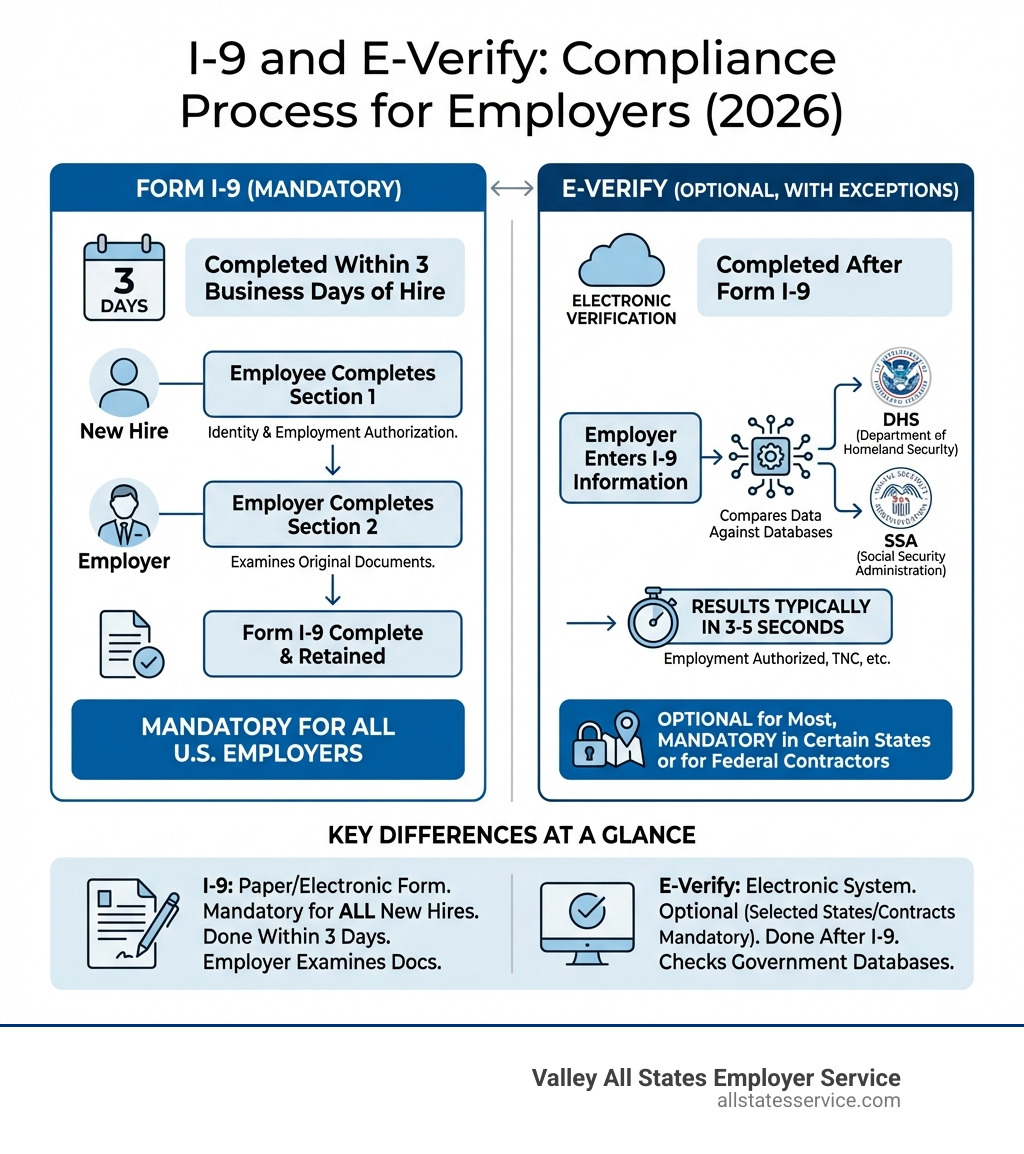
- I-9 must be completed within 3 business days of an employee’s start date.
- E-Verify enrollment is free and takes about 30 minutes.
- Some states and federal contracts require E-Verify participation.
Feeling overwhelmed by employment eligibility verification? You’re not alone. Since the Immigration Reform and Control Act (IRCA) of 1986, employers have been required to complete Form I-9 for every hire, yet compliance remains a misunderstood area of employment law.
The good news is that with basic knowledge and simple systems, I-9 and E-Verify compliance is manageable, even without dedicated HR staff.
The stakes are real. ICE has increased enforcement, and penalties for I-9 violations have climbed. For small businesses on tight margins, a single failure can mean thousands in fines, reputational damage, and increased scrutiny.
But it’s not just about avoiding penalties. A solid verification process protects your business, ensures a legal workforce, and gives you confidence in your hiring practices.
I-9 e verify for small business terms to remember:
The Foundation: Mastering Form I-9 Compliance
Form I-9, Employment Eligibility Verification, is the cornerstone of employment eligibility in the United States. Since the Immigration Reform and Control Act (IRCA) of 1986, every employer must complete and retain a Form I-9 for each new hire to verify their identity and employment authorization.
Why is this crucial for small businesses? Non-compliance carries severe consequences. Penalties for technical I-9 errors range from $230 to $2,292 per violation, while knowingly hiring unauthorized workers can lead to fines from $573 to $20,130 per violation. For a small business, these penalties can be devastating.
Mastering Form I-9 compliance is about more than avoiding fines; it’s about safeguarding your business and building a legal workforce. Understanding what is an I9? is the first step in protecting your company from legal and reputational damage. Proactive management is key to avoiding these significant penalties. For a deeper dive into the financial risks, explore our guide on I-9 Audit Penalties Complete Guide.
Step-by-Step: How to Complete Form I-9
Completing Form I-9 is a straightforward process when broken down into steps:
-
Obtain the Latest Form I-9: Always start with the correct, most current version. You can download the latest Form I-9 from the USCIS website. Using an outdated form can lead to violations.
-
Employee Completes Section 1: On or before their first day of work, the new hire must complete Section 1. This includes personal details and an attestation of their employment status. The employee must sign and date it.
-
Employer Completes Section 2 (The Three-Day Rule): The employer or an authorized representative must complete Section 2. Within three business days of the employee’s start date, you must physically examine original, unexpired documents presented by the employee.
- Document Examination: Employees can present one document from List A (which establishes both identity and employment authorization) or a combination of one from List B (identity) and one from List C (employment authorization). You must accept any valid documents from these lists that appear genuine. You cannot specify which documents an employee must present. For a comprehensive list, refer to I-9 Section 2 Acceptable Documents.
- After examining the documents, complete Section 2 by recording the document information, then sign and date the certification.
-
Retention: Retain the completed Form I-9 for the duration of employment. After employment ends, keep it for either one year after termination or three years after the hire date, whichever is later. Store forms securely and make them available for inspection.
Common I-9 Mistakes Small Businesses Make
Small businesses often make common I-9 compliance mistakes that lead to costly fines. Here are the most frequent errors to avoid:
- Missing Deadlines: The three-day rule for completing Section 2 is absolute. Set up clear onboarding processes with reminders to ensure timely completion.
- Incomplete or Incorrect Forms: Leaving fields blank or using incorrect dates are frequent errors. Carefully review each section for completeness.
- Over-Documentation or Document Discrimination: Asking for more documents than required or requesting specific documents is a serious violation.
- Improper Corrections: To correct an error, draw a single line through the incorrect information, add the correct data, and then initial and date the change. Do not use white-out.
- Not Verifying All Employees: Every new hire requires a Form I-9, including part-time and temporary workers.
- Lack of Internal Audits: Regularly review your I-9 forms. A periodic I-9 Self Audit helps catch and correct errors before an official inspection.
The Next Level: An Introduction to the i-9 e verify for small business System
While Form I-9 lays the groundwork, E-Verify takes employment eligibility verification a step further. E-Verify is a free, web-based system from U.S. Citizenship and Immigration Services (USCIS) that lets employers electronically confirm the employment eligibility of new hires. It compares Form I-9 information against DHS and SSA records, providing an extra layer of confidence. For a comprehensive overview, check out What is e-Verify?.
The process is quick. After completing Form I-9, you create a case in E-Verify using the form’s information. The system checks it against federal databases, with most results returned in seconds, providing near-instant confirmation.

Why is i-9 e verify for small business a smart move?
For small businesses, E-Verify offers several compelling benefits:
- Peace of Mind: It reduces the risk of hiring unauthorized workers, which can lead to fines and legal issues.
- Improved Fraud Detection: The system can detect fraudulent documents or identity theft more effectively than manual I-9 verification alone.
- Compliance Confidence: Using E-Verify demonstrates a proactive commitment to federal immigration laws, which is a significant advantage during an I-9 audit.
- Instant Results: Most cases receive an immediate “Employment Authorized” response, streamlining onboarding.
- Free Service: As a free government service, E-Verify is an accessible tool for small businesses to improve compliance without extra cost.
- Legal Workforce: E-Verify helps you build and maintain a legal workforce, which is crucial for long-term sustainability.
By integrating E-Verify into your hiring, you adopt e-Verify Best Practices that strengthen your compliance and protect your operations.
Is E-Verify Mandatory for My Business?
This is a common question with a nuanced answer. For most private employers, E-Verify is voluntary. However, there are significant exceptions:
- Federal Contractors: If your business holds federal contracts with the Federal Acquisition Regulation (FAR) E-Verify clause, participation is mandatory. This applies to new hires and sometimes existing employees on the contract. The Federal Acquisition Regulation FAR e-Verify Clause dictates these obligations.
- State-Specific Laws: Some states require certain employers to use E-Verify. For businesses operating in Maryland, we recommend checking the latest e-Verify State Requirements Guide 2025 to understand any local mandates.
- Other Mandates: In some cases, a court order might mandate E-Verify participation.
While i-9 e verify for small business is generally optional, it’s crucial to assess your specific circumstances, especially if you are a federal contractor or operate in a state with an E-Verify mandate.
Getting Started: A Simple Guide to E-Verify Enrollment
Enrolling in E-Verify is a straightforward process that takes about 30 minutes. Here’s a simple guide to get started:
-
Preparation is Key: Before you begin, gather basic company information, including your Employer Identification Number (EIN), business address, and an estimate of your employee count.
-
Choose Your Enrollment Path: E-Verify offers two primary enrollment paths:
- Direct Enrollment: Enroll directly with USCIS to manage your E-Verify cases yourself. This is a good option for businesses that prefer direct control. You can enroll in E-Verify directly through the official website.
- E-Verify Employer Agent: To minimize administrative burden, partner with an E-Verify Employer Agent like Valley All States Employer Service. An agent handles the entire process, from case creation to monitoring results, outsourcing the compliance task to experts. Learn more about this option through our e-Verify Employer Agent Service.
-
Complete the Online Enrollment: The enrollment is completed online in a single session. You will fill out an application and agree to the E-Verify Memorandum of Understanding (MOU). It’s best to use a desktop computer.
Once enrolled, you can begin verifying new hires. Using an agent simplifies the process and adds a layer of expertise to ensure accuracy and compliance, a critical aspect of i-9 e verify for small business.
Decoding E-Verify: Understanding Case Results and Your Responsibilities
Once you’ve submitted an E-Verify case, the system provides a “case result.” Understanding these results and your responsibilities is vital for compliant i-9 e verify for small business operations. You can always check the e-Verify Case Status through the system.
Here’s an overview of the possible case results and what they mean:
-
Employment Authorized: This is the most common result. It means the employee’s information matches government records. You can close the case and continue onboarding.
-
E-Verify Needs More Time: This indicates the system could not instantly confirm authorization and is undergoing a secondary review. Do not take adverse action against the employee.
-
Tentative Nonconfirmation (TNC): A TNC means the information did not immediately match government records, possibly due to a data entry error or an outdated record. It triggers specific employer responsibilities.
-
Case in Continuance: This result occurs during the TNC resolution process if the employee contacts DHS or SSA to resolve the mismatch.
-
Close Case and Resubmit: This result might appear if there was an obvious data entry error. You must close the current case and create a new one with the corrected information.
-
Final Nonconfirmation: This is the most serious result. It means employment authorization could not be confirmed after the TNC process. You may terminate employment at this point, but only after ensuring all TNC procedures were followed correctly.
How E-Verify’s Photo Matching Feature Helps Combat Document Fraud
E-Verify’s Photo Matching feature helps combat document fraud. When an employee presents certain documents (like a U.S. Passport or Permanent Resident Card), E-Verify may display a photo from government records. You are required to compare this photo to the one on the employee’s document.
This visual comparison helps detect if someone is using a legitimate document that isn’t theirs. It adds a layer of security against fraud that is valuable for small businesses.
What to Do After a Tentative Nonconfirmation (TNC)
Receiving a Tentative Nonconfirmation (TNC) is a standard part of the process with clear guidelines. Following your responsibilities is crucial to protect both your business and the employee’s rights:
- Notify the Employee Promptly: Inform the employee of the TNC immediately. Provide them with the “Further Action Notice” from E-Verify, which explains the mismatch and next steps.
- Employee’s Decision to Contest: The employee can choose to contest the TNC or not. If they contest, you must give them the information and time needed to contact the appropriate agency (SSA or DHS).
- Do Not Take Adverse Action: It is critical that you do not terminate, suspend, or take any other adverse action against an employee while they are resolving a TNC.
- Referral and Resolution: If the employee contests, refer their case in E-Verify. The employee then has eight federal government workdays to contact the agency. Record the referral date and track the case.
- Final Results: The case will update to “Employment Authorized” or “Final Nonconfirmation.” You can only take adverse action after receiving a Final Nonconfirmation.
Navigating a TNC requires strict adherence to E-Verify protocols. For more detailed guidance, our page on e-Verify Tentative Nonconfirmation provides an in-depth look.
Staying Ahead: Compliance Best Practices, Tech, and Resources
Staying compliant with I-9 and E-Verify requirements is an ongoing commitment. For small businesses, this means adopting best practices, using technology, and knowing where to find help.
Anti-Discrimination Rules
A crucial part of compliance is avoiding discrimination. Federal law prohibits discrimination based on citizenship or national origin during the verification process. Here’s how to ensure fair practices:
- Consistent Processes: Apply the same I-9 and E-Verify procedures to all new hires, regardless of their background.
- Accept All Valid Documents: Accept any valid document from the Lists of Acceptable Documents that appears genuine. Do not ask for more documents than required or prefer certain documents over others.
- Avoid Pre-Screening: Never use E-Verify to pre-screen applicants. Create E-Verify cases only after a job offer is accepted and Form I-9 is complete.
- Educate Staff: Ensure anyone involved in hiring is trained on anti-discrimination rules. The IER guidance on avoiding discrimination is an invaluable resource.
Latest Updates and Remote Verification
The employment verification landscape changes, so staying informed about Form I-9 and E-Verify updates is essential.
- Remote Verification Rules: DHS now allows E-Verify enrolled employers to remotely examine Form I-9 documents under certain conditions. This is a major change for remote workforces. Check the latest Remote I-9 Compliance guidelines to ensure you meet all requirements, like using live video and retaining document copies.
- New Form Versions: USCIS periodically updates the Form I-9. Always use the most current version to avoid technical violations. Regularly check for I-9 Form Updates on the USCIS website.
Technology and Resources for i-9 e verify for small business
Managing I-9s and E-Verify is complex, but many tools and resources can simplify the process:
-
Digital I-9 Solutions: Electronic I-9 Solutions streamline I-9 management. These systems often include error-checking, reminders, and secure storage, reducing mistakes and administrative work.
-
E-Verify Employer Agents: Outsourcing E-Verify to an employer agent like Valley All States Employer Service is a highly efficient solution that ensures accurate and timely processing.
-
Government Resources:
- The USCIS I-9 Central web page is the authoritative source for Form I-9.
- E-Verify.gov provides comprehensive information and user manuals.
- USCIS also offers free webinars for training on both Form I-9 and E-Verify compliance.
-
Small Business Administration (SBA): The SBA Hiring Guide offers broader advice on hiring and managing employees.
By using these aids and resources, you can transform I-9 and E-Verify from a compliance headache into a smooth part of your hiring process.
Frequently Asked Questions about I-9 and E-Verify
Here are answers to common questions from small business owners about employment eligibility verification:
Can I use E-Verify for existing employees?
Generally, no. E-Verify is for newly hired employees. You cannot use it for existing employees unless:
- You are a federal contractor with a contract containing the FAR E-Verify clause, which may require you to verify existing employees assigned to that contract.
- Your business operates in a state that mandates E-Verify for all existing employees (this is rare).
For most small businesses, E-Verify applies only to new hires. We have a dedicated resource on e-Verify for Existing Employees for more details.
What’s the difference between an I-9 audit and an E-Verify check?
These two related terms refer to distinct processes:
- I-9 Audit: An I-9 audit is a review of your completed Form I-9s by a government agency, typically U.S. Immigration and Customs Enforcement (ICE). The agency inspects your records for errors and violations. Our guide on ICE I-9 Audit provides more context.
- E-Verify Check: An E-Verify check is the electronic process of submitting a new hire’s I-9 information to the E-Verify system to confirm work authorization. It’s a proactive step taken before any audit occurs.
Think of it this way: an E-Verify check is a tool to ensure compliance, while an I-9 audit is the government’s way of checking your compliance.
Do I need to keep copies of the documents I examine for Form I-9?
For most employers, keeping copies of the documents presented by employees for Form I-9 is optional. If you choose to make copies, you must do so consistently for all employees, and store them securely with the corresponding Form I-9.
However, if you are an E-Verify employer, retaining copies of specific documents becomes mandatory under certain circumstances. E-Verify participants are required to retain copies of all documents presented by employees for List A, and for List B documents that contain a photograph. For comprehensive details, consult our I-9 Document Requirements Complete Guide.
Conclusion: Simplify Your Compliance and Focus on Growth
Navigating i-9 e verify for small business compliance is a critical responsibility. Understanding Form I-9 requirements and leveraging E-Verify are key to maintaining a legal and compliant workforce. While the rules can seem intricate, the goal is to verify identity and work authorization fairly and accurately.
Compliance is a strategic safeguard that protects your business integrity and reputation, allowing you to operate with confidence.
If managing I-9s and E-Verify feels overwhelming, you don’t have to do it alone. As Valley All States Employer Service, we specialize in providing outsourced E-Verify workforce eligibility verification for employers. Our expert, impartial, and efficient processing minimizes errors and administrative burdens, freeing you to focus on what you do best – growing your business.
Ready to simplify your compliance and gain peace of mind? We invite you to learn more about our E-Verify for Small Businesses services and find how we can help your business thrive.