
E-Verify remote employees: Seamless 2023 Compliance
The Future of Remote Work Compliance is Here
Managing E-Verify remote employees just became much simpler thanks to new federal rules that allow permanent remote document verification for the first time. Instead of requiring physical document examination, employers enrolled in E-Verify can now use an authorized alternative procedure to verify their remote workforce through live video interactions.
Quick Answer for E-Verify Remote Employees:
- Who can use it: Employers enrolled in E-Verify in good standing
- What’s required: Live video call to examine employee documents remotely
- When it started: August 1, 2023 with the new Form I-9
- Key benefit: No more physical document inspection needed for remote hires
- Must do: Use consistently for all employees at each hiring site
The shift from temporary COVID-19 flexibilities to this permanent solution represents a major change for HR teams managing distributed workforces. With remote work becoming the norm rather than the exception, these new rules eliminate a significant compliance headache that has plagued employers since 2020.
This change affects millions of remote workers and the companies that employ them. The Department of Homeland Security estimates that proper implementation of these new procedures can reduce administrative burden while maintaining the integrity of employment eligibility verification.
Whether you’re handling a few remote hires or managing an entirely distributed team, understanding these new procedures is essential for staying compliant while keeping your hiring process efficient.
Understanding the New Rules: Form I-9 Updates and Key Deadlines
The employment verification landscape has transformed dramatically for those managing E-Verify remote employees. The U.S. Citizenship and Immigration Services has moved beyond those temporary COVID-19 workarounds we all scrambled to figure out, replacing them with a permanent, streamlined approach that actually makes sense for today’s remote workforce.
Think of this as the government finally catching up with how we actually work now. Instead of forcing square pegs into round holes, USCIS announced a new version of Form I-9 that works with remote hiring rather than against it. This isn’t just another bureaucratic shuffle, it’s a genuine improvement that makes I-9 Form Completion less of a headache for everyone involved.
The New, Smarter Form I-9
Remember wrestling with that confusing multi-page Form I-9? Those days are officially over. The new form, dated “08/01/23,” fits on a single page and actually makes sense when you read it. It’s like someone finally asked real HR professionals what would make their lives easier.
The instructions are clearer, which means fewer mistakes and less time spent deciphering government-speak. You’ll find updated guidance on acceptable receipts and auto-extension rules for documents listed in the Lists of Acceptable Documents. This takes the guesswork out of determining whether that temporary receipt your new hire brought is actually valid.
What’s really helpful is how the new form addresses remote verification head-on. There’s no more wondering whether you’re doing things right when working with E-Verify remote employees. The form includes specific checkboxes and annotation areas designed for the remote verification process.
Critical Dates You Can’t Miss
Here’s where timing becomes crucial. Missing these deadlines could put your compliance at risk, so let’s break down what happened and when.
August 1, 2023 marked the beginning of a new era. This is when employers could start using the new Form I-9 and when E-Verify participants gained access to the remote document examination procedure. If you were enrolled in E-Verify, this date gave you the green light to verify documents through live video calls.
The transition period lasted through October 31, 2023. During this time, you could still use the old Form I-9 dated “10/19/2019” alongside the new version. This grace period helped businesses adjust their processes without rushing into compliance issues.
November 1, 2023 became the hard cutoff. From this date forward, only the new Form I-9 is acceptable. Using the old version after this point could trigger compliance problems during an audit.
The August 30, 2023 deadline was particularly important if you had used COVID-19 flexibilities. Employers who weren’t enrolled in E-Verify had to physically examine any documents they’d verified remotely during the pandemic by this date. For E-Verify participants, the new alternative procedure provided a compliant way to handle this requirement.
These dates represent more than just administrative changes. They signal a permanent shift toward supporting distributed workforces while maintaining the integrity of employment verification. For businesses managing E-Verify remote employees, this timeline marked the transition from makeshift solutions to a proper, government-sanctioned remote verification system.
How to Use the E-Verify Remote Employee Verification Procedure
Remote document verification isn’t just a temporary fix anymore. It’s become the permanent solution that many of us have been waiting for. The Department of Homeland Security has authorized a specific method that lets you verify your E-Verify remote employees through live video interactions, eliminating the headache of requiring physical document inspection.
This alternative procedure represents a major shift in how we handle the I-9 Verification Process for Remote Employees. Instead of scrambling to arrange in-person meetings or relying on authorized representatives in distant locations, you can now handle everything through a structured video call process.

The beauty of this system lies in its balance. You get the convenience of remote verification while maintaining the security standards that make E-Verify effective. More details about the official process can be found on the Remote Examination of Documents page.
Are You Eligible? Requirements for Remote Document Examination
Before you can start using remote document examination for your E-Verify remote employees, you need to make sure your company qualifies. This isn’t available to every employer, only those who have demonstrated their commitment to the E-Verify program.
The most important requirement is that you must be enrolled in E-Verify and maintain good standing. What exactly does “good standing” mean? Your company needs to be consistently using E-Verify for all new hires across the United States, not just picking and choosing when it’s convenient.
You also need to be enrolled in E-Verify for all hiring sites where you plan to use this alternative procedure. This means if you have multiple locations or hiring offices, each one needs to be properly enrolled. You can’t use remote verification at some sites while skipping E-Verify enrollment at others.
If your company isn’t enrolled yet, don’t worry. The process is straightforward, and you can learn how on the Enrolling in E-Verify page. Understanding these E-Verify Employer Requirements will set you up for success with remote verification.
Your 4-Step Guide to Remotely Verifying Employee Documents
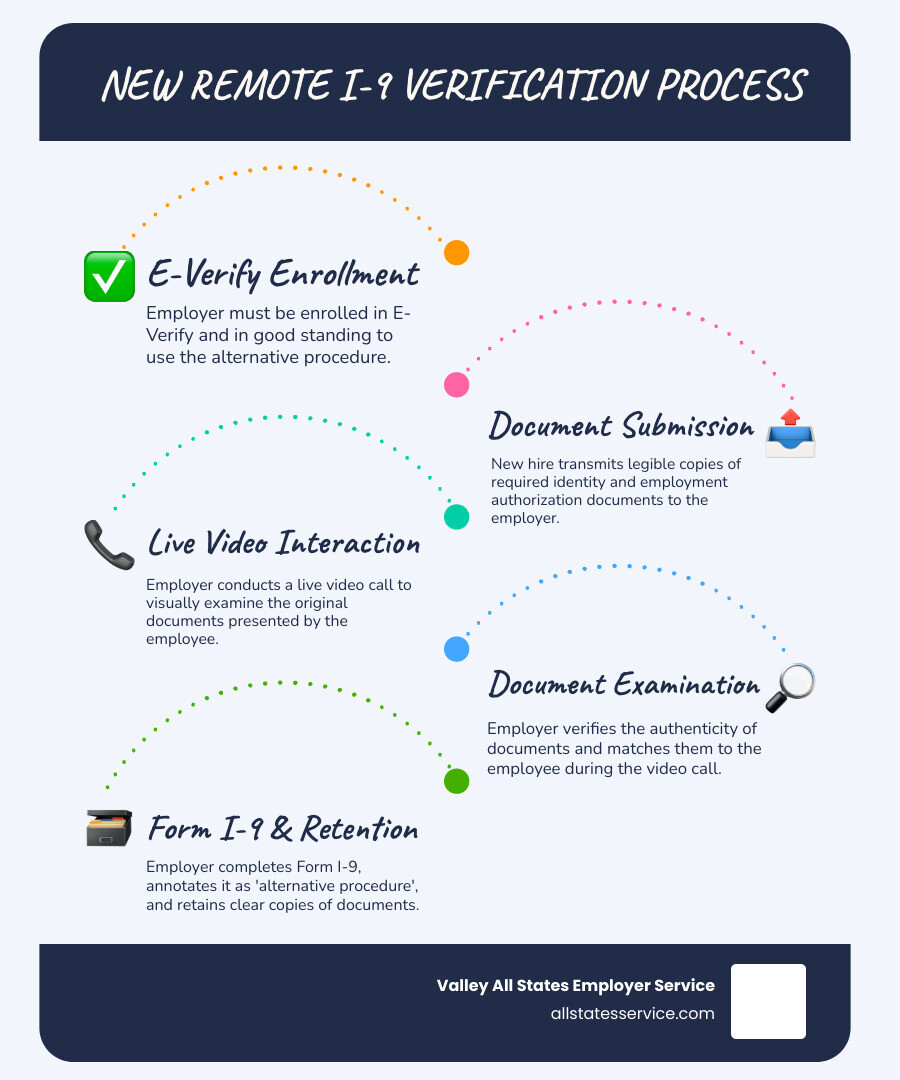
Once you’ve confirmed your eligibility, implementing remote document examination becomes much more manageable. The process combines digital document sharing with live video interaction to ensure thorough verification while accommodating your remote workforce.
Step one involves document transmission. Your employee needs to send you clear, legible copies of both the front and back of their Form I-9 documents. If they’re using acceptable receipts instead of permanent documents, those work too. The key here is clarity. Blurry photos or unclear scans will only slow down the process.
The live video interaction comes next. This isn’t optional or something you can skip. You or an authorized representative must conduct a real-time video call with the employee. This live element is what maintains the integrity of the verification process and distinguishes it from simply accepting emailed documents.
During the video call, you’ll examine the actual documents. The employee must present the same documents they sent copies of earlier. This is where your attention to detail matters most. You’re looking to confirm that the documents appear genuine and actually belong to the person you’re speaking with.
Finally, you’ll retain clear copies of everything you examined. This includes both sides of any two-sided documents. These copies become part of your permanent records and must be kept for the same duration as your other I-9 documentation.
This systematic approach helps ensure your Remote I-9 Compliance stays solid while making the process predictable for both you and your new hires.
Proper Documentation: Using the New Form I-9 and Retaining Records
When you use the alternative procedure for E-Verify remote employees, proper documentation becomes even more critical. The new Form I-9 makes this easier by including a specific checkbox in the “Additional Information” field in Section 2. Simply mark this box to indicate that you used the alternative procedure for document examination.
For reverification situations, you’ll use Supplement B, which is part of the new Form I-9 structure. This keeps everything organized and clearly documented for future reference or potential audits.
If you happened to use the older Form I-9 during the transition period, the annotation process was slightly different. You would simply write “Alternative Procedure” in the Additional Information field. But with the new form’s checkbox system, the process is much more straightforward.
Document retention rules remain just as important as ever. You must keep clear and legible copies of all identity and employment authorization documents that were presented during the video examination. This includes both sides of any two-sided documents, and these copies need to stay in your records for as long as the employee works for you, plus the specified period after their employment ends.
Getting your I-9 Record Keeping system organized now will save you significant stress if you ever face a Form I-9 audit. The remote procedure doesn’t change the importance of maintaining complete, accurate records.
What is E-Verify+ and How Does It Help with Remote Hiring?
Just when you thought employment verification couldn’t get any more streamlined, along comes E-Verify+. This digital innovation is changing how we handle the Form I-9 and E-Verify process, especially for those of us managing E-Verify remote employees. Think of it as the next evolution in employment verification, where technology meets compliance in a way that actually makes sense.
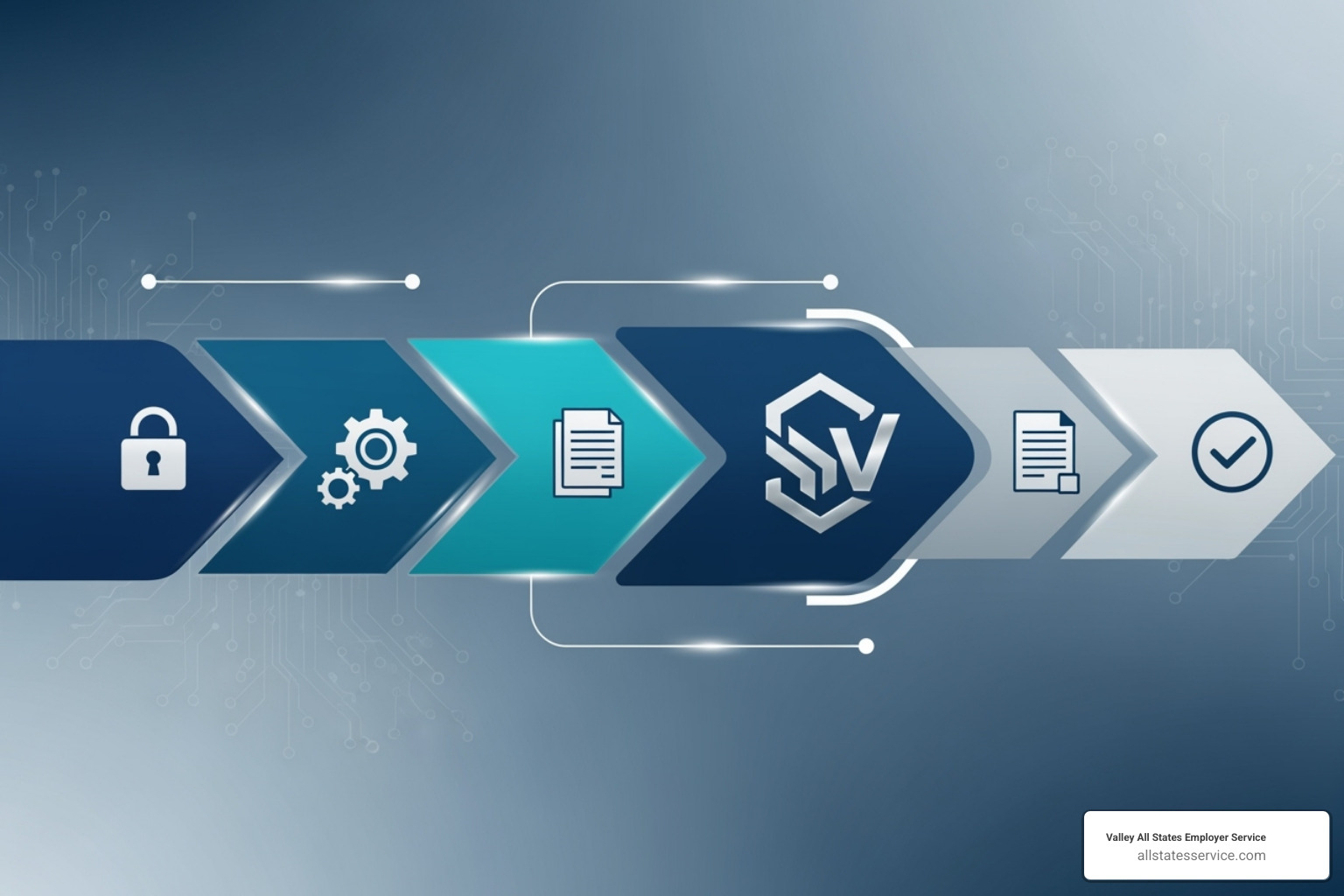
E-Verify+ takes what used to be two separate processes and merges them into one smooth digital experience. Instead of juggling Form I-9 completion and then separately running E-Verify cases, everything happens in one integrated workflow. The system includes sophisticated identity fraud protection through photo and Social Security number matching, which means better security for your business and peace of mind for everyone involved.
What makes this particularly exciting is how it addresses the pain points we’ve all experienced with traditional verification. Reduced data entry errors become a reality when employees can input their own information directly. Direct mismatch notices go straight to employees through their E-Verify+ accounts, cutting out the middleman confusion. For a deeper dive into how this system works, check out Introducing E-Verify+. This technology ensures New Hire Eligibility verification happens faster and more accurately than ever before.
Key Benefits of E-Verify+ for Your Business and New Hires
The beauty of E-Verify+ lies in how it benefits everyone involved in the hiring process. For employers, the streamlined digital workflow eliminates much of the paperwork shuffle that used to bog down onboarding. When Form I-9 and E-Verify merge into one process, your HR team can focus on what they do best instead of wrestling with administrative details.
Improved security features give you confidence that the person you’re hiring is exactly who they claim to be. The system’s fraud protection capabilities work behind the scenes, comparing photos and Social Security numbers to catch discrepancies before they become problems. Most E-Verify+ cases return results in just 3 to 5 seconds, which means your new hires can move forward with their onboarding almost immediately.
One particularly helpful feature is pre-employment verification. You can initiate an E-Verify+ case up to 90 days before an employee’s start date, as long as they’ve accepted your offer. This means less scrambling on day one and smoother transitions for everyone.
From the employee perspective, E-Verify+ offers something we rarely see in government systems: actual convenience. Electronic document submission through secure accounts means no more scanning, emailing, or worrying about document quality. When issues arise, employees receive direct notifications with clear instructions on how to resolve them, eliminating the telephone tag that used to frustrate everyone.
The real game-changer is portable verification. Once employees set up their E-Verify+ account and complete verification with one employer, they can use that same information for future jobs with other E-Verify+ participating employers. It’s truly a “one and done” approach that saves time for everyone involved.
What to Know Before Using E-Verify+: Current Limitations
Before you get too excited about E-Verify+, there are some important limitations to understand. The system is rolling out incrementally throughout 2024, which means not everyone has access yet. Currently, only Employer Access accounts with active program administrators can use E-Verify+. If you’re working with Web Services or E-Verify Employer Agents, you’ll need to wait for future updates.
Here’s something crucial for those managing remote teams: even with all the digital convenience of E-Verify+, live video interactions are still required for remote hires. The guidance is crystal clear on this point. As stated in the official FAQ, E-Verify+ works well for remote hiring. Do I still have to conduct a live video interaction based on current remote hiring requirements? The answer is yes. You still need that live video call to visually confirm the employee and corroborate their documents.
This means E-Verify+ streamlines much of the process, but it doesn’t eliminate the human element that ensures verification integrity. The system improves efficiency while maintaining the security standards that make E-Verify trusted by employers and government agencies alike.
Compliance Best Practices for Your Remote Workforce
Successfully managing E-Verify remote employees goes beyond simply understanding the new procedures. It requires building a foundation of consistent practices that protect both your business and your employees while keeping you on the right side of federal regulations.
Think of compliance as creating a fair playing field for everyone involved. When you establish clear, consistent procedures, you eliminate guesswork and reduce the risk of discrimination claims or costly audit findings.
Applying the Procedure Fairly and Consistently
Here’s where many employers stumble: the Department of Homeland Security requires complete consistency when implementing the alternative remote examination procedure. You can’t pick and choose which employees get the remote option based on personal preferences or assumptions.
If you decide to offer remote document examination to new employees at a specific E-Verify hiring site, you must offer it to all employees at that site. This isn’t just a suggestion; it’s a requirement designed to prevent discrimination based on citizenship status, national origin, or immigration status.
However, you do have some flexibility in how you structure your approach. You can choose to offer the alternative procedure only for remote hires while continuing to examine documents in person for your on-site employees. The critical factor is that your decision must be based on legitimate business reasons, not discriminatory purposes.
This consistency requirement actually makes your life easier once you establish your process. There’s no need to make judgment calls about individual cases, which reduces both administrative burden and legal risk. Maintaining proper Employer HR Compliance means documenting your chosen approach and applying it uniformly across your organization.
The Role of an E-Verify Employer Agent for E-Verify remote employees
Managing E-Verify compliance for remote employees can feel overwhelming, especially for smaller businesses juggling multiple priorities. This is exactly why many smart employers turn to an E-Verify Employer Agent to handle the heavy lifting.
An experienced agent like Valley All States Employer Service takes the entire E-Verify process off your plate. We handle everything from reviewing your Form I-9s to processing E-Verify cases, which means you can focus on running your business instead of worrying about compliance details.
Our approach is straightforward: we provide expert, impartial, and efficient E-Verify processing that dramatically reduces errors and administrative headaches. We offer robust electronic I-9 systems and compliance assistance from trained professionals who stay current on all the latest rule changes and requirements.
The beauty of working with an agent is that you get professional expertise without having to become an expert yourself. We handle the technical details, the deadlines, and the documentation requirements while you concentrate on what you do best. Learn more about our comprehensive E-Verify Employer Agent Service and how it can simplify your remote hiring process.
Official Training and Information Resources
Staying informed about E-Verify and Form I-9 requirements doesn’t have to be a solo journey. USCIS provides excellent free resources that can help you build confidence in your compliance procedures.
I-9 Central serves as your primary resource hub for everything related to Form I-9. When you Visit I-9 Central, you’ll find comprehensive guidance, frequently asked questions, and the latest updates on rule changes. It’s worth bookmarking this site and checking it regularly.
Free webinars are another valuable resource that many employers overlook. USCIS regularly hosts training sessions covering various aspects of Form I-9 and E-Verify procedures. You can register for an upcoming Form I-9 Overview Webinar or explore other topics like myE-Verify and E-Verify+. These sessions give you direct access to experts who can answer your specific questions.
The M-274 Handbook for Employers provides detailed, step-by-step instructions for completing Form I-9 and using E-Verify. While it might seem dense at first glance, it’s an invaluable reference when you encounter unusual situations or need clarification on specific requirements.
Combining these official resources with professional HR Compliance Assistance creates a robust support system that keeps you confident and compliant as you steer remote hiring.
Frequently Asked Questions about E-Verify and Remote Work
Managing E-Verify remote employees brings up plenty of questions, and we get it. The rules have changed, the technology has evolved, and you want to make sure you’re doing everything right. Let’s tackle the most common concerns we hear from employers navigating this new landscape.
What if my state mandates E-Verify participation?
Here’s where things can get a bit tricky. Some states have their own laws requiring E-Verify participation as a condition for business licensing or employment. Even if you’re not a federal contractor, your state might still require you to use E-Verify.
Let’s say you hire a remote employee who lives in Arizona or Alabama, both states with E-Verify mandates. You’ll need to enroll in E-Verify and create a case for that person, regardless of where your main office is located. The E-Verify FAQ specifically addresses this scenario.
The good news? If you’re not a federal contractor, you can choose to enroll only specific hiring sites that need E-Verify rather than your entire company. But here’s our advice: check with your state’s Chamber of Commerce or consult with employment law counsel to understand your specific obligations. State laws vary, and what applies in one state might be completely different in another.
How is the new alternative procedure different from the old COVID-19 flexibilities?
Think of the COVID-19 flexibilities as a temporary band-aid, while the new alternative procedure is a permanent solution built to last. The old flexibilities were emergency measures that allowed remote document examination during the pandemic, but they came with strings attached, including eventual physical inspection requirements.
The new alternative procedure for E-Verify remote employees eliminates the physical inspection requirement entirely. No more awkward “we’ll need to see those documents in person eventually” conversations with your remote hires. Instead, the live video interaction becomes the core verification method, not just a temporary workaround.
Another key difference? The new procedure is only available to employers enrolled in E-Verify who are in good standing. During COVID-19, even non-E-Verify employers could use some remote flexibilities. Now, E-Verify enrollment is your ticket to permanent remote verification.
For employers who used the COVID-19 flexibilities, there’s even a bridge solution. The announcement from E-Verify explains how E-Verify enrolled employers can use the alternative procedure to satisfy any outstanding physical inspection requirements from the flexibility period.
Can I use an authorized representative if I’m not enrolled in E-Verify?
This is where the rubber meets the road. The alternative procedure for remote document examination is exclusively for employers enrolled in E-Verify and in good standing. No exceptions, no workarounds.
If you’re not enrolled in E-Verify, you’re back to the traditional rules. That means physical, in-person document examination for Form I-9 Section 2. For remote employees, this typically means finding an authorized representative in their location who can examine the documents on your behalf.
Here’s the catch: using an authorized representative doesn’t give you access to the remote examination benefits. You’re still bound by the traditional physical inspection requirements. The authorized representative needs to be physically present with your employee to examine their documents.
Want to use the streamlined remote verification process? E-Verify enrollment is mandatory. There’s no way around it. Our I-9 for Remote Employees resource can help you understand all your options, but the bottom line remains the same: E-Verify enrollment is your gateway to the new remote verification world.
Simplify Your Remote Hiring with Expert E-Verify Support
Remote work isn’t going anywhere, and neither are the requirements for verifying E-Verify remote employees. What started as temporary pandemic measures has evolved into permanent, streamlined procedures that actually make sense for today’s distributed workforce. The new alternative procedure for remote document examination isn’t just a compliance checkbox anymore – it’s become the foundation of modern hiring.
But let’s be honest: mastering these new procedures while juggling everything else on your plate can feel overwhelming. Between staying current with Form I-9 updates, managing live video calls for document verification, and ensuring you’re applying procedures consistently across all hiring sites, compliance can quickly become a full-time job.
That’s exactly the challenge we solve at Valley All States Employer Service. We’ve built our entire business around taking the complexity out of E-Verify processing for employers like you. Our team handles the technical details, keeps track of regulatory changes, and ensures your remote hiring process runs smoothly from start to finish.
When you work with us, you’re not just getting E-Verify processing – you’re getting peace of mind. We review your Form I-9s with trained eyes that catch errors before they become problems. Our robust electronic systems streamline document management, and our compliance assistance means you always have expert guidance when questions arise.
Think about it: while you’re focusing on finding the right talent and growing your business, we’re making sure every E-Verify remote employee verification is handled correctly. No more wondering if you’ve marked the right checkbox or retained the proper documentation. No more staying up late researching the latest USCIS guidance.
For small businesses especially, this support can be transformative. You get enterprise-level compliance expertise without the enterprise-level overhead. Our E-Verify for Small Businesses approach recognizes that you need solutions that scale with your team, not against it.
Ready to turn E-Verify compliance from a source of stress into a competitive advantage? Let’s talk about how we can simplify your remote hiring process and keep you confidently compliant, no matter where your next great hire is located.