
Why Employment Eligibility Verification Matters for Your Business
Employment eligibility verification department of homeland security compliance is a federal requirement for every new hire. Within three business days of an employee’s start date, you must verify their identity and work authorization using Form I-9, the official document from U.S. Citizenship and Immigration Services (USCIS).
Here’s what you need to know right now:
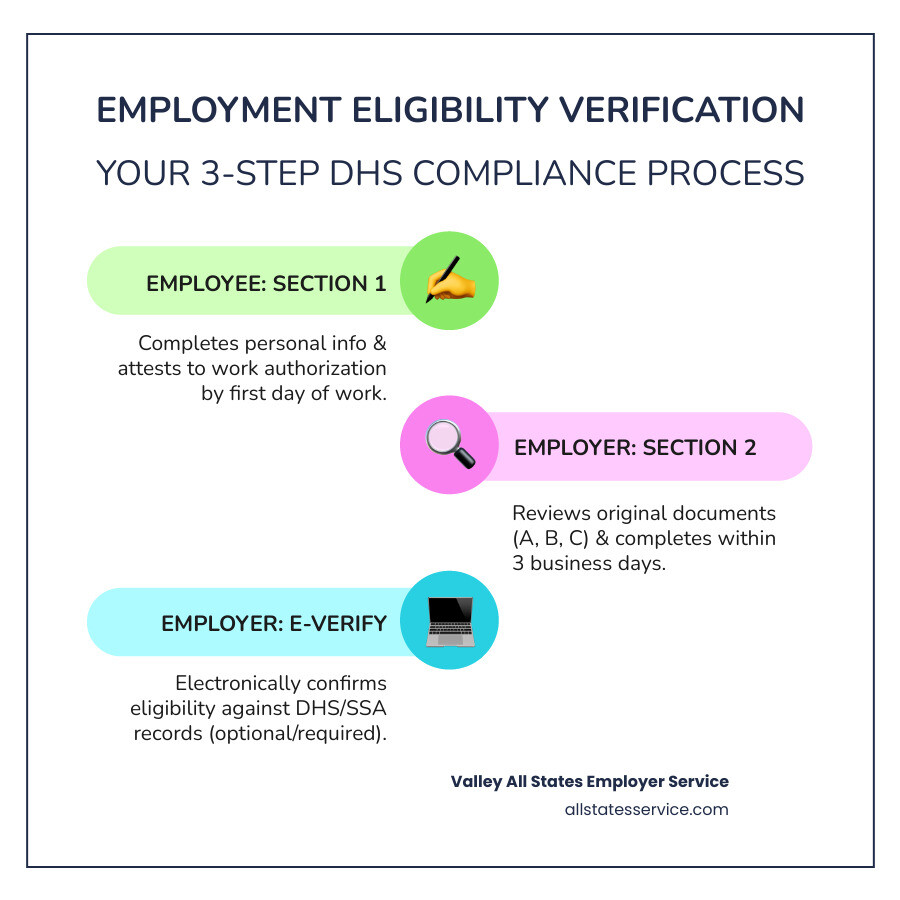
- Employee completes Section 1 of Form I-9 no later than their first day of work.
- Employer completes Section 2 within three business days by physically examining original documents from List A (identity and work authorization) OR List B (identity only) and List C (work authorization only).
- E-Verify (optional for most) allows electronic confirmation through DHS and Social Security Administration records.
- Retention required for three years after the hire date or one year after termination, whichever is later.
- Non-compliance penalties range from hundreds to thousands of dollars per violation.
Knowingly employing someone without proper verification leads to serious consequences. The Department of Homeland Security, through USCIS and Immigration and Customs Enforcement (ICE), actively audits businesses for compliance.
The good news is that the process is manageable once you understand it. Form I-9 is your foundation, and E-Verify adds an optional (or sometimes mandatory) digital verification layer. The key is getting both right from the start.
Many HR managers feel overwhelmed by the technical requirements and worry about costly mistakes. The rules can be confusing, especially with document lists, receipts, reverification, and remote employees.
This guide covers everything the employment eligibility verification department of homeland security requires. We’ll break down Form I-9, explain the DHS role, clarify E-Verify rules, and share best practices to keep you compliant without burdening your hiring process.
The Cornerstone of Compliance: Understanding Form I-9
Form I-9 is the bedrock of employment eligibility verification in the U.S. Mandated by the Immigration Reform and Control Act of 1986, it ensures every new hire is legally authorized to work. It applies to all employers and employees, citizens and non-citizens alike. Understanding its purpose, responsibilities, and documents is crucial for compliance. For a primer, see What is an I-9?
What is Form I-9 and Who is Responsible?
Form I-9, the I-9, Employment Eligibility Verification, verifies the identity and work authorization of new hires. It’s a two-part process involving both the employee and employer.
The employee completes Section 1, providing personal information and attesting to their citizenship or immigration status. This must be done by their first day of work for pay, but not before accepting the job offer. A preparer or translator can assist if needed, but they must also sign a certification.
The employer or an authorized representative completes Section 2. This involves examining original documents to establish identity and employment authorization within three business days of the employee’s start date. For example, if an employee starts Monday, Section 2 is due by Thursday. Employers are liable for proper completion and retention. We simplify this with expert I-9 Form Completion services.
Decoding the Document Lists: A, B, and C
Employees must present documents from the “Lists of Acceptable Documents.” These lists offer flexibility and prevent discrimination, as employers cannot dictate which documents an employee presents. The documents fall into three lists:
- List A Documents: These documents establish both identity and employment authorization. An employee presenting one document from List A has fulfilled both requirements. Examples include a U.S. passport or a Permanent Resident Card.
- List B Documents: These documents establish identity only. If an employee presents a List B document, they must also present a document from List C. Examples include a driver’s license or a state-issued ID card.
- List C Documents: These documents establish employment authorization only. If an employee presents a List C document, they must also present a document from List B. Examples include a Social Security card (unrestricted) or a birth certificate.
Employees can choose which documents to present, as long as they meet the requirements (one from List A, or one from List B and one from List C). For a full breakdown, see our I-9 Acceptable Documents Ultimate Guide and Form I-9 Section 2 Acceptable Documents Guide.
Employer’s Role in Examining Documentation
The employer’s role in examining documents is critical. For Section 2, the employer or their representative must physically examine each original document. This involves checking for tampering and ensuring it appears genuine and relates to the employee. You don’t need to be a document expert, just exercise reasonable care. Our guide on Verifying I-9 Documents offers more insight.
For remote employees, DHS has authorized alternative procedures. After temporary COVID-19 flexibilities, DHS established a permanent alternative for E-Verify employers in good standing. This allows remote document inspection and electronic retention of copies. However, employers remain liable for violations, even when using an authorized representative. We offer I-9 Document Review services to help ensure accuracy.
Adhering to anti-discrimination provisions is key. Employers cannot specify which documents an employee shows or refuse a valid document with a future expiration date. Such actions could be illegal discrimination. The focus must be on whether the documents establish identity and work authorization, not on the employee’s background.
The Role of the Employment Eligibility Verification Department of Homeland Security
The employment eligibility verification department of homeland security is central to ensuring a legal workforce. DHS agencies set regulations, provide tools, and enforce compliance. This oversight maintains the integrity of the U.S. immigration system and prevents unauthorized employment. Staying current on Federal Employment Compliance is non-negotiable.
DHS and USCIS: The Agencies Behind the Process
DHS is the federal department responsible for U.S. security. Within DHS, U.S. Citizenship and Immigration Services (USCIS) manages the Form I-9 process. USCIS develops the form, provides instructions, and offers guidance through resources like I-9 Central, an invaluable online hub for employers and employees.
Immigration and Customs Enforcement (ICE), also part of DHS, is another key player. ICE enforces immigration laws, including conducting I-9 audits. These audits ensure employer compliance and can result in significant penalties. This collaboration highlights the DHS’s comprehensive approach to verification.
Beyond the Basics: Acceptable Receipts and Retention Rules
If an employee doesn’t have an original document, they can sometimes present an “acceptable receipt.” These receipts are typically valid for 90 days, giving the employee time to get the replacement document.
- Lost, Stolen, or Damaged Documents: If an employee’s document from List A, B, or C is lost, stolen, or damaged, they can present a receipt for the application to replace the document. They must then present the actual replacement document within 90 days.
- Specific Documents: Other receipts might include a Form I-94 indicating a refugee’s or asylee’s status, which is valid for 90 days.
Receipts are generally not acceptable for jobs lasting less than three business days or for initial work authorization applications. Employers must track these situations and ensure the employee presents the actual document before the receipt expires.
Employers must retain completed Form I-9s for a specific period: three years after the hire date, or one year after termination, whichever is later. For example, if an employee works for two years, you keep the form for three years from the hire date. If they work for five years, you keep it for one year after termination. Proper I-9 Record Keeping is vital for audits.
Anti-Discrimination Provisions for the Employment Eligibility Verification Department of Homeland Security
While Form I-9 aims to prevent unauthorized employment, it also protects employees from discrimination. The Department of Justice’s Immigrant and Employee Rights Section (IER) enforces these anti-discrimination provisions.
Employers must avoid:
- Document Abuse: This occurs when an employer requests more or different documents than required, or refuses to accept valid documents, often based on a worker’s citizenship, immigration status, or national origin. For instance, an employer cannot demand a Permanent Resident Card from a non-citizen if they present a valid Employment Authorization Document.
- Citizenship Status Discrimination: Treating individuals differently based on their citizenship or immigration status in hiring, firing, or recruitment.
- National Origin Discrimination: Discriminating against individuals because of their country of origin.
The IER offers guidance and investigates discrimination complaints. Employers should not specify which documents to present or refuse documents that appear genuine. Adhering to Human Resources Compliance means following the letter and spirit of the law, ensuring fair treatment for all.
E-Verify: The Digital Layer of Verification
While Form I-9 is the paper-based verification, E-Verify adds a digital layer. This system confirms work authorization by comparing Form I-9 information against government databases.
| Feature | Form I-9 | E-Verify |
|---|---|---|
| Purpose | To verify identity and employment authorization of new hires. | To electronically confirm employment eligibility by matching I-9 data against government records. |
| Requirement | Mandatory for all U.S. employers for every new hire. | Voluntary for most employers, but mandatory for federal contractors and in some states (like Maryland). |
| Process | Paper or electronic form completed by employee and employer, with document inspection. | Web-based system where employer enters I-9 data to query DHS and SSA databases. |
| Outcome | Employer attests to document review and employee’s authorization status. | Provides immediate “Employment Authorized” or potential “Tentative Nonconfirmation” (TNC) result. |
What is E-Verify and How Does it Connect to Form I-9?
E-Verify is a web-based system allowing enrolled employers to confirm employee work eligibility. Operated by DHS and the Social Security Administration (SSA), employers submit Form I-9 information electronically to the system.
E-Verify matches this information against SSA and DHS records, providing electronic confirmation of eligibility. It’s a robust tool for E-Verify Employment Verification that supplements, but does not replace, Form I-9. Employers must still complete and retain a Form I-9 for every new hire.
The E-Verify Process: From Data Entry to Confirmation
The E-Verify process is efficient and usually provides a quick result.
- Case Creation: After Form I-9 is complete, the employer enters the information into E-Verify, creating a “case.”
- Initial Result: Most cases get an immediate “Employment Authorized” result if the information matches.
- Tentative Nonconfirmation (TNC): A mismatch results in a Tentative Nonconfirmation (TNC). This isn’t a final determination. The employee can contest the TNC and resolve the issue with the SSA or DHS. Employers must provide a “Further Action Notice” and allow at least 8 federal working days for the employee to act. Learn more in our guide on E-Verify Tentative Nonconfirmation.
- Final Nonconfirmation (FNC): If the employee doesn’t contest the TNC or can’t resolve it, a Final Nonconfirmation (FNC) is issued, and the employer may terminate employment. Employers cannot take adverse action based only on a TNC. It’s crucial to monitor your E-Verify Case Status.
Is E-Verify Mandatory for Your Business?
While available nationwide, E-Verify is not mandatory for all employers.
- Voluntary for Most: For the majority of private sector employers, E-Verify participation is voluntary.
- Federal Contractors: It becomes mandatory for employers with federal contracts or subcontracts that contain the Federal Acquisition Regulation (FAR) E-Verify clause.
- State Legislation: Many states, including Maryland, mandate E-Verify for certain businesses, such as public employers, state contractors, or private employers of a certain size. Our guides, What Employers Are Required to Use E-Verify? and E-Verify State Laws Complete Guide, offer more details.
Even when voluntary, many employers use E-Verify as a best practice to improve compliance and reduce risk.
Staying Compliant: Penalties, Flexibilities, and Best Practices
Staying compliant with employment eligibility verification department of homeland security requirements is an ongoing process. It demands diligence, accurate records, and awareness of potential pitfalls. A strong I-9 Compliance Guide 2025 is a valuable tool.
The High Cost of Non-Compliance
Failing to comply with Form I-9 and E-Verify rules can have severe consequences. Immigration and Customs Enforcement (ICE) regularly conducts ICE I-9 Audit actions that can lead to significant fines.
Penalties typically fall into two categories:
- Paperwork Violations: These are fines for errors or omissions on Form I-9, such as incorrect dates, missing signatures, or failure to properly record document information. Fines can range from hundreds to thousands of dollars per form.
- Knowingly Hiring or Continuing to Employ Unauthorized Workers: This is the most serious offense. If an employer is found to have knowingly hired or continued to employ an unauthorized individual, they face substantial fines and, in egregious cases, criminal charges.
The financial burden can be crippling, making proactive compliance a smart investment. Our I-9 Audit Penalties Complete Guide details these risks.
Navigating Form I-9 Flexibilities and Remote Hiring
The rise of remote work has changed the employment landscape. DHS recognized this by introducing temporary Form I-9 flexibilities during the COVID-19 pandemic, allowing remote document inspection.

DHS has since established a permanent alternative procedure for E-Verify employers in good standing. This allows remote examination of a new hire’s documents. You must understand the specific requirements, like retaining document copies and noting the alternative procedure on Form I-9. This is key for businesses with many I-9 For Remote Employees or those following our E-Verify Remote Hiring Complete Guide.
These flexibilities show DHS’s adaptability but also highlight the employer’s ultimate responsibility. Stay informed on the latest USCIS and DHS guidance for remote verification.
Best Practices for a Bulletproof I-9 Process
Maintaining compliance with employment eligibility verification department of homeland security requirements doesn’t have to be daunting. Here are best practices for a bulletproof I-9 process:
- Establish Consistent Procedures: Create clear, written policies for Form I-9 completion, document review, and E-Verify submission. Train all involved staff thoroughly.
- Train Your Team Regularly: Regularly train anyone involved in the I-9 process on the latest requirements, document lists, and anti-discrimination rules. Our I-9 Training for Employers is a valuable resource.
- Conduct Regular Self-Audits: Periodically review your I-9 forms for accuracy. Correcting errors internally before an ICE audit can save you from penalties. A good I-9 Self Audit process is key.
- Maintain Secure Storage: Store I-9 forms securely and separately from other personnel files. Ensure they are accessible for government inspection.
- Use the Latest Form I-9: Always use the current Form I-9 version from the USCIS website to avoid compliance issues.
- Address TNCs Promptly: If you receive a TNC, follow the proper steps to inform the employee and allow them to resolve it. Never take adverse action based on a TNC alone.
- Leverage Expert Assistance: Partner with a provider like Valley All States Employer Service. We specialize in outsourced E-Verify verification, minimizing errors and administrative burden with expert processing.
Implementing these practices from our I-9 Best Practices Complete Guide will strengthen your compliance and provide peace of mind.
Frequently Asked Questions about DHS Employment Verification
Employers often have questions about the employment eligibility verification department of homeland security requirements. Here are answers to some common ones.
How long do I have to complete Form I-9 for a new hire?
This is a critical timeline. The process has two parts:
- Employee (Section 1): The new employee must complete and sign Section 1 of Form I-9 no later than their first day of work for pay. They cannot complete it before accepting a job offer.
- Employer (Section 2): As the employer, you must complete and sign Section 2 within three business days of the employee’s first day of employment. If an employee is hired for less than three business days, both sections must be completed on the first day.
Missing these deadlines is a common violation that can lead to audit penalties. Staying organized with I-9 New Hire Paperwork is essential.
What if an employee presents an expired document?
Generally, documents for Form I-9 must be unexpired, but there are exceptions:
- Automatic Extensions: Some immigration documents, like certain Employment Authorization Documents (EADs), may have their validity automatically extended by USCIS. Employers must stay updated on these extensions.
- Expired U.S. Passports or Passport Cards: These are acceptable for List A even if they are expired.
- Reverification: If an employee’s work authorization document (from List A or C) expires, you must reverify their eligibility on or before the expiration date. The employee must present a new, unexpired document, and you complete Supplement B of Form I-9.
Never refuse a valid document that appears expired if an official extension exists. Always consult the latest Federal I-9 Documents guidance from USCIS.
Can I use a third-party service for my employment eligibility verification department of homeland security requirements?
Yes. Many employers use a third-party service, like an E-Verify employer agent or authorized representative, for their Form I-9 and E-Verify needs. This is especially helpful for businesses with remote employees, high turnover, or limited HR resources.
You can designate an authorized representative to complete Section 2 of Form I-9, but the employer remains ultimately liable for any violations. If your third party makes an error, you are still responsible.
A specialized provider like Valley All States Employer Service can help. We offer expert and efficient E-Verify Employer Agent Service to minimize errors and administrative burden. Outsourcing your E-Verify and I-9 processes to us reduces your non-compliance risk and lets you focus on your core business. Our services adhere to all federal regulations in the United States, including Maryland and Lutherville, MD.
Conclusion
Navigating employment eligibility verification department of homeland security requirements is a critical employer responsibility. From Form I-9 to E-Verify, each step ensures a legal workforce and protects your business from penalties. We know managing document lists, timelines, and audit threats can seem like a lot.
The good news is that compliance is achievable. By understanding Form I-9, the roles of DHS and USCIS, document rules, and E-Verify, you can build a reliable process. Remember to follow anti-discrimination provisions and stay informed on remote hiring flexibilities.
Form I-9 and E-Verify are powerful tools for maintaining a compliant workforce. Don’t let complexity deter you. At Valley All States Employer Service, we simplify the process. Our expertise in outsourced E-Verify workforce eligibility verification means we handle the details, so you can focus on your business with confidence.
Ready to simplify your compliance process and ensure every hire is handled correctly? Contact our team today and let us help you steer the employment eligibility verification department of homeland security requirements with ease.