
How to Master Efficient E-Verify Handling Without Losing Your Mind
Why Efficient E-Verify Handling Is Critical for Every Hiring Team
Efficient E-Verify handling means creating cases on time, managing results quickly, and keeping your records audit-ready, all without slowing down your hiring process.
Here’s a quick snapshot of what it takes:
- Enroll correctly in E-Verify before your first hire
- Complete Form I-9 with the employee on or before their first day
- Create your E-Verify case no later than the third business day after the employee starts work
- Review the case result (most come back in 3 to 5 seconds)
- Act on Tentative Nonconfirmations (TNCs) promptly and privately, without taking adverse action
- Close cases properly and keep records organized for potential audits
If you manage hiring at a mid-sized company, you already know the pressure. New employees need to start fast. Compliance can’t slip. And the rules around employment eligibility verification keep getting more complex.
E-Verify is a federal online system run by the Department of Homeland Security (DHS) and the Social Security Administration (SSA). It checks the information from a new hire’s Form I-9 against government records. Most results come back in seconds. But when they don’t, or when a mismatch appears, things can get complicated fast.
The good news? With the right workflows in place, E-Verify doesn’t have to be a headache.
This guide breaks down exactly how to handle the process efficiently, from enrollment to audit readiness, so your team can stay compliant without burning out.
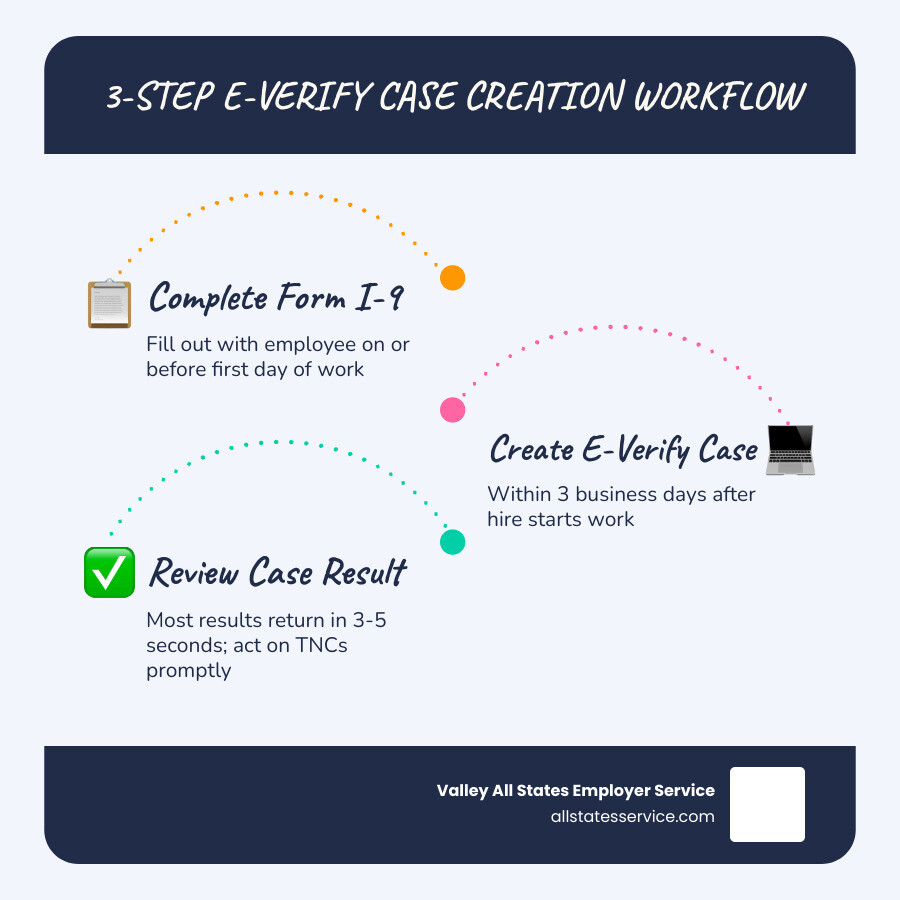
Simple guide to efficient e-verify handling:
Mastering Efficient E-Verify Handling Through Smart Workflows
To achieve efficient e-verify handling, we need to look at the process as a relay race rather than a marathon. If one person drops the baton, the whole team loses time. In HR, “dropping the baton” looks like missing the three-day window for case creation or failing to notify an employee about a mismatch.
The foundation of a smooth workflow starts with the right setup. Before you even hire your next employee, you should ensure your company is properly registered. If you aren’t sure if your business is already in the system, you can use the search tool on the E-Verify: Home page to check your status.
One of the best ways to ensure efficient e-verify handling is to use a desktop computer for all administrative tasks. While mobile devices are great for checking emails, the E-Verify enrollment and case creation screens are much easier to navigate on a full-sized monitor. This simple switch reduces data entry errors, which are the leading cause of unnecessary mismatches.
For those of us managing multiple locations or high hiring volumes, setting up a Login.gov account is now a requirement to access E-Verify securely. This integration adds a layer of security while streamlining how you sign in across different government platforms.
Best Practices for Efficient E-Verify Handling and Enrollment
If you are just getting started, follow these E-Verify Best Practices to set yourself up for success. Enrollment cannot be saved mid-way, so you must complete it in one sitting.
Here is our recommended checklist for a seamless enrollment session:
- Company Information: Have your Federal Employer Identification Number (EIN) and North American Industry Classification System (NAICS) code ready.
- Total Employee Count: Know roughly how many people you employ.
- Hiring Sites: List the locations where you will be using E-Verify.
- Designated Users: Decide who will be your Program Administrator and who will be General Users.
A Program Administrator has full power to add or delete users and edit company profiles. General Users can only create and manage cases. Assigning these user roles correctly ensures that your workflow doesn’t get bottlenecked by a single person being out of the office.
For a deep dive into the technical side of the system, we recommend keeping the E-Verify Quick Reference Guide for Employers bookmarked on your browser. It is a lifesaver when you encounter a status you haven’t seen before.
Navigating TNCs and Case Results Without Compliance Risks
Most of the time, E-Verify is a “set it and forget it” tool. You enter the data, and within five seconds, you see “Employment Authorized.” You’re done! However, efficient e-verify handling is truly tested when you receive a Tentative Nonconfirmation (TNC).
A TNC doesn’t mean the employee isn’t authorized to work. It simply means the information provided doesn’t match government records. This could be due to a name change, a typo in the Social Security number, or an outdated immigration status in the DHS database.
When a Tentative Nonconfirmation occurs, you must:
- Notify the employee privately: Never discuss a TNC in front of other staff.
- Provide the Further Action Notice: This document explains why the mismatch occurred and what the employee needs to do.
- Allow them to contest: The employee has the right to contest the result. If they do, you must refer the case in the system.
- Wait for the result: Employees have 8 federal government working days to contact the appropriate agency.
While the case is pending, you cannot fire, suspend, or delay training for that employee. Doing so is a violation of their rights and can lead to heavy penalties.
How E-Verify+ Drives Efficient E-Verify Handling for Remote Teams
The government recently introduced E-Verify+, and it is a game-changer for efficient e-verify handling. Traditionally, the employer took the lead on data entry. With E-Verify+, the employee takes the wheel.
| Feature | Traditional E-Verify | E-Verify+ |
|---|---|---|
| Data Entry | Employer enters I-9 data | Employee enters data via myUSCIS |
| Notifications | Employer notifies employee of TNC | System notifies employee directly |
| Portability | Must redo for every new job | Verification can carry to future employers |
| Document Upload | Manual scan/upload | Direct upload by employee |
By using E-Verify+, you reduce your administrative burden. The employee completes their own Form I-9 electronically through their secure myUSCIS account. If there is a mismatch, the system sends the notification directly to them. This eliminates the “middleman” aspect of HR and speeds up the resolution process. You can find more details in the E-Verify+ Information Sheet for Employers.
Remote Hiring and the DHS Alternative Procedure
The rise of the distributed workforce has made traditional, in-person I-9 verification difficult. Fortunately, if you are enrolled in E-Verify and remain in good standing, you may be eligible to use the DHS Alternative Procedure for remote document examination.
This procedure allows you to examine an employee’s identity and employment authorization documents via a live video call. However, there are strict rules to follow for E-Verify Remote Complete Guide compliance:
- The employee must transmit a clear copy of the documents to you.
- You must conduct a live video interaction to ensure the documents match the person.
- You must check the box on Form I-9 indicating that you used an alternative procedure.
- You must retain clear copies of all documents examined.
If you don’t want to handle the video calls yourself, you can designate an “authorized representative” to act on your behalf. This can be anyone you trust to review the documents in person, though we always recommend using a professional service to ensure the job is done right.
Avoiding Penalties and Preparing for ICE Audits
Compliance isn’t just about the here and now; it is about being ready for the “what if.” Immigration and Customs Enforcement (ICE) can issue a Notice of Inspection with only three days’ warning. If your records are a mess, you could face fines averaging $2,000 per violation, with some penalties reaching as high as $2,861 for repeated errors.
To maintain E-Verify I-9 Compliance, we suggest these habits:
- Never Pre-screen: It is illegal to use E-Verify to check an applicant’s status before they accept a job offer.
- Use the Historic Records Report: Every year, USCIS deletes old records. For example, records from before 2014 were scheduled for deletion in early 2025. Make sure you download your Historic Records Report regularly to keep your own backup.
- Daily Status Checks: Log in daily to check for “Needs More Time” updates. DHS usually responds within 24 hours, but some cases can take up to 3 business days.
- Watch for Expirations: The system will alert you 90 days before an employee’s work authorization document (like an EAD) expires. Use this time to prompt the employee for updated documentation.
By keeping an airtight audit trail, you turn a high-stress ICE visit into a routine verification of your excellent recordkeeping.
Frequently Asked Questions about E-Verify
When must I create an E-Verify case?
You must create the case no later than the third business day after the employee starts work for pay. If you hire someone on a Monday, you need to have that case submitted by Thursday.
Can I use E-Verify to screen job applicants?
No. This is one of the most common pitfalls that leads to audits and penalties. E-Verify is only for individuals who have already been hired and have completed the Form I-9.
What happens if an employee contests a TNC?
If they contest, you must refer the case in the E-Verify system. Give them the Referral Date Confirmation, which tells them who to contact and by what date. They have 8 federal government working days to take action. You must allow them to continue working with no change in pay or status while the case is pending.
Conclusion
At Valley All States Employer Service, we understand that managing a growing team is hard enough without the added stress of federal compliance. Efficient E-Verify handling is the key to protecting your business from fines while ensuring you only hire authorized workers.
Whether you are looking for a complete guide on employer agents or you need someone to take the entire process off your plate, we are here to help. Our expert team provides impartial, lightning-fast E-Verify processing that minimizes your administrative burden and keeps your records audit-ready.
Don’t let paperwork slow down your growth. Let us handle the technicalities so you can focus on building your business. Learn more about our E-Verify employment verification services and see how easy compliance can be.
Ready to simplify compliance? Contact our team today.