
E-Verify program requirements 2025: Simple Guide
What E-Verify Program Requirements Mean for Your Business
E-Verify program requirements can feel overwhelming, but understanding them is crucial for staying compliant and avoiding costly penalties. E-Verify is a web-based system operated by U.S. Citizenship and Immigration Services (USCIS) that helps employers confirm their workers are eligible to work in the United States by checking Form I-9 information against government databases.
Quick Answer: Core E-Verify Program Requirements
- Enrollment: Complete online enrollment with company information and designate a Program Administrator
- User Training: All users must complete the E-Verify tutorial before creating cases
- Form I-9 First: Always complete Form I-9 before creating an E-Verify case
- Timeline: Create E-Verify cases no later than the third business day after hire
- Display Posters: Post E-Verify Participation and Right to Work notices
- Handle Results: Properly manage case outcomes, especially Tentative Nonconfirmations
- Record Keeping: Maintain E-Verify case numbers with Form I-9 records
E-Verify helps employers “ensure a legal workforce by electronically verifying information entered on the Form I-9, Employment Eligibility Verification, against authoritative sources available to the U.S. Department of Homeland Security.”
The system connects to both Department of Homeland Security (DHS) and Social Security Administration (SSA) databases to verify employee information. While voluntary for most employers, E-Verify is mandatory for federal contractors and employers in certain states.
Understanding these requirements protects your business from compliance issues while streamlining your hiring process. The key is knowing when E-Verify applies to you, how to enroll properly, and what steps you must take for each new hire.
Who Must Comply? Federal, State, and Local Mandates
The question we hear most often is: “Do I actually need to use E-Verify?” It’s a fair question because the answer depends on where you operate and who you work with.
E-Verify program requirements aren’t one-size-fits-all. While the system is voluntary for most private employers, certain businesses must participate by law.
Federal contractors face the strictest requirements. If your company holds federal contracts, you’re likely required to use E-Verify for all new hires. Some contractors must even verify existing employees working on federal projects. This stems from the FAR E-Verify Clause in the Federal Acquisition Regulation. The rules can get complex depending on your contract size and type. For detailed guidance on these requirements, check out our resource on E-Verify for Contractors.
State laws add another layer of complexity. Some states require mandatory use for all employers, regardless of company size. Others limit requirements to public employers only or state contractors. Many states have no E-Verify requirements at all.
This patchwork of state-specific laws means you need to understand the rules in every state where you hire employees. What’s optional in California might be mandatory in Arizona.

The penalties for non-compliance aren’t something you want to test. Fines can reach thousands of dollars per violation. Federal contractors risk the loss of contracts and exclusion from future bidding opportunities. State penalties vary but often include business license suspensions and additional civil penalties.
We’ve seen businesses face serious financial consequences simply because they didn’t understand their E-Verify obligations. The good news? Once you know the rules, compliance becomes much more manageable.
Getting Started: The E-Verify Enrollment Process
Ready to dive into E-Verify? Think of enrollment like setting up your first business bank account. You need the right paperwork, you have to complete everything in one visit, and once you’re done, there are ongoing responsibilities to maintain good standing. The good news? With the right preparation, the process is straightforward.

Information Needed to Enroll
Here’s something that catches many employers off guard: you must complete the entire E-Verify enrollment in one sitting. There’s no “save and continue later” option. This means gathering all your information beforehand isn’t just helpful, it’s essential.
Your company legal name is your starting point. This needs to match exactly what’s on file with the IRS. Next, you’ll need your Employer Identification Number (EIN), which is basically your business’s social security number for tax purposes.
The system will ask for your physical address where your business operates, plus your mailing address if it’s different. You’ll also need to know your NAICS code, which categorizes what type of business you run. Don’t worry if you don’t know this off the top of your head. A quick search online will help you find the right classification.
Have an accurate count of your number of employees ready. The system wants to know your current workforce size. You’ll also need details about all your hiring site locations where you plan to use E-Verify.
If you’re a federal contractor, there’s one more piece: your Unique Entity Identifier (UEI). This replaced the old DUNS number system and is required for anyone subject to the FAR E-Verify Clause.
Ready to get started? Head over to the E-Verify Enrollment Application when you have everything gathered.
The Enrollment Steps
Once you’ve got your paperwork lined up, the actual enrollment flows pretty smoothly. The single web session requirement means you’re committed once you start, so clear your schedule for about 30 minutes.
Gathering information beforehand is your secret weapon here. Having everything at your fingertips prevents that frustrating moment when you’re halfway through and realize you need to hunt down your NAICS code or employee count.
One of the most important decisions you’ll make is designating a Program Administrator. This person becomes the master key holder for your E-Verify account. They can add new users, manage company settings, and they’re the main point of contact with USCIS. Choose someone who’s detail-oriented and will be sticking around your company.
Don’t forget about completing the online tutorial. Both your Program Administrator and any future users must pass this before they can create their first E-Verify case. Think of it as getting your E-Verify driver’s license. The tutorial covers all the E-Verify program requirements and helps prevent costly mistakes down the road.
Key Employer Responsibilities After Enrollment
Congratulations, you’re enrolled! But the work doesn’t stop there. Your first order of business is displaying posters. You need to put up both the Notice of E-Verify Participation and the Right to Work poster where employees and job applicants can easily see them. These can be physical posters or displayed digitally, and they need to be in both English and Spanish.
Training users is another non-negotiable requirement. Every single person who will touch your E-Verify system must complete that online tutorial we mentioned. No exceptions. This protects both you and your employees by ensuring everyone understands the rules.
These requirements might feel like a lot, especially for smaller operations. But remember, they’re designed to protect everyone involved in the hiring process. If you’re feeling overwhelmed, our guide on E-Verify for Small Businesses breaks down these requirements in bite-sized pieces that are easier to manage.
The enrollment process sets the foundation for everything that comes next. Take your time, gather your information, and don’t hesitate to reach out for help if you need it.
Core E-Verify Program Requirements for Daily Operations
Now that you’re enrolled, it’s time for the real work to begin. Running E-Verify day-to-day isn’t complicated, but it does require understanding who does what, how Form I-9 connects to everything, and the exact steps for creating cases. Think of it like learning to drive: once you know the rules and practice a bit, it becomes second nature.
User Roles and Security Protocols: A Key Part of E-Verify Program Requirements
E-Verify uses a simple two-tier system to keep things organized and secure. It’s like having managers and team members, each with their own responsibilities.
The Program Administrator is essentially the captain of your E-Verify ship. Every company needs at least one, and they handle the big-picture stuff: managing your company profile, adding new users, creating cases, viewing reports, and making sure everyone stays on track with E-Verify program requirements. They’re also responsible for staying updated when policies change, which happens more often than you might think.
General Users are your day-to-day case creators. They focus primarily on entering employee information and managing individual cases. It’s a more focused role, but they still need to understand all the program rules.
Here’s where things get serious: security. We’re dealing with sensitive employee information, so E-Verify has strict rules about protecting Personally Identifiable Information (PII). This means keeping all employee data secure and never, ever sharing login credentials. It might seem obvious, but password sharing is one of the fastest ways to get your account suspended or terminated.
The security requirements extend to how you store everything. Form I-9s, E-Verify case records, and all related documents need secure storage. It’s not just good practice; it’s a requirement. For a deeper dive into these responsibilities, check out our guide on E-Verify Employer Requirements.
The Form I-9 and E-Verify Connection
Here’s something that trips up a lot of employers: E-Verify doesn’t replace Form I-9. Instead, it builds on it. You absolutely must complete Form I-9 first, then use that information to create your E-Verify case.
Every new hire in the U.S. requires a properly completed Form I-9. The employee fills out Section 1 on their first day, and you have three business days to complete Section 2 after examining their documents. This is standard I-9 procedure, but E-Verify adds some specific twists.
The biggest difference? Social Security Numbers become mandatory for E-Verify cases, even though they’re usually optional on Form I-9. The system needs that SSN to cross-reference with Social Security Administration records. If your new hire is still waiting for their SSN, you’ll create the case as soon as it becomes available.
There’s also a photo requirement for List B documents. If an employee presents a List B document (which proves identity only), it must have a photograph. This supports E-Verify’s photo matching feature. The only exception is for religious objections, but you’d need to contact E-Verify directly in those situations.
One exciting development is the remote document examination option. E-Verify employers can now remotely examine employee documents for Form I-9 purposes, following specific procedures outlined in the Federal Register. This adds flexibility to your hiring process, especially for remote workers.
The key takeaway? Form I-9 is your foundation, and E-Verify improves it. They work together, not separately. For more details on this crucial relationship, visit our page on E-Verify and I-9.
Creating and Managing E-Verify Cases
Once Form I-9 is complete, you’re ready to create an E-Verify case. This is where the electronic verification actually happens, and timing is everything.
You must create each case no later than the third business day after the employee starts work for pay. This isn’t a suggestion; it’s a hard deadline. Miss it, and the system will ask why you’re late. Consistently missing this deadline can trigger a compliance review, which nobody wants.
Handling rehires gets a bit more complex. If you rehire an employee within three years and their previous E-Verify case showed “Employment Authorized,” you might not need a new case. Instead, you can often use Supplement B to reverify their eligibility on the existing Form I-9.
However, you must treat them as a brand new hire if their previous case resulted in a Final Nonconfirmation or if more than three years have passed. This means completing a fresh Form I-9 and creating a new E-Verify case.
Creating the actual case involves carefully entering information directly from the Form I-9 into E-Verify. You’ll input the employee’s name, date of birth, SSN, citizenship status, and document information. Accuracy matters here because mistakes can cause delays or mismatches.
This process might sound straightforward, but attention to detail is crucial. Many businesses find that partnering with an expert helps minimize errors and administrative headaches. That’s where our E-Verify Employer Agent Service comes in, handling the entire process for you while ensuring perfect compliance.
Navigating Case Results and Mismatches
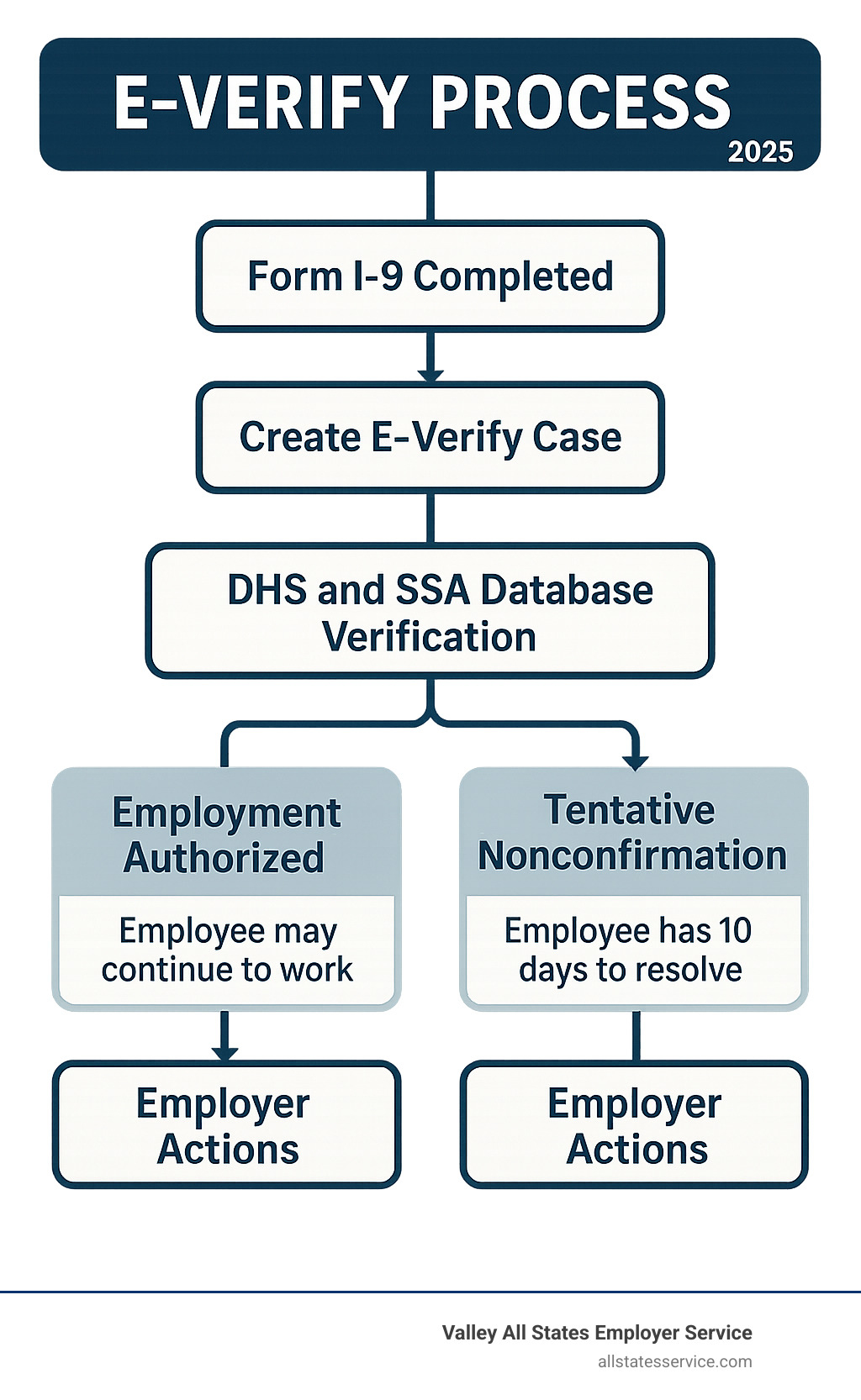
Once you submit an E-Verify case, the system works quickly to cross-reference your employee’s information against government databases. Within seconds to a few business days, you’ll receive one of several possible results. Understanding these outcomes and knowing how to respond is essential for meeting E-Verify program requirements and protecting both your business and your employees’ rights.
The results you receive aren’t just simple “yes” or “no” answers. Each outcome tells a specific story and requires different actions on your part. Some results mean you’re done, others mean you need to wait, and some require immediate attention and careful handling.
Understanding E-Verify Case Results
Employment Authorized is the result every employer hopes to see. This means the employee’s information matched perfectly with government records, and you’re all set. No further action is needed beyond recording the case number on the employee’s Form I-9. Your employee can continue working without any restrictions.
E-Verify Needs More Time appears when the system requires additional processing time to reach a final determination. This isn’t cause for alarm. Simply allow the employee to continue working while E-Verify completes its review. You’ll receive an updated result within a few business days.
Case in Continuance means E-Verify is waiting for updated information from government agencies. Again, the employee can keep working while this process unfolds. These delays often resolve themselves as databases are updated with new information.
Close Case and Resubmit indicates there was likely an error in how the case was created. Perhaps information was entered incorrectly, or there was a technical issue. Close the case as instructed, double-check your employee’s Form I-9 information, and create a new case with the correct details.
Final Nonconfirmation is the most serious result. This means E-Verify cannot confirm the employee is authorized to work in the United States. At this point, you must terminate the employee’s employment. However, this result only comes after the employee has had a full opportunity to resolve any issues through the Tentative Nonconfirmation process.
The Tentative Nonconfirmation (TNC) Process
A Tentative Nonconfirmation, often called a “TNC” or “mismatch,” doesn’t mean your employee isn’t authorized to work. Instead, it means the information you entered didn’t match what’s in the DHS or SSA databases. This happens more often than you might think, and there are many innocent explanations.
Common reasons for TNCs include name changes after marriage, data entry errors, outdated information in government systems, or recently issued documents that haven’t been updated in all databases yet. The key word here is “tentative” because your employee has the right to resolve the mismatch.
When you receive a TNC, you must promptly notify the employee and provide them with the Further Action Notice that E-Verify generates. This notice explains what the mismatch means and gives the employee instructions for resolving it. Most importantly, you must give this notice to the employee no later than the next business day after receiving the TNC.
Your employee then has eight federal government work days to take action. They can visit a Social Security Administration office, contact DHS, or take other steps outlined in their notice. During this time, the employee can continue working. You cannot take any adverse action against them based solely on receiving a TNC.
This protection against discrimination is crucial to E-Verify program requirements. You cannot fire, suspend, or otherwise penalize an employee just because they received a TNC. Many TNCs are resolved successfully once employees have a chance to update their records or correct the mismatch.
If the employee chooses not to contest the TNC or if their efforts to resolve it are unsuccessful, the case will result in a Final Nonconfirmation. Only then are you required to terminate their employment. For guidance on handling these sensitive situations properly, review our E-Verify Best Practices.
Closing a Case
Knowing when and how to close E-Verify cases is another important aspect of compliance. You’ll close cases in several situations: when you receive a Final Nonconfirmation, when the system instructs you to Close Case and Resubmit, or when an employee chooses not to contest a TNC.
The closing process involves selecting the appropriate reason in the E-Verify system and ensuring proper documentation. Always annotate the employee’s Form I-9 with the case number and final result. This creates a clear paper trail that demonstrates your compliance with the program requirements.
Record keeping extends beyond just the case number. Maintain copies of any Further Action Notices you’ve provided to employees, documentation of when you notified employees about TNCs, and records of case closures and their reasons. These documents protect you during compliance reviews and demonstrate that you’ve followed proper procedures.
The most important thing to remember is that E-Verify results require prompt, appropriate action. Whether it’s celebrating an Employment Authorized result or carefully managing a TNC situation, your response shows your commitment to following E-Verify program requirements while treating employees fairly throughout the process.