
Bulk E-Verify Processing for the Overwhelmed HR Manager
When Hiring at Scale, Manual E-Verify Just Doesn’t Cut It
Bulk E-Verify processing is the method of submitting multiple employee verification cases at once, rather than entering them one by one. Here’s a quick breakdown of what it means and how it works:
- Instead of creating each E-Verify case manually, employers use a CSV file or Web Services integration to submit many records at the same time
- Bulk uploads are processed within 24 hours, compared to the 3-to-5 second results for individual cases
- It is most commonly used by high-volume employers, staffing agencies, and organizations using third-party E-Verify employer agents
- The standard E-Verify portal does not support bulk case creation; employers must use Web Services or the SAVE system’s bulk upload tool
- Results are available through the Upload History page, and any records with errors must be corrected and resubmitted separately
If your company hires in batches, whether that’s seasonal workers, large onboarding classes, or rapid expansion across locations, you already know the pain. Logging into E-Verify and creating cases one at a time is slow, error-prone, and frankly exhausting for any HR team.
The problem is real. E-Verify was built to verify one employee at a time. The standard portal still works that way. But for mid-sized and larger employers, that model creates a bottleneck right in the middle of your onboarding process.
The good news? There are legitimate ways to streamline high-volume verification. This guide walks you through exactly how bulk E-Verify processing works, what tools are available, and how to do it right without putting your compliance at risk.
Relevant articles related to bulk e-verify processing:
Streamlining High-Volume Hiring with Bulk E-Verify Processing
When you are onboarding dozens or hundreds of employees at once, manual data entry is your worst enemy. Every keystroke is an opportunity for a typo, and every typo can lead to a Tentative Nonconfirmation (TNC) that takes days to resolve. This is where high-volume processing systems change the game.
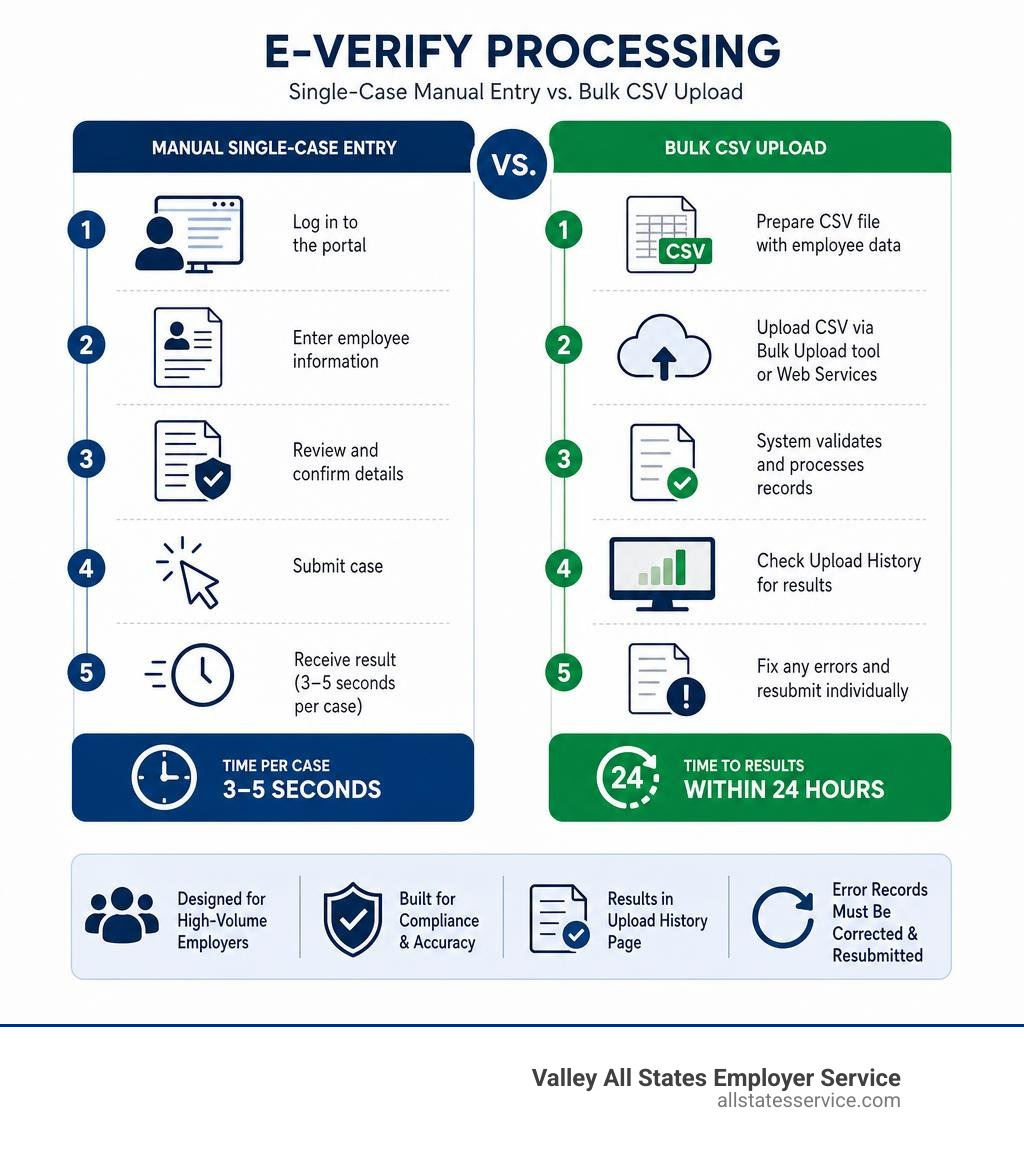
To understand how to streamline your workflow, it helps to compare the standard manual process with a bulk upload approach.
| Feature | Manual Single-Case Verification | Bulk Upload Processing |
|---|---|---|
| Data Entry Method | Manual typing into the E-Verify portal | Spreadsheet (CSV) upload or automated HRIS sync |
| Submission Volume | One case at a time | Hundreds of cases simultaneously |
| Typical Response Time | 3 to 5 seconds per case | Up to 24 hours for the entire batch |
| Ideal For | Small businesses with low hiring volume | High-volume hiring, staffing agencies, seasonal employers |
| System Access | Standard E-Verify web portal | Web Services API or specialized upload tools |
As you can see, the main trade-off is speed of individual results versus overall administrative efficiency. While a manual case gives you an answer in seconds, entering fifty cases manually can take hours of focused, tedious labor. Bulk processing allows you to submit everything in one click and walk away while the system processes the batch in the background.
For organizations managing multiple locations or complex organizational structures, coordinating this data is a major challenge. If you are acting as a corporate administrator, you might oversee several distinct hiring sites. According to the E-Verify User Manual For Corporate Administrators, centralizing your management helps maintain compliance, but it does not automatically grant you the ability to upload employee cases in bulk through the basic web interface.
To achieve true batch processing, employers must utilize Web Services. This method connects your applicant tracking system or human resource information system directly to the federal database. If you want to dive deeper into how these systems communicate, you can read about the technical details in our guide on E-Verify batch processing secrets.
How to Prepare and Submit Your Bulk CSV File
If you are using a system that supports CSV uploads, the preparation of your data file is the most critical step of the entire process. A single misplaced comma or an incorrectly formatted date can cause your entire upload to fail, forcing you to start over.

When preparing your files, you must follow strict formatting rules to ensure the federal databases can read your information. This preparation step is directly tied to your Form I-9 workflow. Before you can even think about E-Verify, you must have a fully completed Form I-9 for every employee. For a complete refresher on how to manage this initial step, check out our comprehensive Form I-9 verification guide.
Additionally, if you are managing a business with multiple physical locations, you must ensure your hiring sites are properly registered and mapped in the system. If you need to set up these locations first, you can refer to the official bulk upload of hiring sites guidelines to import all your physical addresses at once.
Required Data Fields for Bulk E-Verify Processing
To successfully run a bulk verification, your CSV file must contain specific, minimum data fields for each employee. These fields map directly to the information collected on Section 1 and Section 2 of Form I-9:
- First and Last Name: Must match the legal name provided on the I-9 form.
- Date of Birth: Must be formatted precisely as required by your specific software template, usually YYYY-MM-DD or MM/DD/YYYY.
- Social Security Number (SSN): A nine-digit numeric identifier.
- Citizenship Status: The specific status selected by the employee in Section 1.
- Document Details: Specific numeric identifiers from the identity and work authorization documents presented by the employee, such as an A-Number, Form I-94 number, or Passport number.
The absolute biggest headache for HR managers in this step is handling leading zeros in Social Security numbers. If an employee’s SSN starts with a zero, standard spreadsheet programs like Microsoft Excel will automatically strip that zero when saving the file, turning a nine-digit number into an eight-digit number. This will cause an immediate validation failure.
To prevent this, you must format the SSN column as Text in your spreadsheet editor before typing or importing any data, and ensure the leading zeros remain intact when exporting to CSV format.
Step-by-Step CSV Submission Process
Once your data is perfectly clean and formatted, you are ready to submit. Here is the typical workflow for a bulk CSV submission:
- Download the Template: Always use the latest CSV template provided by your software provider or Web Services platform to ensure your column headers match exactly.
- Populate the Data: Copy your employee information into the template, taking special care to format dates and SSNs correctly. Delete any instruction rows before saving.
- Upload the File: Navigate to your bulk upload tool, select your saved CSV file, and click submit.
- Monitor the Upload History: Because bulk files are queued, they are not processed instantly. The system will ingest the file and process the cases, which can take up to 24 hours depending on system volume.
- Review the Results: Once processing is complete, check the status report to see which cases were successfully verified and which ones require attention.
Managing Errors, Compliance, and E-Verify+ Integration
Even with the most careful preparation, high-volume processing will occasionally run into errors. Managing these errors efficiently while keeping your company compliant with federal timelines is a critical skill for any HR professional.

When a bulk upload contains errors, the system will typically process the valid records and reject the invalid ones. To handle the rejections, most systems offer an Export Errors tool. This tool generates a secondary file containing only the failed records along with specific error codes, such as missing data or invalid formatting. You can easily correct the issues in this secondary file and resubmit it without worrying about creating duplicate cases for the employees who were already successfully verified.
Beyond error correction, you must keep compliance at the forefront of your operations. Under federal rules, you must create an E-Verify case no later than the third business day after the employee starts work for pay. Using bulk processing does not exempt you from this timeline, so you must establish a regular upload schedule to avoid missing these deadlines.
Furthermore, your record-keeping requirements remain strict. You must retain the original Form I-9 for three years after the date of hire, or one year after employment ends, whichever is later. For Web Services users, keeping track of these requirements is made easier by using self-auditing tools. We highly recommend reviewing the Self-Assessment Guide for Web Services Users to ensure your digital processes align perfectly with federal compliance standards.
If you want a broader overview of what is expected of you as an employer, our detailed breakdown of employer compliance responsibilities is an excellent resource to share with your leadership team.
Looking forward, the integration of E-Verify+ is changing how high-volume employers manage onboarding. E-Verify+ is a service that streamlines the process by combining Form I-9 completion and E-Verify into a single digital workflow. Instead of your HR team manually entering I-9 data into a spreadsheet for bulk upload, the employee completes their portion online and uploads their own documents. The system then handles the verification automatically, significantly reducing the administrative burden on your staff.
Handling Mismatches in Bulk E-Verify Processing
When a case cannot be automatically verified, the system issues a Tentative Nonconfirmation (TNC). This means the information entered does not immediately match records held by the Social Security Administration (SSA) or the Department of Homeland Security (DHS).
When dealing with a TNC in a bulk processing environment, you must handle each case individually and privately:
- Notify the Employee: You must print the Further Action Notice generated by the system and review it privately with the employee.
- Confirm the Decision: The employee must decide whether they wish to contest the mismatch. Both you and the employee must sign the notice.
- Refer the Case: If the employee chooses to contest, you must refer the case through the system. This triggers an 8-day window during which the employee must contact the appropriate agency (SSA or DHS) to resolve the issue.
- Maintain Status: You cannot take any adverse action, such as suspending or terminating the employee, while the TNC is being contested and resolved.
Frequently Asked Questions about Bulk Verification
High-volume employment verification can feel complicated. Here are answers to some of the most common questions we hear from HR managers trying to navigate the system.
If you are looking for a foundational overview of how the entire program works from start to finish, you can read our complete E-Verify program guide.
Can any employer use bulk upload features directly in the standard E-Verify portal?
No. The standard web portal designed for general employers only allows you to create and process cases one at a time. If you log into the standard government website, you will not find a button to upload a spreadsheet of new hires.
To use bulk upload features, you must either develop your own custom software interface using the official Web Services API, or partner with an authorized E-Verify Employer Agent who already has this technology built into their platform.
How long does it take to get results from a bulk upload?
While individual manual submissions return results in 3 to 5 seconds, bulk uploads are placed into a processing queue. Depending on the size of your file and the current volume of the federal systems, it can take up to 24 hours for all cases in a bulk upload to be fully processed and for the status notifications to appear in your history log.
What is the most common mistake in bulk CSV submissions?
Without a doubt, the most common mistake is the dropping of leading zeros in Social Security numbers and zip codes due to default spreadsheet formatting. Other frequent errors include using incorrect date formats, leaving mandatory fields blank, and including special characters in name fields that the federal databases cannot interpret.
Simplify Your Compliance Workflow
Managing high-volume hiring is stressful enough without the added pressure of compliance deadlines, formatting errors, and manual data entry. At Valley All States Employer Service, we specialize in taking that burden off your shoulders.
We provide expert, impartial, and highly efficient outsourced E-Verify processing. By partnering with us, you gain access to advanced batch processing capabilities without having to build or maintain your own expensive Web Services integration. We identify and correct formatting errors, manage the upload process, and help you navigate complex compliance requirements, allowing your HR team to focus on what they do best: supporting your people.
Ready to simplify compliance and eliminate the stress of manual verification? Learn more about our specialized E-Verify employment verification services and let us streamline your onboarding workflow today.