
Navigating the complex world of employment verification compliance
Why Employment Verification Compliance Can Make or Break Your Hiring Process
Employment verification compliance is the process of confirming that every new hire is legally authorized to work, and that their identity and employment history are accurate, before they start working for your organization.
Here’s a quick breakdown of what it involves:
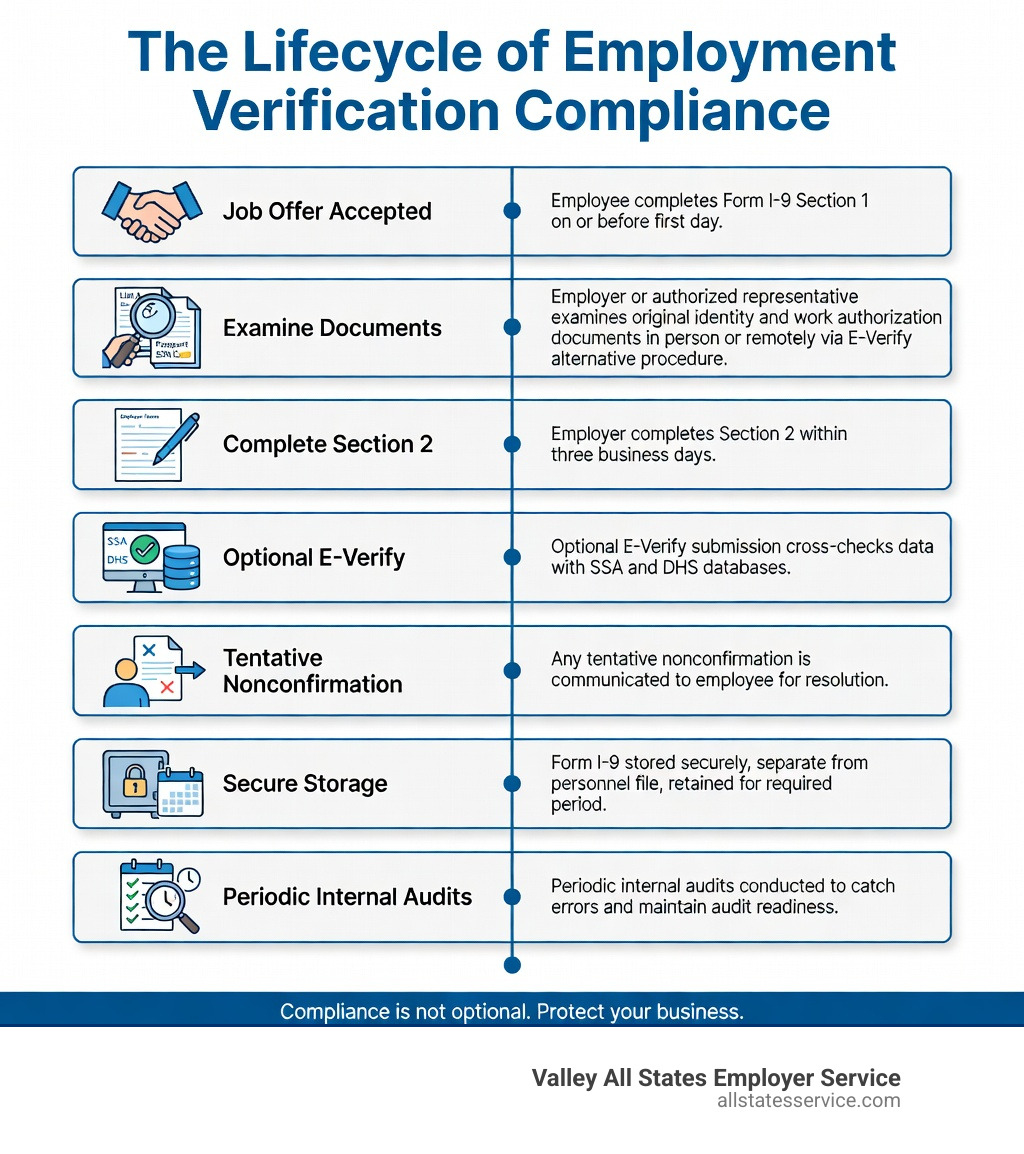
- Form I-9 – Required for all U.S. employers; must be completed by the employee’s first day (Section 1) and by the employer within three business days of the start date (Section 2)
- Acceptable documents – Employees present List A (identity + work authorization), or List B (identity) plus List C (work authorization) documents
- E-Verify – An optional federal electronic system that cross-checks I-9 data against SSA and DHS records; mandatory for federal contractors and in certain states
- Employment verification letters – Confirm job title, status, and dates for mortgage, immigration, or rental applications
- Record retention – I-9 forms must be kept for three years after hire or one year after termination, whichever is later
Getting this right is not optional. The Immigration Reform and Control Act of 1986 (IRCA) requires every U.S. employer to verify the identity and work eligibility of every person they hire. Fail to do it correctly, and the consequences are serious. One cleaning company learned this the hard way, facing over $6 million in fines after investigators found a 100% substantive violation rate and evidence of knowingly employing unauthorized workers.
For a busy HR manager, the rules can feel like a maze. Federal requirements, state-level E-Verify mandates, remote verification procedures, Canadian immigration standards, privacy laws, and document retention rules all compete for your attention, often all at once.
This guide cuts through the complexity so you know exactly what to do, when to do it, and how to protect your business.
Understanding the Basics of Employment Verification Compliance
At its heart, employment verification compliance is about truth. When we hire someone, we need to know they are who they say they are and that they have the legal right to work in the United States. This isn’t just about filling out a form, it is about protecting our company from massive fines and ensuring we are building a legal, authorized workforce.
The process usually kicks off after a candidate accepts a job offer. While background checks often happen during the screening phase, the actual legal verification of work eligibility happens right at the start of employment. You might wonder, how long does employment verification take? If you are doing it manually, it can take a few days of back and forth. However, with modern tools and services, confirming a candidate’s history can happen in minutes or just a few days.
Using professional employment verification services helps ensure that you aren’t just checking boxes, but actually following the law. This is especially important for preventing identity theft and ensuring that the documents provided, like passports or birth certificates, are genuine and unexpired.
Employment verification compliance vs. reference checks
It is easy to get these two confused, but they serve very different purposes. A reference check is qualitative. You are calling a former manager to ask, “Was Jane a good team player?” or “How did she handle tight deadlines?” It’s about character and skill.
On the other hand, employment verification is factual. We are looking for hard data:
- Exact dates of employment.
- Official job titles held.
- Confirmation that the person actually worked where they said they did.
Think of it this way: a reference check tells you if you should hire them, while the employment verification process tells you if you can hire them legally. Both are important, but only one carries a $6 million fine if you get it wrong.
Why verification is required for legal compliance
The federal government takes workforce eligibility very seriously. The primary driver is the Immigration Reform and Control Act of 1986. This law made it illegal for employers to knowingly hire individuals who are not authorized to work in the U.S.
To enforce this, the United States Citizenship and Immigration Services (USCIS) and the Social Security Administration (SSA) work together to provide the framework for employment eligibility checks. By following these mandates, we help maintain a fair labor market and ensure our business stays on the right side of federal law. It is a shield that protects us during government audits and shows that we are acting in good faith.
Mastering Form I-9 and E-Verify in the United States
The Form I-9 is the most important document in your onboarding packet. Every single employee, regardless of citizenship, must complete one.
The timeline is strict. The employee must complete Section 1 no later than their first day of work for pay. You, the employer, must complete Section 2 within three business days of that start date. If someone starts on a Monday, you need that Section 2 finished and signed by Thursday.
To complete Section 2, the employee must present original, unexpired documents. You cannot accept photocopies, except in very specific circumstances like a certified copy of a birth certificate. You must physically examine these documents to ensure they look genuine and relate to the person standing in front of you.
Acceptable Documents for Form I-9
The government provides a “List of Acceptable Documents” divided into three categories. An employee can choose to provide one document from List A, OR a combination of one document from List B and one from List C.
| List A (Identity & Authorization) | List B (Identity Only) | List C (Authorization Only) |
|---|---|---|
| U.S. Passport or Passport Card | Driver’s license or ID card issued by a state | U.S. Social Security Account Number card |
| Permanent Resident Card (Green Card) | School ID card with a photograph | Consular Report of Birth Abroad |
| Employment Authorization Document (I-766) | Voter’s registration card | Original or certified copy of birth certificate |
| Foreign passport with I-551 stamp | Military dependent’s ID card | U.S. Citizen ID Card (Form I-197) |
Maintaining employment verification compliance for remote teams
The rise of remote work changed the game for HR. In the past, you had to see those documents in person. Now, if you participate in E-Verify, you may be eligible to use an “alternative procedure” for remote document examination.
This allows you to examine documents via a live video call. However, there are rules:
- You must be enrolled in E-Verify and in good standing.
- You must examine a clear copy of the documents first.
- You must conduct a live video interaction with the employee.
- You must check the box on the I-9 indicating you used the alternative procedure.
This is a huge win for the digital gatekeeper for employment verification systems, making it much easier to hire talent from across the country while staying compliant.
When E-Verify becomes mandatory
While E-Verify is voluntary for most businesses, it is not optional for everyone. If you are a federal contractor or subcontractor with a contract that includes the Federal Acquisition Regulation (FAR) E-Verify clause, you must use it.
Additionally, many states have passed their own laws. Some states require all employers to use E-Verify, while others only require it for public employers or those receiving state incentives. Staying on top of e-verify employment verification is essential because a “tentative nonconfirmation” (TNC) requires quick action to allow the employee to resolve the discrepancy with the SSA or DHS.
The High Cost of Non-Compliance and Legal Risks
If you think the government isn’t watching, think again. U.S. Immigration and Customs Enforcement (ICE) conducts thousands of audits every year. They don’t need a warrant or a subpoena to look at your I-9s, they just need to give you three days’ notice.
The ICE fines case study mentioned earlier is a sobering reminder. A cleaning company was hit with an $8 million fine for a variety of violations. Even simple paperwork errors, like a missing date or a checked box in the wrong place, can result in fines ranging from hundreds to thousands of dollars per form.
When you multiply those “small” errors by a workforce of hundreds or thousands, the numbers get scary very quickly. This is why we advocate for a robust employment compliance ultimate guide strategy within every HR department.
Civil and criminal penalties for employers
The risks go beyond just writing a check. If the government finds a pattern or practice of knowingly hiring unauthorized workers, you could face:
- Debarment – Being banned from receiving any future government contracts.
- Criminal prosecution – In extreme cases, business owners and HR managers can face jail time.
- Asset forfeiture – The government can seize property or funds linked to illegal hiring.
- Reputation damage – News of a massive ICE fine can destroy your brand’s standing in the community and make it impossible to recruit top talent.
Investing in employment compliance solutions is not just a line item in the budget, it is an insurance policy for your company’s future.
Handling audits and inspections
If you get that dreaded notice from ICE, do not panic. You have three business days to gather your forms. This is why keeping your I-9s organized and separate from general personnel files is a best practice.
We recommend using the USCIS Handbook for Employers M-274 as your “bible” for compliance. Conduct internal audits at least once a year. If you find an error, do not try to hide it or use white-out. Draw a line through the incorrect info, enter the correct data, and initial and date the change. Showing that you are proactive about workforce eligibility verification can go a long way in reducing penalties if an official audit occurs.
Best Practices for Streamlining Your Verification Process
Compliance does not have to be a manual, paper-heavy nightmare. In fact, relying on paper is one of the easiest ways to make a mistake. Integrating your verification process with your Human Capital Management (HCM) software can automate many of the reminders and data entry steps.
Using an automated employment verification guide can help you transition to a digital workflow. Digital systems often have built-in logic that prevents an employee from submitting a form with missing information, which is a common cause of “substantive violations.”
Many companies also find success with an outsourced employment verification model. By letting experts handle the heavy lifting, your HR team can focus on culture and strategy rather than document technicalities.
Issuing compliant employment verification letters
Your employees will occasionally need proof of their job for personal reasons. Whether it is for a mortgage application, a car loan, or supporting an immigration petition, you need a standard Verification of Employment Policy.
Here is what you should keep in mind:
- Get consent – Never release salary information without a signed release from the employee.
- Stick to the facts – Only confirm start dates, job titles, and current status (active or inactive).
- Be consistent – Use a template so every letter looks the same and contains the same level of detail.
- Go digital – Digital signatures are widely accepted and can speed up the process for an employee trying to close on a house.
If you are operating in specific regions, such as employment verification in Maryland, ensure you are aware of any state-specific privacy laws that might limit what you can disclose to third parties.
Managing records and document retention
The government’s “math” for how long to keep an I-9 is a bit tricky. You must keep the form for three years after the date of hire OR one year after the date employment ends, whichever is later.
If you hire someone and they work for you for twenty years, you need to keep that form for twenty-one years. If they work for you for six months, you keep it for three years.
Starting in 2025, USCIS is also beginning a process of scheduled records disposal for older E-Verify cases. If you rely on the E-Verify system to store your history, make sure you download your historic records reports now. Using a dedicated document verification service can help you manage these timelines and ensure you never delete a record too early or keep one longer than necessary for privacy reasons.
Frequently Asked Questions
How far back should employment history be verified?
For most standard background checks, a seven-year lookback period is the industry norm. This provides a solid picture of a candidate’s career progression and stability. However, for high-security roles or executive positions, some employers may look back ten years or even at the person’s entire career history. Always ensure your lookback period is consistent for all candidates in the same role to avoid discrimination claims.
What documents are acceptable for Section 2 of Form I-9?
As we discussed, employees must provide either one document from List A (like a U.S. Passport) or a combination of one from List B (identity, like a driver’s license) and one from List C (work eligibility, like a Social Security card). All documents must be original and unexpired. A common pitfall is accepting a Social Security card that says “NOT VALID FOR EMPLOYMENT” or “VALID FOR WORK ONLY WITH DHS AUTHORIZATION.” These are restricted cards and are not acceptable as List C documents.
Can an employer specify which documents to present?
Absolutely not. This is a major compliance trap. Under the anti-discrimination provisions of the Immigration and Nationality Act, the employee has the right to choose which documents to present from the Lists of Acceptable Documents. If you tell an employee, “You must bring your Green Card,” you are committing “document abuse,” which can lead to heavy fines and legal action from the Department of Justice.
Even in states with specific rules, like the Right to Privacy in the Workplace Act, the core principle remains: the choice of documents belongs to the worker, not the boss.
Ready to simplify your compliance journey?
Navigating employment verification compliance does not have to feel like a solo hike through a thick forest. At Valley All States Employer Service, we specialize in taking the administrative burden off your shoulders.
We provide expert, impartial, and highly efficient E-Verify workforce eligibility verification. Our goal is to minimize your errors and ensure that your onboarding process is as smooth as possible. Whether you are dealing with a handful of hires in Lutherville, MD or managing a massive workforce across Maryland and beyond, we have the tools to keep you protected.
Ready to simplify your process? Get I-9 verification assistance today.