
Everything You Need to Know About E-Verify I-9 Documents
What Are E-Verify I-9 Documents? A Quick Answer for HR Managers
E-Verify I-9 documents are the identity and work authorization records employees must present during the Form I-9 verification process, which employers then use to confirm eligibility through the E-Verify system.
Here’s a fast breakdown of the three document categories:
| Document List | What It Proves | Examples |
|---|---|---|
| List A | Identity AND work authorization | U.S. Passport, Permanent Resident Card, Employment Authorization Document (Form I-766) |
| List B | Identity only | Driver’s license, state ID card, school ID with photo |
| List C | Work authorization only | Unrestricted Social Security card, U.S. birth certificate |
Key rules to know:
- Employees present either one List A document, or one List B document combined with one List C document
- All documents must be unexpired
- E-Verify employers have additional requirements, including mandatory Social Security numbers and photo ID for List B documents
Every new hire in the United States triggers the same legal requirement: verify who they are and confirm they’re authorized to work. That’s what Form I-9 is for, and E-Verify takes that process one step further by cross-checking the information against federal government databases.
For a busy HR team, this can feel like a lot to manage. The document lists are specific. The timelines are strict. And the penalties for getting it wrong are real.
The good news? Once you understand how the document lists work and what E-Verify requires on top of standard I-9 rules, the process becomes much more manageable.
This guide walks you through everything, from which documents are acceptable and why, to completion timelines, reverification rules, and how to stay audit-ready.
Understanding the Role of E-Verify I-9 Documents in Hiring
When we talk about hiring compliance, the conversation always starts with Form I-9. This form was born out of the Immigration Reform and Control Act of 1986 (IRCA). Its purpose is straightforward: to ensure that every person hired for work in the U.S. has the legal right to be here and hold a job.
Every employer must complete a Form I-9 for every individual they hire for employment in the United States. This includes citizens and noncitizens alike. The process involves the employee attesting to their authorization to work and presenting valid e verify i 9 documents that prove their identity and eligibility. If you are just starting out, it helps to understand what is an i-9 form and why it is the backbone of your HR compliance folder.
The documents provided by the employee are the “evidence” in this process. As an employer, your job is to examine these documents to ensure they reasonably appear to be genuine and relate to the person presenting them. To keep your business safe, you should learn about the A to Z of valid documents to avoid being caught off guard during an internal or federal audit.
Current Form I-9 Editions and Validity
Keeping track of form versions can feel like a full-time job. USCIS periodically updates Form I-9 to improve security and clarity. Currently, the newest edition is dated 01/20/25. However, the previous 08/01/23 edition is still valid for use until May 31, 2027, or July 31, 2026, depending on specific system updates.
If you use an electronic I-9 system, it is vital to ensure your software provider has updated to the latest version. Using an expired form is a common compliance error that can lead to “paperwork violations” and fines. When printing the form, make sure all pages, including the edition date at the bottom, are clearly visible.
Why E-Verify Integration Matters
While the I-9 is a paper (or electronic) record kept by the employer, E-Verify is an active, internet-based system. It compares information from an employee’s Form I-9 to records available to the U.S. Department of Homeland Security (DHS) and the Social Security Administration (SSA).
By integrating E-Verify into your workflow, you get an automated confirmation of a person’s work eligibility, usually within seconds. This significantly reduces hiring errors and helps protect your business from unknowingly employing unauthorized workers. For a deeper dive into how these two systems work together, check out our E-Verify and I-9 ultimate guide.
Breaking Down the Lists of Acceptable Documents
The “Lists of Acceptable Documents” can be found on the last page of Form I-9. These are the only documents you are allowed to accept. As an employer, you cannot tell an employee which documents they must bring; they have the right to choose from the lists provided.
When examining e verify i 9 documents, we use the “reasonableness standard.” This means you aren’t expected to be a forensic document expert. You simply need to decide if the document looks genuine and matches the person standing in front of you. You can find the official Form I-9 Acceptable Documents list on the USCIS website, or refer to our ultimate guide to acceptable I-9 documents for practical tips on spotting errors.
List A: Identity and Employment Authorization
List A documents are the “all-in-one” solution. If an employee provides one document from List A, they do not need to provide anything else. These documents prove both who the person is and that they are allowed to work.
Common List A documents include:
- U.S. Passport or Passport Card: The gold standard for many employees.
- Permanent Resident Card (Form I-551): Also known as a “Green Card.” USCIS redesigns these every few years, so older versions may look different but are still valid until they expire.
- Employment Authorization Document (Form I-766): Commonly called an EAD.
- Foreign Passport with I-94: Usually for nonimmigrants authorized to work for a specific employer.
List B and List C: The Two-Document Path
If an employee doesn’t have (or doesn’t want to use) a List A document, they must provide one document from List B (Identity) and one from List C (Work Authorization).
List B (Identity):
- State-issued driver’s license or ID card.
- School ID with a photograph.
- Voter’s registration card.
- Native American tribal document.
List C (Work Authorization):
- Unrestricted Social Security Card: It cannot have notations like “NOT VALID FOR EMPLOYMENT.”
- Birth Certificate: Must be an original or certified copy issued by a state, county, or municipal authority.
- Consular Report of Birth Abroad.
Specific E-Verify I-9 Documents Requirements for Employers
If your company uses E-Verify, the rules change slightly. There are three major differences you need to remember:
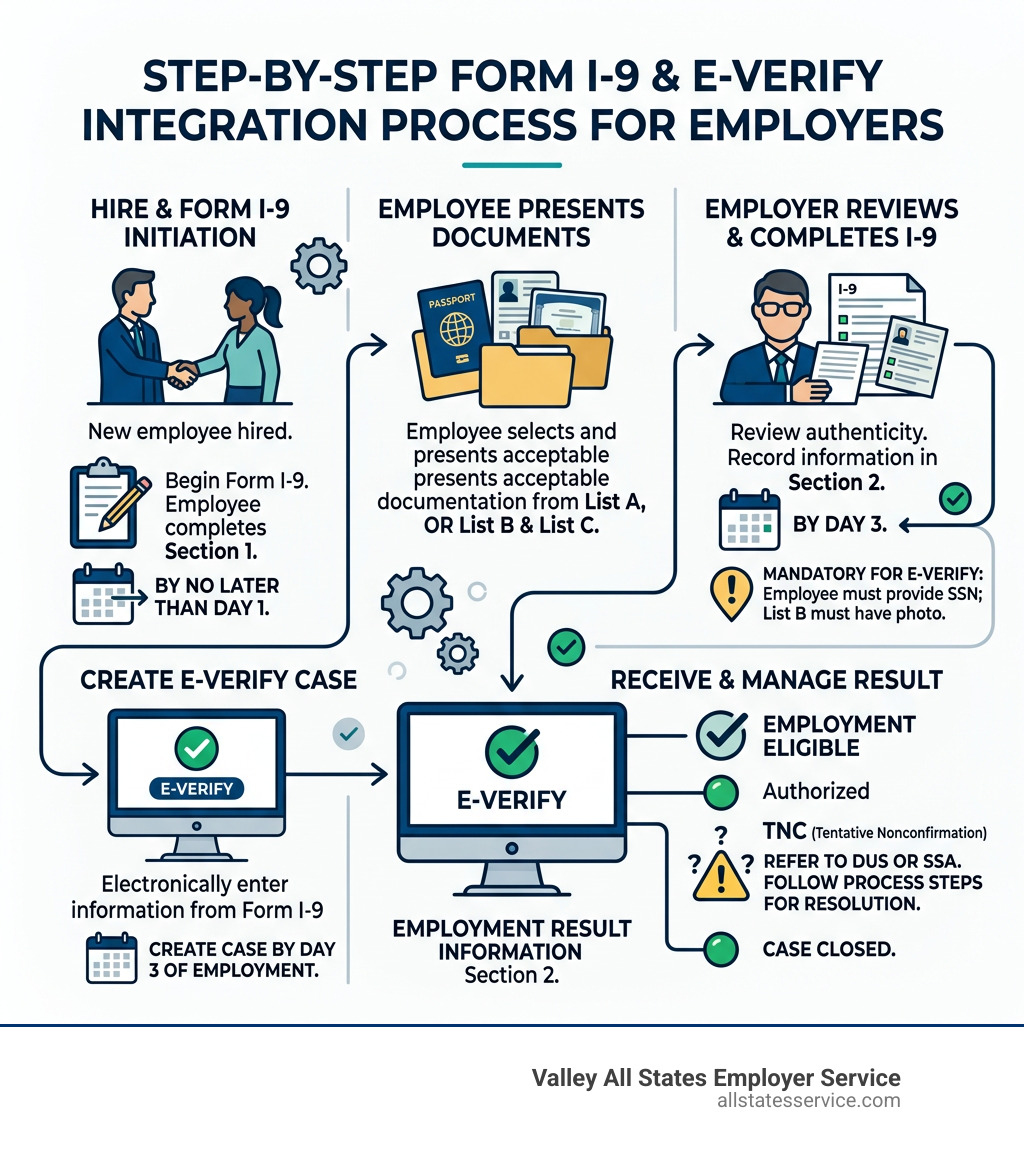
- Social Security Numbers (SSN) are mandatory: On a standard I-9, providing an SSN is technically voluntary for the employee. However, for E-Verify, it is required.
- List B Photo Requirement: Any List B document presented to an E-Verify employer must contain a photograph. If an employee has a religious objection to being photographed, you should contact the E-Verify Contact Center for guidance.
- Photocopying Requirements: E-Verify employers are required to make and keep copies of certain documents if the employee presents them. This includes the U.S. Passport, Passport Card, Permanent Resident Card (Form I-551), and Employment Authorization Document (Form I-766). These copies are used by the system’s “photo matching” tool to verify the document is legitimate.
Timelines and Procedures for Completion
Timing is everything when it comes to compliance. Federal law dictates exactly when each part of the process must happen.
- Section 1 (Employee): Must be completed no later than the first day of employment. The employee can actually complete it any time after they have accepted a job offer, but never before.
- Section 2 (Employer): We must complete this section within three business days of the employee’s first day of work. For example, if an employee starts on Monday, Section 2 must be finished by Thursday.
If you are feeling overwhelmed by the paperwork, our guide to completing I-9 Section 2 breaks down every box and field to ensure you don’t miss a thing.
Handling Reverification and Rehires
What happens when an employee’s work authorization expires? That is where Supplement B (formerly Section 3) comes in. We must reverify an employee’s work authorization no later than the date their current authorization expires.
It is important to note that you do not need to reverify U.S. Passports or Permanent Resident Cards (even when they expire). However, documents like the Employment Authorization Document (Form I-766) must be tracked and updated. If you rehire an employee within three years of the date their original Form I-9 was completed, you may be able to use Supplement B instead of starting a whole new form. Check our reverification and rehire guide for the specific steps.
Remote Examination of E-Verify I-9 Documents
In the past, employers were required to physically “touch and feel” the documents. However, there are now DHS-authorized alternative procedures for remote examination. To qualify for this, an employer must be an E-Verify participant in good standing.
Under this procedure, the employee sends copies of their documents to the employer, and the employer conducts a live video interaction to compare the documents to the employee. You must still complete Section 2 and indicate that you used the alternative procedure. Detailed instructions on this can be found in the Handbook for Employers M-274.
Compliance, Retention, and Avoiding Penalties
Compliance isn’t just about filling out the form; it is about keeping it. You must retain a Form I-9 for every current employee. For former employees, you must keep the form for either three years after the date of hire or one year after the date employment ended, whichever is later.
During a DHS or Department of Labor audit, you will usually be given three days’ notice to produce your I-9 forms. Having an organized system, whether digital or physical, is the only way to survive these inspections without massive stress. Our E-Verify and I-9 compliance guide offers a checklist to help you stay prepared.
Anti-Discrimination Rules for Employers
While being thorough is good, being overzealous can lead to “document abuse.” The law is very clear: you cannot discriminate based on citizenship, immigration status, or national origin.
- Do not ask for more or different documents than required.
- Do not reject valid documents because they have a future expiration date.
- Do not specify which documents you want to see.
If you violate these rules, you could face significant fines from the Department of Justice. Always refer to a reliable I-9 document requirements guide to ensure your internal policies are fair and legal.
Special Provisions for Minors and Individuals with Disabilities
Sometimes, an employee might not have a standard ID. For minors under the age of 18, they can use school records, report cards, or clinic records for List B. If they have none of these, a parent or guardian can complete the identity attestation in Section 1, and the employer writes “Individual under age 18” in the signature space for Section 2. Similar provisions exist for individuals with disabilities who may not have traditional identification.
Frequently Asked Questions about Verification
What should I do if an employee’s document is lost or stolen?
If an employee’s document is lost, stolen, or damaged, they can present a “receipt” for the application of a replacement document. This receipt is valid for 90 days. After that time, the employee must present the actual replacement document. Receipts are not acceptable if the employee is applying for a new document, only a replacement for one they previously held.
Can I accept an expired document for E-Verify?
No. All e verify i 9 documents must be unexpired at the time of presentation. There were some temporary exceptions during the COVID-19 pandemic, but those have ended. The only exception is if the document has been automatically extended by a Federal Register notice or a Form I-797 (Notice of Action) from USCIS.
Is a Social Security number mandatory for all employees?
For standard I-9 purposes, no. But for E-Verify, yes. If a new hire has applied for an SSN but hasn’t received it yet, you should complete the Form I-9, attach a memo explaining the delay, and wait to create the E-Verify case until the number arrives. Once the SSN is provided, create the case immediately and note the reason for the delay in the system.
Let Us Handle Your E-Verify Compliance
Navigating e verify i 9 documents doesn’t have to be a headache for your HR team. At Valley All States Employer Service, we specialize in outsourced E-Verify workforce eligibility verification. We serve businesses across the United States, including those in Lutherville, MD, and throughout Maryland, providing expert and impartial processing.
Our mission is to minimize your administrative burden and eliminate the risk of costly errors. By letting our experts handle your E-Verify submissions, you can focus on what you do best: growing your business and supporting your team.
Ready to simplify your hiring? Explore our complete I-9 compliance services today and see how we can make your onboarding process faster, safer, and more efficient.