
Understanding the E-Verify Verification Process: Your Essential Starting Point
The e-verify verification process is the system U.S. employers use to electronically confirm that new hires are authorized to work in the United States. Here’s what you need to know:
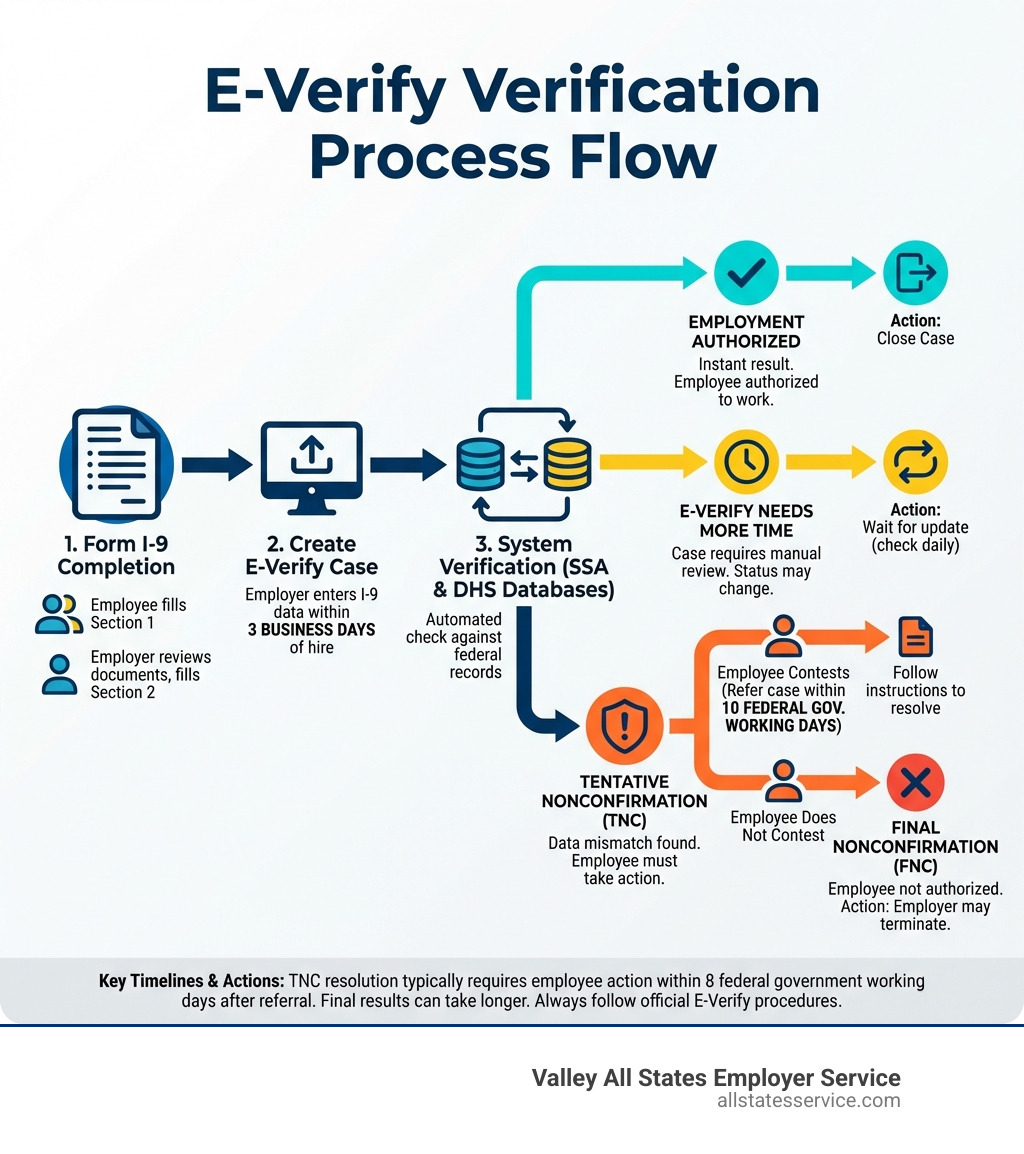
The E-Verify Verification Process in 5 Steps:
- Complete Form I-9 – Employee fills out Section 1, employer completes Section 2 with document review
- Create E-Verify Case – Enter I-9 information into the E-Verify system within 3 business days of hire
- System Cross-Check – E-Verify compares data against Social Security Administration and DHS records
- Receive Result – Get Employment Authorized, Tentative Nonconfirmation, or other case status
- Take Action – Close case or follow procedures for resolving mismatches
Key Facts:
- E-Verify is free and available in all 50 states
- Most cases receive results within 24 hours
- The system is mandatory for federal contractors and some state employers
- It supplements (not replaces) the required Form I-9 process
If you’re an HR manager juggling compliance requirements while trying to keep hiring moving smoothly, you’re not alone. The e-verify verification process can feel overwhelming at first. There are deadlines to track, data to enter correctly, and potential mismatches to resolve.
But here’s the good news: once you understand the flow, E-Verify becomes a straightforward part of your onboarding routine.
E-Verify helps you stay compliant with federal immigration law while protecting your business from penalties. It takes employment verification to the next level by electronically matching Form I-9 information against authoritative government databases. This means fewer compliance worries and more confidence in your hiring decisions.
Whether E-Verify is mandatory for your business or you’re choosing to participate voluntarily, this guide walks you through every step of the process. We’ll cover enrollment, case creation, handling different results, and what to do when issues arise.
Essential e-verify verification process terms:
Getting Started: E-Verify Enrollment and Setup
Before you can begin verifying employment eligibility, you need to enroll in E-Verify. While E-Verify started as a voluntary program, its use has expanded significantly. It’s now mandatory for certain employers across the United States.
For instance, all federal contractors and subcontractors whose contracts contain the Federal Acquisition Regulation (FAR) E-Verify clause must use the system for new hires and all employees assigned to the contract. Beyond federal requirements, some states, like Maryland, have their own mandates for E-Verify use, often for public employers or those receiving state contracts. This creates a patchwork of compliance obligations that you need to be aware of.
To determine if E-Verify is mandatory for your business, it’s wise to consult state-specific guidelines or legal counsel. Our guide on E-Verify Mandatory can offer more insights.
It’s important to understand the difference between E-Verify enrollment and registration. These terms are often used interchangeably, but enrollment typically refers to the initial process of signing up your company to use the E-Verify system. Registration might refer to setting up individual user accounts after the company is enrolled. The core goal is to establish your organization’s access to the system.
The enrollment process is designed to be straightforward. You can begin your journey to confirming employment eligibility with confidence by visiting the official E-Verify website. If you’re ready to start, you can ENROLL NOW Confirm with Confidence. For a detailed walkthrough of the initial steps, explore our E-Verify Registration Process guide.
What Information Do You Need to Enroll?
Enrolling in E-Verify requires a few key pieces of information about your business. Gathering these details beforehand will help you complete the process smoothly and efficiently. We recommend having everything ready as enrollment progress cannot always be saved if not completed immediately.
Here’s a list of what you’ll typically need:
- Company Information: This includes your legal business name, physical address, and employer identification number (EIN).
- Hiring Site Locations: You’ll need to specify all the locations where you hire employees and where E-Verify will be used.
- User Contact Information: Details for the program administrator and any other users you plan to set up, including their names, job titles, and contact information.
- North American Industry Classification System (NAICS) Code: This code classifies your primary business activity.
- Federal Contractor Status: If you are a federal contractor, you’ll need to indicate this.
- Reason for E-Verify Use: Whether you’re enrolling voluntarily, or due to a federal contract or state mandate.
It’s also a good practice to review the E-Verify Memorandum of Understanding (MOU) during this stage. This document outlines the responsibilities of both the employer and the Department of Homeland Security (DHS) regarding E-Verify usage.
Choosing Your E-Verify Access Method
E-Verify offers different access methods to suit various business needs. Understanding these options helps you choose the best fit for your organization, whether you’re a small business or a large corporation.
- Employer Access: This is the most common method. As an employer, you directly access the E-Verify system, create cases, and manage verification processes for your new hires. This method gives you full control and direct interaction with the system.
- E-Verify Employer Agent: Many businesses, especially small to medium-sized ones, choose to partner with an E-Verify Employer Agent. We, Valley All States Employer Service, act as an impartial and efficient third-party agent. We handle the entire e-verify verification process on your behalf, minimizing errors and administrative burden. This allows you to focus on your core business operations while ensuring compliance. Learn more about our E-Verify Employer Agent Service.
- Web Services Access: For larger organizations with high hiring volumes, web services access allows for direct integration of E-Verify functionalities into existing HR or payroll software. This method requires technical expertise to set up and maintain but offers significant automation benefits.
- Corporate Administrator: This role is typically for organizations with multiple hiring sites or a complex corporate structure. A corporate administrator manages other employer accounts under a single umbrella, providing centralized oversight and reporting.
Choosing the right access method depends on your company’s size, resources, and technical capabilities. For many, an E-Verify Employer Agent provides the perfect balance of compliance assurance and administrative relief.
The Core E-Verify Verification Process Step-by-Step
Once you’re enrolled, the heart of the system lies in the core e-verify verification process. This is where you actually submit information about your new employees to confirm their work authorization. It’s crucial to follow the steps accurately and within the specified timelines to maintain compliance.
The process always starts with the Form I-9, Employment Eligibility Verification. This form is the foundation for all employment eligibility checks in the United States. E-Verify then builds upon this foundation, providing an electronic check against government databases.
A key statistic to remember is that E-Verify cases must be created no later than the third business day after the employee starts work for pay. This “three-day rule” is non-negotiable for compliance. Failing to meet this deadline can lead to penalties. If you’re hiring new talent, our guide on E-Verify New Hire offers more details.
One important feature of E-Verify is Photo Matching. If an employee presents certain identity documents, such as a Permanent Resident Card, Employment Authorization Document, U.S. passport, or passport card, the system will prompt you to compare the photo on their document with a photo displayed during case creation. This helps detect fraudulent documents.
Step 1: Completing the Form I-9
The Form I-9 is the cornerstone of employment eligibility verification. Every employer in the U.S. must complete and retain a Form I-9 for each new employee hired after November 6, 1986. E-Verify then uses the information from this form to perform its electronic checks.
- Employee Section 1: On their first day of employment, your new hire completes Section 1 of the Form I-9, providing personal information and attesting to their work authorization status.
- Employer Section 2: Within three business days of the employee’s first day of work, you, as the employer, must complete Section 2. This involves physically examining the employee’s original, unexpired identity and employment authorization documents from the List of Acceptable Documents. You must ensure the documents appear genuine and relate to the person presenting them.
- Document Examination: You cannot specify which documents an employee must present. They choose from the acceptable lists. For employers enrolled in E-Verify, there are now alternative procedures for examining Form I-9 documentation. This allows for remote examination of documents if certain steps are followed, reflecting the evolving nature of remote work.
It’s essential to complete the Form I-9 accurately and on time. You can find comprehensive guidance on the official Form I-9, Employment Eligibility Verification page.
Step 2: Creating the E-Verify Case
After you’ve properly completed the Form I-9, the next step is to create a case in E-Verify. This is where the electronic verification happens.
- Login to E-Verify: Access the system through your chosen method, whether direct employer access or via an employer agent. You can always find the login portal at Login EnrollLogin.
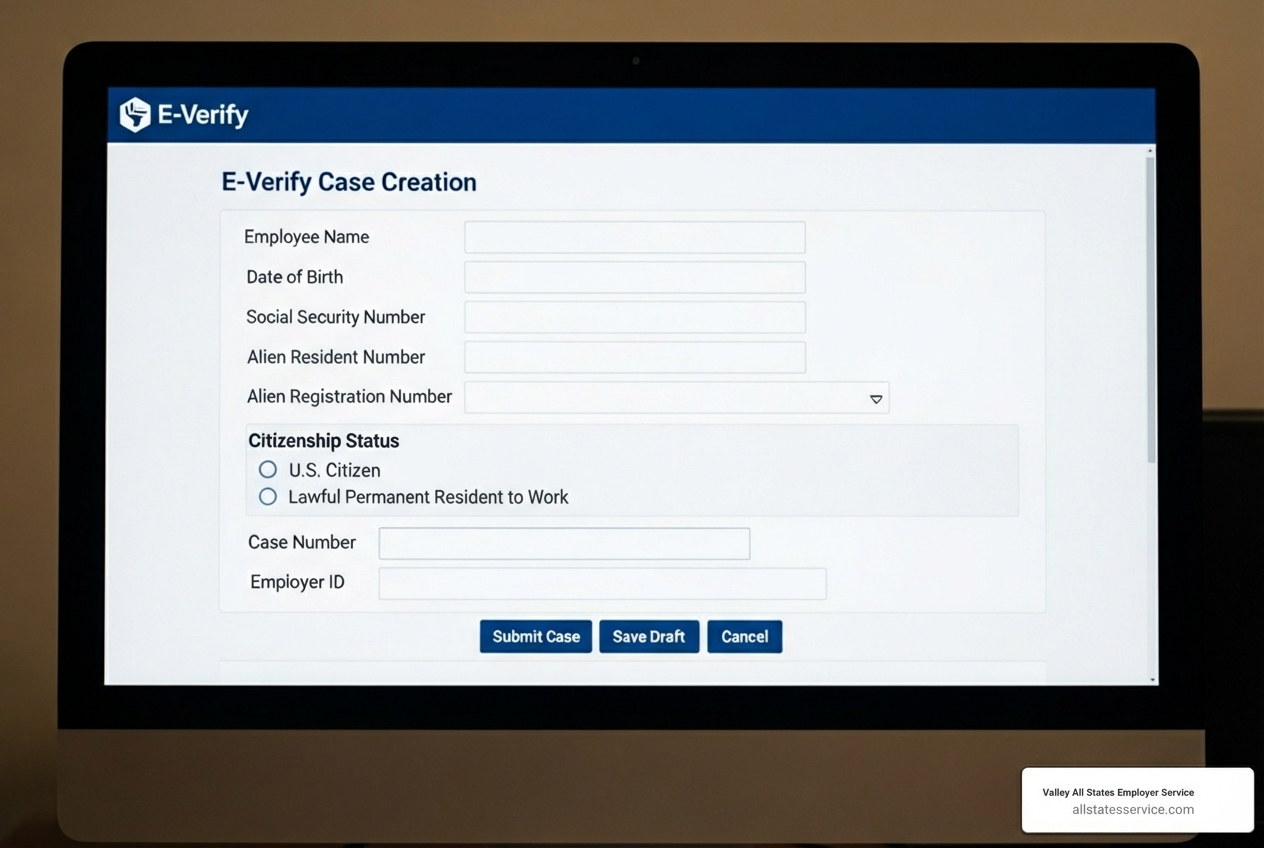
- Entering Data from Form I-9: You (or your agent) will enter specific information from both Section 1 and Section 2 of the employee’s completed Form I-9 into the E-Verify system. This includes the employee’s name, date of birth, Social Security Number (SSN), citizenship status, and document information. If the employee provided an email address on their Form I-9, you should enter it as E-Verify may send them notifications.
- Submitting the Case: Once all required fields are accurately filled, you submit the case. This must be done no later than the third business day after the employee starts work for pay. If you realize you missed the deadline, create the case immediately and select an appropriate reason for the delay from the dropdown menu, such as “Audit Revealed that New Hire Was Not Run.” For a step-by-step guide on creating a case, refer to the official 2.2 Create A Case section of the E-Verify manual.
Key Differences Between Form I-9 and the E-Verify Verification Process
While inextricably linked, Form I-9 and E-Verify serve distinct purposes in employment eligibility verification. Understanding these differences is key to compliance.
- Mandatory vs. Supplemental: Form I-9 is a mandatory federal requirement for all U.S. employers, regardless of whether they use E-Verify. E-Verify, on the other hand, is a supplemental, web-based system. It’s mandatory only for federal contractors and employers in states with specific mandates.
- Paper vs. Electronic: Form I-9 involves physical document examination and retention of paper or electronic copies of the form. E-Verify is an electronic system that compares information against government databases.
- Scope of Verification: Form I-9 verifies identity and work authorization based on documents provided by the employee. E-Verify takes this a step further by electronically confirming if the information provided on the Form I-9 matches records with the Social Security Administration (SSA) and the Department of Homeland Security (DHS). It provides a faster, more robust check on the validity of the information.
Our detailed guide on E-Verify vs I-9 Guide provides an even deeper dive into these distinctions.
Understanding and Handling E-Verify Case Results
After you submit an E-Verify case, the system processes the information and provides a result. Most cases receive a response within 24 hours. It’s crucial to understand what each result means and what actions you need to take.
Here’s an overview of the common case results:
- Employment Authorized: This is the best outcome! It means the employee’s information matched government records, and they are authorized to work in the United States. You simply close the case in E-Verify and record the case number on the employee’s Form I-9.
- E-Verify Needs More Time: Sometimes, E-Verify can’t immediately confirm employment authorization. This means the case has been referred to DHS for further verification. You should wait for an updated status. DHS will respond to most of these cases within 24 hours, though some may take up to three federal government working days.
- Case in Continuance: This status occurs if an employee receives a Tentative Nonconfirmation (TNC) and takes action to resolve it, but more time is needed for the SSA or DHS to update their records. You cannot take any adverse action against the employee while their case is in continuance.
- Final Nonconfirmation: This result means E-Verify cannot confirm the employee’s employment eligibility after the employee has had the opportunity to resolve a TNC. If this occurs, you may terminate employment, but only after receiving this final result.
For a comprehensive look at what each status means and how to track them, check out our E-Verify Case Status guide.
What Happens with a Tentative Nonconfirmation (TNC)?
A Tentative Nonconfirmation, or TNC, indicates that the information you entered into E-Verify did not match records available to the SSA and/or DHS. A TNC does not mean the employee is unauthorized to work. It simply means additional action is required to resolve the discrepancy.
When you receive a TNC, here’s what happens:
- Notifying the Employee: You must promptly and privately notify the employee of the TNC. You’ll print a “Tentative Nonconfirmation Further Action Notice” from E-Verify and review it with them. It’s crucial to provide this notice, translated versions if necessary, and explain their rights.
- Employee Decision to Contest: The employee then has a choice: they can decide to contest the TNC or not. If they choose to contest, they must do so within 8 federal government working days. If they don’t contest, or if they decide not to take action, the case will eventually lead to a Final Nonconfirmation.
A TNC can be unsettling for employees, but knowing the steps helps manage the situation effectively. Our article on E-Verify Tentative Nonconfirmation digs deeper into this scenario.
Employee Rights and Employer Responsibilities in the TNC Process
During a TNC, both employees and employers have specific rights and responsibilities that must be carefully followed. This ensures fairness and compliance with anti-discrimination laws.
Employee Rights:
- Right to Contest: The employee has the right to challenge the information that led to the TNC. They are provided with instructions on how to contact the SSA or DHS to resolve the mismatch.
- Protection from Adverse Action: You cannot take any adverse action against an employee, such as terminating them, reducing their pay, or delaying their training, solely because they received a TNC or are in the process of resolving it. This protection lasts until a Final Nonconfirmation is received. Nonimmigrant students, in particular, have many rights during this process. They cannot incur adverse actions because of the TNC. For more information, refer to the USCIS Employee Rights Toolkit.
Employer Responsibilities:
- Adhere to Procedures: You must follow the precise steps outlined by E-Verify for notifying the employee and referring them to the appropriate agency (SSA or DHS).
- Maintain Employment: You must allow the employee to continue working, with pay, while they are resolving their TNC.
- Do Not Discriminate: You cannot discriminate against an employee based on their national origin or citizenship status during the TNC process.
- Close Cases: Every E-Verify case created must be closed, regardless of the outcome.
Understanding and upholding these responsibilities is paramount to navigating the TNC process correctly. Our guide on E-Verify Employer Responsibilities provides a comprehensive overview.
Special Considerations and Compliance
Beyond the standard e-verify verification process, there are specific situations and broader compliance considerations that employers in the United States, including Maryland and Lutherville MD, need to be aware of.
Federal Contractor Rules: If you are a federal contractor, your E-Verify obligations are more extensive. Contracts containing the FAR E-Verify clause require you to use E-Verify not only for new hires but also for all employees assigned to the federal contract, including existing employees. There are specific exemptions and rules for these contracts, such as for contracts lasting fewer than 120 days or valued at $150,000 or less. It’s crucial to consult the E-Verify Supplemental Guide for Federal Contractors. Our E-Verify Federal Contractors Ultimate Guide can help you master these essentials.
myE-Verify for Employees: While E-Verify is primarily an employer tool, employees also have a resource called myE-Verify. This free online portal allows individuals to:
- Self Check: Confirm that their government records are accurate, helping to prevent TNCs before they even apply for a job.
- Self Lock: Protect their Social Security Number (SSN) in the E-Verify system, helping to prevent employment-related identity fraud.
This is a valuable tool for new hires, particularly students or those new to the workforce. You can learn more about this on the official myE-Verify website.
Preventing Unauthorized Employment: At its core, E-Verify helps employers prevent unauthorized employment. By comparing Form I-9 data against vast government databases, it provides a strong deterrent against hiring individuals who are not legally authorized to work in the U.S. This contributes to a legal and stable workforce, protecting both employers and authorized workers.
Penalties for Non-Compliance: The stakes are high when it comes to E-Verify and Form I-9 compliance. Penalties for non-compliance can range from monetary fines to criminal charges. These can arise from:
- Failing to complete Forms I-9 correctly or on time.
- Knowingly hiring or continuing to employ unauthorized workers.
- Failing to use E-Verify when mandated.
- Discriminating against employees during the verification process.
Staying compliant is not just about avoiding penalties; it’s about maintaining ethical hiring practices and a strong reputation. Our guide on I-9 Compliance Penalties offers a detailed look at the consequences of non-compliance.
Mastering the E-Verify Verification Process for Compliance
Navigating the complexities of the e-verify verification process requires diligent attention to detail and proactive strategies. Here’s how to master compliance for your business.
Record Keeping: Proper record keeping is fundamental. You must retain completed Forms I-9 for specific periods and ensure they are readily available for inspection. For E-Verify, this includes recording the case number on the Form I-9 or attaching a copy of the case details page. A critical update for 2025 is that USCIS will permanently delete E-Verify cases updated before December 31, 2014, starting January 6, 2025. This means employers must download Historic Records Reports and retain them with corresponding Forms I-9 for audit preparedness. This highlights the importance of maintaining your own comprehensive records.
Internal Audits: Regularly conducting internal audits of your Form I-9 and E-Verify processes can help identify and correct errors before they become compliance issues. This proactive approach can save you from significant fines and headaches during an official audit. Our E-Verify Self Audit guide provides valuable steps to perform these checks.
Staying Updated on Rule Changes: E-Verify rules and immigration laws can change. Staying informed about updates from DHS, USCIS, and relevant state agencies (like those in Maryland) is crucial. Subscribing to official newsletters, attending webinars, and consulting with compliance experts are excellent ways to remain current.
Best Practices:
- Accuracy is Key: Ensure all information entered into E-Verify precisely matches the Form I-9. Even minor discrepancies can lead to TNCs.
- Timely Submission: Always adhere to the three-business-day rule for case creation.
- Consistent Application: Use E-Verify for all new hires (if mandated or chosen voluntarily), not selectively. Avoid pre-screening applicants.
- Employee Rights: Always respect employee rights, especially during the TNC process.
- Training: Provide regular training for all HR personnel involved in the hiring and verification process.
By implementing these best practices, you can significantly reduce your compliance risk and streamline your e-verify verification process. For more in-depth best practices, consult our E-Verify Best Practices guide.
Frequently Asked Questions about E-Verify
We know that the e-verify verification process can bring up a lot of questions. Here are some of the most common inquiries we receive:
What’s the main difference between Form I-9 and E-Verify?
Form I-9 is a mandatory federal form for all hires to verify identity and work authorization. E-Verify is a largely voluntary web-based system that cross-references Form I-9 data with government records for an extra layer of confirmation. Form I-9 is the foundational document, while E-Verify is an optional (or sometimes mandatory) electronic check that builds upon the Form I-9 information.
What happens if I miss the 3-day deadline to create an E-Verify case?
You should create the case as soon as you find the oversight. The system will require you to select a reason for the delay, such as “Audit Revealed that New Hire Was Not Run” or “Other,” and you should document the reason internally. It’s important to rectify the situation immediately to demonstrate good faith compliance, even if the deadline was inadvertently missed.
Can I use E-Verify to check existing employees?
Generally, no. E-Verify is designed for new hires. The main exception is for federal contractors with the FAR E-Verify clause, who may be required to verify existing employees assigned to a federal contract. Unless specifically required by a federal contract or a rare state mandate that applies to existing employees, E-Verify should only be used for newly hired individuals.
Simplify Your E-Verify Journey
Navigating the e-verify verification process doesn’t have to be a source of stress or administrative burden for your business. With the right knowledge and support, you can achieve compliance confidence, streamline your onboarding, and focus on what you do best.
We understand the challenges employers face, from staying updated on ever-changing regulations to ensuring every step of the verification process is executed flawlessly. That’s why expert support can make all the difference. Outsourcing your employment verification can significantly reduce your administrative burden and minimize the risk of costly errors. Our Outsourced Employment Verification Ultimate Guide provides a comprehensive look at how this can benefit your business.
At Valley All States Employer Service, we pride ourselves on providing expert, impartial, and efficient E-Verify processing. We partner with businesses like yours across the United States, including Maryland and Lutherville MD, to ensure your e-verify verification process is seamless and compliant. By leveraging our expertise, you gain peace of mind, knowing your workforce eligibility verification is handled by professionals dedicated to accuracy and adherence to federal regulations.
Ready to streamline your workforce verification and ensure every new hire is authorized to work? Contact us to streamline your workforce verification today. We’re here to help you build a legal and confident workforce.