
Why I-9 Compliance Management Matters More Than Ever
I-9 compliance management is the systematic process of ensuring your business properly completes, verifies, stores, and maintains Form I-9 for every employee, minimizing errors that could trigger federal audits and fines.
Quick Answer: What You Need to Manage I-9 Compliance:
- Complete Form I-9 for every new hire within three days of their start date
- Examine original documents (List A, B, or C) to verify identity and work authorization
- Store forms securely for three years after hire or one year after termination (whichever is later)
- Track expiration dates for employees with temporary work authorization
- Conduct internal audits regularly to catch and correct errors before ICE does
- Use E-Verify if required by federal contract or state law
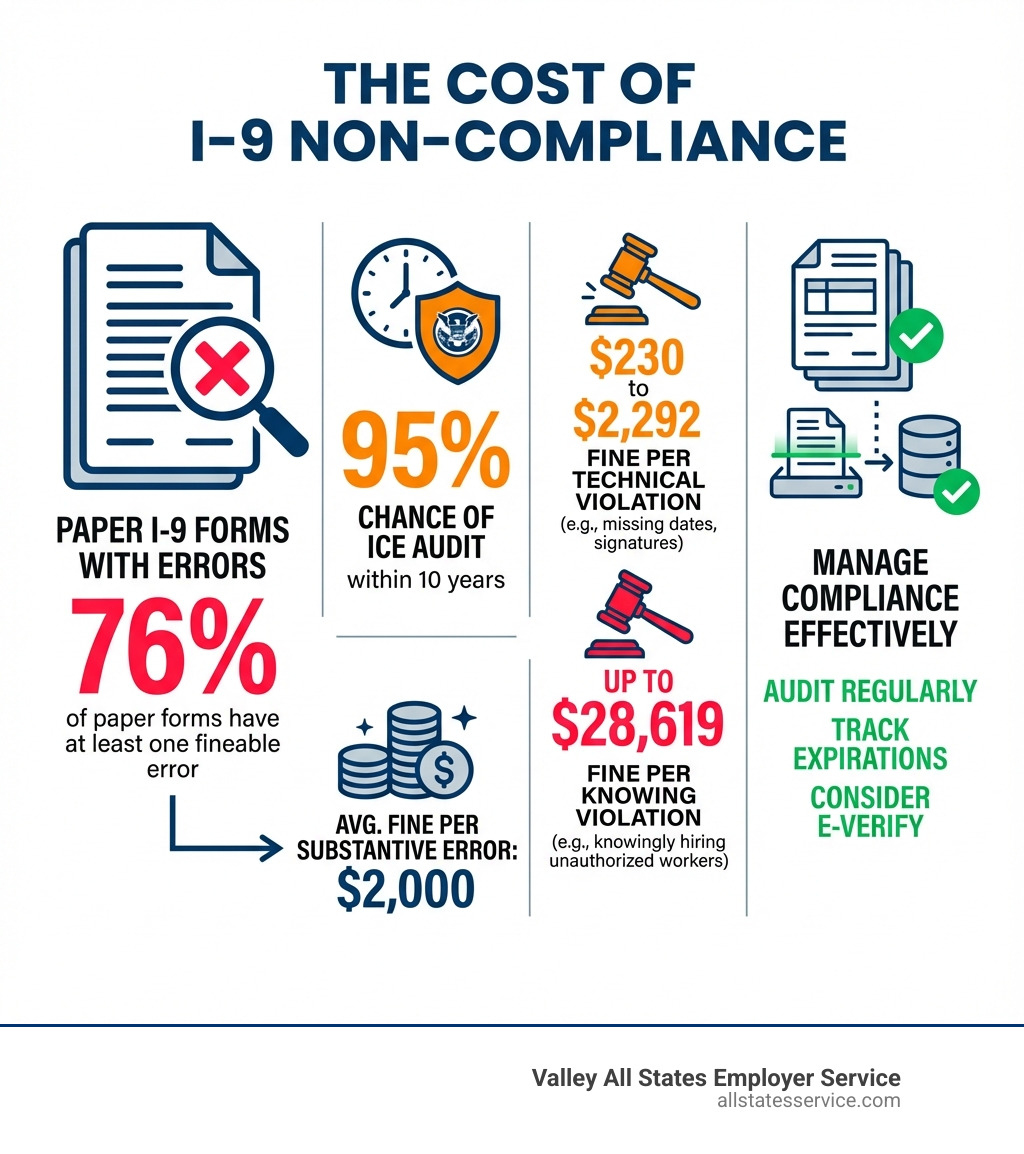
As an HR manager, you juggle many priorities. But consider this: 76% of paper I-9 forms contain at least one fineable error. That means three out of four paper forms have mistakes that could cost your company money.
The average fine for a substantive error is $2,000, and these can multiply quickly across a workforce. With a 95% chance of an ICE audit in the next decade, the question isn’t if your I-9s will be scrutinized, but when.
Most violations are unintentional—missing signatures, incorrect dates, or incomplete sections. They often result from complex rules, time pressure, and simple human error.
This guide covers everything you need for effective I-9 compliance: Form I-9 basics, remote verification rules, internal audits, and how technology can protect your business. This handbook will help you protect your business from penalties and streamline your onboarding process.
Explore more about I-9 compliance management:
- background check pre employment screening
- employment and income verification services
- pre employment work history verification
Understanding Form I-9: The Cornerstone of Employment Verification
Form I-9 is the cornerstone of employment eligibility verification in the U.S. Mandated by the Immigration Reform and Control Act (IRCA) of 1986, it requires all employers to verify that every new hire is authorized to work.
The form verifies both identity and employment authorization. A single mistake can lead to penalties, even if the employee is authorized to work. It proves you, the employer, performed your due diligence.
Employees must complete their section and present documents, while employers must review them and complete their part on a strict deadline. Understanding these roles is key to effective I-9 compliance management. You can learn more about this vital form at I-9, Employment Eligibility Verification – USCIS.
Breaking Down the Form I-9 Sections
The Form I-9 is divided into distinct sections, each with specific requirements and deadlines. Understanding these components is vital for accurate completion.
-
Section 1: Employee Information and Attestation: The employee must complete this section by their first day of work. They provide personal details, attest to their status (e.g., U.S. citizen, lawful permanent resident), and sign and date the form. For a deeper dive into what this form entails, check out our guide on What is an I-9 Form?.
-
Supplement A: Preparer and/or Translator Certification: This supplement is used if a preparer or translator helps the employee complete Section 1, certifying their assistance.
-
Section 2: Employer or Authorized Representative Review and Verification: You or your authorized representative must complete this section within three business days of the employee’s start date. You must examine original documents from List A (identity and work authorization), or a combination of List B (identity) and List C (work authorization), and certify they appear genuine. Our I-9 Document Requirements Complete Guide provides comprehensive details on acceptable documents.
Handling Reverification and Rehires
I-9 compliance management doesn’t end after the initial hire. For certain employees, ongoing attention is required.
-
Reverification: If an employee’s work authorization expires, you must reverify it using Supplement B before the expiration date. It is your responsibility to track these dates and request updated documentation from the employee in a timely manner.
-
Rehire Rules: For employees rehired within three years, you may be able to update their original Form I-9 using Supplement B, as long as their work authorization is still valid. If it has expired, reverification is required. For comprehensive guidance on this process, see our I-9 Process for Rehires.
-
Documents Not Requiring Reverification: You do not need to reverify an employee’s U.S. passport, passport card, or a permanent resident card (Form I-551). List B identity documents also never require reverification. Our Form I-9 Section 2 Complete Guide offers more insights into these specifics.
The Evolving Landscape: Remote Work and Recent I-9 Updates
The rise of remote work has dramatically changed I-9 compliance management, leading to new permanent procedures after temporary pandemic-era flexibilities.
The latest Form I-9 (dated 08/01/23) became mandatory on November 1, 2023. It streamlines the process with a single page for Sections 1 and 2 and a separate Supplement B for reverification and rehires. Staying current is crucial for compliance. You can find more details on these changes in our I-9 Form Updates.
Temporary COVID-19 flexibilities for virtual I-9 inspection ended on July 31, 2023. Employers who used them had to complete in-person inspections by August 30, 2023. This situation highlighted the need for a permanent remote solution.
In response, the Department of Homeland Security (DHS) introduced a permanent Alternative Procedure for remote verification, effective August 1, 2023. This allows E-Verify enrolled employers in good standing to perform remote document inspections, a game-changer for remote workforces.

Navigating I-9 Compliance for a Remote Workforce
Remote work presents unique challenges for I-9 compliance management, particularly with the requirement to inspect original documents.
-
Challenges of Remote Hiring: The traditional requirement for physical document examination created logistical challenges for remote hiring, making a compliant and efficient remote method essential.
-
Using an Authorized Representative: Previously, employers could use an “authorized representative” (like a notary or HR professional) to complete Section 2 in person. However, this method carries risk, as the employer remains fully liable for any errors made by their representative. Clear instructions are vital if using this option. Our guide on I-9 for Remote Employees digs deeper into these considerations.
-
Alternative Procedure for E-Verify Employers: E-Verify enrolled employers in good standing can now use the streamlined Alternative Procedure for remote document examination, which involves:
- The employee sending copies of their documents to the employer.
- The employer (or authorized representative) conducting a live video interaction with the employee to examine the documents.
- The employer retaining clear copies of the documents.
- The employer noting that the Alternative Procedure was used in the “Additional Information” field of Section 2.
This significantly simplifies the remote verification process while maintaining compliance. For best practices and detailed steps, refer to our Remote I-9 Verification Best Practices 2025.
- Documenting Remote Inspections: Meticulous documentation is key for any remote inspection. If using the Alternative Procedure, you must annotate the Form I-9. Proper documentation is your protection during an audit. For more on USCIS’s stance on remote verification, see USCIS I-9 Remote Verification.
Mastering Your I-9 Compliance Management Strategy
Proactive I-9 compliance management means establishing internal processes to minimize risk. This includes regular internal audits and knowing how to respond to government scrutiny.
Internal I-9 Audits
Internal audits are not legally required, but they are a best practice that can significantly reduce your liability. Think of them as your first line of defense against costly penalties.
-
Neutral Selection Criteria: When conducting an internal audit, select forms using neutral, non-discriminatory criteria, such as auditing all forms or a random sample. Never select forms based on national origin or citizenship status to avoid discrimination claims under the Immigration and Nationality Act (INA).
-
Correcting Errors: Finding errors during an internal audit means you can fix them before an official audit.
- For Section 1 errors (employee’s section): Ask the current employee to line out the error, add the correct information, and initial and date the change. If the employee is gone, document the error and the reason it cannot be corrected.
- For Section 2 or 3 errors (employer’s section): Line out the error, add the correct information, and initial and date the change. Never use correction fluid or backdate. For numerous errors, consider redoing the section on a new form, attaching it to the original with a signed explanation.
-
Preparing for an ICE Audit: An internal audit prepares you for a potential Immigration and Customs Enforcement (ICE) audit. If you receive a Notice of Inspection (NOI), you usually have only three business days to produce your I-9s. Your internal audit process should ensure your forms are always “audit-ready.”
-
Good Faith Compliance: Demonstrating good faith compliance through clear policies, training, and consistent error correction can help mitigate penalties during an ICE audit. The Guidance for Employers Conducting Internal Employment Eligibility Verification Form I-9 Audits provides valuable insights.
Avoiding Steep Penalties and Ensuring Compliance
The financial and legal ramifications of I-9 non-compliance can be severe, reaching up to $28,619 per violation. Understanding the types of errors and how to avoid them is central to effective I-9 compliance management.
-
Substantive vs. Technical Errors:
- Technical errors are minor mistakes (e.g., a missing date) with fines from $230 to $2,292.
- Substantive errors are more serious (e.g., failing to complete Section 2) and carry higher penalties.
- Knowing hire violations, knowingly employing an unauthorized worker, are the most severe.
-
Fine Amounts: Penalties for I-9 violations add up quickly. The average fine for a substantive error is $2,000. With 76% of paper I-9s containing errors, the financial exposure is immense. We also offer a detailed guide on I-9 Compliance Penalties.
-
Anti-Discrimination Provisions: During the I-9 process, you cannot discriminate based on citizenship or national origin. This means you cannot:
- Ask for more or different documents than required.
- Reject valid documents that appear genuine.
- Treat employees differently based on their perceived ethnicity or accent.
- Retaliate against employees for asserting their rights.
The Immigrant and Employee Rights Section (IER) of the Department of Justice enforces these provisions. Their website, Immigrant and Employee Rights Section (IER), offers valuable resources. An Internal I-9 Audit Complete Guide further emphasizes these points.
Integrating E-Verify into Your I-9 Compliance Management
E-Verify is a web-based system operated by USCIS that complements Form I-9 by allowing employers to electronically confirm the employment eligibility of their newly hired employees.
-
E-Verify Overview: E-Verify is a web-based system that compares Form I-9 information against SSA and DHS records, adding another layer of verification. It is free and voluntary for most employers but mandatory for some. You can learn more at 1.2 E-Verify: The Web-Based Verification Companion to Form I-9.
-
E-Verify vs. I-9: E-Verify complements, but does not replace, Form I-9. You must still complete a Form I-9 for every new hire before creating a case in E-Verify. Our guide on E-Verify and I-9 explains the relationship in detail.
-
Tentative Nonconfirmation (TNC) Process: A Tentative Nonconfirmation (TNC) indicates a data mismatch. When this occurs:
- You must notify the employee immediately.
- The employee has eight federal workdays to contact the appropriate agency (SSA or DHS) to resolve it.
- You cannot take adverse action against an employee for a TNC while they are contesting it.
- The case will be updated to “Employment Authorized” if resolved, or “Final Nonconfirmation” if not.
-
Federal Contractors (FAR Clause): Participation in E-Verify is mandatory for businesses with a federal contract containing the Federal Acquisition Regulation (FAR) E-Verify clause. This often applies to all new hires and sometimes existing employees on the contract. You can find more information at e-verify.gov.
-
State-Specific Requirements: Some states, including Maryland, have their own E-Verify requirements, often for public employers or contractors. Always check your state’s laws for full compliance. Our E-Verify Employer Responsibilities outlines these duties.
-
Puerto Rico Birth Certificate Rules: Be aware of specific document rules. For example, only Puerto Rico birth certificates issued on or after July 1, 2010, are valid List C documents for I-9 purposes.
-
The Future of E-Verify (NextGen): USCIS is improving the system with E-Verify NextGen. This initiative aims to give employees more control over their verification, including setting up accounts and resolving TNCs directly. Staying informed is key for forward-thinking I-9 compliance management.
Leveraging Technology and Services for Seamless Compliance
Relying on manual processes for I-9 compliance management is risky. Technology and specialized services can transform compliance from a burden into a strength.
| Feature Comparison | Dedicated I-9 Management Software | Standard HRIS (Human Resources Information System) |
|---|---|---|
| Primary Focus | I-9 and E-Verify Compliance | Broad HR functions (payroll, benefits, recruiting) |
| Error Checking | Smart, real-time, built-in validation | Basic or no I-9 specific error checking |
| E-Verify Integration | Seamless, automated submission, TNC management | Often limited or requires manual data entry |
| Remote Verification | Purpose-built tools, guided workflows | May require workarounds or authorized rep reliance |
| Audit Readiness | Centralized, audit-ready reports, audit trail | Basic document storage, limited audit features |
| Reverification Alerts | Automated tracking and reminders | Manual tracking or limited alerts |
| Historical I-9 Correction | Guided, compliant workflows | Manual, error-prone corrections |
| State-Specific Logic | Built-in compliance for varying state rules | Generally lacks specific state I-9 logic |
| Scalability | Designed for high volume, multi-location | May struggle with complex I-9 scenarios |
| Cost | Specialized investment | Included in broader HR software suite |
-
Risk Mitigation: Dedicated I-9 solutions significantly reduce errors. While 76% of paper I-9s have mistakes, electronic systems have a much lower error rate thanks to built-in validation, guided workflows, and automated checks.
-
Streamlining Onboarding: Automating the I-9 process speeds up onboarding. Employees can complete Section 1 remotely, and employers can handle Section 2 verification faster, improving efficiency and the new hire experience.
-
Employer Liability with Third Parties: When using third-party I-9 services or software, the employer remains ultimately liable for compliance. If your provider makes an error, your business is still responsible. Choose your provider carefully.
-
Anti-Discrimination Rules for Software: Anti-discrimination rules also apply to software. The system should not pre-populate data, force completion of optional fields, or restrict an employee’s choice of valid documents. This ensures technology aids compliance without creating new risks. Joint guidance from the Department of Justice and DHS, such as the Joint DOJ/DHS guidance on I-9 software, emphasizes these points.
Choosing the Right Tools for I-9 Compliance Management
Selecting the right I-9 compliance management solution is a critical decision. Look for these key features. Our Electronic I-9 Solutions page provides more insights.
-
Smart Error-Checking: Guides users through the form and flags errors in real time to ensure accuracy.
-
E-Verify Integration: Offers seamless, automated submission to E-Verify with clear workflows for managing TNCs.
-
Secure Remote Verification Tools: Provides compliant tools for remote Section 2 completion, including secure document upload and live video options.
-
Audit-Ready Reporting: Creates a centralized, digital repository with robust reporting for quick access during an ICE audit.
-
Automated Reverification Alerts: Automatically tracks expiration dates and sends alerts for reverification deadlines to prevent compliance lapses.
-
Historical I-9 Correction Workflows: Includes compliant workflows for correcting historical I-9s with a clear audit trail.
-
Integration with HR Systems: Integrates with your existing HRIS or ATS to reduce manual data entry.
-
Expert Support: Provides access to compliance experts for guidance and support.
Partnering with a Third-Party I-9 Verification service can provide these features and expertise, allowing you to focus on your core business while ensuring robust compliance. For a comprehensive overview, see our I-9 Compliance Solutions Guide 2025.
Frequently Asked Questions about I-9 Compliance
What is the most common I-9 error and how do I avoid it?
The most common errors are missing signatures, dates, or incorrect document information. To avoid them, use a detailed checklist for each form. An electronic I-9 management system is even better, as it uses built-in validation to prevent these simple mistakes before they happen. Our guide on I-9 Form Completion provides additional tips.
Can I use a notary for remote I-9 verification?
Yes, you can use a notary as an authorized representative, but they are not acting in their official notary capacity (no seal is used). They are simply your agent for examining documents. You, the employer, remain fully liable for any errors they make. For E-Verify employers, the new Alternative Procedure is a more streamlined and compliant option for remote hires. For more details, explore Where to Find Notary for I-9 Verification for Remote Employees.
How long must I keep I-9 forms after an employee leaves?
You must keep an employee’s Form I-9 for three years after their hire date OR one year after their termination date, whichever is later.
For example, an employee hired on 1/1/2023 and terminated on 1/1/2025 must have their I-9 retained until 1/1/2026 (one year after termination is later than three years from hire). Purge forms once they meet their retention deadline to reduce liability. Our guide on Auditing I-9 Forms covers retention in more detail.
Conclusion
Navigating I-9 compliance management can feel daunting. But proactive compliance isn’t just about avoiding fines; it’s about creating efficient and secure hiring practices that protect your business.
By understanding Form I-9, using E-Verify, and leveraging technology, you strengthen your company’s foundation. With the high rate of errors and audits, ignoring I-9 compliance is a risk you can’t afford to take.
Internal audits, legal awareness, and dedicated I-9 management solutions can turn compliance into a strategic advantage. At Valley All States Employer Service, we simplify this for you with outsourced E-Verify workforce eligibility verification, minimizing your errors and administrative burden.
Ready to perfect your compliance strategy? Explore our I-9 Compliance Management services.