
Valid Documents for I 9: 3 Steps, No Penalties
Why Getting Valid I-9 Documents Right Matters
Valid documents for I-9 verification are the foundation of legal employment in the United States. Every employer must complete Form I-9 for every new hire to prove identity and work authorization, and getting this wrong can cost you thousands of dollars in fines.
Quick Answer: Three Ways to Prove Eligibility
Employees must present documents from one of these combinations:
- List A: One document proving both identity AND work authorization (like a U.S. Passport or Permanent Resident Card)
- List B + List C: One document proving identity (like a driver’s license) PLUS one document proving work authorization (like a Social Security card)
- Acceptable Receipts: Temporary proof while awaiting replacement documents (valid for 90 days)
All documents must be unexpired and appear genuine.
Since 1986, the Immigration Reform and Control Act has required employers to verify every new employee’s eligibility to work. The process sounds simple: review documents, complete a form, keep records. But here’s the reality: penalties for I-9 violations range from $272 to over $2,700 per form, and Immigration and Customs Enforcement has ramped up audits in recent years.
The stakes are high, but compliance doesn’t have to be complicated. As a busy HR manager, you need clarity on which documents are acceptable, how to examine them properly, and what to do in tricky situations like remote hires or expired authorization.
This guide walks you through every valid document category, special circumstances you’ll encounter, and employer responsibilities that keep you compliant. Whether you’re processing your first I-9 or your thousandth, you’ll find practical answers to avoid costly mistakes.
What is Form I-9 and Why is Document Verification Critical?
At Valley All States Employer Service, we know that understanding Form I-9 is the first step toward building a compliant workforce. The purpose of Form I-9 is straightforward: it documents the verification of identity and employment authorization for every new employee hired to work in the United States. This requirement stems from the Immigration Reform and Control Act of 1986, which made it unlawful to knowingly hire or continue to employ individuals not authorized to work in the U.S.
For employers, Form I-9 is more than just paperwork. It’s a legal obligation that, when handled correctly, protects us from significant civil and even criminal penalties. For employees, it’s their opportunity to prove their legal right to work in the country. It ensures a fair and legally authorized workforce, benefiting both businesses and individuals. You can learn more about its purpose in our guide, What is an I-9?.
Our responsibility as employers extends beyond simply collecting documents. We must ensure that the documents presented by employees appear genuine and relate to them. This diligence is crucial because employers can face penalties for knowingly accepting false documentation. For a comprehensive overview, check out our Employment Eligibility Verification Complete Guide.
The I-9 Timeline: Key Deadlines You Can’t Miss
Timing is everything in I-9 compliance. There are strict deadlines for completing different sections of the form, and missing them can lead to non-compliance fines.
-
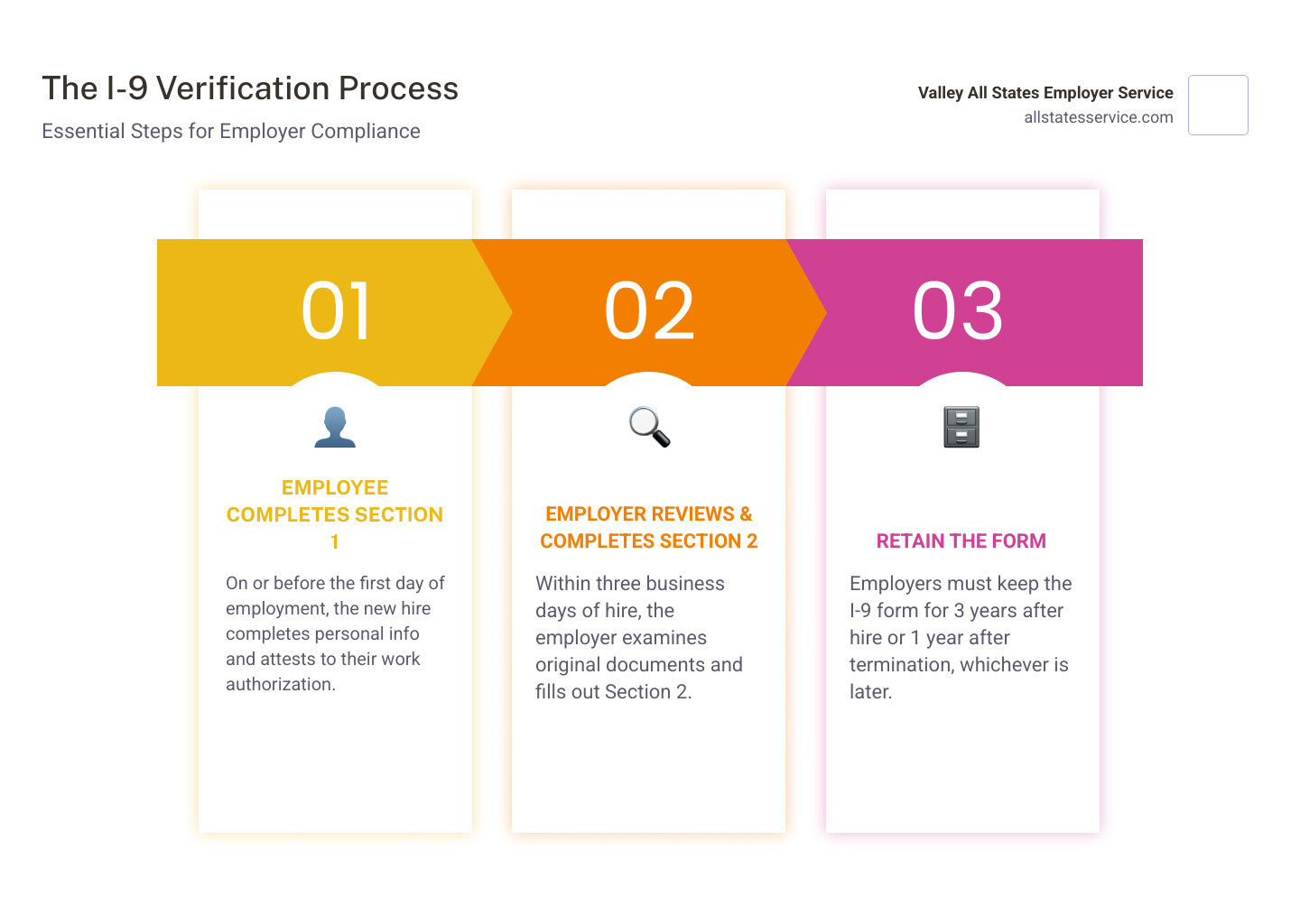
Employee Completes Section 1: This section must be completed and signed by the employee no later than their first day of employment. They can fill it out after accepting a job offer but not before. This ensures they attest to their citizenship or immigration status from the outset. For insights into this process, see our article on New Hire Paperwork I-9.
-
Employer Completes Section 2: As employers, we must complete Section 2 within three business days after the employee’s first day of employment. If an individual is hired for less than three business days, Section 2 must be completed no later than their first day of employment. During this step, we physically (or virtually, under specific circumstances) examine the valid documents for I-9 presented by the employee. Our I-9 Form Completion guide offers more details.
These deadlines are not flexible, and adhering to them is a fundamental aspect of maintaining I-9 compliance.
The Three Lists: Decoding Valid Documents for I-9
When it comes to proving identity and work authorization, employees have choices. Form I-9 features three distinct lists of acceptable documents: List A, List B, and List C. We must never specify which documents an employee must present. This is a critical anti-discrimination principle. We must accept any document or combination of documents from these lists that appear genuine and relate to the person presenting them.

Let’s break down these lists:
- List A Documents establish both identity and employment authorization. If an employee presents one document from List A, their verification is complete.
- List B Documents establish identity only.
- List C Documents establish employment authorization only.
An employee can choose to present one List A document OR one document from List B and one document from List C. They cannot be required to provide both a List A document and a List B/C combination. This employee choice is vital to prevent discrimination. For a deeper dive into these options, consult our I-9 Eligibility Documents Guide and Documents for I-9.
List A: Documents Establishing Both Identity & Employment Authorization
These are the power players of I-9 verification, as they fulfill both requirements with a single document. All List A documents must be unexpired.
Here are the primary types of valid documents for I-9 found in List A:
- U.S. Passport or U.S. Passport Card: A universally accepted document for U.S. citizens.
- Permanent Resident Card (Form I-551), also known as a “Green Card”: This is for lawful permanent residents. USCIS redesigns these cards periodically, but older designs remain valid until their expiration date. We’ve got a dedicated guide for Filling out I-9 with Permanent Resident Card.
- Foreign Passport with a Temporary I-551 Stamp or Temporary I-551 Printed Notation on a Machine-Readable Immigrant Visa: This combination proves lawful permanent resident status.
- Employment Authorization Document (EAD) (Form I-766) with a Photograph: This document shows authorization to work for non-citizens. Similar to Permanent Resident Cards, EADs undergo redesigns, but previous versions are still valid until their stated expiration.
- Foreign Passport with Form I-94 or Form I-94A, and an Endorsement to Work: For nonimmigrant aliens authorized to work for a specific employer, this combination is critical. The Form I-94 or I-94A must match the passport name, indicate an unexpired nonimmigrant status, and not conflict with the proposed employment.
- Passport from the Federated States of Micronesia (FSM) or the Republic of the Marshall Islands (RMI) with Form I-94 or Form I-94A Indicating Nonimmigrant Admission Under the Compact of Free Association: Special provisions for citizens of these nations.
You can always refer to the official source for the most current list and examples: Official USCIS Acceptable Documents List.
List B: Documents Establishing Identity Only
When an employee presents a List B document, they must also provide a List C document. All List B documents must contain a photograph or other identifying information, such as name, date of birth, gender, height, eye color, and address. These must also be unexpired.
Common List B valid documents for I-9 include:
- Driver’s License or ID Card issued by a U.S. state or outlying possession (like Maryland).
- ID Card issued by federal, state, or local government agencies.
- School ID Card with a Photograph.
- Voter’s Registration Card.
- U.S. Military Card or Draft Record.
- Military Dependent’s ID Card.
- U.S. Coast Guard Merchant Mariner Card.
- Native American Tribal Document.
- Driver’s License issued by a Canadian government authority.
Special Rule for Minors Under 18: For employees under 18 who cannot present a standard List B document, acceptable alternatives include:
- School record or report card.
- Clinic, doctor, or hospital record.
- Day-care or nursery school record.
These documents must still establish identity. Our I-9 Section 2 Acceptable Documents guide offers more context.
List C: Documents Establishing Employment Authorization Only
Just like with List B, if an employee presents a List C document, they must also provide a List B document. All List C documents must be unexpired, except for certified copies of birth certificates, which do not expire.
Key List C valid documents for I-9 include:
- Social Security Account Number Card (unrestricted): This is a very common document, but it comes with a crucial caveat. It is not acceptable if it states “NOT VALID FOR EMPLOYMENT,” “VALID FOR WORK ONLY WITH INS AUTHORIZATION,” or “VALID FOR WORK ONLY WITH DHS AUTHORIZATION.”
- Certification of Report of Birth issued by the Department of State (Form DS-1350, FS-545, FS-240).
- Original or Certified Copy of a Birth Certificate issued by a U.S. State, county, municipal authority, or outlying possession. Note: Puerto Rico birth certificates issued before July 1, 2010, are not acceptable.
- Native American Tribal Document.
- U.S. Citizen ID Card (Form I-197).
- Identification Card for Use of Resident Citizen in the United States (Form I-179).
- Employment Authorization Document issued by the Department of Homeland Security (DHS): This includes documents such as Form I-94 (Arrival/Departure Record) for certain categories, Form I-571 (Refugee Travel Document), or other DHS documents that establish employment authorization.
For more information on these combinations, refer to our I-9 Section 2 Acceptable Documents Guide.
Navigating Special Circumstances: Receipts, Remote Hires, and E-Verify
The world of I-9 compliance isn’t always black and white. Special circumstances like receipts, remote work, and E-Verify add layers of complexity. As employers, we need to understand these nuances to stay compliant and avoid common pitfalls. Our I-9 Verification Requirements Guide and I-9 Compliance Solutions Guide 2025 are great resources.

What are acceptable receipts for valid documents for I-9?
Sometimes, an employee might not have their original valid documents for I-9 readily available. This is where acceptable receipts come in, but they are subject to strict rules:
- Temporary Use: Receipts can be used for a temporary period while an employee awaits a replacement document. This typically applies to lost, stolen, or damaged documents from List A, List B, or List C.
- 90-Day Rule: The employee must present the actual document within 90 days of the date of hire (or the date reverification is required).
- Not for Initial Authorization: It’s crucial to remember that receipts showing an application for an initial grant of employment authorization are generally not acceptable. For example, a receipt for an application for an EAD is usually not valid. The rule primarily applies to replacements.
An exception exists for lawful permanent residents presenting a Form I-94 with a temporary I-551 stamp, or refugees presenting a Form I-94 with an admission stamp. These can serve as temporary List A documents for up to one year.
How does E-Verify Impact the I-9 Document Process?
E-Verify is an internet-based system operated by DHS in partnership with the Social Security Administration (SSA). It allows employers to electronically confirm the employment eligibility of their newly hired employees. While E-Verify uses information from Form I-9, it’s not a replacement for it. The I-9 must still be completed first.
Here’s how E-Verify interacts with valid documents for I-9:
- Improved Verification: E-Verify compares the information from an employee’s Form I-9 with government records to determine work authorization. This adds an extra layer of scrutiny.
- List B Photo Requirement: For employers participating in E-Verify, if an employee chooses to present a List B document for identity, that document must contain a photograph. This is a key difference from standard I-9 requirements, where some List B documents without photos are acceptable for non-E-Verify employers.
- Social Security Number: Even if a Social Security card has restrictions making it invalid for I-9 purposes, E-Verify employers must still enter the employee’s Social Security number into the system (if provided in Section 1 of Form I-9).
E-Verify is a powerful tool for ensuring a legally authorized workforce, especially for federal contractors and employers in Maryland who may have specific requirements. We offer comprehensive support for E-Verify and I-9, including a detailed E-Verify vs I-9 Guide and an I-9 E-Verify Compliance Guide.
Handling Remote Employees and Document Verification
The rise of remote work has presented unique challenges for I-9 compliance, particularly regarding the physical inspection of valid documents for I-9. While temporary flexibilities were introduced during the COVID-19 pandemic, DHS has since implemented a permanent alternative procedure for remote I-9 document verification.
- Alternative Procedures: Employers enrolled in E-Verify and in good standing now have the option to remotely examine documents. This involves the employee transmitting copies of their documents to the employer, who then conducts a live video interaction to examine the documents. The employer must retain clear copies of the documents.
- Authorized Representatives: If an employer is not enrolled in E-Verify or chooses not to use the alternative procedure, they can designate an “authorized representative” to complete Section 2 on their behalf. This representative can be anyone the employer chooses (e.g., a notary, a family member, a manager), but the employer remains liable for any errors or violations made by the representative.
- Virtual I-9 Process: For companies like ours that offer Remote Form I-9 services, we can act as the authorized representative, providing expert, impartial verification. This takes the burden and liability off the employer. Our guides on How to Review I-9 Documents for Remote Employees and USCIS I-9 Remote Verification explain how we can assist.
It’s crucial for employers to understand the specific requirements and potential liabilities associated with remote verification methods.
Employer Responsibilities: Examination, Retention, and Penalties
Our role as employers in the I-9 process is far-reaching, encompassing document examination, meticulous record-keeping, and a keen awareness of anti-discrimination laws and potential penalties.
Document Examination: When an employee presents their valid documents for I-9, we must physically examine them (or use an authorized alternative procedure for remote hires) to determine if they reasonably appear to be genuine and relate to the person presenting them. We are not expected to be document fraud experts, but we cannot ignore obvious discrepancies. Our I-9 Document Review services can help ensure this step is executed correctly.
Anti-Discrimination Laws: This is a critical area. We must:
- Allow Employee Choice: Never specify which documents an employee must present from the acceptable lists.
- Not Reject Based on Future Expiration: Employers should not consider the expiration date on an employee’s document when determining their qualification for a position. Doing so may violate employment discrimination laws. Reverification is only required when the document establishing employment authorization (List A or List C) expires, not for identity documents (List B).
- Treat All Employees Fairly: The same verification process must apply to all new hires, regardless of their national origin, citizenship, or immigration status.
Document Retention Rules: After completing Form I-9, we must retain it for a specific period. This is essential for audit readiness. Employers must keep completed Form I-9 for:
- One year after the date employment ends, OR
- Three years after the first day of employment,
Whichever date is later.
These forms should be stored securely and separately from personnel files. Proper I-9 Record Keeping is vital for compliance.
Penalties for Non-Compliance: The stakes are high. Employers may face civil or criminal penalties for:
- Knowingly hiring or continuing to employ unauthorized workers.
- Knowingly and willfully making false statements on Form I-9.
- Knowingly accepting false documentation.
- Technical or substantive violations, such as failing to complete the form correctly or on time.
Fines can range from hundreds to tens of thousands of dollars, depending on the severity and frequency of the violations. This is why services like our I-9 Audit Services are invaluable. For a full breakdown, check our I-9 Compliance Penalties guide.
Frequently Asked Questions about I-9 Documents
We hear a lot of questions about I-9 documents. Here are some of the most common ones we encounter:
Can an employer specify which document an employee must provide?
Absolutely not. Specifying which valid documents for I-9 an employee must present is a discriminatory practice and violates anti-discrimination laws. Employees have the right to choose which acceptable documents to present from List A, or a combination of one from List B and one from List C. Our role is to inform them of their options and accept whatever valid documents they choose.
What happens if an employee’s document is expired?
Generally, all documents presented for Form I-9 must be unexpired. However, there are some nuances. USCIS provides specific guidance on certain documents that may have automatic extensions, which means they are considered unexpired past their printed expiration date under specific circumstances (e.g., certain EADs or Permanent Resident Cards with extension notices). It’s crucial to verify the latest USCIS guidance for any such extensions. If a document is expired and not subject to an automatic extension, it is not considered a valid document for I-9 purposes, and the employee must provide an unexpired alternative.
What are the most common valid documents for I-9 that employees present?
While employees can present any valid documents for I-9 from the acceptable lists, we often see a few common choices. A U.S. Passport or U.S. Passport Card is a popular List A document because it satisfies both identity and employment authorization with one item. Another very common combination is a state-issued driver’s license (from List B) paired with an unrestricted Social Security card (from List C). These are widely accessible documents for many individuals.
Simplify Your I-9 and E-Verify Compliance
Navigating the rules for valid documents for I-9 is a cornerstone of lawful employment and risk management. By understanding the three lists, handling special situations correctly, and respecting employee rights, we can build a compliant and efficient onboarding process. For businesses looking to streamline this process and ensure accuracy, partnering with an expert E-Verify agent like Valley All States Employer Service can provide peace of mind and reduce administrative burdens. We specialize in expert, impartial, and efficient E-Verify processing, minimizing errors and administrative burdens for our clients across the United States, including Maryland. Ready to master your I-9 compliance?