
i 9 employment eligibility verification form 2025 Master Guide
Why the I-9 Employment Eligibility Verification Form 2025 Matters for Your Business
The i 9 employment eligibility verification form 2025 is a critical federal requirement that every U.S. employer must complete for new hires. This form verifies that employees are authorized to work in the United States and helps businesses comply with immigration law.
Quick Facts About the 2025 I-9 Form:
- New Edition Date: January 20, 2025 (01/20/25)
- Form Expires: May 31, 2027
- Key Change: Remote verification checkbox for authorized employers
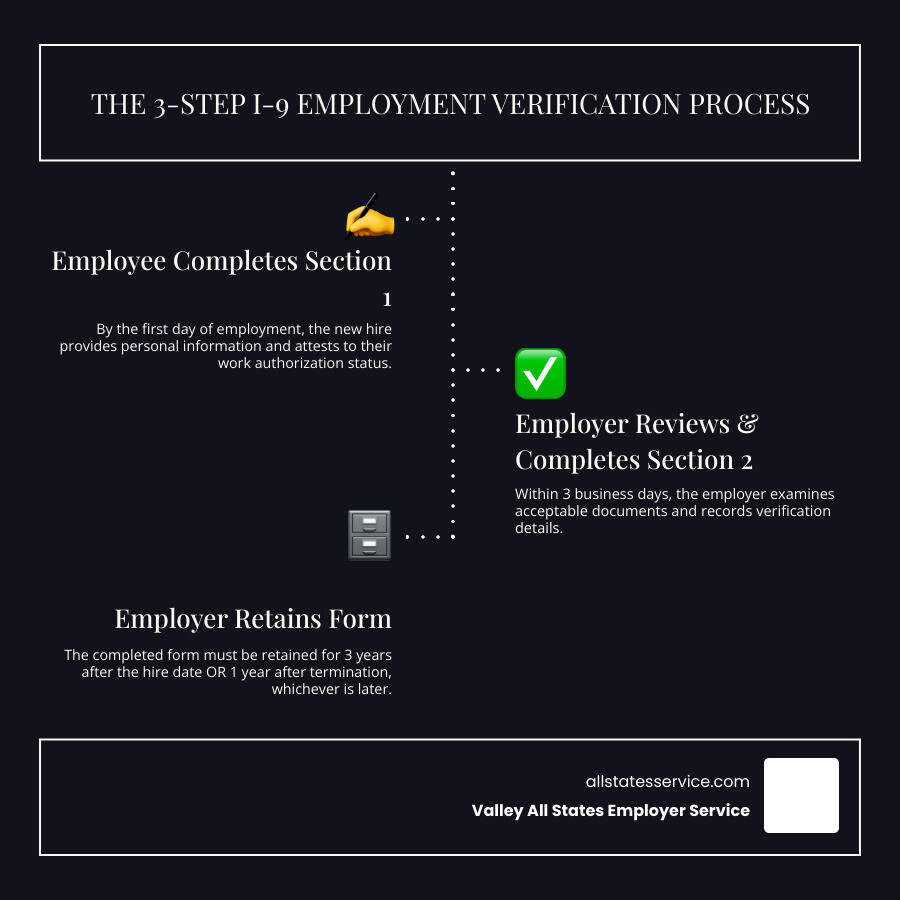
- Completion Deadline: Section 1 by first day of work, Section 2 within 3 business days
- Penalties: Range from $2,861 per paperwork error to $28,619 per unauthorized worker
- Who Must Complete: All U.S. employers for every new hire, regardless of citizenship status
It’s the first day for your new hire, and the onboarding process is in full swing. Amidst the welcome packets and orientation schedules lies this critical federal requirement. The Form I-9 serves as your first line of defense in ensuring a legal workforce, but navigating its rules can feel overwhelming.
Recent updates to the form have introduced new terminology and streamlined the process. The biggest change? A new checkbox that allows certain employers to verify documents remotely, reflecting the shift toward flexible work arrangements.
The stakes are higher than ever. Immigration and Customs Enforcement (ICE) has ramped up workplace audits using advanced analytics and AI tools to flag discrepancies. With penalties reaching nearly $30,000 per violation for repeat offenses, getting I-9 compliance right isn’t optional.
Understanding the Basics: What is Form I-9?
Think of the i 9 employment eligibility verification form 2025 as your business’s security checkpoint. Every time you welcome a new team member, this form ensures they’re legally authorized to work in the United States, whether they’re a lifelong citizen or a recent immigrant with proper documentation.
The Form I-9 serves two essential purposes: employment eligibility verification and identity verification. It’s not just paperwork for the sake of paperwork. This requirement exists because of the Immigration Reform and Control Act of 1986, which made it illegal for employers to knowingly hire workers without proper authorization.
Here’s what makes the I-9 process work: Both you and your employee have specific responsibilities. Your new hire must complete their section honestly, attesting to their work authorization status and providing acceptable documents. As the employer, you review those documents to ensure they appear genuine and belong to the person presenting them.
But here’s where many employers get tripped up. The Anti-Discrimination Notice is just as important as the verification itself. You cannot ask for specific documents or treat employees differently based on their citizenship status or national origin.
Your employee gets to choose which documents to present from the official acceptable documents list. Whether they show you a U.S. passport, a driver’s license with Social Security card, or any other valid combination, that’s their call, not yours. Demanding to see a “green card” or questioning why someone’s work authorization has an expiration date could land you in legal hot water.
The U.S. Citizenship and Immigration Services oversees this entire process, providing the official forms and guidance. They’ve designed the system to be straightforward, but the devil is always in the details.
Want to dive deeper into the fundamentals? Our comprehensive guide on What is an I-9? breaks down everything you need to know to get started on the right foot.
Key Updates to the I-9 Employment Eligibility Verification Form 2025
The i 9 employment eligibility verification form 2025 has received a fresh makeover, and while the changes might seem minor at first glance, they pack a meaningful punch for employers navigating today’s workforce landscape. The new 01/20/25 edition will be your go-to form through May 31, 2027, so let’s break down what’s different and why it matters.
The form just got a lot friendlier. USCIS has streamlined the entire layout, condensing Sections 1 and 2 into a single, clean page. Gone are the days of flipping through multiple pages during the hiring process. Even better? The instruction manual shrunk from a hefty 15 pages down to a more manageable 8 pages. Your HR team will thank you for this one.
You’ll notice a terminology change in Section 1 that reflects updated federal language. The fourth checkbox now reads “An alien authorized to work” instead of the previous “A noncitizen authorized to work.” This change aligns the form with statutory terminology. Don’t worry if an employee checks the old box on an older form version, just make sure to select the correct option when entering information into systems like E-Verify.
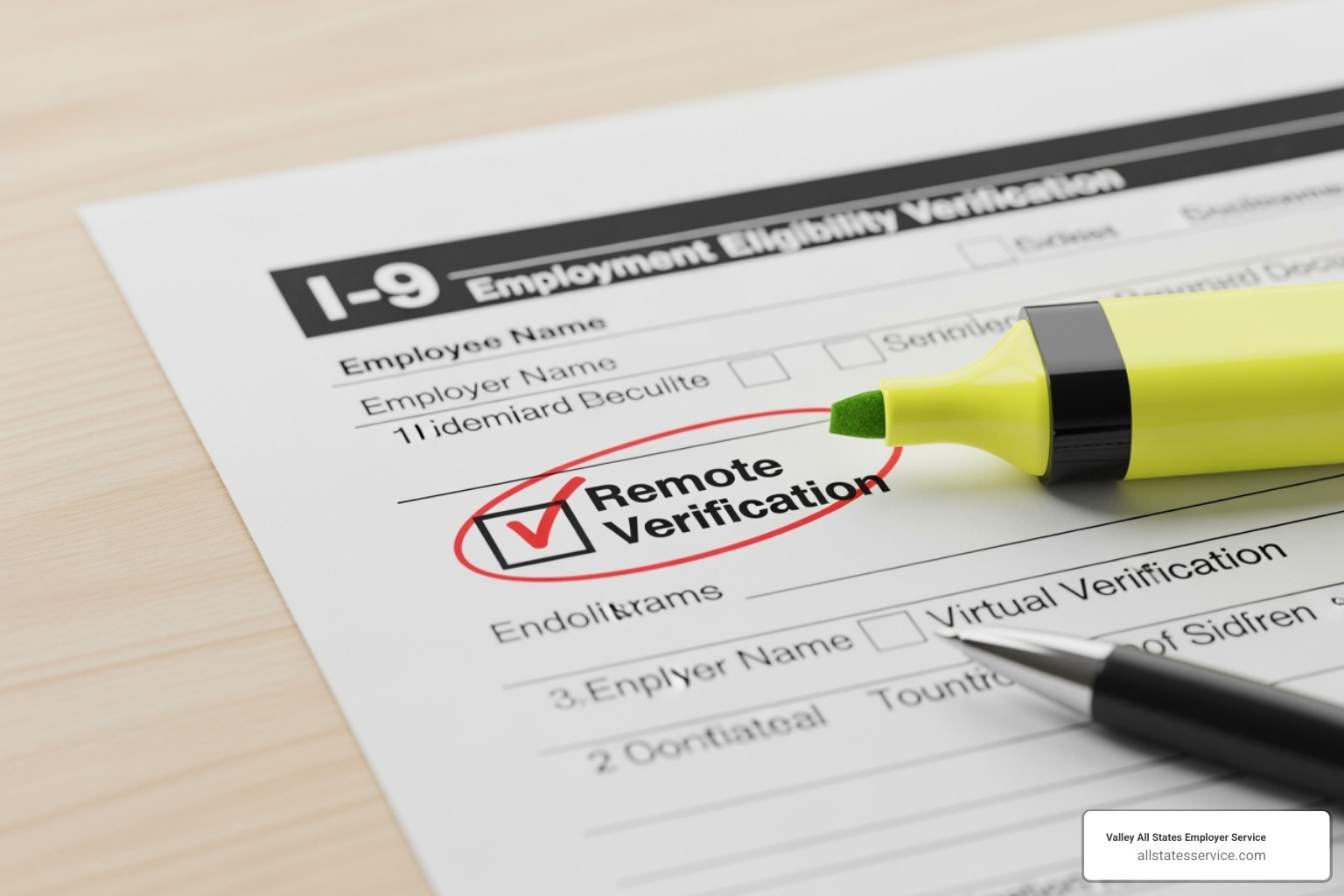
Here’s where things get exciting for modern workplaces: the remote verification checkbox. This game-changing addition allows eligible employers who use a DHS-authorized alternative procedure to indicate they’ve examined documents remotely. If your business has acceptd remote hiring, this checkbox acknowledges that reality and provides a compliant path forward. For detailed guidance on this process, check out our resource on USCIS I-9 Remote Verification.
The form has also become more modular and user-friendly. What used to be Section 3 for reverification and rehires is now Supplement B, giving it the dedicated space it deserves. Similarly, the Preparer and/or Translator Certification has moved out of Section 1 and into its own Supplement A. These standalone supplements make the process cleaner and help you focus on the specific scenario at hand.
These updates reflect USCIS’s commitment to making compliance more straightforward while acknowledging how work has evolved. For a comprehensive overview of all these adjustments, you can review the official Minor Changes to Form I-9 and E-Verify Updates from USCIS.
The bottom line? These changes make the i 9 employment eligibility verification form 2025 more intuitive and better suited for today’s diverse hiring practices. Whether you’re onboarding someone in your office or welcoming a remote team member from across the country, the updated form has you covered.
A Step-by-Step Guide to I-9 Completion and Document Verification
Think of the Form I-9 process as a relay race between you and your new employee. Each person has their part to play, and timing matters. Let’s walk through exactly how to complete the i 9 employment eligibility verification form 2025 without stumbling at any hurdle. For additional support, our comprehensive I-9 Form Completion guide has you covered.
Section 1: Employee Information and Attestation
Your new hire kicks off the process with Section 1. This is entirely their responsibility, and they need to complete it by their first day of work. Here’s the catch though: they can’t fill it out until they’ve actually accepted your job offer. It’s like getting the keys to the house before you’ve signed the lease.
The employee provides the basics: full name, address, date of birth, and Social Security number. Then comes the important part where they attest to their citizenship or immigration status by checking one of four boxes. This isn’t just paperwork; it’s their legal declaration of their right to work in the United States.
Sometimes employees need help understanding the form, especially if English isn’t their first language. When a preparer or translator assists with Section 1, they must complete Supplement A. This separate form ensures everyone knows who helped and maintains the integrity of the process. Always point employees to the Official Form I-9 instructions so they understand exactly what they’re signing.
Section 2: Employer Review and Verification
Now it’s your turn to step up to the plate. You have three business days from the employee’s first day to complete Section 2. No pressure, right? Actually, this timeline is more generous than it sounds when you know what you’re doing.
Your job is to examine the documents your employee presents and determine if they reasonably appear genuine and relate to the person standing in front of you. You’re not expected to be a document expert or forensics specialist. You’re just using common sense to spot obvious problems.
Here’s where many employers get tripped up: you cannot tell employees which documents to bring. That’s their choice entirely. They can present one document from List A (which proves both identity and work authorization), or they can bring one document from List B (identity only) plus one from List C (work authorization only).
List A documents are the heavy hitters: a U.S. Passport, Permanent Resident Card, or Employment Authorization Document covers all your bases in one shot. List B documents include familiar items like a driver’s license or state ID card, while List C documents feature the trusty Social Security card or U.S. birth certificate.
The key is examining these documents with a reasonable eye. Does the photo look like your employee? Are the security features present? Do the names match? If something seems off, you can ask the employee to provide different acceptable documentation, but you can’t specify exactly what that should be. For detailed guidance on what red flags to watch for, check out our article on Verifying I-9 Documents.
Navigating Remote Hires and the Alternative Verification Procedure
Remote work has changed everything, including how we verify I-9 documents. The good news? The i 9 employment eligibility verification form 2025 has caught up with reality.
If you’re an E-Verify employer in good standing, you can now examine documents remotely through live video interaction. This isn’t just a quick phone call; it’s a structured video session where you carefully review each document the employee presents. You’re looking for the same things you would in person: genuineness, relatedness to the employee, and proper security features.
The new form includes a dedicated checkbox in Section 2 to indicate when you’ve used this alternative procedure. It’s a small change that makes a big difference for businesses with remote teams scattered across the country.
This flexibility is a game-changer, but it comes with responsibility. You need to document the process properly and ensure your video interaction meets all the requirements. Our resources on I-9 Verification for Remote Employees and Can I-9 Verification Be Done Remotely? provide the detailed guidance you need to stay compliant.
Handling Reverification and Rehires with Supplement B
Life happens. Work authorization expires. People leave and come back. Legal names change after marriage. That’s where Supplement B comes to the rescue. This standalone form, previously buried as Section 3, now handles these special situations with much more clarity.
Reverification becomes necessary when an employee’s work authorization has an expiration date. Before that date arrives, the employee must present new, unexpired documents from List A or List C. Think of it as renewing their license to work. However, you never reverify permanent documents like a U.S. Passport or Permanent Resident Card. Those don’t expire for employment purposes.
Rehiring former employees within three years gets interesting. You might be able to use their original Form I-9 and just complete Supplement B, but only if their employment authorization hasn’t expired and the original form is still acceptable. It’s like picking up where you left off, but with proper documentation.
Legal name changes also require Supplement B. When employees get married, divorced, or legally change their names for other reasons, you update their information using this supplement rather than starting from scratch.
The beauty of Supplement B is that it keeps everything connected to the original Form I-9 while properly documenting the changes. For specific scenarios and step-by-step instructions, our guide on the I-9 Process for Rehires breaks down exactly what to do when.
Form I-9 vs. E-Verify: What’s the Difference?
If you’re navigating employment verification, you’ve probably heard about both Form I-9 and E-Verify. While these two systems work hand in hand, they’re actually quite different beasts. Think of it this way: if Form I-9 is your foundation, E-Verify is the extra security system you can add on top.
Let’s clear up the confusion around these two processes, especially as you work with the i 9 employment eligibility verification form 2025.
Form I-9 is mandatory for every single U.S. employer, no exceptions. Whether you’re hiring one person or one thousand, you’ll complete this form for every new hire. It’s a straightforward document where you physically examine the employee’s paperwork and verify it looks genuine. The beauty of Form I-9? It doesn’t always require a Social Security number, and those List B identity documents don’t need photos to be acceptable.
E-Verify, on the other hand, is voluntary for most employers (though some states and federal contractors must use it). This web-based system takes the information from your completed I-9 and runs it through databases at the Social Security Administration and Department of Homeland Security. It’s like having a digital detective double-check your work.
Here’s where it gets interesting: E-Verify is pickier than Form I-9. It generally requires a Social Security number for all employees, with only specific exceptions for certain nonimmigrant categories. Those List B identity documents? They typically need photos for E-Verify to work its magic.
There’s one crucial difference that trips up many employers: Form I-9 must be used when an employee’s work authorization expires and needs reverification. E-Verify? It sits this one out completely. You cannot use E-Verify for reverification purposes.
| Feature | Form I-9 | E-Verify |
|---|---|---|
| Requirement | Mandatory for all U.S. employers | Voluntary for most; mandatory for some states/federal contractors |
| Method | Paper/electronic document, visual examination | Web-based system, electronic database comparison |
| Social Security Number | Not always required | Generally required (with specific exceptions) |
| Photo on List B Documents | Not required | Required |
| Reverification | Must be used for expired work authorization | May NOT be used for reverification |
| Timing | Within 3 business days of hire | After Form I-9 completion |
The data comparison in E-Verify happens after you’ve completed your I-9 process. You’ll enter the same document information you recorded on the Form I-9, and the system checks it against government records. It’s an additional layer of verification that can catch discrepancies you might miss during the visual document examination.
Many employers find that using both systems together creates a more robust verification process. The I-9 ensures you’re meeting your basic legal obligations, while E-Verify provides that extra confidence in your hiring decisions.
Want to dive deeper into how these systems work together? Our guides on I-9 and E-Verify and I-9 E-Verify Compliance can help you steer both processes smoothly. You can also explore the official E-Verify website for comprehensive system information.
Staying Compliant: Retention, Audits, and Penalties
Think of Form I-9 compliance like maintaining your car. You don’t just buy it and forget about it. You need regular maintenance, proper storage, and you better hope you’re ready when that inspection comes around. The i 9 employment eligibility verification form 2025 works the same way.
Compliance isn’t a one-time checkbox you tick off during onboarding. It’s an ongoing responsibility that, frankly, keeps many HR professionals up at night. And for good reason. The consequences of getting it wrong have never been steeper.

I-9 Record Retention Rules
Here’s where things get interesting. Once you’ve completed that Form I-9, your job isn’t done. You become the keeper of these documents for a specific period we call the “3-1 Rule.” It’s actually pretty simple once you get the hang of it.
You must keep each completed Form I-9 for three years from the hire date or one year after the employee leaves, whichever is longer. Let’s say Sarah works for you for just four months before moving to another state. You still need to hang onto her I-9 for the full three years from when she started. But if John works for you for seven years, you only need to keep his form for one year after he retires.
We strongly recommend storing your I-9 forms separately from regular employee files. This makes life so much easier during audits and protects sensitive information from unnecessary exposure. Think of it as having a dedicated filing cabinet just for these forms. For detailed storage strategies, check out our comprehensive guide on I-9 Record Keeping.
The High Cost of Non-Compliance in 2025
Let’s talk numbers, because they might surprise you. The penalties for I-9 violations aren’t just increasing, they’re skyrocketing. We’re not talking about a gentle warning letter anymore.
For 2025, paperwork errors alone can cost you $2,861 per mistake. That’s right, per mistake. A missing signature here, an incorrect date there, and suddenly you’re looking at thousands of dollars in fines. Now imagine you have 50 employees and multiple errors across their forms. The math gets scary fast.
But here’s where it gets really expensive. If you’re found to be knowingly hiring unauthorized workers, the penalties jump to $28,619 per person for repeat offenses. That’s not a typo. One violation could cost more than many people’s annual salary.
ICE isn’t playing around either. They’re using advanced analytics and AI tools to spot patterns and flag companies for audits. It’s like having a digital bloodhound that never gets tired. The days of flying under the radar are pretty much over. Our detailed breakdown of I-9 Compliance Penalties shows just how serious these financial risks have become.
Preparing for an I-9 Audit
Nobody wants to get that dreaded Notice of Inspection (NOI) from ICE, but if you do, you typically have just three business days to produce all your I-9 forms. Three days. That’s not a lot of time to scramble around looking for missing documents.
The best defense? Be your own auditor. Regularly review your I-9 documentation before anyone else does. Think of it as a practice fire drill. You want to find and fix problems while you still can, not when an ICE agent is sitting across from your desk.
When you conduct these internal reviews, don’t panic if you find errors. Document your corrections clearly and fix them promptly. This shows good faith effort, which can actually help reduce penalties if an audit does happen. It’s like getting points for showing your work in math class.
Training your HR team is absolutely crucial here. The more they know about proper I-9 completion, the fewer problems you’ll have down the road. Knowledge really is your best insurance policy. Our resources on I-9 Self-Audit and Auditing I-9 Forms can walk you through the entire process step by step.
Staying compliant with the i 9 employment eligibility verification form 2025 isn’t just about avoiding fines. It’s about protecting your business, your reputation, and your peace of mind. Because trust us, you have better things to worry about than ICE audits.
Frequently Asked Questions about the I-9 Employment Eligibility Verification Form 2025
Let’s tackle the questions that keep HR professionals up at night. After years of helping businesses steer these waters, we’ve heard just about every i 9 employment eligibility verification form 2025 question imaginable. Here are the ones that come up most often, along with the straight answers you need.
Where can I download the latest I-9 form?
This might seem obvious, but you’d be surprised how many employers end up with outdated versions floating around their offices. The golden rule is simple: always go directly to the source. The U.S. Citizenship and Immigration Services (USCIS) website is your one-stop shop for the most current version.
Head to the official USCIS Form I-9 page and Download the latest Form I-9 in PDF format. Make sure you’re getting the 01/20/25 edition, which is valid through May 31, 2027. Bookmark this page and check it periodically, because using an expired form can land you in hot water during an audit.
Pro tip: Delete any old versions from your computer and shared drives. Having multiple versions around is a recipe for confusion and compliance headaches.
Can I ask an employee to show a specific document, like a Green Card?
Here’s where many well-meaning employers trip up. The answer is a firm no, and this is one of the most important anti-discrimination protections built into the I-9 process.
You cannot tell an employee which specific documents to bring. You can’t say “I need to see your Green Card” or “Can you bring your passport?” The choice belongs entirely to the employee. They can present one document from List A, or they can combine one document from List B and one from List C. Your job is to accept whatever valid, unexpired documents they choose to show you.
This rule exists for good reason. Asking for specific documents can constitute document discrimination, which violates federal law. It doesn’t matter if you think a particular document would be “easier” to verify or if you’re more familiar with certain types of identification. The employee gets to decide, not you.
The Anti-Discrimination Notice isn’t just paperwork. It’s a real protection that you need to respect throughout the entire verification process.
What if an employee presents an expired document?
This scenario makes many employers nervous, and understandably so. Here’s the general rule: employees must present unexpired documents for I-9 verification. But like most things in employment law, there are some important exceptions you need to know about.
List B documents (identity only) must always be unexpired. No exceptions here. If someone shows you an expired driver’s license, you need to ask them to provide a different, unexpired document from the acceptable lists.
However, certain List A or List C documents may have automatic extensions or special conditions that keep them valid even past their printed expiration date. Employment Authorization Documents (EADs) are the most common example. Some categories of EADs receive automatic extensions under specific circumstances, which means they remain acceptable for I-9 purposes even after the date printed on the card.
The key is staying current with the official guidance. Always consult the latest List of Acceptable Documents from USCIS, which includes detailed information about any current extensions or exceptions.
When in doubt, don’t guess. If an employee presents what appears to be an expired document, check the official guidance or consult with an employment law professional. Making the wrong call here can lead to discrimination claims or compliance violations.
Conclusion
Staying current with the i 9 employment eligibility verification form 2025 is not just about paperwork—it’s about protecting your business from significant financial and legal risks. The stakes have never been higher, with penalties reaching nearly $30,000 per violation and enforcement agencies using advanced technology to identify compliance gaps.
Think about it this way: every Form I-9 you complete correctly is like an insurance policy for your business. By understanding the new form features, embracing alternative verification procedures for remote staff, and maintaining meticulous records, you’re building a strong foundation that protects your company’s future.
The landscape of employment eligibility verification keeps evolving. New updates arrive regularly, enforcement increases each year, and the ongoing shift to remote work creates fresh challenges. Juggling all these requirements while running your business can feel overwhelming—and honestly, it doesn’t have to be.
Many successful businesses have finded that outsourcing their I-9 and E-Verify compliance isn’t just convenient—it’s smart business. When you partner with experts who live and breathe employment verification every day, you get peace of mind knowing that your forms are completed correctly, your records are properly maintained, and your business stays ahead of regulatory changes.
Valley All States Employer Service specializes in managing E-Verify and I-9 compliance for businesses just like yours. We handle the complex details, minimize your administrative burden, and significantly reduce your risk of costly errors. Our team provides expert, impartial, and efficient E-Verify processing, allowing you to focus on what you do best—growing your business and serving your customers.
Ready to simplify your workforce eligibility verification and protect your business from compliance headaches? Learn more about our workforce eligibility verification services and find how we can make your life easier.