
Why Secure I-9 Document Storage is a Critical Compliance Task
Secure I-9 document storage is one of those HR responsibilities that doesn’t get much attention until something goes wrong. Then it gets all the attention, usually from a government auditor who wants to see your files within three business days.
Quick Answer: How to Store I-9s Securely
You must store Form I-9 documents using one of these methods:
- Paper storage in locked, secure filing cabinets (separate from personnel files)
- Electronic storage with proper security controls, audit trails, and indexing systems
- Microfilm/microfiche with appropriate viewing equipment and detailed indexing
Key requirements:
- Keep I-9s separate from general personnel files
- Make forms available within 3 business days of an inspection request
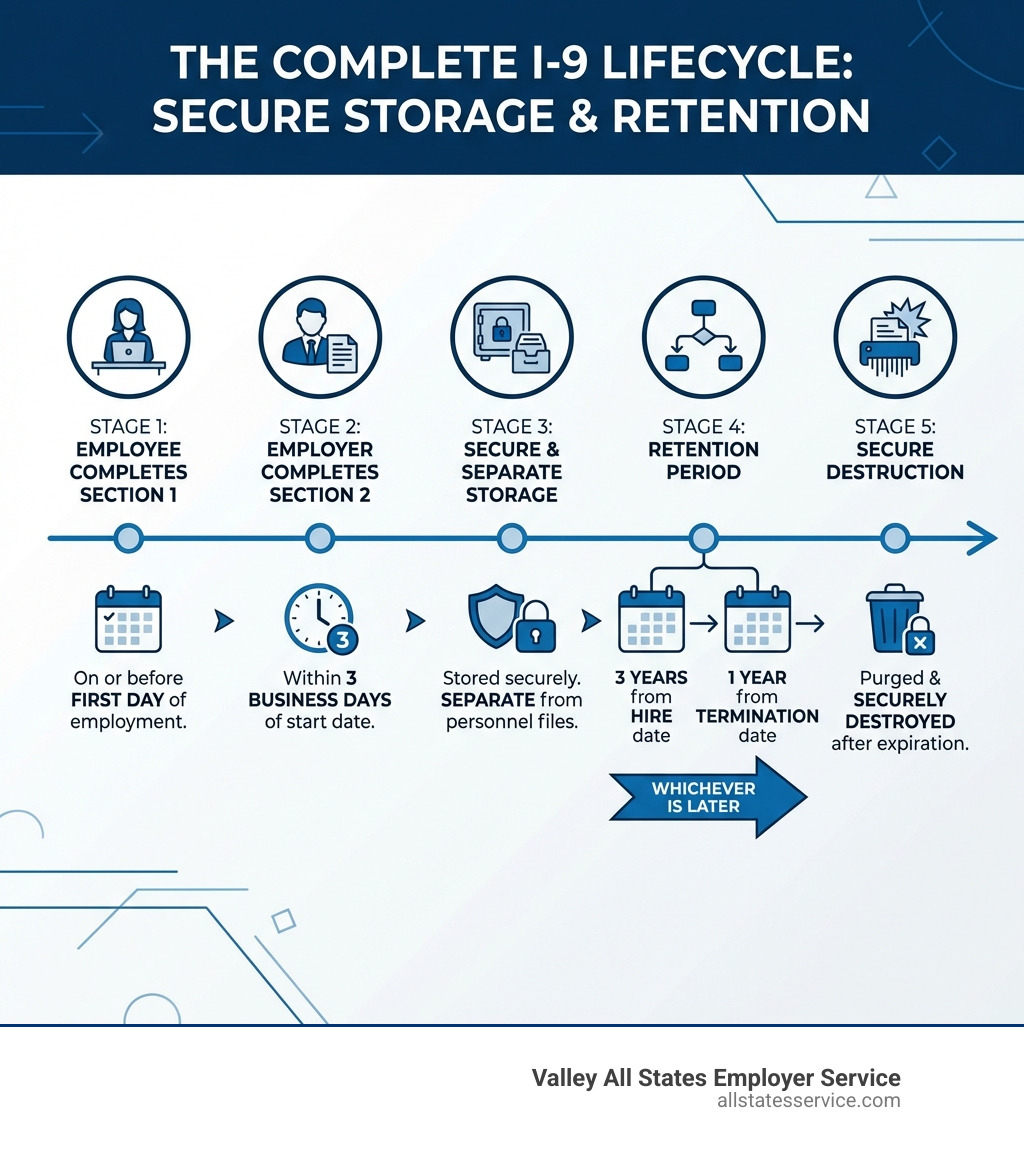
- Retain for 3 years after hire date OR 1 year after termination (whichever is later)
- Implement security controls to protect employee personal information
Here’s the reality: Form I-9 is required for every employee hired in the United States since 1986. It verifies identity and employment authorization. But completing the form is only half the battle. How you store it, protect it, and eventually purge it matters just as much.
The stakes are high. Penalties for I-9 violations range from $230 to $2,292 per form for technical issues like failing to produce a document during an audit. That means a small business with 50 employees could face tens of thousands of dollars in fines if their storage system fails.
The good news? Once you understand the rules and set up a proper system, I-9 storage becomes manageable. You’ll know exactly what to keep, where to keep it, how long to hold onto it, and when to safely destroy it.
This guide covers everything you need to know, including the retention timeline, your storage options, best practices for organization, and how to handle modern challenges like remote employees.
Ready to find out how to protect your business from costly compliance mistakes? Let’s start with the most important rule you need to know.
Secure I-9 document storage vocab explained:
The “3-Year/1-Year” Rule: Mastering I-9 Retention Periods
The golden rule of I-9 document retention is often called the “3-Year/1-Year” rule. It’s a simple concept, but critical for compliance: you must retain each Form I-9 for three years after the date of hire or one year after the employee’s employment ends, whichever is later. This ensures we hold onto the document for the legally mandated minimum period.
Calculating this specific retention deadline requires a quick comparison. First, note the employee’s date of hire. Then, if the employee has left the company, note their termination date.
Here’s how we calculate the specific retention deadline for a Form I-9:
- Calculate 3 years from the date of hire.
- Calculate 1 year from the date of employment termination.
- The later of these two dates is your retention deadline.
Let’s look at a couple of examples to make this crystal clear:
Short-term employee example: An employee is hired on January 1, 2023, and terminates employment on July 1, 2023.
- Three years from hire date: January 1, 2026
- One year from termination date: July 1, 2024
- The later date is January 1, 2026. So, we must retain this I-9 until at least January 1, 2026.
Long-term employee example: An employee is hired on January 1, 2020, and terminates employment on January 1, 2025.
- Three years from hire date: January 1, 2023
- One year from termination date: January 1, 2026
- The later date is January 1, 2026. In this case, we retain the I-9 until January 1, 2026.
You can see how this rule ensures that even if an employee works for a short period, we still retain their I-9 for a sufficient time. For current employees, we simply retain their Form I-9 for as long as they are employed, then apply the “1 year after termination” rule once they leave. Staying on top of this I-9 Record Keeping is essential for seamless operations. USCIS also provides detailed guidance on Retention and Storage to help employers steer these requirements.
Choosing Your Method: Paper, Electronic, and Microfilm Storage Options
Once you understand how long to keep your I-9s, the next step is deciding how to store them. Fortunately, the government provides flexibility, allowing for paper, electronic, and even microfilm storage. Each method has its own set of requirements to ensure accessibility and security during an audit.

Paper Storage: The Traditional Approach
Paper storage is the most traditional method, and still perfectly acceptable. However, it comes with specific best practices to ensure compliance and protection of sensitive data.
The primary requirement for paper storage is physical security. This means keeping your I-9 forms in locked cabinets or a secure area, accessible only to authorized personnel. We also highly recommend storing I-9 forms separately from general personnel files. Why? Because I-9 forms contain sensitive identity and employment authorization information that auditors from agencies like the Department of Homeland Security (DHS), the Immigrant and Employee Rights Section (IER) at the Department of Justice (DOJ), or the Department of Labor (DOL) may need to inspect. Keeping them separate makes retrieval quicker during an audit and limits the exposure of other personnel data.
Whether your forms are stored on-site or off-site, the crucial point is that they must be available for inspection within three business days of a request. This means if you use off-site storage, you need a system to retrieve those documents quickly. For more guidance on managing paper forms, SHRM offers valuable Tips for Retaining and Storing the New Form I-9.
Electronic I-9 Storage: The Modern Solution
For many businesses today, electronic I-9 storage is the preferred method due to its efficiency and searchability. Imagine being able to pull up any I-9 form with a few clicks, rather than sifting through endless paper files. This is where Electronic I-9 Solutions truly shine.
However, electronic storage comes with its own stringent set of USCIS requirements. It’s not enough to just scan your forms and save them to a shared drive. Your electronic system must have:
- System integrity: Controls to ensure the accuracy, reliability, and integrity of the electronically stored documents.
- Audit trails: Mechanisms to prevent and detect any unauthorized or accidental changes, additions, deletions, or deterioration of electronic Forms I-9. This includes secure, permanent records of all access and actions taken on electronic files.
- Indexing system: A clear and detailed indexing system for easy identification and retrieval of records.
- Reproducing paper copies: The capability to produce legible and readable paper copies from the electronic records.
- Quality assurance: An inspection and quality assurance program to regularly evaluate the system’s performance.
When it comes to electronic signatures, specific standards must be met. The system must allow individuals to acknowledge reading the attestation, attach the signature to the form at the time of transaction, verify the signer’s identity, and provide a printed confirmation upon request. Failure to meet these electronic signature standards can invalidate the form, leading to compliance issues. Documenting all business processes related to electronic Form I-9 creation, modification, and authenticity is also mandatory.
Microfilm/Microfiche: The Legacy Option
While less common today, microfilm and microfiche remain an acceptable and legal retention method. If you’re a business with a long history or specific archival needs, this might still be a part of your strategy.
The key requirements for microfilm/microfiche storage are similar to electronic storage in principle:
- Legibility: The images must be clear, readable, and reproducible.
- Indexing: A detailed indexing system is necessary to locate specific forms quickly.
- Reader-printer availability: You must be able to provide a reader-printer for government officials to view and obtain copies of the forms during an inspection.
If you convert paper originals to microfilm or microfiche, the original paper forms can be destroyed once they have been securely preserved in this format. Regardless of the method chosen, the goal is always the same: secure, accessible, and compliant storage.
Best Practices for Secure I-9 Document Storage and Organization
Regardless of whether you choose paper, electronic, or a hybrid system, certain best practices are universal for ensuring secure I-9 document storage and maintaining audit-readiness. It’s about protecting sensitive information and making sure you can provide documents quickly when requested. For a comprehensive overview of how to manage these processes, our I-9 Best Practices Complete Guide and Internal I-9 Audit Complete Guide can be invaluable resources.
Organizing for Easy Retrieval: Audit-Proof Your System
One of the most common mistakes employers make is mixing I-9s with general personnel files. This is a big no-no! Keeping I-9 forms separate from personnel files is crucial for several reasons:
- Privacy protection: I-9s contain personal identifying information (PII) that should only be accessed by those with a legitimate need. Separating them limits the exposure of this sensitive data.
- Limiting auditor access: When DHS, DOJ, or DOL officers request I-9s for inspection, they only need to see those specific forms. If they are mixed with personnel files, it can lead to unnecessary delays and potential scrutiny of other documents they are not authorized to review.
- Efficiency during audits: Auditors expect quick access. Having a dedicated system for I-9s means you can retrieve them within the mandated three business days without scrambling.
To achieve this, consider these organizational tips:
- Dedicated files: Create separate filing systems (physical or electronic) exclusively for I-9 forms.
- Active vs. terminated employee files: Keep I-9s for active employees in one section and move them to a separate “terminated employee I-9” section once employment ends.
- Labeling by purge date: Clearly label folders (physical or digital) with the earliest purge date for the I-9s contained within. This makes it easy to identify which forms are eligible for destruction, preventing you from holding onto documents longer than necessary.
Regularly Auditing I-9 Forms internally can help ensure your system is audit-proof and that all forms are accurate and correctly filed.
The Purge Process: How to Properly Dispose of Old I-9s
Once the retention period for an I-9 form has expired, it’s time to purge it. Holding onto expired I-9s can expose your business to unnecessary risks. This practice, known as data minimization, reduces the amount of sensitive information you store, lessening the impact of any potential data breach. It also prevents auditors from finding errors on forms that you were no longer legally required to keep.
Here’s how to handle the purging of old I-9 forms:
- Confirm retention eligibility: Double-check the purge date using the “3-Year/1-Year” rule to ensure the form is indeed eligible for disposal.
- Document purge activity: Create a log that records the employee’s name, hire date, termination date, calculated purge date, and the date the form was actually purged. This provides an audit trail of your compliant disposal practices.
- Secure shredding for paper: For paper forms, use a cross-cut shredder or a professional shredding service. Simply throwing them in the trash is not secure.
- Digital deletion protocols: For electronic forms, ensure they are securely and permanently deleted from all storage locations, including backups. This might involve specialized software or IT protocols to prevent recovery.

Holding onto expired I-9s is like hoarding old tax returns, an unnecessary and potentially risky practice.
Ensuring Data Privacy and Secure I-9 Document Storage
Protecting the personal information contained within I-9 forms is paramount. This goes beyond just meeting retention periods; it’s about safeguarding employee data from unauthorized access, alteration, or loss. Our I-9 Compliance Services Ultimate Guide digs deeper into these critical security measures.
Key considerations for ensuring data privacy and secure I-9 document storage:
- Access controls: Implement strict access controls. Only authorized personnel, typically HR or compliance officers, should have access to I-9 forms. For electronic systems, this means strong passwords, multi-factor authentication, and role-based access permissions.
- Protecting PII: Train your staff on the importance of protecting Personally Identifiable Information (PII) on I-9 forms. This includes not sharing forms unnecessarily and handling them with care.
- Backup plans: For electronic storage, robust backup and disaster recovery plans are non-negotiable. Regular backups, stored securely off-site, ensure that you can recover your I-9 records in case of system failure, natural disaster, or cyberattack.
- Security protocols: Use encryption for electronic files, especially if stored in the cloud or transmitted digitally. Physical security measures, such as surveillance and secure entry, are essential for paper records.
- Staff training: Regular training for all personnel who handle I-9s is vital. They need to understand the procedures for proper completion, storage, access, and destruction, as well as the implications of non-compliance.
By implementing these measures, we not only meet regulatory requirements but also demonstrate a commitment to protecting our employees’ sensitive data.
Navigating Modern Challenges: Remote Work and I-9 Compliance
The rise of remote work has introduced new complexities to I-9 compliance, particularly regarding document examination and storage. The traditional in-person physical examination of documents became a challenge during the COVID-19 pandemic, leading to temporary flexibilities. While those flexibilities have largely ended, the Department of Homeland Security (DHS) has provided a permanent solution for E-Verify employers.
For employers enrolled in E-Verify, DHS announced a new flexible option for employment eligibility verification. This “alternative procedure” allows E-Verify employers to conduct remote examination of I-9 documents. This is a significant development, especially for businesses with hybrid work models or fully remote teams. Our Remote I-9 Services are designed to help you steer these new requirements seamlessly.
Here’s what the alternative procedure entails:
- Live video interaction: The employer (or an authorized representative) must conduct a live video interaction with the employee to ensure the document presented during the video call matches the document sent by the employee.
- Retaining document copies: If you choose to remotely examine documents, you must retain clear and legible copies of the front and back (if two-sided) of ALL Form I-9 documentation an employee presents remotely, along with the employee’s Form I-9. This is critical for audit purposes.
- E-Verify enrollment: This alternative procedure is only available to employers who are enrolled in E-Verify. If you’re not an E-Verify participant, you must continue to conduct physical, in-person document examinations or use an authorized representative for this purpose.
This new guidance, detailed in the DHS announcement on flexible employment eligibility options, acknowledges the evolving nature of work. However, it places a higher emphasis on diligent record-keeping and ensuring the integrity of the remote verification process. For businesses with remote teams, understanding I-9 for Remote Employees is more important than ever.
The High Cost of Non-Compliance: Penalties and Audit Risks
Ignoring secure I-9 document storage and retention requirements can lead to serious consequences for your business. The government takes I-9 compliance very seriously, and a failure to produce documents or maintain them correctly can result in significant fines and penalties.
Government agencies, including the Department of Homeland Security, the Immigrant and Employee Rights Section (IER) at the Department of Justice, and the Department of Labor, have the authority to inspect your I-9 forms. When they request an inspection, you must be able to produce the forms within three business days. Failing to do so can immediately trigger penalties.
Monetary penalties for non-compliance can be substantial. For technical or substantive issues, including failing to produce a Form I-9 during an audit, penalties can range from $230 to $2,292 per violation. Imagine if an auditor finds issues across dozens or even hundreds of forms, and the fines can quickly escalate into thousands, or even hundreds of thousands, of dollars.
Beyond monetary fines, improper I-9 storage or retention can lead to:
- Increased scrutiny: Once an employer is found non-compliant, they may face more frequent and thorough audits in the future.
- Reputational damage: Publicized penalties can harm your company’s image and make it difficult to attract and retain talent.
- Business disruption: Audits are time-consuming and can divert valuable resources away from your core business operations.
This is why proactive management and robust I-9 Audit Penalties Complete Guide are not just good practices, they’re essential business protections. Engaging with professional audit services, as highlighted in Don’t Get I-9’d: Why Professional Audit Services Are Your Best Defense, can help identify and rectify issues before they become costly problems.
Frequently Asked Questions about I-9 Storage
We often hear similar questions from employers trying to steer the complexities of I-9 compliance. Here are some of the most common ones, along with our expert answers.
Can I store copies of the employee’s documents with the Form I-9?
Yes, you may store copies (or electronic images) of the documents an employee presents for Form I-9 verification. However, there’s a crucial caveat: if you choose to retain copies, you must do so consistently for all employees, regardless of their national origin, citizenship, or immigration status. Inconsistent copying practices can lead to anti-discrimination violations.
For employers participating in E-Verify, retaining copies of certain documents (such as a U.S. Passport, Permanent Resident Card, or Employment Authorization Document) is often a requirement if the employee presents them. For more details on this, refer to Retaining Copies of Documents Your Employee Presents and our guide on Acceptable I-9 Documents. Making copies does not replace the requirement to complete and retain the Form I-9 itself.
What parts of the Form I-9 do I need to keep?
You are only required to retain the pages of the Form I-9 where you and your employee entered data (typically Section 1 and Section 2, and Section 3 if reverification or rehire occurred). You do not need to keep the instructions, the Lists of Acceptable Documents (page 2), or any blank supplement pages. Retaining only the necessary pages helps with data minimization and simplifies your storage system.
What happens if I lose a Form I-9?
Losing a Form I-9 is a serious issue that needs immediate attention. If you find a missing Form I-9, here’s the recommended course of action:
- Attempt to reconstruct: First, try to locate any existing records or information that can help you reconstruct the I-9.
- Complete a new form: If the form cannot be found, you should have the employee complete a new, current version of Form I-9 immediately. Make sure they complete Section 1, and then you complete Section 2 based on the documents they present.
- Attach an explanation memo: Crucially, attach a signed and dated memo to the new Form I-9 explaining why it was completed late. Detail your good faith efforts to locate the original form and the steps taken to rectify the situation.
- Do not backdate: Never backdate a new Form I-9 to reflect the original hire date. This can be seen as an attempt to falsify records.
Demonstrating good faith efforts to comply, even after an error, is important. The goal is to correct the record as quickly and accurately as possible.
Simplify Your I-9 Storage and Ensure Compliance
Navigating the intricacies of secure I-9 document storage doesn’t have to be a daunting task. By understanding the “3-Year/1-Year” retention rule, choosing an appropriate storage method, whether paper, electronic, or a combination, and implementing best practices for organization and data privacy, you can build a robust and compliant system. The goal is always to protect sensitive employee information while ensuring your records are audit-ready and accessible within the strict three-business-day window.
The landscape of I-9 compliance is constantly evolving, especially with changes like the DHS alternative procedure for remote document examination for E-Verify employers. Staying informed and proactive is your best defense against potential penalties and operational disruptions.
At Valley All States Employer Service, we understand the challenges employers face. We specialize in providing expert, impartial, and efficient E-Verify workforce eligibility verification, minimizing errors and administrative burden for our clients. We’re here to help you simplify your processes, protect your business, and achieve peace of mind.
Ready to confidently manage your I-9 obligations? Explore our services for Verifying I-9 Documents and let us help you build a compliant and secure I-9 storage solution.