
Form I 9 Section 2: Essential 2025 Compliance Guide
Why Form I-9 Section 2 Is the Employer’s Critical Compliance Checkpoint
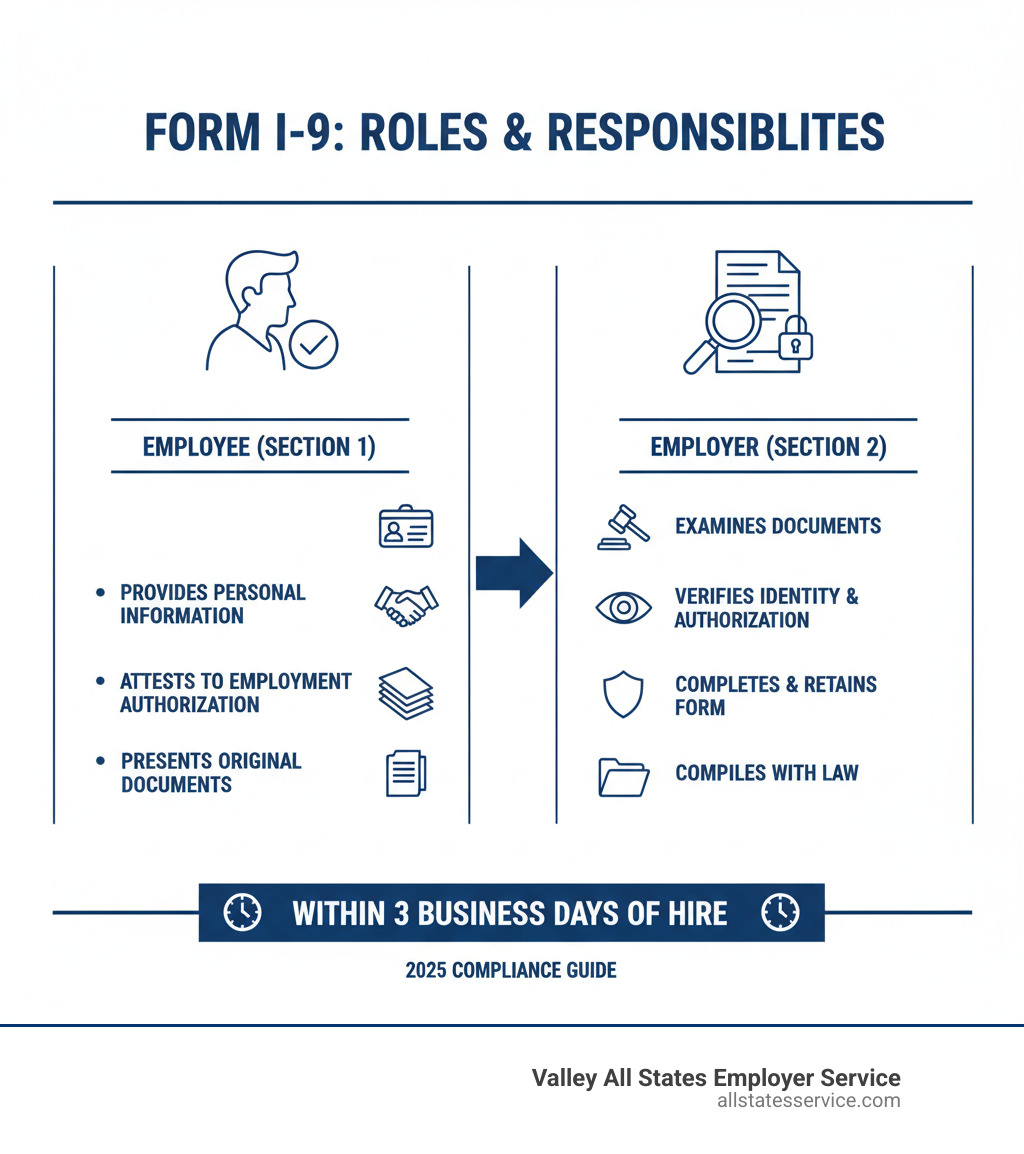
Form I-9 Section 2 is the employer’s critical step for verifying the identity and employment authorization of every new hire. Under the Immigration Reform and Control Act (IRCA), this is your legal responsibility. Getting it wrong can lead to civil penalties costing hundreds to thousands of dollars per form.
Here’s a quick overview of Section 2:
- Who completes it: You (the employer) or your authorized representative.
- When to complete it: Within 3 business days of the employee’s first day of work for pay.
- What it requires: Physical examination of original documents proving identity and work authorization.
- Key rule: You cannot specify which documents an employee presents.
- Deadline exception: For jobs lasting less than 3 days, Section 2 must be completed on the first day of employment.
While your employee completes Section 1, you must physically examine their documents, confirm they appear genuine and relate to the person, and record the details accurately. Employers are liable for all Form I-9 compliance. Common mistakes like missing information, accepting expired documents, or late completion can trigger significant fines during audits.
This guide provides the compliance checkpoints you need to complete Section 2 correctly, covering everything from the 3-day rule to special situations like remote hires and E-Verify.
Properly completing and retaining Form I-9 for each employee is crucial for maintaining a legal workforce. Section 2 is the core of this verification process, ensuring every team member is authorized to work in the United States. For a deeper dive into the basics, check out our guide on What is an I-9?.
A Step-by-Step Guide to Completing Form I-9 Section 2
Completing Form I-9 Section 2 can feel intimidating, but the process becomes straightforward once you understand it. This section is your compliance checkpoint for verifying your new hire’s documents. Think of it as your compliance checkpoint, and we’re going to walk through it together, step by step.
Getting Section 2 right protects your business and ensures you’re building a compliant workforce. For more detailed guidance on your role, check out our article on Filling Out an I-9 Employer.
Step 1: Know Your Deadlines (The 3-Day Rule)
Timing is critical for I-9 compliance. You must complete and sign Form I-9 Section 2 within three business days of the employee’s first day of work for pay. For example, if an employee starts on Monday, you have until the end of business on Thursday to complete Section 2.
For short-term hires where the job lasts less than three days, you must complete Section 2 no later than the first day of employment.
If an employee fails to present acceptable documentation within the three-day window, you must terminate their employment to remain compliant. Understanding these deadlines is fundamental to your I-9 process. For a broader look at your responsibilities, our Employer I-9 Verification Guide has more details.
Step 2: Examine Employee Documents and Understand the Lists
Next, you must physically examine the original documents your employee presents. Photocopies, faxes, or scans are generally not allowed, with the exception of a certified copy of a birth certificate. Your goal is to confirm the documents appear genuine and relate to the person. While you are not expected to be a fraud expert, you must reject any document that does not reasonably appear genuine.
For remote employees, employers enrolled in E-Verify may use an alternative remote examination procedure authorized by DHS.
A critical rule is that you cannot tell an employee which documents to present. They have the right to choose from the Lists of Acceptable Documents. Demanding specific documents (like a green card) is discriminatory and can lead to penalties.
Finally, ensure all documents are unexpired. Accepting expired documents is a common and costly mistake. For more guidance, see our resource on Verifying I-9 Documents or the official Handbook for Employers (M-274).
Step 3: Accurately Record Document Information
Once you’ve verified the documents, you must accurately record the details in Form I-9 Section 2. For each document, enter the document title, issuing authority, document number, and expiration date (if any). If a document does not expire, like a Social Security card, write “N/A” in the expiration date field.
If the employee provides a List A document, record its information in the List A column and leave the other columns blank. If they provide documents from List B and List C, fill in those respective columns.
Use common abbreviations for issuing authorities (e.g., “CA DMV”) or write the full name if unsure. Enter all information exactly as it appears on the document. Use the Additional Information box for notations like E-Verify case numbers, automatic document extensions, or notes for special circumstances.
Step 4: Complete the Employer Certification
The final step is the employer certification. Your signature carries legal weight, confirming you properly examined the documents and believe the employee is authorized to work. In the certification block, you must enter:
- The employee’s first day of employment.
- The date you examined the documents and signed Section 2.
- Your signature, printed name, and title (e.g., “HR Manager”).
- Your employer’s business name and full physical address (P.O. boxes are not acceptable).
Missing or incorrect information in this section can create compliance issues during an audit. For official guidance, refer to the Instructions for Form I-9 from USCIS.
Understanding the Lists of Acceptable Documents
Understanding the Lists of Acceptable Documents is essential for Form I-9 Section 2. Your employee chooses which documents to present; you cannot specify.
- List A documents establish both identity and employment authorization.
- List B documents establish identity only.
- List C documents establish employment authorization only.
An employee can present one document from List A, or a combination of one from List B and one from List C.
Let’s break down each list.
List A: Documents That Establish Both Identity & Employment Authorization
List A documents establish both identity and work authorization, simplifying the process. If an employee presents a valid List A document, no other documents are needed. Common examples include:
- U.S. Passport or U.S. Passport Card: A reliable and straightforward form of verification.
- Permanent Resident Card (Form I-551): Also known as a “Green Card.” Older versions remain valid until their expiration date.
- Employment Authorization Document (Form I-766): Issued to non-citizens authorized to work. Like Green Cards, older versions are valid until they expire.
- Foreign passport with a temporary I-551 stamp or notation: This serves as temporary proof of status and will require reverification upon expiration.
List B: Documents That Establish Identity
List B documents establish identity only and must be presented with a List C document. Common examples include:
- State-issued driver’s license or ID card: Must be issued by a state or U.S. outlying possession.
- School ID card with a photograph.
- U.S. Military card or draft record.
- Voter’s registration card.
For employers using E-Verify, any List B document presented must contain a photograph. Learn more in our guide on I-9 E-Verify Compliance.
List C: Documents That Establish Employment Authorization
List C documents establish employment authorization and must be paired with a List B document. Common examples include:
- Unrestricted U.S. Social Security card: The card must not contain work restrictions like “NOT VALID FOR EMPLOYMENT.”
- Original or certified copy of a birth certificate: Must be issued by a U.S. state or territory with an official seal. Puerto Rico birth certificates must be issued on or after July 1, 2010.
- Certification of Report of Birth issued by the Department of State (e.g., Form FS-240).
- Native American tribal document.
For detailed criteria, consult the Handbook for Employers (M-274). Understanding these combinations is key to completing Form I-9 Section 2 correctly. For more on document examination, see our resource on Verifying I-9 Documents.
Special Considerations for Form I-9 Section 2
Completing Form I-9 Section 2 can involve special situations, such as using E-Verify, hiring remote workers, or accommodating minors and employees with disabilities. These scenarios require extra attention to ensure compliance.

Special Rules for Form I-9 Section 2 When Using E-Verify
E-Verify is a DHS web-based system that electronically confirms employment eligibility. Participation comes with additional rules for Form I-9 Section 2:
- List B Photo Requirement: If an employee presents a List B document, it must contain a photograph.
- Document Copying: You must retain copies of any U.S. passport, passport card, Form I-551 (Green Card), or Form I-766 (EAD) presented by the employee. Attach the copy to their Form I-9.
- SSN Requirement: Employees must provide their Social Security Number in Section 1. If an employee has applied for but not yet received an SSN, you should create the E-Verify case as soon as the number is available and document any delay.
E-Verify does not handle reverification of expired work authorization; you must still use Section 3 of the Form I-9 for that. For more, visit e-verify.gov or see our guide on I-9 E-Verify Compliance. Valley All States Employer Service offers expert E-Verify processing to simplify compliance for your business.
Using an Authorized Representative to Complete Form I-9 Section 2
For remote hires or when you cannot be present, you can designate an authorized representative to complete Form I-9 Section 2. This can be anyone you choose, such as a notary public, another manager, or an HR professional.
However, you remain 100% liable for any errors or violations your representative makes. Choose a reliable person and provide them with clear instructions on the process, including the 3-day rule, document examination, and anti-discrimination rules.
For remote hires, the representative typically examines documents in person. E-Verify participants may qualify for an alternative remote examination procedure under DHS rules. If you use a notary public, they act as your agent and should not use their notary seal on the form. For best practices, see our guides on Remote I-9 Verification Best Practices 2025 and Third-Party I-9 Verification.
Handling Receipts, Minors, and Employees with Disabilities
Certain situations in Form I-9 Section 2 require special handling to ensure fair and compliant verification.
- Receipts: If an employee’s document was lost, stolen, or damaged, you can accept a receipt for a replacement document. The employee then has 90 days from their hire date to present the actual document.
- Minors Under 18: If a minor cannot present a List B identity document, a parent or legal guardian can complete Section 1. The minor only needs to provide a List C document. In Section 2, you write “Individual under age 18” in the List B column.
- Employees with Disabilities: For an employee with a disability in a special placement program who cannot provide a List B document, a representative of that program can assist. The employee presents a List C document, and you write “Special Placement” in the List B column.
These accommodations ensure the I-9 process is accessible while maintaining compliance.
Avoiding Common Mistakes and Steep Penalties
Mistakes in Form I-9 Section 2 can lead to steep financial and legal consequences under Section 274A of the Immigration and Nationality Act (INA). Civil penalties range from hundreds to thousands of dollars per incorrect form.

To protect your business, avoid these common errors:
- Missing information: Leaving any required field blank, from a document number to your own signature, can invalidate the form.
- Accepting expired documents: Always check expiration dates. An expired document is not acceptable unless its validity has been officially extended.
- Late completion: The 3-day rule is strict. Missing the deadline, even by a day, is a violation. For short-term hires, Section 2 is due on day one.
- Specifying documents: Telling an employee which documents to provide is a form of illegal discrimination.
- Failing to examine original documents: You must physically inspect original documents, not copies or scans (unless using an authorized remote procedure).
- Improper retention: You must keep Form I-9s for three years after the hire date or one year after termination, whichever is later.
- Ignoring red flags: “Constructive knowledge” means you can be held liable if you should have known an employee was unauthorized, such as when documents are obviously fraudulent.
Regular internal audits are the best way to catch and correct errors before the government does. For more on the financial risks, see our guide on I-9 Compliance Penalties. To conduct your own review, use our Internal I-9 Audit Complete Guide.
Conclusion: Master Section 2 and Ensure a Compliant Workforce
Mastering Form I-9 Section 2 is essential for running a compliant business. It involves upholding federal law, protecting your company from penalties, and building a legal workforce.
Key takeaways include:
- The 3-day rule is non-negotiable for completing Section 2.
- Careful examination of original documents is required to ensure they appear genuine.
- Accurate recording of document details in the correct columns prevents common errors.
- Proper completion of the employer certification solidifies your legal attestation.
- Understanding the document lists and special rules for E-Verify, remote hires, and other situations is crucial.
- Avoiding common mistakes is your best defense against steep fines.
Consistency and attention to detail are your greatest allies. Establishing clear procedures and training for anyone involved in I-9 completion will create a strong compliance program. Diligence in Form I-9 Section 2 protects your business and upholds the integrity of the U.S. employment system.
Ready to simplify compliance and ensure every Form I-9 Section 2 is picture-perfect? Our team is here to provide expert assistance. Learn more about Verifying I-9 Documents or get comprehensive support for Form I-9 Completion. Contact Valley All States Employer Service today – we’re your partner in navigating the complexities of employment eligibility verification.