
e verify new i 9 form: Demystify 2025 Compliance
Your Roadmap to Flawless I-9 and E-Verify Compliance
The e verify new i 9 form involves two separate systems. Form I-9 is the mandatory employment eligibility verification form all U.S. employers must complete for every new hire. E-Verify is an optional (but sometimes required) electronic system that confirms Form I-9 information against government databases.
Quick Answer: What You Need to Know Right Now:
- Form I-9 (Edition 01/20/25) is the current version, valid through 05/31/2027
- All U.S. employers must complete Form I-9 for every hire
- E-Verify is mandatory for federal contractors and in some states
- Section 1 must be completed by the employee on their first day of work
- Section 2 must be completed by the employer within 3 business days
- E-Verify employers can now use remote document examination procedures
- Critical deadline: Download E-Verify records updated before Dec 31, 2014 by January 6, 2025
As an HR manager, you juggle new hire paperwork, compliance deadlines, and the constant worry of costly penalties. Employment verification has grown more complex with recent Form I-9 updates, new remote examination rules, and the permanent deletion of old E-Verify records.
This guide breaks down the I-9 and E-Verify process for 2025, showing you what’s changed, what’s required, and how to avoid common mistakes that trigger audits.
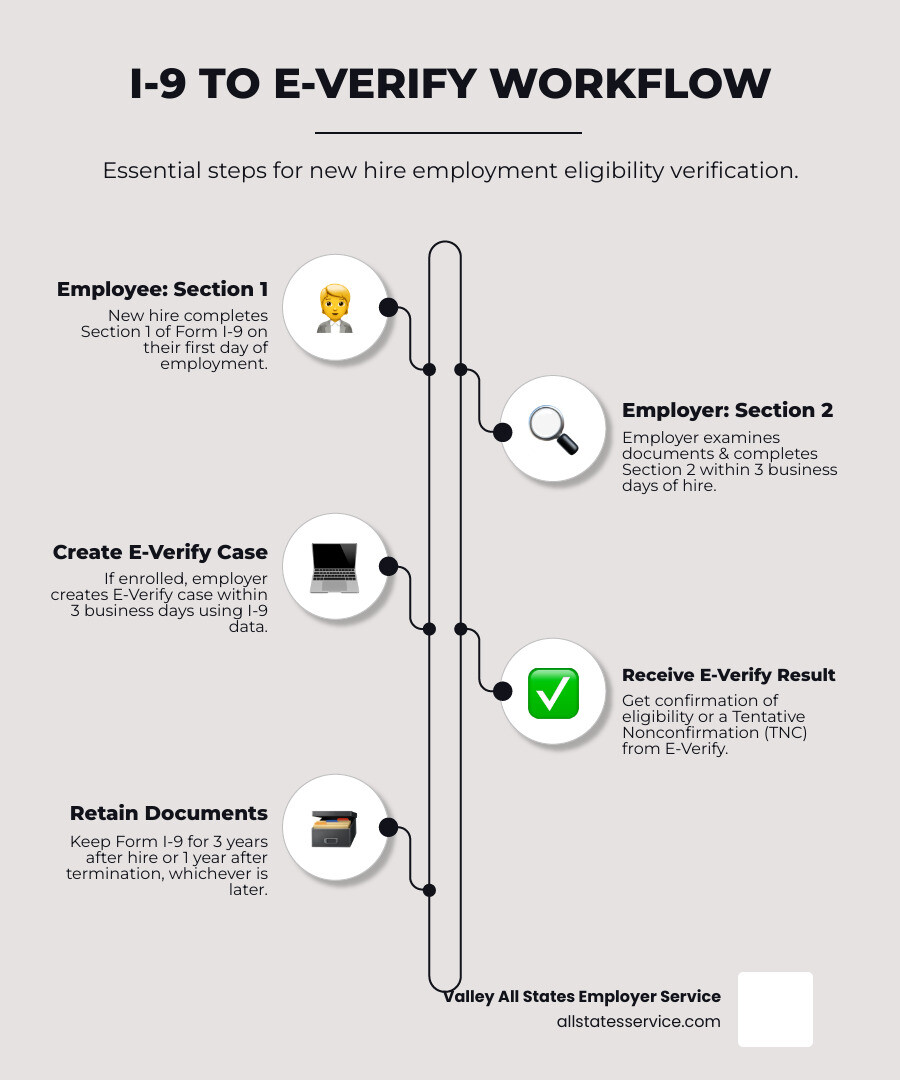
The Core Connection: How Form I-9 and E-Verify Work Together
Form I-9 and E-Verify are a verification team. While separate, they work together to confirm your new hires can legally work in the U.S.
Form I-9 is the foundational document all U.S. employers must complete for every hire to verify their identity and employment authorization. The employee completes Section 1, and you examine their documents to complete Section 2.
E-Verify is an optional electronic system from USCIS and the Social Security Administration that takes verification a step further. It checks Form I-9 information against government databases from the SSA and DHS. In short, Form I-9 documents your verification, while E-Verify electronically confirms it. To see how these systems fit your compliance strategy, our E-Verify & I-9 Compliance: The Ultimate Guide has the full picture.
Let’s break down how these requirements differ:
| Feature | Form I-9 (Employment Eligibility Verification) | E-Verify (Electronic Verification System) |
|---|---|---|
| Purpose | Document identity & work authorization | Electronically confirm work authorization against government records |
| Mandatory for Employers | Yes, for all U.S. employers | Generally voluntary, but mandatory for federal contractors and some states |
| SSN Required? | Optional for employee to provide (Section 1) | Yes, required for case creation |
| Photo on List B Docs? | Not required | Yes, required for List B identity documents (with limited exceptions) |
| Reverification | Yes, required for expiring work authorization | No, may not be used for reverification of expiring employment authorization |
| Administered By | USCIS | USCIS in partnership with SSA |
Key Differences You Must Know
Understanding the differences between Form I-9 and E-Verify is key to avoiding mistakes. The biggest difference is that Form I-9 is mandatory for all U.S. employers, while E-Verify is generally voluntary. However, E-Verify is required for federal contractors with the FAR E-Verify clause and in certain states. For more on the basics, check out What is E-Verify?
Another key distinction is the SSN requirement. An employee’s Social Security Number is optional for Form I-9, but it is mandatory to create an E-Verify case. The system needs the SSN to check against SSA records.
Pay attention to photo requirements on List B documents. For a standard I-9, a List B identity document does not need a photo. E-Verify employers, however, must require a List B document with a photo, with very few exceptions. This stricter rule improves identity verification.
Finally, the reverification rules differ. You must use Section 3 of Form I-9 to reverify an employee’s expiring work authorization. You cannot use E-Verify for reverification, as it is only for new hires.
The Purpose of Form I-9 in Employment Verification
Form I-9 is the legal foundation of your hiring process, required since the Immigration Reform and Control Act of 1986 made it illegal to knowingly hire unauthorized workers. The form is how you prove you’ve done your due diligence.
The process is simple. First, your employee completes Section 1 on or before their first day, attesting to their work status under penalty of perjury. Then, within three business days, you must examine their documents and record the details in Section 2. This physical or remote examination creates a documented trail showing you’ve verified your employee’s eligibility.
This process protects you from penalties and helps maintain the integrity of the U.S. workforce. Every e verify new i 9 form process begins with this step. For a deeper look, visit our guide on What is an I-9?. You can always view or download the official Form I-9 from USCIS.
What’s New in 2025? Key Updates to the E-Verify New I-9 Form
Compliance rules change, and 2025 has brought significant updates to the e verify new i 9 form process. Staying current protects your business from penalties and keeps your onboarding process smooth.
From a revised form to new remote examination rules and a critical data disposal deadline, let’s review what’s changed. For context on how these updates fit into broader policy, see our article on U.S. Announces New Immigration Policy Changes for 2025.
The Latest Form I-9 (Edition 01/20/25)
USCIS released a new, streamlined Form I-9, edition date 01/20/25, valid through 05/31/2027. This user-friendly version is now a single page, with separate supplements for Preparer/Translator (Supplement A) and Reverification (Supplement B).
Key changes include renaming the fourth checkbox in Section 1 to “An alien authorized to work” to align with statutory language, revised List B document descriptions, and an updated DHS privacy notice. The instructions are also shorter. It’s time to switch from the 08/01/23 version. Find specifics in the official Minor Changes to Form I-9 and E-Verify Updates from USCIS.
The Permanent Remote Examination Option for E-Verify Employers
This is a major update for businesses with remote teams. As of August 1, 2023, DHS made the alternative procedure for remote document examination permanent. If you are enrolled in E-Verify and in good standing, you can now verify Form I-9 documents remotely.
The process involves your employee sending you copies of their documents, followed by a live video interaction where they present the originals. You examine the documents on camera to ensure they appear genuine and relate to the employee. Afterward, you retain clear copies of the documents and create an E-Verify case.
This option is exclusively for E-Verify employers. If you are not enrolled, you must still use physical inspection or an authorized representative. For enrolled employers, this flexibility is a game-changer for hiring distributed teams. Our I-9 Remote Verification Best Practices 2025 guide walks you through the process.
Critical Deadline: USCIS E-Verify Records Disposal
A critical deadline is January 6, 2025. USCIS will permanently delete E-Verify cases last updated on or before December 31, 2014. You must act now if you have cases from that period.
During an audit, you need a complete record, including Form I-9s and corresponding E-Verify case information. Once USCIS deletes old cases, they are gone forever. The solution is to download your Historic Records Reports for any cases from that period and store them with the matching Forms I-9.
These reports are your backup documentation, proving you followed the proper E-Verify process. Without them, you risk having compliance gaps that could raise red flags in an audit. USCIS has posted details at E-Verify records scheduled for disposal.
A Practical Guide to I-9 and E-Verify Compliance
Getting your e verify new i 9 form process right doesn’t have to be complicated. With a clear roadmap, you can build a compliant and efficient hiring process. This is your playbook for staying out of trouble while onboarding new employees. For a comprehensive overview, check out our I-9 Compliance Services Complete Guide.
Step-by-Step: Completing the E-Verify New I-9 Form
The I-9 and E-Verify process follows a clear timeline.
Day One: Employee Completes Section 1
On or before their first day, your new hire must complete and sign Section 1, attesting to their work authorization. A preparer or translator can assist if needed using Supplement A.
Within Three Business Days: Employer Completes Section 2
You must examine the employee’s original, unexpired documents and complete Section 2. They can present one document from List A (identity and work authorization) or a combination of one from List B (identity) and one from List C (work authorization). You must verify the documents appear genuine and relate to the employee. E-Verify employers may use the remote video option.
Within Three Business Days: Create E-Verify Case
If enrolled in E-Verify, you must create a case within three business days of the hire date using information from Form I-9. The employee’s SSN is mandatory for this step. E-Verify typically returns an immediate result. If you get a Tentative Nonconfirmation (TNC), you must notify the employee and allow them to contest it without taking adverse action.
Record Retention
Retain Form I-9 for three years after the hire date or one year after termination, whichever is later. E-Verify employers using remote verification must also keep copies of the documents. For more details, see our I-9 Form Completion guide.
Handling Special Scenarios and Requirements
Here’s how to handle common compliance curveballs.
When Documents Go Missing
If an employee’s documents are lost, stolen, or damaged, they can present a receipt for a replacement document. This receipt is valid for 90 days, during which they can work. For E-Verify employers, you cannot create the case until you see the actual document. If the three-day deadline passes, select “Other” as the reason for delay in E-Verify and note that you are awaiting the actual document. Once it arrives, update Section 2 and create the case.
Federal Contractors Have Extra Homework
If your organization has federal contracts with the FAR E-Verify clause, you must use E-Verify for all employees assigned to that federal contract, including existing staff. This requires tracking which employees work on covered contracts and ensuring they are all verified.
State Laws Add Another Layer
Many states have their own E-Verify rules. Some mandate it for public employers, others for private companies of a certain size. For example, Illinois recently updated its Right to Privacy in the Workplace Act, adding new notification requirements for TNCs. Our E-Verify State Laws Complete Guide breaks down requirements by state.
The High Cost of Non-Compliance
I-9 and E-Verify violations carry steep penalties that can impact your bottom line and reputation. Immigration and Customs Enforcement (ICE) conducts regular I-9 audits, and every error counts.
Paperwork violations, like missing signatures or incorrect dates, can result in fines from hundreds to thousands of dollars per form. Knowing hire violations, where you knowingly employ an unauthorized worker, are the most serious and can lead to criminal charges.
E-Verify violations, such as creating cases late or taking adverse action on a TNC, can result in fines and loss of E-Verify access. For federal contractors, this can jeopardize your contracts. Proactive compliance protects your business from fines, distraction, and reputational damage. Our I-9 Audit Penalties Complete Guide details the potential consequences.
How Technology Can Streamline Your Verification Process
Managing Form I-9s and E-Verify cases manually is risky. Papers get lost, deadlines are missed, and small mistakes can lead to costly audits. Modern technology transforms the e verify new i 9 form process, protecting you from the human errors that cause penalties.
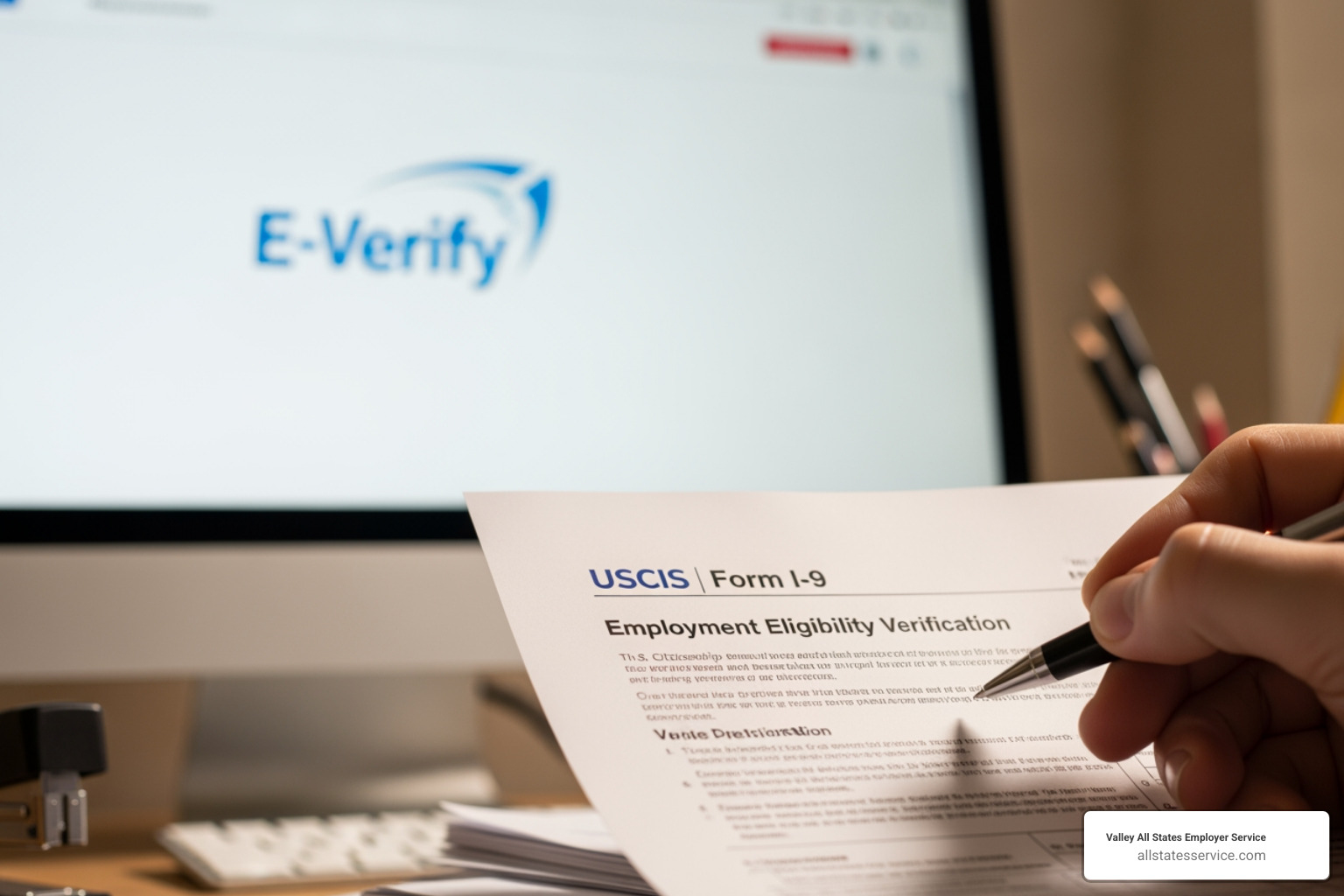
Digital I-9 solutions guide employees through Section 1, preventing incomplete forms. For Section 2, the software walks you through document examination, ensuring every field is correct. Key benefits include:
- Automated Reminders: Get alerts for expiring work authorizations, giving you time to complete Section 3 reverification.
- Error-Checking: Catch mismatched dates, incomplete fields, or invalid document information in real time.
- Direct E-Verify Integration: Information from the I-9 automatically creates the E-Verify case, reducing typos and ensuring timely submission.
- Secure Cloud Storage & Audit Trails: Replace filing cabinets with secure, searchable digital storage. A complete, timestamped audit trail documents every action, providing a defensible record for audits.
At Valley All States Employer Service, we use these tools to provide expert and efficient E-Verify processing. We minimize your errors and administrative burden so you can focus on your business. Explore our Electronic I-9 Solutions, and see how they fit into a broader strategy in our Outsourced HR Compliance Ultimate Guide.
Frequently Asked Questions about the E-Verify New I-9 Form
Here are answers to common questions about the e verify new i 9 form.
Which version of Form I-9 should I use in 2025?
You must use the Form I-9 with an edition date of 01/20/25. This is the current version, valid through 05/31/2027. Using the most current form is mandatory, so ensure your paper and electronic systems are updated. You can always find the correct version on the USCIS page for the Latest Form I-9, Employment Eligibility Verification.
Can I examine I-9 documents remotely if I don’t use E-Verify?
No. The alternative procedure for remote document examination is only available to employers enrolled in E-Verify and in good standing. If your organization does not use E-Verify, you must still conduct a physical, in-person examination of the employee’s documents. You can do this yourself or designate an authorized representative to do it for you. The flexibility of remote verification is an exclusive benefit for E-Verify users. Our I-9 Verification Remote Complete Guide walks through all scenarios.
What should I do if I get a Tentative Nonconfirmation (TNC) in E-Verify?
A Tentative Nonconfirmation (TNC) does not mean an employee is unauthorized to work. It simply indicates a mismatch between the information on Form I-9 and government records, which can happen for many reasons, like a recent name change or a typo.
You must promptly and privately inform the employee and give them the “Tentative Nonconfirmation Further Action Notice,” which explains their options. The employee has eight federal government workdays to contact the appropriate agency (SSA or DHS) to resolve the issue.
You absolutely cannot terminate, suspend, or take any other adverse action against the employee based only on the TNC. The employee must be allowed to continue working while they resolve the discrepancy. Taking action at this stage could lead to discrimination claims. Our guide on E-Verify Tentative Nonconfirmation provides more detailed steps.
Conclusion: Master Your Compliance and Focus on Growth
Keeping up with Form I-9 and E-Verify compliance is a constant challenge. With new form editions, remote verification rules, and record disposal deadlines, the landscape is always changing.
Proactive compliance, however, doesn’t have to be a burden. By understanding the latest e verify new i 9 form changes and using the right technology, you can turn compliance from a headache into a strategic advantage. This protects you from penalties, smooths your onboarding process, and builds a solid foundation for growth.
Every hour spent worrying about compliance is an hour lost on growing your business. At Valley All States Employer Service, we handle the complexities for you. We provide expert, impartial, and efficient E-Verify workforce eligibility verification, minimizing errors and administrative burdens.
Partnering with us gives you peace of mind, knowing your verification process is handled by professionals who stay current on every regulation. Let us handle the compliance heavy lifting so you can focus on building your team and growing your business.