
Why E-Verify Expert Support Can Make or Break Your Compliance
E-Verify expert support helps businesses verify new hires’ work authorization quickly, accurately, and in full compliance with federal and state law, without the headaches of managing it alone.
Here’s what expert E-Verify support typically covers:
- Case creation within the required 3-business-day window after a new hire’s first day
- Tentative Nonconfirmation (TNC) handling so employees get proper notice and time to respond
- Photo matching and document review to avoid submission errors
- Case closure management to prevent open, unresolved cases
- State mandate compliance across 20+ states that require E-Verify for some or all employers
- Remote I-9 and E-Verify coordination using authorized representatives or virtual verification
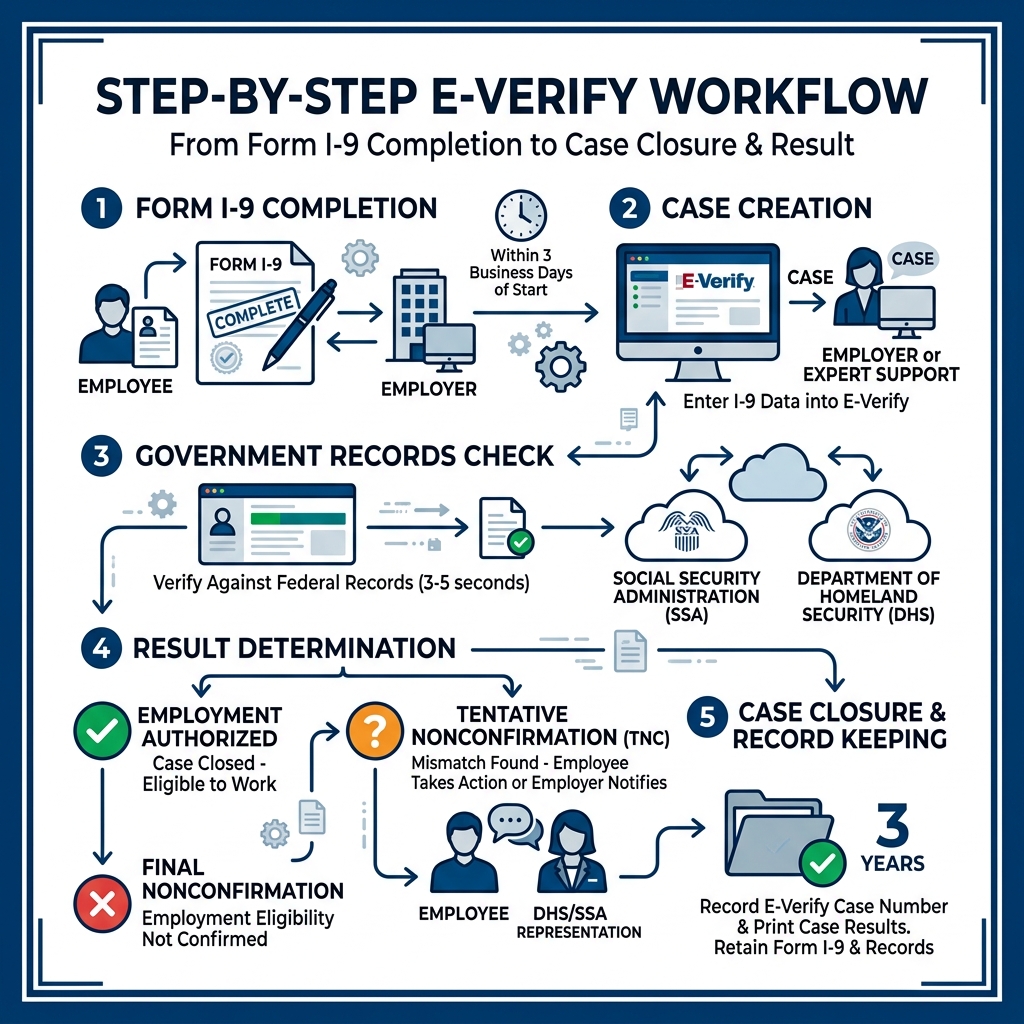
E-Verify is a federal online system run by the Department of Homeland Security (DHS) in partnership with the Social Security Administration (SSA). It checks a new hire’s Form I-9 data against government records and returns a result in 3 to 5 seconds. Sounds simple, right?
In practice, it’s anything but.
Between strict timelines, photo upload requirements, mismatch notices, and state-specific mandates, even experienced HR teams run into costly mistakes. And with more than 20 states now requiring E-Verify for at least some employers, the stakes keep rising.
That’s where professional support makes all the difference.
Explore more about E-Verify expert support:
Understanding the E-Verify and Form I-9 Connection
The relationship between Form I-9 and E-Verify is like a lock and a key. You cannot have one without the other. While every employer in the United States must complete Form I-9 for every new hire, E-Verify is the digital layer that confirms the information on that form is actually authentic.
The process begins with Section 2 of the Form I-9. Once the employee presents their identity and employment authorization documents, we must examine them and complete the form. Under federal rules, an E-Verify case must be created no later than the end of three business days after the employee’s first day of work for pay.
When you use the system correctly, it provides an initial case result within 3 to 5 seconds. This real time verification is a massive advantage, but it requires perfect data entry. Even a small typo in a Social Security number can trigger a mismatch that halts the hiring process. You can Learn about the Form I-9 through official channels, but managing the daily grind of these submissions is where many businesses struggle. For those looking to offload this technical burden, getting More info about E-Verify services is often the first step toward peace of mind.
Why Your Business Needs E-Verify expert support
You might wonder why you can’t just handle this in-house. While the system is “free” to use, the hidden costs of administrative burden and compliance risk are high. If you are a federal contractor, participation isn’t just a good idea, it is a contractual requirement. Furthermore, states like Arizona, Georgia, and North Carolina have strict mandates that can lead to business license suspension if you fail to comply.
E-Verify expert support acts as a shield for your company. We help you navigate voluntary enrollment if you are in a high-scrutiny industry like healthcare or construction. By having experts manage your account, you ensure that every case is handled uniformly, reducing the risk of “selective verification” which can lead to discrimination lawsuits. We take the guesswork out of the Memorandum of Understanding (MOU) and ensure your team is always following the latest DHS guidelines.
Navigating Common Challenges with E-Verify expert support
Even with the best intentions, technology can be finicky. One of the most common hurdles employers face is the dreaded Tentative Nonconfirmation (TNC). This happens when the information submitted doesn’t immediately match DHS or SSA records. It doesn’t mean the person isn’t authorized to work, but it does mean there is a discrepancy that needs fixing.

Another major pain point is photo matching. If an employee presents a Permanent Resident Card or Employment Authorization Document, E-Verify will display a photo on the screen. We must compare that digital photo to the actual document provided by the employee. If the scan is poor quality, or if the employer faxes the document instead of using a high-resolution scan, the system might flag it.
Using an E-Verify Employer Agent Service allows you to bypass these technical glitches. We know exactly how to assess document quality and handle the system’s quirks so your hiring workflow stays on track.
| Result Type | What it Means | Action Required |
|---|---|---|
| Employment Authorized | Information matches government records. | Close the case and record the number. |
| Tentative Nonconfirmation (TNC) | Information does not match government records. | Notify employee and allow them to contest. |
| Final Nonconfirmation | Eligibility could not be confirmed after a contest. | Terminate employment or notify DHS of intent to keep. |
Handling Mismatches and Case Closures
When a TNC occurs, the clock starts ticking. The employee has exactly eight federal government working days to contact the appropriate agency to contest the finding. During this time, you cannot take any adverse action against them, such as firing them or delaying their training.
Once the process is finished, the case must be closed. This is a step many employers forget. Leaving cases open is a major compliance red flag during audits. Whether the result is positive or negative, every case needs a final resolution in the system. If you decide to continue employing someone after a Final Nonconfirmation, you must notify DHS within 72 hours. Failing to follow these specific steps can lead to accusations of Reporting Violations and significant fines.
The Role of Employer Agents and Remote Verification
The world of work has changed, and remote hiring is now the norm for many businesses. This creates a challenge for I-9 and E-Verify compliance because the employer is still required to physically (or virtually, under specific rules) examine documents.
For employers enrolled in E-Verify, the DHS Alternative Procedure allows for virtual document inspection via a live video call. This is a huge benefit, but it comes with strict record-keeping requirements. You must retain clear copies of all documents and follow a specific workflow to stay legal.
Our E-Verify Employer Agent Guide 2026 provides a roadmap for how to handle these modern hiring scenarios without losing sleep over an ICE audit. We act as your authorized representative, ensuring that remote verifications are handled with the same level of care as in-person ones.
Leveraging E-Verify expert support for Compliance
Managing an E-Verify account involves several roles. You have Corporate Administrators who oversee multiple locations and Employer Agents who handle the actual case submissions. By choosing E-Verify Outsourcing, you effectively hire a team of experts to fill these roles for you.
We ensure your account is secured through Login.gov and that your MOU is always up to date. We also provide the required posters that must be displayed in your workplace (or digitally for remote teams) to inform applicants of their rights. This comprehensive approach ensures that you aren’t just “using” E-Verify, but you are mastering it.
Frequently Asked Questions about E-Verify Support
We hear many of the same questions from business owners who are trying to stay compliant while growing their teams. Here are the most critical answers you need to know.
What should I do if I find an I-9 error after opening a case?
Mistakes happen. If you realize you entered the wrong birth date or misspelled a name after the E-Verify case is already open, do not just leave it. You should go back to the original Form I-9, strike through the incorrect information with a single line, enter the correct data, and then initial and date the change.
In the E-Verify system, you should close the existing case and select the reason that the case was opened with incorrect data. Then, you simply create a new case with the correct information. This creates a clear paper trail that shows you found the error and fixed it promptly, which looks much better to auditors than trying to hide the mistake.
How does E-Verify+ improve the hiring process?
E-Verify+ is the latest evolution of the system, designed to make life easier for both you and your new hires. It allows for a more digital integration where employees can upload their own documents directly to the system. This reduces the amount of manual data entry your HR team has to perform, which naturally lowers the chance of typos. It also provides more transparency for the employee, letting them see the status of their verification in real time.
When and how should I contact E-Verify support?
If you run into a technical wall, the E-Verify Contact Center is available Monday through Friday, from 8 a.m. to 8 p.m. Eastern time. They can help with password resets and general policy questions. However, keep in mind that their normal email response time is two federal government working days. When you have a hiring deadline today, waiting 48 hours for an email can be stressful. This is why having E-Verify expert support on speed dial is so valuable, we provide the immediate answers the government help desk might not.
Getting Started with Professional Assistance
At Valley All States Employer Service, we believe that you should focus on running your business while we focus on the paperwork. The enrollment process for E-Verify can be daunting, involving complex user manuals and hours of webinars. We skip the learning curve and get you compliant from day one.
Whether you are dealing with a surge of new hires or you are trying to clean up old I-9 records, we are here to help. Our team stays on top of every update to the M-274 Handbook and every new state mandate so you don’t have to. We provide an impartial, efficient, and expert approach to workforce eligibility that minimizes your administrative burden.
Ready to simplify your hiring process? You can Learn more about our I-9 compliance services and see how we can turn a complex federal requirement into a seamless part of your onboarding. Contact our team today and let us handle the verification while you handle the growth.