
What It Really Means to Enroll in E-Verify (And Why It Matters for Your Business)
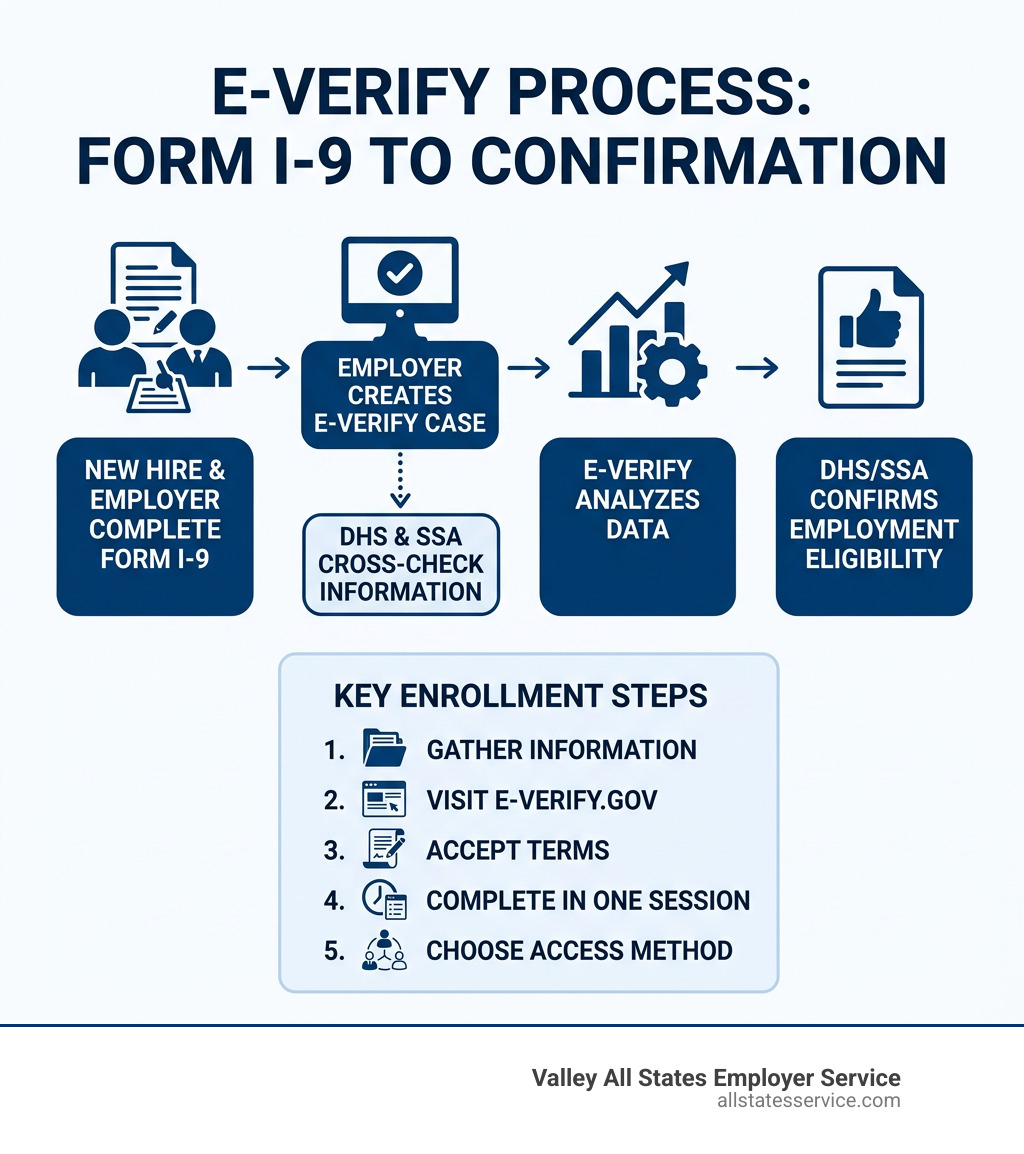
Enroll in E-Verify by following these key steps:
- Gather your information – company legal name, EIN, addresses, hiring sites, employee count, and NAICS code
- Visit the official site – go to e-verify.gov and click “Enroll Now”
- Accept the Terms of Use and submit your email to receive a one-time activation link
- Complete enrollment in one session – you cannot save progress midway
- Choose your access method – Employer, Employer Agent, Corporate Administrator, or Web Services
- Add your Program Administrator and Signatory
- Submit your application and print your signed Memorandum of Understanding (MOU)
Hiring a new employee comes with a lot of moving parts. Between onboarding paperwork, benefits setup, and team introductions, verifying work authorization can feel like just one more item on an already long list.
That’s where E-Verify comes in.
E-Verify is a free, web-based system run by the Department of Homeland Security (DHS) in partnership with the Social Security Administration (SSA). It lets employers quickly confirm that new hires are legally authorized to work in the United States, by cross-checking information from Form I-9 against federal records.
Is your business ready to streamline hiring and stay on the right side of compliance?
The good news: the enrollment process is more straightforward than most HR managers expect. And once you’re set up, verifying new hires takes just minutes.
Let’s explore exactly how to get your business enrolled, step by step.
Watch the E-Verify At-A-Glance Video for a quick 8-minute overview before you dive in.
Enroll in everify helpful reading:
Preparing Your Business for Enrollment
Before you sit down at your computer to enroll in everify, a little preparation goes a long way. Think of it like gathering your ingredients before you start cooking. Because the system does not allow you to save your progress and return later, having all your company details in front of you is the best way to ensure a smooth, frustration-free experience.

You will need to have your legal business name exactly as it appears on your tax documents. Along with that, keep your Employer Identification Number (EIN) handy. You will also be asked for your primary physical address where your business operates, as well as a separate mailing address if you use a P.O. Box or a different corporate office for mail.
To help you stay organized, we recommend reviewing the official Enrollment Checklist. This document is a lifesaver for busy HR professionals. It covers everything from your total number of employees to your North American Industry Classification System (NAICS) code. If you aren’t sure what your NAICS code is, don’t worry, the enrollment site provides a search tool to help you find the one that best matches your industry.
For those who want a deeper dive into the technical side, you can also learn about E-Verify account setup to understand how the digital infrastructure supports your business. Preparation is the first step toward compliance, and it ensures you won’t get timed out while searching for a stray document.
Information Required to enroll in everify
Beyond the basic company data, you need to designate specific roles within your organization. The two most important roles are the Signatory and the Program Administrator.
The Signatory is the person who has the legal authority to bind the company to the E-Verify terms. This is often an owner, a CEO, or a high-level executive. They will be the one “signing” the Memorandum of Understanding (MOU). The Program Administrator, on the other hand, is the person who will actually manage the account day-to-day, adding other users and creating cases. In smaller businesses, these two roles are often filled by the same person.
If you are still asking, “What is E-Verify?” at this stage, it is simply the digital bridge between your Form I-9 and federal databases. You will also need to list your hiring site locations by state. If you have offices in Maryland and Virginia, you must indicate which sites will be participating.
For federal contractors, there is an extra piece of the puzzle. You will need your Unique Entity Identifier (UEI). This is specifically for companies subject to the Federal Acquisition Regulation (FAR) E-Verify clause. Gathering these details saves time during the session and prevents the “session timeout” screen from ruining your afternoon.
How to enroll in everify Successfully
Now that you have your documents ready, it is time to head to the portal. The process is designed to be intuitive, but there are a few technical “gotchas” to keep in mind.
First, visit the official website and select “Enroll Now.” You will be asked to accept the Terms of Use before you can proceed. Once you submit your work email address, the system will send you a one-time activation link. This link is your golden ticket into the enrollment application.
You can start the process here: ENROLL NOW.
One of the most important tips we can give you is to complete the process in one session. If you walk away to take a phone call or grab lunch, the system may log you out for security reasons, and you will have to start from the beginning. We also strongly recommend using a desktop computer. While mobile devices are great for checking email, the enrollment screens are data-heavy and much easier to navigate on a full-sized monitor.
For a more detailed walkthrough of the technical registration, check out our guide on The E-Verify registration process. If you prefer a visual demonstration, the E-Verify Overview Webinar is an excellent resource that can even earn you professional development credits.
Final Steps to enroll in everify
As you move through the screens, you will have a chance to review all the company information you entered. This is the time to double-check that EIN and those addresses. If you have a large number of hiring sites, you don’t have to enter them one by one. E-Verify offers a bulk upload CSV option, which is a massive time-saver for growing companies.
For a comprehensive look at the entire journey, see our complete guide to E-Verify sign up. The final hurdle is signing the Memorandum of Understanding (MOU). This is the formal agreement between your company, the DHS, and the SSA.
Once the Signatory has electronically signed the document, make sure to print a copy for your records. Many states and federal auditors will want to see this signed MOU as proof of your participation. Your enrollment is not complete until you submit the application at the very end of the process.
Choosing Your Access Method and Category
Not every business uses E-Verify in the same way. During enrollment, you will be guided through four questions to help determine your “Access Method.” This essentially tells the system who is going to be clicking the buttons.
| Access Method | Best For… |
|---|---|
| Employer | Most businesses that verify their own employees. |
| Employer Agent | Companies that verify employees for other businesses. |
| Corporate Administrator | Large firms managing multiple E-Verify accounts. |
| Web Services | Companies using their own software to connect to E-Verify. |
Most of our clients fall into the “Employer” category. However, if you are a larger organization with multiple branches, you might consider the Corporate Administrator option to keep everything centralized. If you are interested in how a third party can handle this for you, our E-Verify employer agent guide explains how that relationship works.
You will also need to declare your “Employer Category.” This asks if you are a federal contractor or a government entity. If you have a federal contract that includes the FAR E-Verify clause, you are required to use the system for both new hires and sometimes existing staff assigned to the contract. Selecting the right category ensures proper system access and keeps you compliant with specific federal mandates.
Securing Your Account with Login.gov
Security is a top priority for the DHS. To enroll in everify and maintain your account, you will need to use Login.gov. This is a secure sign-in service used by many government agencies to ensure that the person logging in is actually who they say they are.
Login.gov provides enhanced account protection through multi-factor authentication (MFA). This means that even if someone steals your password, they can’t get into your account without a second “factor,” like a code sent to your phone or an authenticator app.
When you are Signing in to E-Verify with Login.gov, you will link your E-Verify user ID to your Login.gov account. A critical rule to remember: never use a shared email address. Each user must have their own unique email and Login.gov account. Using “HR@company.com” for five different people is a recipe for security lockouts and compliance headaches.
The process also involves identity proofing. You may need to answer a few questions about your history or provide a photo of your ID to prove your identity. This is part of the broader move toward Accessing Government Services via ID.me and Login.gov, ensuring that sensitive employee data stays protected.
Frequently Asked Questions
How long does the enrollment process take?
The actual online enrollment usually takes about 30 to 45 minutes if you have your checklist ready. If you choose to attend a full training webinar, those typically last about an hour. For individuals creating a myE-Verify account, it is even faster, usually taking just 5 to 10 minutes. Efficiency depends on having your checklist ready before you start.
Can I save my progress and finish later?
Unfortunately, no. There is no “save for later” button. If you close your browser or your session times out due to inactivity, you will have to restart the process. This is why we emphasize having a stable internet connection and all your data gathered before you begin. Use the activation link sent to your email immediately to avoid it expiring.
What happens after I submit my application?
Once you hit submit, USCIS will review your application. You will receive an email confirmation once you are approved. From there, you can begin the user registration for the rest of your staff. It is vital to understand the E-Verify employer requirements once you are active. For instance, you must start verifying new hires within three days of their start date. You should also ensure that any staff using the system complete the required tutorial and mastery test.
Streamlining Your Employment Compliance
We know that even “easy” processes take time away from growing your business. At Valley All States Employer Service, we specialize in taking the weight of E-Verify off your shoulders. We provide outsourced workforce eligibility verification that is expert, impartial, and highly efficient.
By letting us handle your E-Verify processing, you minimize the administrative burden on your HR team and significantly reduce the risk of data entry errors that can lead to “Tentative Non-Confirmations.” We offer impartial compliance support to ensure your business stays meeting all federal and state requirements without the stress.
Ready to simplify your hiring process and ensure your workforce is fully authorized?
Get started with our E-Verify services today and let us handle the paperwork while you focus on your people.