
I-9 employer responsibilities: 3 Essential Steps
Why Understanding Your I-9 Employer Responsibilities Matters
I-9 employer responsibilities are a non-negotiable legal obligation for every U.S. employer. The Immigration Reform and Control Act (IRCA) requires employers to verify every new hire’s identity and employment authorization using Form I-9 from U.S. Citizenship and Immigration Services (USCIS).
Your core I-9 responsibilities include:
- Provide the form – Give new hires the complete Form I-9 and instructions
- Employee completes Section 1 – By the end of their first day of work
- Employer completes Section 2 – Within 3 business days of the hire date, after examining acceptable documents
- Retain the form – For 3 years after hire date OR 1 year after termination (whichever is later)
- Reverify when needed – Before temporary work authorization expires
- Make forms available – For government inspection when requested
I-9 compliance errors carry serious consequences. Audits by the Department of Homeland Security and Immigration and Customs Enforcement can result in fines from hundreds to thousands of dollars per form. Simple paperwork errors add up fast.
The good news is that with solid systems, I-9 compliance is manageable. This guide breaks down what to do, when to do it, and how to avoid the most common mistakes.
Understanding your I-9 employer responsibilities protects your business and lets you focus on growth, not government audits.
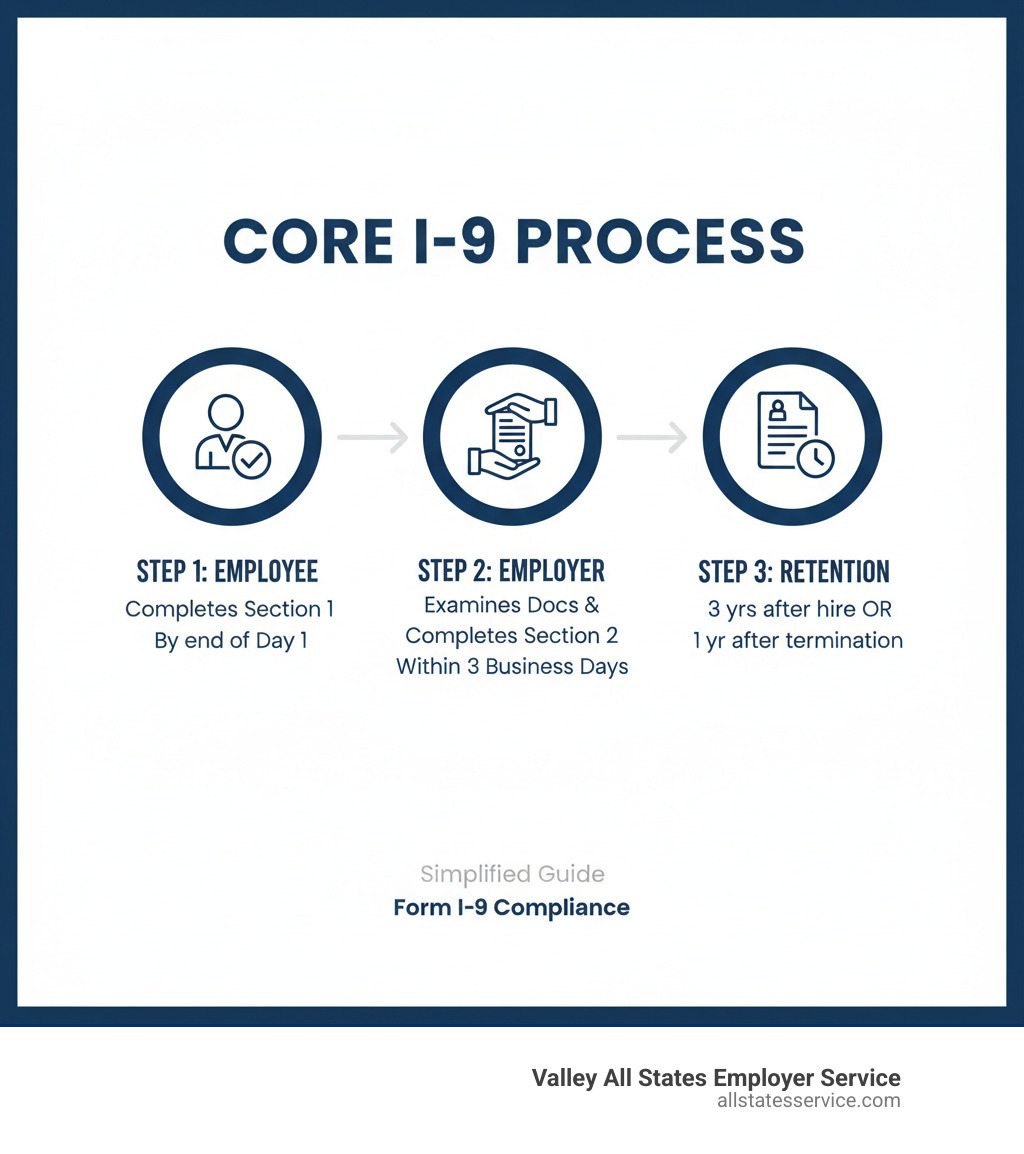
The Core I-9 Process: A Step-by-Step Breakdown
Every U.S. employer must complete Form I-9 for each new hire. The Immigration Reform and Control Act requires this to confirm everyone is legally authorized to work in the United States. The form is straightforward, but timing is critical. Missing deadlines can trigger penalties, so let’s review the process.
Employee’s Role: Completing Section 1
The new hire must complete Section 1 of Form I-9 by their first day of work. They provide their legal name, address, date of birth, and Social Security number (if applicable) and attest to their citizenship or immigration status. The employee signs and dates Section 1, confirming its accuracy under penalty of perjury. A preparer or translator can assist if needed and must complete the corresponding certification section.
Your job is to provide the form and ensure it’s completed on time. The USCIS Form I-9 Employee Information Sheet is a helpful resource for new hires. This step is a key part of your new hire paperwork process.
Employer’s Role: Completing Section 2
After the employee completes Section 1, you have three business days from their start date to complete Section 2. For hires lasting less than three days, both sections must be completed on day one.
This part of your I-9 employer responsibilities is hands-on. You must physically examine original, unexpired documents proving both identity and work authorization. The employee chooses from the acceptable document lists: either one List A document (like a U.S. passport) or a combination of one List B document (like a driver’s license) and one List C document (like a Social Security card).
The full Form I-9 Acceptable Documents list is on the USCIS site. The documents must be unexpired originals that appear genuine and relate to the employee. You are not expected to be a document expert, just to check for facial legitimacy.
Never tell an employee which documents to bring. This is document abuse and violates anti-discrimination laws. The choice is theirs. Record the document information in Section 2, then sign and date the form, attesting that you believe the documents are genuine. Our I-9 Section 2 Complete Guide and guide on verifying I-9 documents offer more detail.
Reverification and Rehires: Using Supplement B
Your I-9 employer responsibilities may continue after the initial hire. Supplement B (formerly Section 3) is used to update employment authorization.
Reverification is required before an employee’s temporary work authorization expires. Notify employees at least two weeks in advance so they can provide updated documents. You do not need to reverify expired U.S. passports, passport cards, Permanent Resident Cards, or List B identity documents.
For rehires within three years of the original I-9 completion, you can use Supplement B to update the form instead of starting over. It’s also used for legal name changes. Our guide on the I-9 process for rehires covers these scenarios. For a full overview, see our resource on filling out employment eligibility verification.
Mastering Key I-9 Employer Responsibilities and Compliance Rules
Your I-9 employer responsibilities continue long after the first week. Ongoing compliance involves managing retention, preventing discrimination, and staying current with rule changes. This is the foundation of a legally sound workplace. Here’s what you need to know to protect your business.

Form I-9 Retention and Storage Requirements
A key I-9 employer responsibility is retention. You must keep each Form I-9 for three years after the hire date OR one year after termination, whichever is later. For example, if an employee hired March 1, 2023, leaves March 1, 2024, you must keep the form until March 1, 2026 (three years from hire). If an employee hired Jan 1, 2020, leaves Jan 1, 2024, you keep it until Jan 1, 2025 (one year from termination).
Store I-9s securely and separately from other personnel files. This protects sensitive data and simplifies retrieval for inspections by agencies like ICE. You typically get at least three business days’ notice for an inspection. Whether you use paper or electronic storage, consistency and security are key. Our I-9 Record Keeping guide offers more detail on organizing files for audit readiness.
A Key I-9 Employer Responsibility: Avoiding Discrimination
The I-9 process has strict anti-discrimination rules. You cannot treat employees differently based on national origin, citizenship, or immigration status during verification. This means you cannot request extra or specific documents from certain employees, or reject valid documents with future expiration dates. This is called document abuse.
The employee chooses which documents to present from List A or Lists B and C. Your job is only to verify that the documents appear genuine and relate to the employee. The Department of Justice’s Immigrant and Employee Rights Section (IER) investigates and penalizes these violations. Fair treatment is not just about avoiding fines; it’s about building a respectful workplace and is a core part of Human Resources Compliance and Employer HR Compliance.
Staying Current: Remote Verification and Recent Updates
I-9 employer responsibilities are constantly changing, especially with the rise of remote work. Temporary COVID-19 flexibilities for remote verification ended on July 31, 2023. Employers who used them had until August 30, 2023, to complete in-person physical inspections if not eligible for the new alternative.
A permanent alternative procedure launched on August 1, 2023. If you are enrolled in E-Verify and in good standing, you can inspect I-9 documents remotely via live video. You must examine copies of the documents during the call, retain clear copies, and note the use of the alternative procedure on the form.
A new Form I-9 version was released on August 1, 2023, and became mandatory on November 1, 2023. It includes a checkbox for the remote verification procedure. Using an outdated form is a common violation. Staying informed is essential for compliance. Our guides on USCIS I-9 Remote Verification, I-9 for Remote Employees, and I-9 Form Updates can help.
The High Cost of Non-Compliance: Common Mistakes and Penalties
Understanding the penalties for non-compliance is a critical part of your I-9 employer responsibilities. Immigration and Customs Enforcement (ICE) conducts regular audits, and the financial consequences of violations can be severe. Even well-intentioned employers make mistakes, but all violations carry real consequences. Let’s review common errors and their penalties.

Common I-9 Mistakes to Avoid
Most I-9 violations are unintentional but still costly. Here are common mistakes:
- Timing issues: Failing to complete Section 1 by the employee’s first day or Section 2 within three business days are common technical violations that add up during an audit.
- Incomplete forms: Missing signatures, dates, or leaving fields blank in Section 1 or 2 each count as a separate violation.
- Improper corrections: To fix an error, draw a single line through it, write the correction, then initial and date the change. Never use correction fluid, erase, or backdate forms.
- Accepting expired documents: Accepting an expired document during initial verification is a violation. For temporary work authorizations, you must reverify eligibility before the document expires.
- Using outdated forms: Using an outdated Form I-9 is a violation. The current version became mandatory on November 1, 2023.
- Document abuse: Requesting specific or extra documents, or rejecting valid-looking documents, is document abuse and violates anti-discrimination laws.
- Poor record retention: Not retaining forms for the required period (3 years after hire or 1 year after termination, whichever is later) is a violation.
These mistakes are preventable. Our Auditing I-9 Forms guide can help you spot and correct issues.
Understanding I-9 Penalties and Audits
An ICE audit begins with a Notice of Inspection (NOI), giving you at least three business days to produce your Forms I-9 for review. Financial penalties fall into several categories and add up quickly.
- Paperwork violations: These include technical errors. Fines range from $272 to $2,701 per violation. A single, repeated error across many forms can lead to six-figure fines.
- Knowingly hiring or continuing to employ unauthorized workers: This carries the steepest penalties, ranging from $676 to over $21,563 per unauthorized worker, depending on the offense number. Criminal penalties are also possible. See our I-9 Compliance Penalties guide for details.
- Discrimination violations: These fines range from $445 to $3,563 per individual for a first offense, with higher penalties for repeat violations.
Systematic errors can lead to financially devastating fines. Our I-9 Audit Penalties Complete Guide and ICE I-9 Audit resources can help you prepare. The bottom line is that I-9 employer responsibilities are not optional. The cost of non-compliance is too high, but with proper systems and training, compliance is achievable.
Building a Compliant Program: Best Practices and Tools
The best way to manage I-9 employer responsibilities is to build proactive systems. The right tools and practices protect your business and free you up to focus on growth.
The Role of E-Verify in Fulfilling I-9 Employer Responsibilities
E-Verify is a web-based system from DHS and the SSA that electronically confirms a new hire’s authorization to work in the U.S. After completing Form I-9, you submit information to E-Verify. The system compares it to government records, usually returning an “Employment Authorized” result in seconds. A mismatch results in a Tentative Nonconfirmation (TNC), giving the employee an opportunity to resolve the issue.
E-Verify is mandatory for federal contractors and in some states like Maryland. Many optional users adopt it for added protection against “knowing hire” violations. Enrollment is also required to use the remote I-9 verification procedure.
E-Verify is a key partner in managing your I-9 employer responsibilities. It streamlines verification and documents your compliance efforts. Our guides on E-Verify Employment Verification and the I-9 E-Verify Ultimate Guide explain how to use this tool, which you can find at E-Verify.
[TABLE] comparing Paper vs. Electronic I-9 Systems
You can manage Forms I-9 with paper or electronic systems. Both work, but they offer different experiences.
| Feature | Paper I-9 System | Electronic I-9 System |
|---|---|---|
| Completion | Manual filling, prone to illegibility and errors | Guided, error-checking, often pre-filled fields |
| Error Rates | Higher, relies on human vigilance | Lower, built-in validation and alerts |
| Storage | Physical files, requires secure space | Digital records, cloud-based, secure servers |
| Retrieval | Time-consuming, physical search | Instant, searchable, accessible from anywhere |
| Audit Readiness | Requires manual organization and review | Quick generation of audit reports, easy access |
| Security | Vulnerable to physical damage, theft, unauthorized access | Encrypted, access controls, audit trails |
| Cost | Low initial cost, higher labor for management | Higher initial setup, lower long-term labor costs |
| Compliance | Requires strict manual adherence to rules | Automates compliance checks, tracks deadlines |
Paper systems are simple to start but become cumbersome. As you grow, storage and retrieval for audits become difficult. Manual processes also lead to more errors. Electronic I-9 systems are a game-changer. They guide users, flag errors, and send automatic reminders for reverification. All forms are stored in a secure, searchable database, allowing for instant access and quick report generation for audits.
They also integrate with E-Verify for a seamless workflow. The investment pays off in reduced errors, lower admin costs, and peace of mind. Our Electronic I-9 Solutions are designed to simplify compliance.
Training Your Team and Conducting Self-Audits
Technology is great, but knowledgeable people are essential. Training everyone involved in the I-9 process is a key part of your I-9 employer responsibilities. All HR staff and hiring managers need to understand the entire I-9 process. Our I-9 Compliance Training covers the form’s legal significance, document review, anti-discrimination rules, error correction, and recent updates.
Training should be ongoing to cover regulatory changes and new team members. A well-trained team prevents problems and ensures fair, confident processing. Regular I-9 Self Audit sessions are also crucial. Internal audits help you find and fix mistakes before a government inspection. Review a neutral sample of forms, correct any errors properly, and use the findings to improve your process.
Self-audits are preventive maintenance that demonstrates good faith. Combined with training and the right tools, they form a complete approach to Compliance Management Solutions and Workplace Compliance Solutions.
Frequently Asked Questions about I-9 Compliance
Here are answers to common questions about I-9 employer responsibilities.
How do I correct a mistake on a completed Form I-9?
If you find an error, the key is to correct it transparently. On paper forms, draw a single line through the error, write the correct information, then initial and date the change. Never use correction fluid, erase, or otherwise obscure the original entry. This can raise red flags during an audit.
The employee must correct Section 1 errors, while the employer corrects Section 2 or Supplement B. For a form with major errors, you may need to complete a new one, attach it to the original, and add a signed explanation. Crucially, never backdate corrections. Always use the current date.
What should I do if an employee’s work authorization is about to expire?
Proactively managing expiring work authorization is a key I-9 employer responsibility. You must reverify an employee’s eligibility before their temporary work authorization document expires. Track expiration dates and set reminders to notify the employee at least two weeks in advance. This provides enough time to gather new documents.
To reverify, use Supplement B of Form I-9. The employee presents a new, unexpired document proving work authorization. You examine it, record the details in Supplement B, and sign and date it. Important: You do not need to reverify U.S. citizens or lawful permanent residents, even if their documents (like a passport or Permanent Resident Card) expire.
Can I-9 verification be done remotely?
Yes, remote I-9 verification is possible, but only for eligible employers. If your company is enrolled in E-Verify and in good standing, you can use the permanent alternative procedure for remote document inspection. This helps manage I-9 employer responsibilities for remote teams.
The process involves a live video call where the new hire shows you their documents. You must examine clear copies (front and back) during the call and retain them with the Form I-9. You must also note on the form (in the “Additional Information” field of Section 2) that you used the alternative procedure.
The key requirements are E-Verify enrollment, a live video inspection, and retaining clear copies. If you are not enrolled in E-Verify, you must arrange for a physical document inspection. Our guide, Can I-9 Verification Be Done Remotely?, provides a step-by-step walkthrough.
Simplify Your Compliance and Focus on Your Business
Managing your I-9 employer responsibilities doesn’t have to be overwhelming. With the right approach and support, compliance can be a smooth part of your business operations, not a source of stress. Every hour spent worrying about I-9 compliance is an hour not spent on growing your business. The administrative burden of tracking deadlines, reverifications, and rule changes can drain your resources.
That’s where Valley All States Employer Service comes in. We simplify E-Verify and workforce eligibility verification. Our expert, efficient processing reduces errors and administrative overhead for businesses across the U.S., including Lutherville, MD, and all of Maryland. We handle the details so you can focus on your business.
Working with us builds a foundation of confidence. You’ll know your workforce is verified, your records are in order, and you’re ready for any inspection. For a complete overview, explore our Form I-9 Ultimate Guide, which offers detailed guidance on all your obligations.
Ready to simplify your I-9 employer responsibilities? Let’s streamline your HR compliance together. Reach out to our team today to see how much easier compliance can be.