
Why I-9 Electronic Signatures Matter for Today’s Employers
I-9 electronic signatures are legally valid and widely used by employers to streamline the employment verification process while maintaining full compliance with USCIS regulations. Here’s what you need to know:
Quick Facts About I-9 Electronic Signatures:
- Legal Status: Fully permitted under federal regulations (8 CFR 274a.2) and the E-SIGN Act
- Physical Inspection Still Required: You must physically or remotely examine documents before electronic signing
- System Requirements: Your electronic system must maintain audit trails, ensure data integrity, and provide secure storage
- When You Can Use Them: After completing the mandatory document inspection in Section 2
- What You Need: A compliant software system or properly configured in-house solution that meets USCIS standards
The end of COVID-19 flexibilities on July 31, 2023, brought back the requirement for physical document inspection. But here’s the good news: that doesn’t mean you’re stuck with paper forms, filing cabinets, and manual processes.
You can still modernize your I-9 workflow with electronic signatures. The key is understanding that electronic signing happens after you’ve met the physical inspection requirement, whether that’s in person, through an authorized representative, or via the new remote examination option for E-Verify employers.
Many HR teams assume that “physical inspection” means “paper forms.” That’s not true. You can inspect documents in person and then use electronic signatures to complete and store Form I-9 digitally. This approach gives you the compliance you need and the efficiency you want.
The stakes are high. A single missing or improperly completed I-9 can result in fines of approximately $2,800. With the current base fine structure, an audit covering just 100 files could lead to penalties approaching $280,000. That’s why getting your electronic signature process right matters so much.
Quick I-9 electronic signatures definitions:
The New Normal: Blending Physical Inspection with Digital Signatures
The landscape of Form I-9 compliance underwent a significant shift when the temporary exception period, which began in March 2020 due to the pandemic, officially ended on July 31, 2023. This meant a full return to the requirement for physical inspection of identity and employment authorization documents. For employees hired during the pandemic waiver period, employers were given until August 30, 2023, to physically re-inspect those documents. The Form I-9 exception period has ended.
This return to physical inspection might sound like a step backward for those who acceptd digital onboarding. However, it’s important to understand that the physical inspection requirement applies to the documents, not the entire I-9 process. You can still leverage the power of I-9 electronic signatures and digital storage after the mandatory document review is complete. This approach allows us to keep our onboarding processes efficient and compliant.
The Standard In-Person Process
Even with electronic signatures, the core of the I-9 process remains the same: verifying an employee’s identity and their legal authorization to work in the United States.
Here’s how the standard in-person process works:
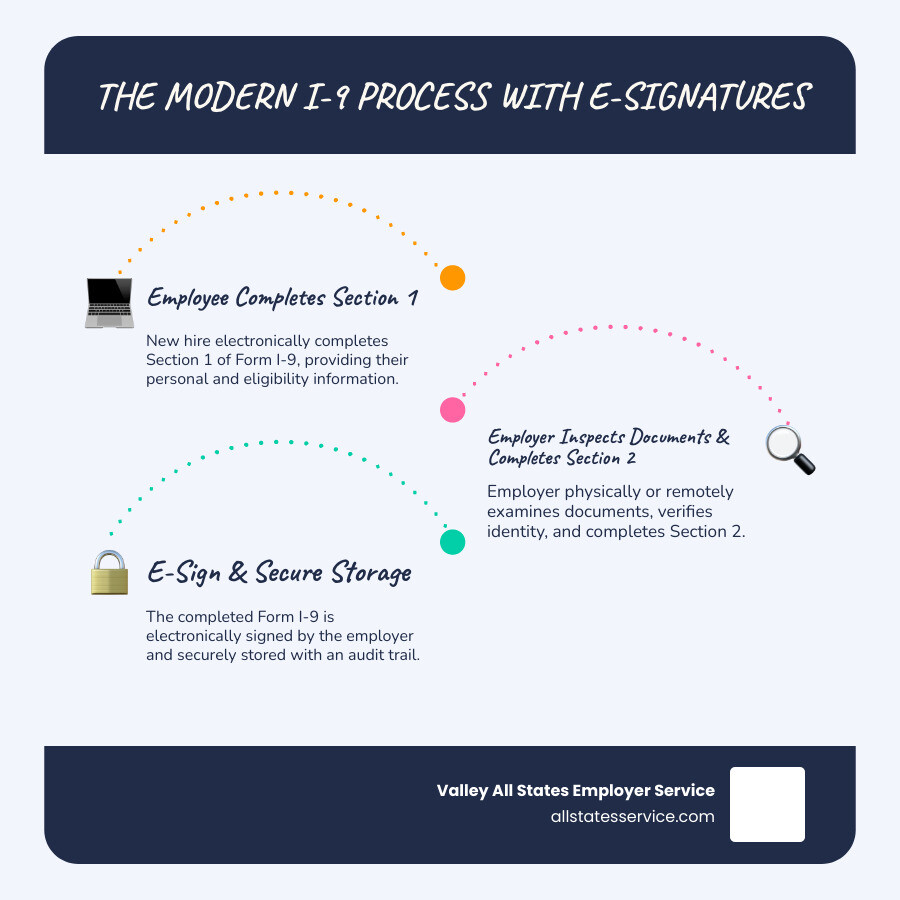
- Employee Completes Section 1: The new hire fills out Section 1 of Form I-9, attesting to their employment eligibility. This can easily be done electronically using a compliant system.
- Employee Presents Documents: The employee presents original, unexpired documents from the List of Acceptable Documents to their employer or an authorized representative.
- Employer Examines Documents: The employer (or authorized representative) must physically examine these documents. The goal is to determine if they reasonably appear to be genuine and relate to the employee presenting them. If a document looks fraudulent, we must not accept it and ask the employee to provide a different document. We can even report suspected fraud through the ICE Tip Form.
- Employer Completes Section 2: Once satisfied, the employer records the document information into Section 2 of the Form I-9.
- Electronic Signature After Verification: Only after this physical inspection and data entry is complete, the employer or authorized representative can then affix their I-9 electronic signature to Section 2, certifying that they have reviewed the documents. The employee can also electronically sign Section 1 if they haven’t already.
This blend ensures we meet the physical inspection mandate while still benefiting from digital efficiency.
Handling Remote Hires
What about our remote employees? The physical inspection requirement can seem tricky for distributed teams. Fortunately, there are compliant solutions.
Traditionally, for remote hires, employers could appoint an authorized representative to conduct the in-person document review on their behalf. This could be anyone the employer designates, such as a notary public, a family member, or a friend. However, as the employer, we are ultimately liable for any violations in connection with Form I-9 or the verification process, even those committed by our designated representatives. It’s crucial to provide clear instructions and potentially even use technology like video conferencing to guide the representative through the process.
A significant update arrived with the new Form I-9 dated ’08/01/23′, which became mandatory on November 1, 2023. This form includes an alternative procedure for employers enrolled in E-Verify. If we are an E-Verify participant, we may now remotely examine employee documents via live video interaction. This is a game-changer for fully remote workforces, allowing us to maintain a fully digital onboarding experience without relying on third-party physical inspections. This alternative procedure was detailed in a Federal Register notice published on July 25, 2023. To use this, we must be enrolled in E-Verify and follow specific guidelines.
Understanding the Rules for I-9 Electronic Signatures and Storage
When it comes to using I-9 electronic signatures and digital storage, we’re not operating in a regulatory vacuum. The federal government, specifically USCIS and DHS, has established clear guidelines to ensure the integrity and authenticity of these vital employment records. These rules are detailed in regulations like 8 CFR 274a.2.
The legal validity of electronic signatures for Form I-9 is firmly established under the E-SIGN Act and specific DHS regulations. In fact, the interim final rule permitting electronic storage of Form I-9, published in 2006, was estimated to reduce the burden on businesses by a staggering 650,000 hours annually! This demonstrates the government’s recognition of the efficiency gains that digital processes can bring.

We must remember that the completed Form I-9 is not filed with the Department of Homeland Security (DHS). Instead, it’s retained by us, the employer, and must be made available for inspection upon request by Immigration and Customs Enforcement (ICE) investigators or other authorized federal officials. This means our electronic system must be robust and readily accessible.
Key Requirements for Your Electronic System
If we choose to use an electronic system for Form I-9, whether for completion, signature, or storage, it must meet specific performance standards outlined in the regulations. These standards are designed to ensure the reliability and trustworthiness of our digital records.
Our electronic system must include:
- System Integrity, Accuracy, and Reliability: The system needs reasonable controls to guarantee that the information captured is accurate and hasn’t been tampered with.
- Security Controls: Robust measures are needed to prevent and detect any unauthorized or accidental creation, modification, alteration, deletion, or deterioration of electronically completed or stored Forms I-9. This includes access controls, regular backups, and recovery procedures.
- Indexing System and Searchability: We need an effective indexing system that allows us to easily identify and retrieve any electronically retained Form I-9. The system should be searchable by any data element, making audits much smoother.
- Legible Reproduction: The system must be able to reproduce a clear, legible, and readable paper copy of the electronic Form I-9 whenever needed. This is critical for inspection purposes.
- Quality Assurance Program: A periodic inspection and quality assurance program must be in place to regularly evaluate the electronic system for compliance with these standards.
- Government Access: Crucially, our electronic storage system must not be subject to any license or contract restrictions that would inhibit U.S. Government agencies from accessing or using the system on our premises. We must be prepared to provide the necessary hardware, software, and personnel for government officials to locate, retrieve, read, and reproduce any electronically stored Form I-9 and supporting documents.
These requirements ensure that our digital records are as reliable, if not more so, than traditional paper records.
The Critical Role of the Audit Trail
One of the most essential components of a compliant electronic I-9 system is a robust audit trail. Think of an audit trail as a digital breadcrumb path that carefully records every action taken on an electronic Form I-9.
A compliant audit trail must include:
- Unique User ID: Every individual who accesses or modifies a Form I-9 must be identified with a unique user ID.
- Timestamps: A precise date and time stamp must be recorded for every action.
- Tracking Changes: The audit trail must document any creation, completion, update, modification, alteration, or correction of the electronic Form I-9 record.
An audit trail is not required for simply viewing a form. It’s specifically for actions that alter the record. However, if our software cannot produce this critical event audit trail during an ICE audit, every I-9 processed through that system could be deemed “missing” or invalid, leading to potentially massive fines. This is a key differentiator between compliant and non-compliant software, and something we must scrutinize with our vendors.
Ensuring Legally Valid I-9 Electronic Signatures
For I-9 electronic signatures to be legally valid, the electronic signature system must meet specific criteria designed to ensure authenticity and integrity. This isn’t just about clicking a button; it’s about a secure and verifiable process.
Our system must ensure:
- Identity Verification: There must be a reliable method to verify the identity of the individual providing the electronic signature. This could involve login credentials, multi-factor authentication, or other secure means.
- Attestation Acknowledgment: The system must allow the individual to acknowledge that they have read and understood the attestation statement (e.g., in Section 1 or Section 2).
- Attaching the Signature: The electronic signature must be securely affixed to the Form I-9 at the time of the transaction.
- Time of Transaction: The system must capture the precise date and time the signature was applied.
- Providing a receipt to the employee upon request: While not mandatory unless requested, our system should be able to provide or transmit a confirmation of the Form I-9 transaction to the employee within a reasonable period if they ask for it. This helps maintain transparency and employee trust.
These standards, found in 8 CFR 274a.2(h) and (i), ensure that electronic signatures are just as binding and auditable as traditional wet signatures.
Choosing Your Path: Compliant Software vs. DIY Systems
When it comes to implementing I-9 electronic signatures and digital storage, employers generally have two paths: adopting a commercial software solution or attempting to build and maintain an in-house system. Each path has its own set of considerations, and choosing the right one is crucial for compliance, scalability, and user experience.
For most businesses, especially those in Maryland or elsewhere in the United States, a commercial software solution is often the more practical and safer choice. The compliance burden of building and constantly updating an in-house system to meet evolving USCIS and DHS regulations can be overwhelming. We aim to minimize errors and administrative burden for our clients, and that often means leveraging specialized expertise.
Key Features to Look for in an I-9 Software Solution
Not all electronic I-9 software is created equal. To ensure compliance and avoid costly pitfalls, we need to be discerning when evaluating solutions. Here are the must-have features:
- Current Form Version: The software must use the most current version of Form I-9, which is the ’08/01/23′ edition. It should automatically update to new versions as they are released by USCIS.
- Section Completion Order: A compliant system will enforce the correct order of completion, ensuring the employee finishes Section 1 before the employer (or authorized representative) completes Section 2.
- Error-Checking and Guidance: The software should provide guidance and error-checking capabilities to help employees and employers complete the form accurately, reducing common mistakes. It should allow employees and employer representatives to leave optional and unused fields blank when appropriate.
- Accepts All acceptable documentation: The system must allow us to enter any acceptable documentation, including valid receipts, that employees choose to present. It should also accommodate employees with only one name by allowing them to enter it in the last name field and ‘Unknown’ in the first name field.
- Correction Capabilities: The system must allow for proper corrections. Employees, preparers, and translators should be able to make and record corrections to Section 1. Similarly, employers should be able to make and record corrections to Section 2 and reverification/rehire information in Section 3. Importantly, it should prevent employers from making changes to Section 1.
- E-Verify Integration: For employers enrolled in E-Verify, seamless integration is essential. The software should facilitate creating E-Verify cases and managing Tentative Nonconfirmations (TNCs) efficiently.
- Secure Storage and Audit Trail: As discussed, the system must provide secure electronic storage that meets all integrity, accuracy, and reliability standards, along with a comprehensive audit trail for all actions taken on the form. This includes unique user IDs and timestamps for every creation, completion, update, modification, or correction.
- Accessibility for Government: The software should not impede government access to the Forms I-9 during an inspection.
We believe that choosing a vendor that can produce an audit trail for each stored I-9 file, identifying users and providing time/date stamps for all system access and modifications, is the most important question an employer should ask.
Building Your Own System for I-9 Electronic Signatures
While technically possible, building our own system for I-9 electronic signatures and storage carries a significant compliance burden and is generally not recommended for most businesses. USCIS states that we may create our own electronic Form I-9 if we:
- Provide employees with instructions for completing the form.
- Create a legible electronic form without altering USCIS content or sequence.
- Do not insert additional data elements or language.
- Retain generated forms according to specified standards.
However, the challenge lies in meeting all the stringent technical and procedural requirements outlined in 8 CFR 274a.2(e)-(i). This includes implementing robust security controls, maintaining a detailed audit trail, ensuring legible reproduction, and establishing a quality assurance program. We would also need to document our business processes for creating, modifying, and authenticating electronic Forms I-9 carefully. The expertise and resources required to build and continuously maintain such a system, ensuring it remains compliant with every regulatory update, are substantial. For most, the peace of mind and specialized features offered by commercial solutions far outweigh the perceived benefits of a DIY approach.
Avoiding Costly Pitfalls: Risks of Non-Compliant E-Signing
Using I-9 electronic signatures offers immense benefits, but if our system isn’t compliant, the risks can be severe. Immigration and Customs Enforcement (ICE) conducts audits, and they are increasingly scrutinizing electronic I-9 systems. The consequences of non-compliance are not trivial; they can include substantial civil money penalties, criminal penalties, and even debarment from government contracts.
Consider this stark reality: the current base fine for each ‘missing’ I-9 (often a result of non-compliant electronic record-keeping) approximates $2,800. In an audit covering a modest inventory of 100 files, a total base fine in the range of $280,000 could be assessed. That’s a significant financial hit that can be entirely avoided with a compliant system.

Common Red Flags and Prohibited Practices
Many commercially available I-9 software products might not have the necessary security, integrity, and reliability control features required by regulation. It’s crucial for us to be aware of practices that can lead to non-compliance and severe penalties:
- Automatic Pre-population: Software that automatically pre-populates Form I-9 fields (especially Section 1) from other sources like job applications without the employee’s direct input and attestation is a major red flag.
- Employer Changing Section 1: The employer or their representative cannot make changes to Section 1 of the Form I-9. This section is for the employee only. If our software allows the employer to do this, it’s non-compliant.
- Preventing Preparer/Translator Assistance: The system must allow for preparer/translator assistance where needed for Section 1.
- Requesting Specific Documents: We cannot dictate which documents an employee presents from the Lists of Acceptable Documents. The software should not guide employees to present specific documents.
- Post-Dating Signatures: Backdating or post-dating signatures or completion dates on the Form I-9 is strictly prohibited and can lead to severe penalties.
- Completing I-9s on Behalf of Employees: Unless acting as a preparer/translator, employers cannot complete Section 1 for the employee. The system must ensure the employee’s direct involvement.
- Altering E-Verify Processes: Any software that automatically creates new E-Verify cases for corrections or alters the standard E-Verify workflow in a non-compliant way is problematic.
If our current I-9 protocols include any of these practices, we need to terminate them immediately and seek legal advice for correction and remediation. Once ICE serves a Notice of Inspection (NOI), it’s too late to attempt to correct errors. Remediation is only possible if the software failure is identified and addressed before the NOI is served.
What Happens During an ICE Audit?
An ICE audit can be a daunting experience, but understanding the process can help us prepare. When ICE initiates an audit, they typically issue a Notice of Inspection (NOI), giving us at least three business days to produce our Forms I-9 and supporting documentation.
During an audit, ICE investigators will:
- Review Forms I-9: They’ll carefully examine each Form I-9 for completeness, accuracy, and proper retention.
- Inspect Documentation: They may also review copies of documents presented by employees, especially if we chose to retain them.
- Metadata Review: For electronic systems, they will thoroughly review the audit trail and system metadata. This is where the robustness of our I-9 electronic signatures and storage system is truly tested. They’ll look for evidence of who accessed the system, when, and what changes were made.
If our system’s audit trail is insufficient, lacks unique user IDs, or doesn’t have proper timestamps for modifications, every I-9 processed through that system could be deemed invalid. This can result in all those forms being classified as “missing,” leading to the hefty fines we mentioned earlier. This is why a compliant electronic system isn’t just a convenience; it’s a critical defense against significant legal and financial exposure.
The Benefits of Going Digital with Form I-9
Despite the intricacies of compliance, embracing I-9 electronic signatures and digital management offers compelling advantages that can transform our HR operations. The government itself recognized these benefits; the interim final rule permitting electronic storage of the Form I-9 reduced the burden on businesses by an estimated 650,000 hours annually. That’s a lot of time and resources freed up!
Here are some of the key benefits we experience when going digital with Form I-9:
- Efficiency: Digital processes drastically cut down on the time spent on paperwork. Employees can complete Section 1 remotely, and employers can quickly fill Section 2 and apply electronic signatures. This speeds up onboarding and allows new hires to become productive faster.
- Reduced Errors: Compliant electronic I-9 systems often include built-in error-checking and guided workflows. This minimizes common mistakes, ensuring accuracy and reducing the risk of penalties during an audit.
- Improved Compliance: A well-implemented electronic system is designed to adhere to USCIS and DHS regulations, including proper data capture, audit trails, and secure storage. This helps us stay compliant with evolving rules, like the new Form I-9 dated ’08/01/23′ that became mandatory on November 1, 2023.
- Better Onboarding Experience: For new hires, a seamless digital onboarding process is a positive first impression. It removes friction and frustration, allowing them to focus on their new role rather than wrestling with stacks of paper.
- Centralized Storage: Electronic systems centralize all Form I-9 records in a secure, easily accessible location. This eliminates the need for physical filing cabinets, reduces clutter, and ensures that records are readily available for retrieval during an audit. We can even scan and upload original signed paper Forms I-9 to retain them electronically, then destroy the paper original, as long as our electronic system meets the standards.
- Audit Readiness: With robust audit trails and organized digital records, we are always prepared for an ICE audit. We can quickly produce requested documents, demonstrate the integrity of our records, and clearly show who did what, when. This proactive approach can make a significant difference in the outcome of an inspection.
Embracing digital solutions for Form I-9 isn’t just about modernizing; it’s about building a more efficient, compliant, and employee-friendly HR process.
Conclusion
Navigating the complexities of Form I-9 compliance, especially with the evolving landscape of physical inspection requirements and the power of I-9 electronic signatures, can feel like a maze. However, the path to compliance, risk mitigation, and a superior digital onboarding experience is clear.
Choosing a compliant electronic system is not just about efficiency, it’s about protecting our business from steep financial penalties. As we’ve seen, the risks of non-compliance are substantial, with potential fines reaching hundreds of thousands of dollars for even a modest number of I-9 forms.
For employers in Maryland and across the United States looking to streamline compliance and reduce administrative burdens, partnering with an expert can be a game-changer. Valley All States Employer Service provides outsourced E-Verify and I-9 support to ensure you get it right every time. Our expertise ensures that your I-9 electronic signatures and storage systems meet or exceed all federal requirements, providing you with peace of mind and freeing up your valuable HR resources.
Ready to simplify your I-9 process and ensure your digital documentation is always audit-ready? Explore our electronic I-9 solutions today.