
Check Your TIN No Online with These Simple Steps
Why Getting Online TIN Verification Right Can Save Your Business Thousands
Online TIN verification is the process of confirming that a taxpayer’s name and Taxpayer Identification Number (TIN) match official IRS records before you file information returns like 1099s or W-2s.
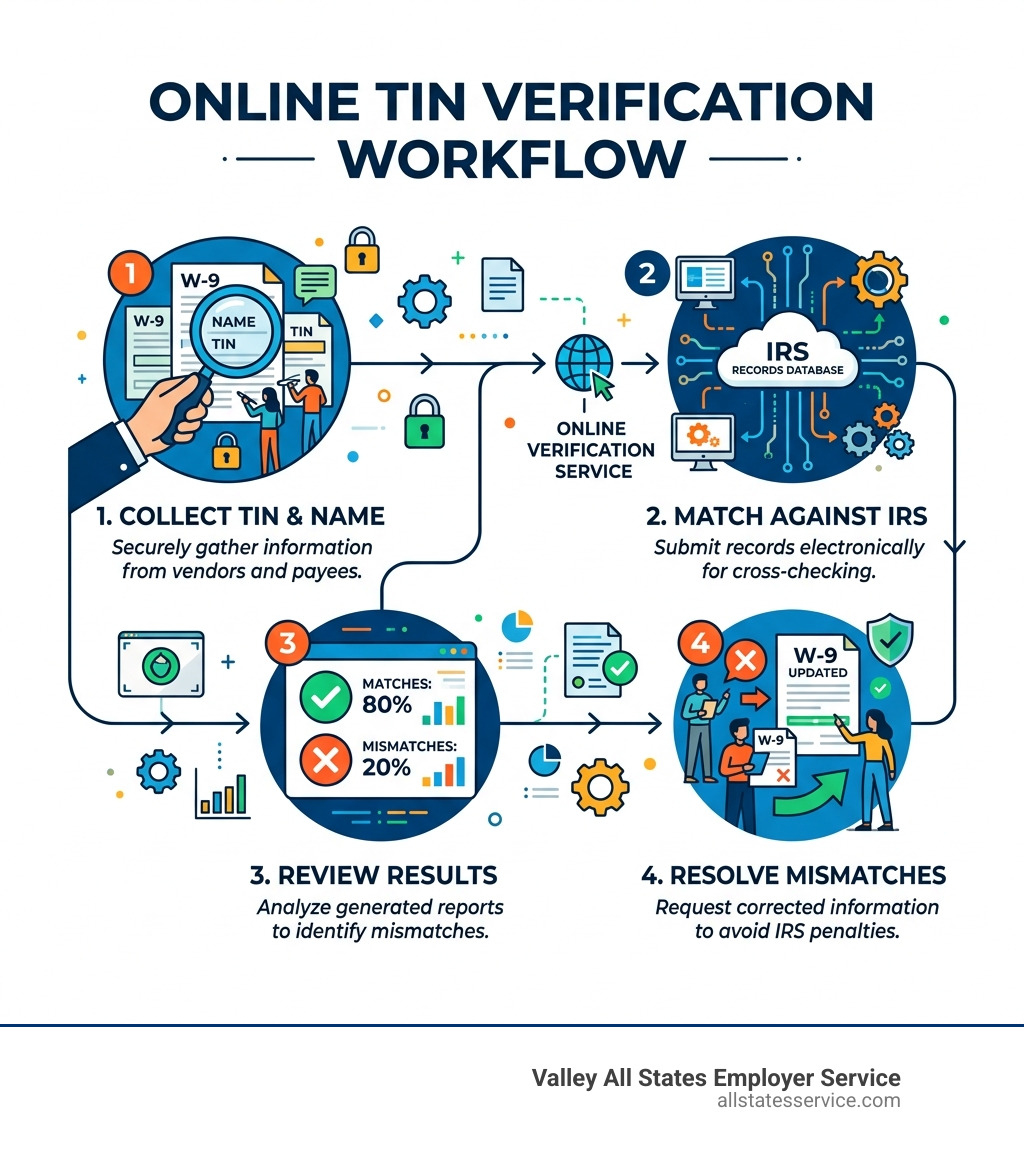
Here’s how to verify a TIN online quickly:
- Use the IRS TIN Matching Program (free, for eligible payers) at IRS e-Services, choose interactive (up to 25 TINs, instant) or bulk (up to 100,000 TINs, within 24 hours)
- Use a commercial TIN verification service like TINCheck, Tax1099, or TINVerify for real-time results without needing an IRS e-Services account
- Upload a bulk file with your vendor or payee list to check thousands of records at once before filing season
- Review results and request updated W-9 forms from anyone whose TIN doesn’t match
Here’s something that might surprise you: 1 in every 5 TIN checks does not match IRS records. That’s a 20% mismatch rate across the board.
For a busy HR or accounts payable team, that number is a serious risk. A single mismatch can trigger an IRS B-Notice, require you to start 24% backup withholding, and expose your business to penalties of up to $330 per form, or up to $680 per form if the IRS determines the error was intentional.
The good news? Most of these penalties are completely avoidable. Verifying TINs before you file, not after, is the key difference between a clean filing season and a stack of IRS notices.
Understanding the Importance of Online TIN Verification
When we talk about online tin verification, we are really talking about proactive risk management. In our experience at Valley All States Employer Service, we have seen how a simple typo or an outdated business name can spiral into a logistical nightmare. The IRS maintains a massive database of names and numbers, and if your records do not align perfectly with theirs, the system flags it.
The statistics are quite sobering. With a 20% mismatch rate, if you are managing 100 vendors, 20 of them might have incorrect data. If you do not catch these before filing, you are looking at potential penalties that can reach $330 per form. For a company with a large vendor base, these costs add up faster than a Maryland summer humidity spike.
Beyond the immediate fines, there is the dreaded “B-Notice” (Backup Withholding Notice). When the IRS sends you a CP2100 or CP2100A notice, it is telling you that the information you provided is incorrect. At that point, you are legally required to begin backup withholding at a rate of 24% on future payments to that payee. This creates a massive administrative burden for your accounting team and can strain your relationships with vendors who suddenly see their checks shrink.
By integrating a solid employment verification process ultimate guide into your workflow, you can catch these issues at the onboarding stage rather than at the filing deadline.
Why Accuracy Matters in 2026
As we move through April 2026, the IRS has become even more sophisticated in how it tracks data across different platforms. A Taxpayer Identification Number is not just one thing, it is an umbrella term that covers several types of IDs:
- Social Security Number (SSN): Used primarily for individuals and sole proprietors.
- Employer Identification Number (EIN): Used for businesses, corporations, and partnerships.
- Individual Taxpayer Identification Number (ITIN): For certain nonresident and resident aliens who cannot get an SSN.
- Adoption Taxpayer Identification Number (ATIN): A temporary number for a child in the process of being adopted.
Accuracy matters because the IRS matching system is literal. If a vendor provides a name like “John’s Crabs LLC” on their W-9 but the IRS has them registered as “John Smith Seafood Enterprises,” the system will return a mismatch even if the EIN is technically correct. This is why we always recommend verifying the legal name alongside the number. For more technical details on how the government views these matches, you can refer to the Taxpayer Identification Number (TIN) Matching – IRS resources.
How the Official IRS TIN Matching Program Works
The IRS provides a free tool for payers who are authorized to submit information returns. However, it is not as simple as just “logging in.” You must be listed on the IRS Payer Account File (PAF) database and complete an application through IRS e-Services. Once you are in, you have two primary ways to check your data.
Interactive Matching
This is perfect for small batches or real-time onboarding. You can enter up to 25 name and TIN combinations at a time. The best part? The results are immediate. You will know within seconds if the data is a match, a mismatch, or if the TIN was never issued. The system allows for up to 999 requests per 24-hour period, which is usually plenty for most small to mid-sized businesses.
Bulk Matching
If you are preparing for year-end filing and have a list of hundreds or thousands of vendors, bulk matching is your best friend. You can upload a file containing up to 100,000 name and TIN combinations. The IRS processes these and provides results within 24 hours through their Secure Object Repository (SOR).
| Feature | Interactive Matching | Bulk Matching |
|---|---|---|
| Max Combinations | 25 per request | 100,000 per request |
| Response Time | Immediate | Within 24 hours |
| Daily Limit | 999 requests | Varies by account |
| Best Use Case | Onboarding new vendors | Pre-filing audit of all vendors |
Using the Social Security Number Verification Service (SSNVS)
While the IRS tool is great for 1099s, the Social Security Administration (SSA) offers a separate tool called SSNVS specifically for W-2 filing. This service is limited to verifying current or former employees. It is a critical step to ensure that your employees’ earnings are properly credited to their records and to avoid the hassle of filing W-2c forms later.
Using SSNVS via the Business Services Online portal allows you to verify up to 10 names and SSNs immediately, or up to 250,000 via a bulk file upload with results usually available by the next business day. For businesses looking for comprehensive workforce verification solutions, using both IRS and SSA tools is the gold standard of compliance.
Leveraging Technology for Efficient Online TIN Verification
While the free government tools are excellent, many businesses find the registration and login process to be a bit of a hurdle. This is where commercial online tin verification services shine. These platforms often use API integrations to connect directly with the IRS database, offering a much more user-friendly experience.
Imagine you are onboarding a new gig worker or vendor. Instead of waiting for someone to manually log into e-Services, an API can verify the TIN in under 3 seconds right from your onboarding portal. This kind of speed is essential for maintaining a competitive edge in 2026. Automated processes don’t just save time, they eliminate the human error that comes with manual data entry.
Furthermore, commercial tools often offer “one-click” verification that checks multiple databases at once. This scalability is vital for high-volume businesses. If you are curious about how to bring this level of efficiency to your HR department, you might want to look into an automated employment verification ultimate guide to see how these systems integrate with your existing software.
Beyond the IRS: Additional Compliance and Security Checks

Verification isn’t just about taxes anymore. In today’s regulatory environment, you need to know exactly who you are doing business with to stay on the right side of the law. Many online tin verification services now include “plus” features that check more than just the TIN and name.
OFAC Sanctions and Watchlists
The Office of Foreign Assets Control (OFAC) maintains lists of individuals and companies owned or controlled by, or acting for or on behalf of, targeted countries. Doing business with someone on the SDN (Specially Designated Nationals) list can lead to massive federal fines and even criminal charges.
Death Master File (DMF)
Identity theft is a persistent threat. Checking the Social Security Administration’s Death Master File ensures that the SSN being provided doesn’t belong to a deceased individual. This is a common red flag for fraud that simple TIN matching might miss.
Security Standards
When you are handling sensitive data like SSNs and EINs, security is non-negotiable. Look for services that boast:
- SOC 2 Compliance: Ensuring the service provider manages your data securely to protect your interests and privacy.
- TLS/SSL Encryption: To protect data while it is in transit between your computer and the server.
- Two-Factor Authentication (2FA): To ensure that only authorized personnel can access your verification dashboard.
Integrating Global Watchlists into Your Workflow
For businesses operating internationally or hiring from a global talent pool, local checks aren’t enough. Comprehensive screening should include:
- INTERPOL Wanted Lists: Identifying individuals wanted for serious crimes.
- EU Sanctions Lists: Ensuring compliance with European regulatory standards.
- Politically Exposed Persons (PEP): Identifying individuals who hold prominent public positions, as they may present a higher risk for involvement in bribery or corruption.
Automating these Anti-Money Laundering (AML) checks alongside your TIN verification creates a robust shield for your company.
Best Practices for Managing Vendor and Employee Data
We always tell our clients that compliance is a marathon, not a sprint. To stay ahead of the IRS, you need a consistent system. It starts with the W-9 solicitation. Never pay a vendor until you have a signed W-9 on file. This form is your primary source of data for online tin verification.
How often should you re-verify? We recommend a three-step practice:
- At Onboarding: Verify the data the moment you receive the W-9.
- Before Payment Batches: If you haven’t paid a vendor in a few months, a quick check can ensure they haven’t changed their business structure (e.g., moving from a sole proprietorship to an LLC).
- Before Annual Filing: Run a bulk check on your entire active vendor list in December to catch any last-minute issues before 1099s go out in January.
It is also vital to maintain audit logs. The IRS typically looks back at records for at least four years. Keeping a digital paper trail of when you verified a TIN and what the result was can be your best defense during an audit. For a more detailed look at managing this data, check out our guide to outsourced employee verification.
Handling a TIN Mismatch or Error
So, you ran a check and got a “TIN Not Issued” or a mismatch result. What now? Don’t panic, but do act quickly.
- Stop and Request: Reach out to the vendor or employee immediately. Tell them the information provided does not match IRS records and request an updated W-9.
- Backup Withholding: If they cannot provide a matching TIN, you may be required to begin backup withholding at the 24% rate. This isn’t optional, it is a federal requirement once you are aware of a mismatch.
- Clear Communication: Explain that this is an IRS compliance issue. Most vendors will be happy to correct a typo to avoid having 24% of their payment withheld.
Frequently Asked Questions about Online TIN Verification
Is TIN verification mandatory for all businesses?
Technically, the IRS does not mandate that you use their TIN matching tool. However, they do mandate that the information you file is accurate. Think of online tin verification as a preventive measure. It is the only way to ensure you are meeting your compliance obligations and avoiding the “intentional disregard” penalties that can hit $680 per form.
Can a signed W-9 form protect me from IRS penalties?
A signed W-9 is a great start, but it is not a “get out of jail free” card. While a payee signing a W-9 under penalty of perjury shifts some liability to them for providing false info, it does not excuse the payer from backup withholding requirements if the IRS notifies you of a mismatch. You are still responsible for the accuracy of the forms you submit.
How often should I re-verify my vendor TINs?
As we mentioned earlier, the best practice is to verify three times: during onboarding, before major payment cycles, and right before the annual 1099 filing season. This ensures that any changes in business status or simple data entry errors are caught long before they become expensive mistakes.
Conclusion
Navigating online tin verification and tax compliance can feel like trying to find your way through a thick fog without a map. But it doesn’t have to be that way. By utilizing the tools provided by the IRS and SSA, or by leveraging the speed and security of commercial verification services, you can protect your business from unnecessary penalties and administrative headaches.
At Valley All States Employer Service, we specialize in taking the weight of compliance off your shoulders. Whether it is expert E-Verify processing or navigating the complexities of workforce eligibility, our goal is to minimize your administrative burden and give you peace of mind.
Ready to simplify your compliance and stop worrying about IRS penalties? Ready to simplify your compliance? Contact us today. We are here to help you get it right the first time, every time.