
See Exactly What a Completed I-9 Form Looks Like
What a Completed I-9 Form Looks Like (And Why It Matters for Your Business)
What does a completed I-9 form look like is one of the most common questions HR managers ask when onboarding new employees. Here’s a quick breakdown:
A properly completed Form I-9 includes:
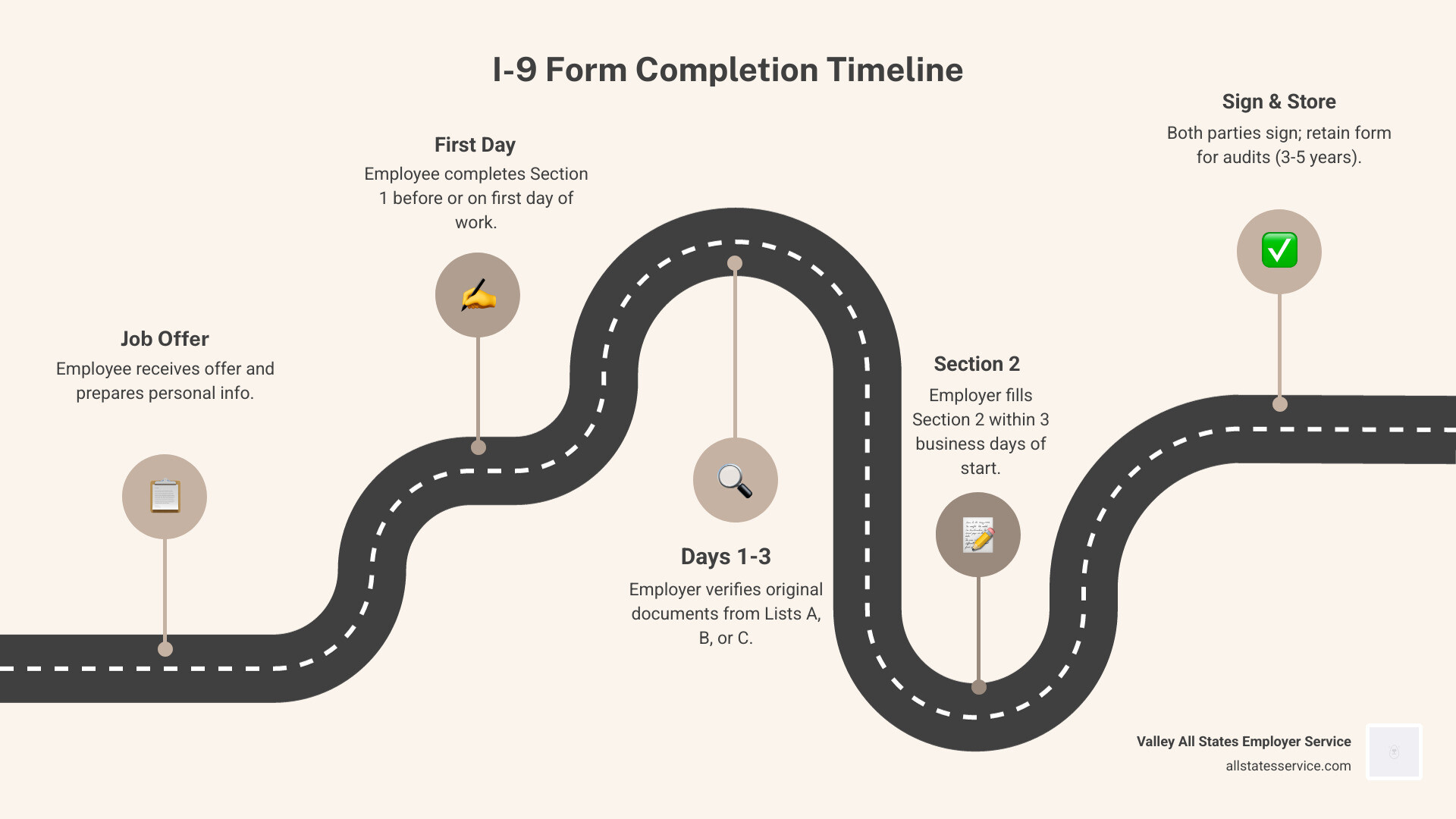
- Section 1 – Filled out by the employee on or before their first day of work. Includes legal name, address, date of birth, Social Security Number (if required), citizenship or immigration status, and a signed attestation.
- Section 2 – Filled out by the employer within three business days of the employee’s first day. Includes document titles, issuing authorities, document numbers, and expiration dates from List A, or one document each from List B and List C.
- Supplement A (if needed) – Completed by a preparer or translator who helped the employee fill out Section 1.
- Supplement B (if needed) – Used for rehires within three years or to reverify expiring work authorization.
Every field must be filled in accurately, documents must be original and unexpired, and both parties must sign under penalty of perjury.
Getting this form right is not optional. Federal law requires every U.S. employer to complete Form I-9 for every person hired after November 6, 1986. And the stakes are real. Errors, missing signatures, or expired documents can all trigger fines during a government audit.
For a busy HR manager juggling onboarding, payroll, and a dozen other priorities, that’s a lot of pressure riding on a two-page form.
The good news? Once you know exactly what a correctly completed I-9 looks like, the process becomes much more manageable. This guide walks you through each section with real-world examples, so you know precisely what to fill in, when, and why.
Glossary for what does a completed i 9 form look like:
Breaking Down the Sections of a Completed I-9
To understand what is I 9 form requirements, we first have to look at how the document is structured. As of April 2026, the current version of the form (expiring 05/31/2027) is designed to be streamlined, but it still requires precision.
The form is split into two primary sections that must be completed during the initial hire, plus two supplements used for specific circumstances. When you look at completing Form I-9 | USCIS guidelines, you will see that every single box matters. If a field does not apply, such as an apartment number or a middle initial, we recommend using “N/A” to show the field wasn’t simply forgotten.
The Role of the Employee and Employer
The I-9 is a collaborative effort. The employee is responsible for Section 1, where they attest to their identity and legal right to work in the U.S. The employer is responsible for Section 2, where they physically examine documents to ensure they are genuine.
Both parties are signing a legal attestation. For the employer, this means you are certifying that the documents presented reasonably appear to be genuine and relate to the person standing in front of you. If you want to complete your I 9 employment authorization form like a pro, you must ensure that no section is left blank and that all dates are in the correct mm/dd/yyyy format.
What Does a Completed I-9 Form Look Like for Section 1?
Section 1 is the employee’s territory. They must complete this after accepting a job offer but no later than their first day of work for pay.

When examining the perfect I 9 a completed I 9 form example to save your sanity, you’ll notice these key elements in Section 1:
- Full Legal Name: No nicknames. If the employee has only one name, they should enter it in the “Last Name” field and type “Unknown” in the “First Name” field.
- Address: This must be a physical address. P.O. Boxes are not allowed unless the employee is a border commuter from Canada or Mexico.
- Date of Birth: Be careful here. Many people accidentally write the current year instead of their birth year.
- Social Security Number: This is actually optional unless your company uses E-Verify. However, most employees provide it regardless.
- Attestation: The employee must check one of the four boxes regarding their citizenship or immigration status.
Correctly Identifying Citizenship Status
The status an employee chooses determines what additional information they must provide. Here are the four categories:
- A citizen of the United States: This is the most common selection.
- A noncitizen national of the United States: This usually applies to people born in American Samoa or certain other U.S. territories.
- A lawful permanent resident: These individuals must provide their 7 to 9-digit Alien Registration Number (A-Number) or USCIS Number.
- A noncitizen authorized to work: This includes people on visas like H-1B or F-1. They must provide an expiration date for their work authorization (or write “N/A” if it doesn’t expire) along with their A-Number, Form I-94 admission number, or foreign passport number.
Document Verification and Section 2 Requirements
Section 2 is where the employer takes over. This section must be completed within three business days of the employee’s start date. For example, if an employee starts on Monday, you must finish Section 2 by Thursday.
The biggest question we get is, “what I 9 documents do I need?” The employee gets to choose which documents to present from the “Lists of Acceptable Documents.” As an employer, you cannot tell them which ones to bring.
| List A (Identity & Authorization) | List B (Identity Only) | List C (Authorization Only) |
|---|---|---|
| U.S. Passport or Passport Card | Driver’s License | Social Security Card (Unrestricted) |
| Permanent Resident Card (Green Card) | School ID with photo | Birth Certificate |
| Employment Authorization Document (EAD) | Voter’s Registration Card | Certification of report of birth |
| Foreign Passport with I-94 | Military ID | Native American Tribal Document |
What does a completed I-9 form look like with a U.S. Passport?
When an employee presents a U.S. Passport, it counts as a List A document. This is the “gold standard” because you only have to fill out one column.
In a completed form using a passport, we would see:
- Document Title: U.S. Passport
- Issuing Authority: U.S. Department of State
- Document Number: The 9-digit passport number
- Expiration Date: The date the passport expires (it must be unexpired)
Finally, you must enter the employee’s first day of employment and sign the certification. We must physically examine the original document in the employee’s presence unless we are using a DHS-authorized alternative procedure.
What does a completed I-9 form look like for non-citizens?
For non-citizens, the form can look a bit more complex. For example, an F-1 student might present a foreign passport, a Form I-94 (Arrival/Departure Record), and a Form I-20.
In this case, the “List A” column would contain information for all three documents. We would record the foreign passport number and its expiration date, then the 11-digit I-94 admission number, and finally the information from the Form I-20.
For an H-1B worker, the process is similar, using the foreign passport and the I-94 record. It is vital to ensure the I-94 shows the correct class of admission and hasn’t reached its “admit until” date.
Handling Reverifications and Common Mistakes
Even after the initial hire, our work might not be done. Supplement B (formerly Section 3) is used for reverification and rehires.
If you want to stay compliant, mastering the I 9 verification form step by step means knowing when to use this supplement. We use it when:
- An employee’s work authorization is about to expire.
- An employee is rehired within three years of the original form’s date.
- An employee legally changes their name.
We do not need to reverify U.S. citizens or noncitizen nationals, even if their passports expire. We also don’t reverify Lawful Permanent Residents who presented a Green Card, as those are List A documents that don’t require reverification upon expiration (though there are specific rules for conditional residents).
Avoiding Penalties and Errors
The government doesn’t have much of a sense of humor when it comes to I-9 audits. Common errors that can lead to fines include:
- Missing Signatures: This is the number one mistake. Both the employee and the employer must sign.
- Incorrect Dates: Section 1 must be dated the day the employee fills it out, and Section 2 must be dated within that three-day window.
- Expired Documents: You cannot accept an expired document, with very few exceptions for specific extensions.
- Leaving Fields Blank: If a field is optional and you aren’t using it, write “N/A” to be safe.
Frequently Asked Questions about I-9 Completion
What is the three day rule for Section 2?
The “Three Day Rule” means that if an employee starts work on a Monday, the employer must review their documents and sign Section 2 by the end of business on Thursday. If the job lasts less than three days, Section 2 must be completed no later than the first day of work.
Can I accept a photocopy of a document?
Generally, no. We must examine original documents. The only exception is a certified copy of a birth certificate. You cannot accept a photocopy of a driver’s license or a Social Security card.
When is Supplement A required?
Supplement A is used only if the employee used a preparer or translator to help them complete Section 1. If the employee filled it out themselves, this page remains blank and does not need to be retained.
Final Steps for Compliance
Knowing what does a completed i 9 form look like is the first step toward a compliant workforce. But as your business grows, managing paper forms, tracking expiration dates, and ensuring every “i” is dotted can become a full-time job.
At Valley All States Employer Service, we specialize in taking that burden off your shoulders. We provide outsourced E-Verify workforce eligibility verification to ensure your hiring process is fast, accurate, and fully compliant with federal law. By integrating E-Verify into your workflow, we help minimize the risk of human error and administrative headaches.
You must retain I-9 forms for three years after the date of hire or one year after the date employment ends, whichever is later. Storing these securely and separately from general personnel files is a best practice that protects employee privacy and makes audits much smoother.