
The New Era of Remote Onboarding
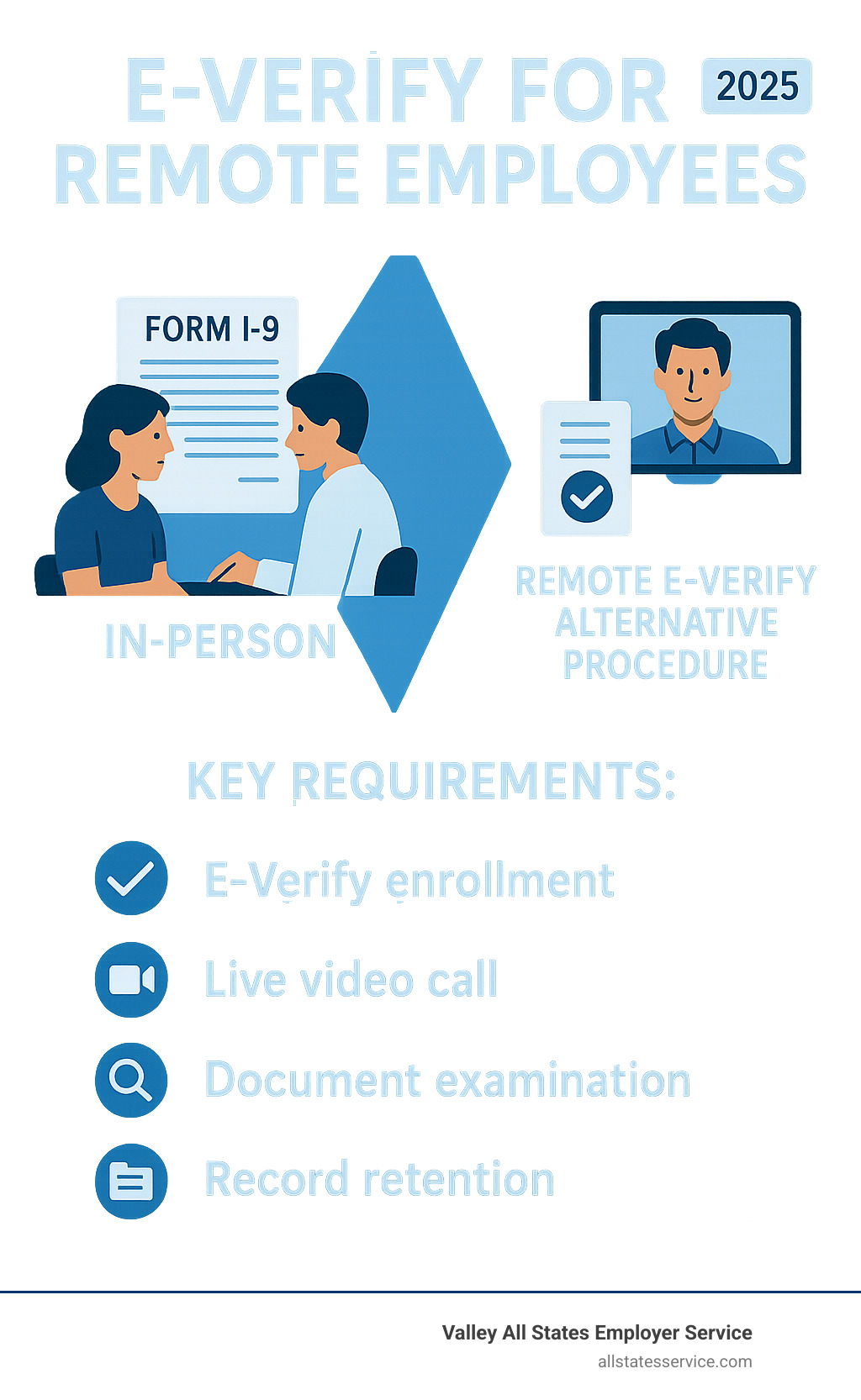
E-verify for remote employees is now a permanent reality. A DHS-authorized alternative procedure allows qualified employers to examine identity and employment authorization documents via live video, removing the need for in-person verification.
Quick Answer for Remote E-Verify:
- Who can use it: Employers enrolled in E-Verify and in good standing
- How it works: Examine document copies + live video call with employee
- Requirements: Check alternative procedure on Form I-9, retain document copies, create E-Verify case
- When available: Permanent option since August 1, 2023
With three in 10 employees now working exclusively remotely, your onboarding process must adapt. The biggest challenge for HR managers is verifying employment eligibility for new hires scattered across different states.
Temporary COVID-19 flexibilities for remote Form I-9 verification expired on July 31, 2023. In their place, the Department of Homeland Security introduced a permanent, official method for remote document examination through live video calls.
The new Form I-9 (dated 08/01/23) includes a checkbox for this remote procedure, but understanding the rules is key to staying compliant.
Understanding the Basics: Form I-9, E-Verify, and E-Verify+
To master e verify for remote employees, you must understand the key components.
Form I-9 is the starting point. Every U.S. employer must complete this document, available on the Form I-9, Employment Eligibility Verification page, to verify a new hire’s identity and legal authorization to work.
E-Verify improves this process. This free online system compares Form I-9 information against DHS and SSA records, often providing results in seconds. It’s a powerful tool against identity fraud and helps avoid costly compliance issues. Our E-Verify and I-9 Compliance services ensure this process is efficient and transparent.
E-Verify+ is a newer system that combines the Form I-9 and E-Verify into one process, offering improved fraud detection. However, it is not yet available for Web Services or E-Verify Employer Agents.
Is E-Verify mandatory? It is for federal contractors and in many states. For example, Florida requires private employers with 25 or more employees to use it. For all others, it is voluntary but highly recommended.
What is the relationship between Form I-9 and E-Verify?
Form I-9 is the foundation, and E-Verify is the security check. After the employee completes Section 1 and you complete Section 2, you must create an E-Verify case within three business days of their start date. This confirms the information against government databases.
A mismatch may result in a Tentative Nonconfirmation (TNC). This requires you to notify the employee and give them an opportunity to resolve the issue. Our E-Verify Employment Verification services can help you steer these situations smoothly.
Key Changes in the New Form I-9 for Remote Verification
The latest Form I-9, dated 08/01/23, has been mandatory since November 1, 2023. You can get The new Form I-9 from USCIS.
This new form is built for the remote work era. It features a single-page, mobile-friendly format and, most importantly, a remote examination checkbox to officially document the use of the alternative procedure.
| Feature | Old Form I-9 (10/19/2019 or 10/21/19) | New Form I-9 (08/01/2023) |
|---|---|---|
| Format | Multi-page layout | Single-page, mobile-friendly design |
| Remote Options | No official remote procedure | Remote examination checkbox included |
| Digital Compatibility | Basic digital completion | Improved mobile and digital compatibility |
| Compliance Date | Expired November 1, 2023 | Current version, mandatory since November 1, 2023 |
The new form simplifies compliance with a cleaner layout and built-in acknowledgment of modern work practices.
The Alternative Procedure for Remote Document Examination
When temporary COVID-19 flexibilities for Form I-9 verification ended, the Department of Homeland Security introduced a permanent alternative procedure for remote document examination. Effective August 1, 2023, this change is a game-changer for employers with remote teams. You can read the details in the DHS alternative procedure announcement.
This official process allows you to conduct e verify for remote employees compliantly and efficiently, without the logistical headaches of in-person meetings. We can help you steer the new E-Verify Employer Requirements and make this transition smooth.
Who Qualifies for the Alternative Procedure?
Not every employer can use this remote procedure. The key requirement is that you must be enrolled in E-Verify and in good standing. This means you must:
- Be enrolled in E-Verify for all hiring sites using the alternative procedure.
- Use E-Verify for all new hires at those participating sites.
- Comply with all E-Verify program rules, including completing fraudulent document awareness training. You can find information on Enrolling in E-Verify on the official site.
Step-by-Step Guide to Remote I-9 Verification Using E-Verify
Here’s how the remote verification process works:
Step 1: Employee completes Section 1 on or before their first day.
Step 2: Employee sends document copies (front and back) to you electronically.
Step 3: Examine the document copies for any obvious red flags before the video call.
Step 4: Conduct a live video interaction where the employee presents their original documents. Compare them to the copies you received.
Step 5: Complete Section 2 of Form I-9 after the call.
Step 6: Check the “alternative procedure” box in Section 2 of the new Form I-9. This is a critical step.
Step 7: Create an E-Verify case within three business days of the employee’s start date.
Document Retention and Record-Keeping Rules
Digital verification requires strict record-keeping for e verify for remote employees.
You must retain clear, legible copies of all documents (front and back) presented during the video call. These are essential for an audit.
The retention timeline is unchanged: keep records for three years after the hire date or one year after employment ends, whichever is later.
Your digital storage system must be secure, organized, and ready for inspection by officials. Our I-9 Verification Assistance can help you set up a foolproof system to ensure you are always audit-ready.
Navigating Challenges and Ensuring Compliance for Remote E-Verify
Remote verification introduces new challenges in legal considerations, data security, and consistency. Building a compliant and smooth remote onboarding process means getting ahead of these issues. Our E-Verify Best Practices guide can help.
How to Overcome Common Remote Verification Challenges
When implementing e verify for remote employees, you may encounter these common issues:
- Document Authenticity: You are not a forensic expert. During the video call, your responsibility is to determine if documents “reasonably appear to be genuine and relate to the individual.” The E-Verify fraudulent document training is essential here.
- Technology Issues: Set clear expectations with new hires about needing a stable internet connection and a working camera. Have a backup plan in case of technical difficulties.
- Employee Privacy: Be transparent about your security measures. Explain why you need the information and how you protect their data to build trust.
- Team Training: Ensure anyone conducting video verifications is thoroughly trained on the procedure, red flags, and how to handle issues.
- Authorized Representatives: While you can use trained internal staff, if you use a notary public as an authorized representative, they must not add their notary seal to the Form I-9.
Best Practices for Data Security and Privacy
Rock-solid security is non-negotiable when handling sensitive documents. Key practices include:
- Secure Transmission: Use encrypted file-sharing methods or secure portals, not regular email.
- Encrypted Video: Use a video conferencing platform with end-to-end encryption.
- Access Controls: Limit access to I-9 information to only those who need it and use multi-factor authentication.
- Secure Storage: Keep digital copies in encrypted, backed-up systems that are easily accessible for audits.
- Clear Policies: Establish and follow clear data retention and disposal policies.
Avoiding Discrimination and Ensuring Consistency
Consistency is crucial for I-9 compliance and avoiding discrimination claims.
If you offer the alternative procedure at a hiring site, you must offer it to all employees at that site. You can, however, create a policy to use the remote option only for fully remote employees while requiring in-person verification for on-site staff, as long as it’s applied consistently.
Employees always have the right to request in-person verification if they prefer it or lack the necessary technology. Be prepared to accommodate these requests. Documenting your policies clearly is your best protection.
How Remote Verification Transforms Your Onboarding Process
Remote I-9 verification does more than ensure compliance; it revolutionizes your onboarding. Using e verify for remote employees via the DHS alternative procedure creates a better experience for everyone.
The benefits are significant:
- Streamlined Onboarding: Your HR team spends less time coordinating schedules and chasing paperwork, and more time on strategic tasks.
- Reduced Administrative Burden: You save money on shipping, notary fees, and the hidden costs of delayed start dates.
- Wider Talent Pool: You can hire the best person for the job, regardless of their location.
- Improved New Hire Experience: A convenient, flexible process creates a positive first impression and sets a great tone for the new employee’s journey.
- Faster Start Dates: New hires can start sooner, allowing your projects to move forward without delay.
State-Specific E-Verify Mandates
While the federal procedure offers flexibility, some states have their own E-Verify mandates. For example, Florida requires private employers with 25 or more employees to use E-Verify, as detailed in its E-Verify legislation.
Other states have similar rules for public employers or government contractors. These mandates don’t complicate remote verification; they make it more valuable. When you’re already required to use E-Verify, the ability to do so remotely eliminates a major logistical hurdle.
For consistency across a multi-state workforce, many employers choose to use the e verify for remote employees procedure for all their hiring sites. This simplifies compliance and keeps your process uniform.
Frequently Asked Questions about E-Verify for Remote Employees
Here are answers to common questions about using e verify for remote employees.
Can I use the remote verification procedure for all my employees?
Consistency is key. If you offer the alternative procedure at a hiring site, you must offer it to all employees at that site. However, you can create a consistent policy to use the remote option for remote-only employees while requiring in-person verification for on-site staff.
Employees always have the right to request in-person verification if they prefer it or lack the necessary technology.
What happens if an employee’s documents can’t be verified during the video call?
If a document appears suspicious or invalid during the video call, you cannot accept it. The employee must provide other acceptable documents from the official lists. If they cannot, employment cannot proceed.
If an E-Verify case results in a Tentative Nonconfirmation (TNC), you must follow the standard TNC resolution process, which gives the employee a chance to resolve the issue with the appropriate government agency.
Do I still need to use an authorized representative for e verify for remote employees?
No, you don’t necessarily need an external representative. The DHS alternative procedure allows your trained internal staff to conduct the remote examination directly via video call. This gives you more control over the process.
If you do use an authorized representative, such as a notary public, they must complete Section 2 as a representative and should not affix their notary seal to the form.
Conclusion: Simplify Your Remote Hiring with Expert Support
Remote work is the new standard, and the DHS alternative procedure for e verify for remote employees provides the tools for compliant onboarding. However, compliance is rarely simple. Navigating technology issues, staff training, and varying state requirements can be a significant challenge for busy HR teams.
This is where Valley All States Employer Service can help. We specialize in workforce eligibility verification, handling the complex compliance details so you can focus on hiring great people and growing your business.
We take the administrative burden off your shoulders, eliminating the guesswork and stress of staying audit-ready. With our expertise, you get more than just E-Verify processing; you get the peace of mind that comes from knowing your compliance is handled with accuracy and attention to detail.
Ready to transform your remote hiring process and ensure bulletproof compliance? Get professional I-9 verification assistance today and find how much easier onboarding can be with the right partner.