
Unlock Efficiency: How Electronic I-9 Storage Software Works
Why Electronic I-9 Storage Matters for Today’s Employers
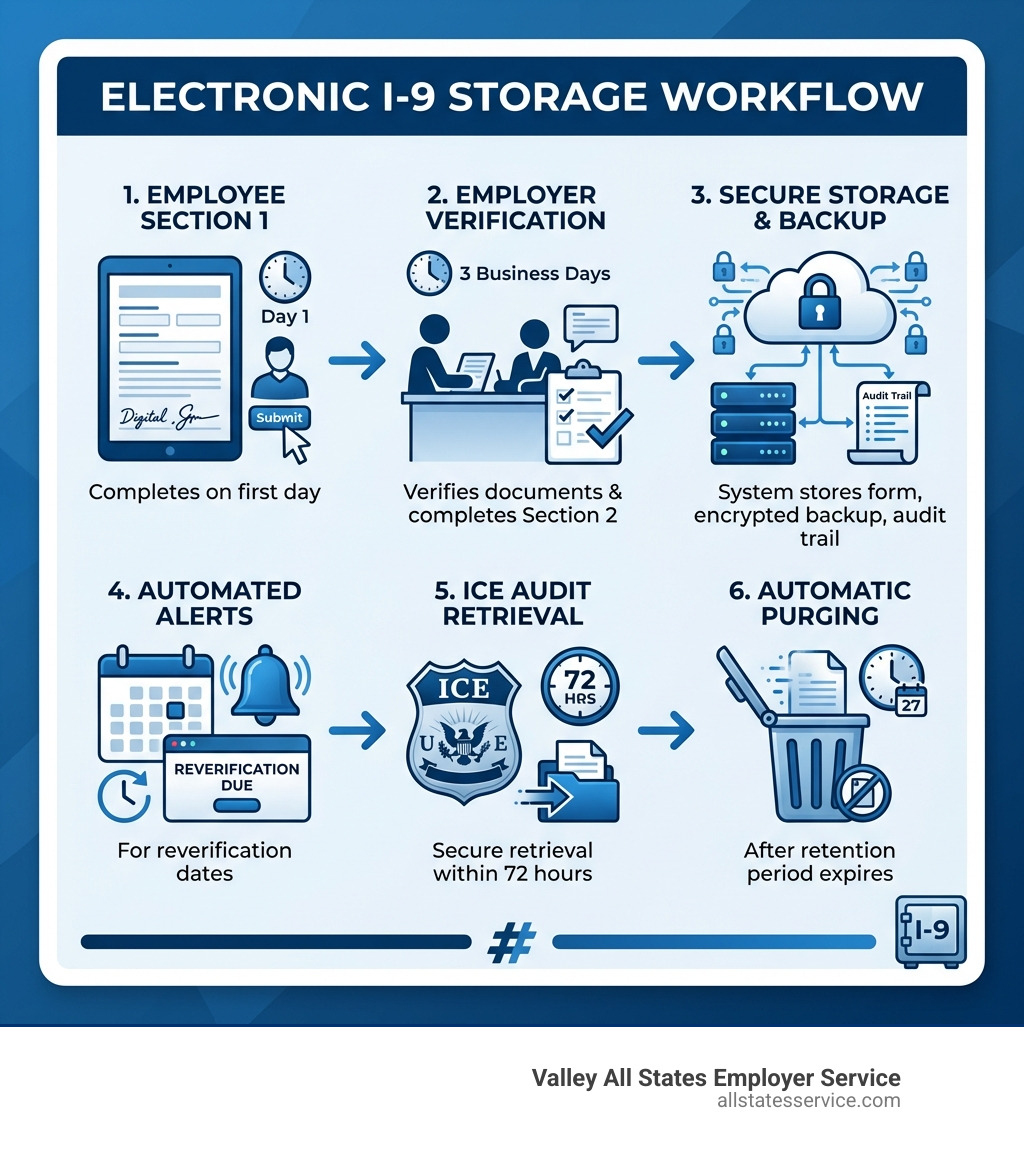
I 9 electronic storage software helps U.S. employers complete, sign, and securely store Form I-9 documents digitally while meeting all federal compliance requirements. Here’s what you need to know:
Key Benefits:
- Automated error detection catches mistakes before submission
- Secure cloud storage with audit trails and encrypted backups
- Remote verification support for distributed teams
- E-Verify integration for automated eligibility checks
- Audit readiness with 72-hour response capability
Core Requirements:
- Must comply with 8 C.F.R. § 274a.2 regulations
- Permanent audit trails tracking every access and change
- Ability to produce legible paper copies on demand
- Retention for 3 years after hire or 1 year after termination
HR teams know all too well that compliance is a constant and critical part of daily work. Digging through drawers during audits, coordinating notaries for remote hires, and managing paper forms across multiple locations can feel like a full-time job on its own.
The Immigration Reform and Control Act of 1986 requires every U.S. employer to verify the identity and work eligibility of new hires using Form I-9. For decades, this meant paper forms, filing cabinets, and manual tracking. Today, electronic I-9 systems transform this burden into a streamlined digital process.
But switching from paper to electronic storage isn’t as simple as scanning documents. The Department of Homeland Security has specific requirements for system integrity, security controls, and audit capabilities. You need software that not only stores forms but also prevents unauthorized changes, maintains permanent logs, and produces records within three business days when ICE comes knocking.
The good news? Modern I-9 software handles the complexity for you. With built-in validation checks, automated reminders for reverification, and secure cloud access from anywhere, these platforms reduce errors while cutting onboarding time from days to minutes.
Important i 9 electronic storage software terms:
Navigating DHS Requirements for I-9 Electronic Storage Software
When we talk about moving to a digital system, we aren’t just talking about convenience. We’re talking about staying on the right side of the law. The Department of Homeland Security (DHS) has very specific rules, primarily found in 8 C.F.R. § 274a.2, that govern how an employer can electronically generate, sign, and store Form I-9.
If you decide to use i 9 electronic storage software, the system must have reasonable controls to ensure the integrity, accuracy, and reliability of the records. This means the software must prevent any unauthorized creation of, addition to, alteration of, or deletion of the forms. It isn’t enough to just have a “save” button. The system needs to be a fortress that keeps the data exactly as it was when it was signed.
One of the most critical USCIS retention and storage requirements is the ability to produce legible and printable copies. If an Immigration and Customs Enforcement (ICE) agent walks into your office, you must be able to pull up a clear, readable version of any I-9 they request.
To stay compliant, your software must also:
- Maintain an indexing system: You need to be able to find specific records quickly using names, dates, or other identifiers.
- Provide data backups: A server crash is not an excuse for losing federal records. Compliant systems use redundant, encrypted cloud backups.
- Support inspection programs: The system must allow authorized government personnel to access the records without unnecessary hurdles.
By using dedicated electronic I-9 solutions, you ensure that these technical boxes are checked automatically, protecting your business from the “gotcha” moments of an audit.
Compliant Electronic Signatures and Audit Trails for I-9 Electronic Storage Software
A common pitfall for many businesses is thinking that typing a name into a Word document counts as an electronic signature. Spoiler alert: it doesn’t. For a signature to be valid on a Form I-9, it must comply with the E-Sign Act and specific DHS regulations.
The software must provide a way for the signer to acknowledge that they have read the attestation and that the signature is legally binding. It also needs to verify the identity of the person signing. Most high-quality i 9 electronic storage software uses a “click-to-sign” method that attaches the signature to the form at the exact time of the transaction.
But the real magic happens behind the scenes with the audit trail. An audit trail is a permanent, timestamped log of every single action taken within the system.
If someone logs in and changes a typo in an employee’s name, the audit trail records who did it, when they did it, and what the original text was. This level of transparency is exactly what government auditors look for. It proves that the records haven’t been tampered with and that your business processes are consistent. Without a permanent audit trail, your digital records might as well be written in pencil as far as ICE is concerned.
Integrating E-Verify with I-9 Electronic Storage Software
While Form I-9 is mandatory for everyone, E-Verify is a web-based system that allows us to take verification a step further. It compares the information on an employee’s I-9 against records from the DHS and the Social Security Administration (SSA).
Using software that features automated I-9 verification is a game changer. Instead of manually re-typing data into the government’s E-Verify portal, the software pushes the data directly from the completed I-9. This eliminates the “fat-finger” typos that lead to annoying Tentative Nonconfirmations (TNCs).
If a TNC does occur, the software manages the workflow. It alerts you immediately, provides the necessary Further Action Notices in multiple languages, and tracks the deadlines for the employee to contest the result. In states like Florida, Arizona, and North Carolina, E-Verify is actually mandatory for most employers. Even if it isn’t required in your state, the peace of mind it provides by confirming an employee’s legal right to work is invaluable.
Streamlining Remote Hiring with Digital Verification
The world has changed, and so has the way we hire. If you’re hiring a remote worker in a different state, you can’t exactly ask them to pop into the office to show you their passport. This is where i 9 electronic storage software really shines.
In 2023, USCIS introduced “alternative procedures” for document examination. If an employer is enrolled in E-Verify and in good standing, they can use live video interaction to examine an employee’s identity and employment authorization documents.
Here is how the remote process generally works in a digital system:
- Section 1: The new hire receives an email link and completes their portion on their own device before their first day.
- Document Upload: The employee securely uploads photos or scans of their documents (like a passport or social security card).
- Live Video Call: The employer meets with the employee via video chat, views the original documents to ensure they appear genuine, and compares them to the uploaded copies.
- Section 2: The employer completes their portion of the form, checking a box to indicate they used the alternative procedure.
This process is a massive win for I-9 record keeping because it keeps everything in one centralized, digital location. No more mailing original documents or hiring expensive mobile notaries to act as your authorized representatives.
Top Software Providers and Features to Look For
Choosing the right platform can feel overwhelming. There are dozens of options, ranging from basic add-ons in your HRIS to specialized, “gold-standard” compliance tools. When we evaluate i 9 electronic storage software, we look for a few non-negotiable features.
| Feature | Why It Matters |
|---|---|
| Error Validation | Flags missing fields or mismatched dates in real-time. |
| Automated Reminders | Notifies you 90 days before a work authorization expires. |
| API Integration | Connects to your existing ATS or Payroll system to share data. |
| Correction Workflows | Allows you to legally fix errors on old forms with audit logs. |
| Tiered Permissions | Ensures only authorized HR staff can see sensitive SSN data. |
Some of the top providers in the space for 2025 include Tracker I-9, which has a 20-year track record of zero client fines during audits, and ADP’s I-9 Management, which offers a massive network of physical locations for in-person verification if needed. Others, like i9 Intelligence, focus on full automation and “risk scores” to help you see exactly where your compliance gaps are.
The best software isn’t just a digital filing cabinet. It’s a proactive compliance partner that tells you what needs to be fixed before an auditor ever sets foot in your building.
Avoiding Penalties and Managing Record Retention
Let’s talk about the elephant in the room: the cost of getting it wrong. I-9 violations are not just a slap on the wrist. Federal penalties can range from $250 to over $5,500 per worker for substantive violations. If you have a lot of paperwork errors, those fines can reach up to $28,619 per violation.
We’ve seen major companies face staggering fines. For example, ABC Professional Tree Services received a $2 million penalty, and McDonald’s was fined $400,000 for accepting false documents. Most of these penalties come from simple mistakes: missing signatures, incorrect dates, or failing to re-verify an expired work permit.
One of the best ways to avoid these fines is through proper record retention and purging. According to Investopedia’s Form I-9 overview, you must keep a Form I-9 for:
- 3 years after the date of hire, OR
- 1 year after the date employment is terminated, whichever is later.
Keeping records longer than necessary is actually a risk. If you are audited, ICE can look at every form you have on file. If you have 10-year-old forms for employees who left years ago, and those forms have errors, you can still be fined for them. Good i 9 electronic storage software will automatically flag and “purge” (delete) records once they hit their legal expiration date, keeping your liability to an absolute minimum.
Frequently Asked Questions about I-9 Management
Can I create my own electronic I-9 system?
Technically, yes, but it is a massive undertaking. You can create your own system as long as it adheres strictly to USCIS data elements and includes all the required instructions. You cannot change the name, content, or sequence of the data fields. You also must maintain full business process documentation that explains how the system works, how it ensures authenticity, and how you prevent unauthorized changes. For most businesses, it is much safer and cheaper to use a vetted commercial provider.
How long must I keep electronic I-9 records?
The rule is the same for paper and electronic: three years from the date of hire or one year from the date of termination, whichever is later. The beauty of electronic systems is that they calculate these dates for you. Instead of manually checking termination dates in a spreadsheet, the system sends you a notification when it’s time to hit the delete button.
Is E-Verify mandatory for all employers?
At the federal level, E-Verify is voluntary for most employers, though it is mandatory for federal contractors with the E-Verify clause in their contracts. However, many states have passed their own laws. If you have employees in Maryland, you’ll want to stay updated on local requirements, though Maryland currently does not have a general private-employer mandate. Regardless of the law, enrolling in E-Verify is the only way to take advantage of the remote live-video verification procedures, which makes it a very attractive option for modern businesses.
Conclusion
Managing I-9 compliance doesn’t have to be a source of stress for your HR team. By moving to i 9 electronic storage software, you replace messy filing cabinets and manual tracking with a secure, automated, and audit-ready system.
At Valley All States Employer Service, we specialize in helping businesses navigate these complex waters. We provide outsourced E-Verify workforce eligibility verification, acting as your expert partner to minimize errors and take the administrative burden off your plate. Whether you are a small startup or a growing enterprise, our goal is to make your compliance process impartial, efficient, and bulletproof.
Ready to leave the paperwork behind? Unlock efficiency with our electronic I-9 solutions and ensure your business is protected for 2025 and beyond. Contact our team today to learn how we can simplify your onboarding and keep you audit-ready.