
How to Master the 1 9 Form IRS Without Losing Your Mind
Why the 1 9 Form IRS Rules Every U.S. Hire You Make
The 1 9 form IRS is one of the most important compliance documents in American hiring, and it’s required for every single employee you bring on, whether they’re a U.S. citizen or not.
Here’s a quick answer if you need it fast:
- What it is: Form I-9 (Employment Eligibility Verification) is a federal form managed by USCIS, not the IRS, though it works alongside IRS forms like the W-4 during onboarding
- Who completes it: Both the employee (Section 1) and the employer (Section 2)
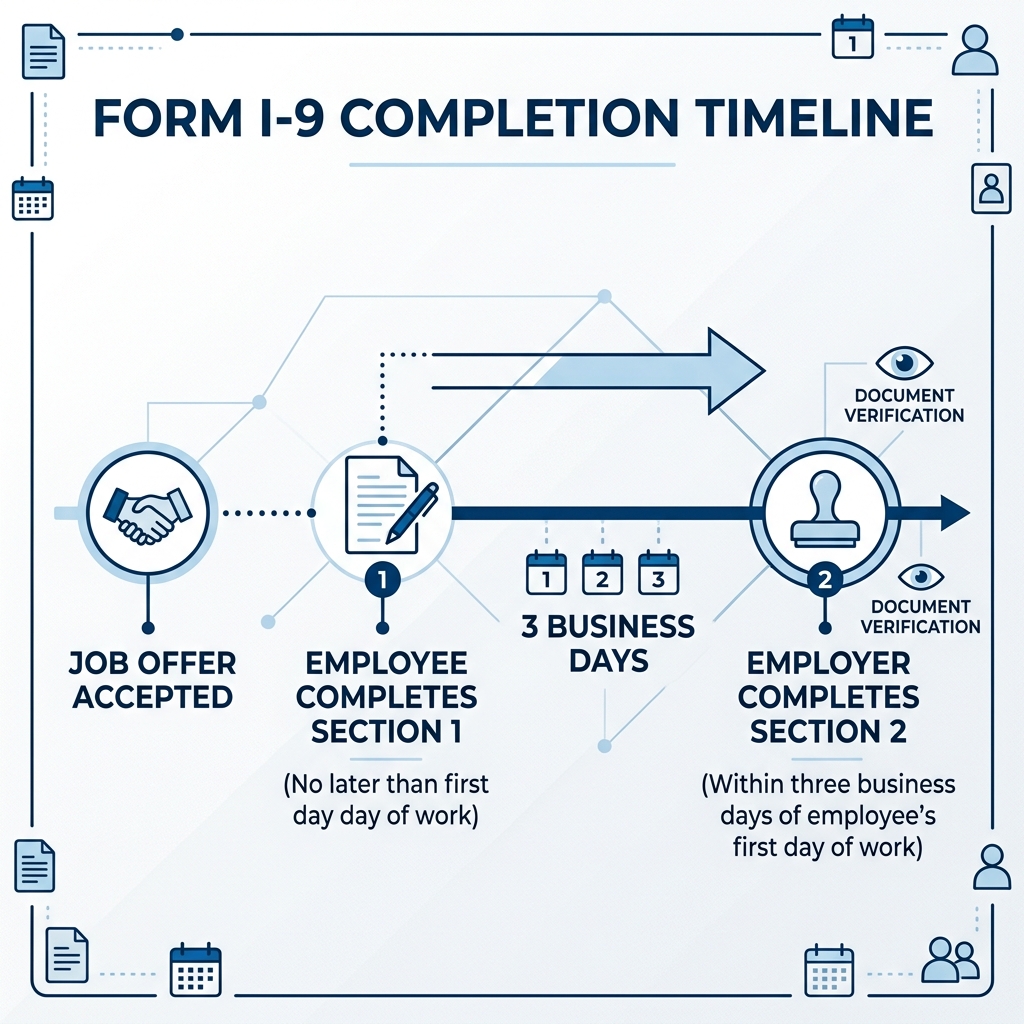
- When: Employee completes Section 1 by their first day of work; employer completes Section 2 within three business days
- Where to get it: Directly from USCIS (current edition: 01/20/25, expires 05/31/2027)
- Where to file it: Nowhere, you keep it on file and make it available for government inspection
If you’re an HR manager juggling onboarding, payroll setup, and compliance deadlines all at once, Form I-9 can feel like a minefield. One missed signature, one expired document, one late completion, and your business is exposed to real legal and financial risk.
The stakes are high. Federal law requires every employer who recruits, refers for a fee, or hires an individual for employment in the U.S. to complete this form. Employers are liable for failing to comply, and that liability doesn’t disappear just because you were busy.
The good news? Once you understand the structure, the timelines, and the rules around acceptable documents and retention, this process becomes a lot more manageable.
1 9 form irs glossary:
- I-9 compliance solutions
- I-9 employee verification
- employment verification department of homeland security
Understanding the 1 9 Form IRS and Employment Eligibility
When we talk about the 1 9 form IRS, it is important to clear up a common misconception right away. While many people search for it using the IRS name, this form is actually governed by U.S. Citizenship and Immigration Services (USCIS), a branch of the Department of Homeland Security. The IRS cares about your taxes, but the USCIS cares about whether your employees are legally allowed to work in the United States.
The primary purpose of Form I-9, Employment Eligibility Verification is to document that each new employee is authorized to work in the U.S. This applies to everyone, including U.S. citizens, noncitizen nationals, lawful permanent residents, and noncitizens authorized to work.
Every employer must ensure that the form instructions are available to employees during completion. If you fail to do this, or if the form is filled out incorrectly, you face significant liability. For more detailed insights, you can check out our guide on the irs-i-9-tax-form.
Key Differences Between W-4 and the 1 9 Form IRS
While the I-9 and the W-4 often sit next to each other in a new hire packet, they serve very different masters. The W-4 is an actual IRS form used to determine federal income tax withholding. It relies heavily on the employee’s Social Security Number (SSN).
Here is where it gets tricky for some employers. An Individual Taxpayer Identification Number (ITIN) is a nine-digit number that starts with the number 9. The IRS issues these for tax reporting only. An ITIN does not grant anyone the right to work in the U.S., and it cannot be used in place of an SSN for employment purposes.
If an employee is misclassified as an independent contractor when they are actually an employee, they might end up filing About Form 8919, Uncollected Social Security and Medicare Tax on Wages | Internal Revenue Service. This form allows them to report their share of taxes that you, the employer, failed to withhold. Keeping your I-9 and W-4 processes clean helps prevent these messy misclassification disputes.
Document Requirements for the 1 9 Form IRS
To complete the 1 9 form IRS process, employees must present original, unexpired documents that prove who they are and that they are allowed to work. These are categorized into three lists:
- List A: Documents that establish both identity and employment authorization (e.g., a U.S. Passport or Permanent Resident Card).
- List B: Documents that establish identity only (e.g., a Driver’s license or a school ID card with a photo).
- List C: Documents that establish employment authorization only (e.g., an unrestricted Social Security card or a birth certificate).
If an employee provides a document from List A, they are done. If they don’t have a List A document, they must provide one from List B and one from List C. As an employer, you cannot tell the employee which documents to bring. You must let them choose from the official List of Acceptable Documents.

Navigating the Three Sections of Form I-9
The 1 9 form IRS is divided into specific sections, and knowing who fills out what is half the battle. If an employee needs help from a translator or a preparer, you must also use Supplement A, which is the Preparer and/or Translator Certification.
Timelines for Section 1 and Section 2
Timing is everything in compliance. If you miss these windows, you are technically out of compliance from day one.
- Section 1 (Employee): The employee must complete and sign this section no later than their first day of employment. They can actually do it any time after they have accepted a job offer, but never before.
- Section 2 (Employer): You, the employer, must complete this section within three business days of the employee’s first day of work. For example, if they start on Monday, you must finish Section 2 by Thursday.
During Section 2, you must physically examine the documents the employee provides. You are looking to see if they appear genuine and relate to the person standing in front of you. If you use a preparer to help the employee, ensure they sign Supplement A.
| Requirement | Section 1 | Section 2 |
|---|---|---|
| Who Completes | The Employee | The Employer |
| Deadline | By the first day of work | Within 3 business days of hire |
| Key Action | Attesting to status | Examining original documents |
Handling Reverification and Rehires
What happens if you hire someone back who worked for you two years ago? Or what if an employee’s work authorization card expires? This is where Supplement B (formerly Section 3) comes into play.
If you rehire an employee within three years of the date their original Form I-9 was completed, you may be able to use Supplement B instead of starting a whole new form. You can also use this supplement for reverification when an employee’s employment authorization or documentation expires.
That you should never reverify a U.S. Passport, a Permanent Resident Card, or List B identity documents. For the nitty-gritty details on these edge cases, the Handbook for Employers M-274 is the ultimate resource for HR professionals.
Compliance, Retention, and the E-Verify Connection
Completing the 1 9 form IRS is just the beginning. You also have to store it properly. You don’t mail these forms to the government; you keep them in a secure file, ready for when a government official knocks on your door for an audit.
Retention and Storage Rules
The law is very specific about how long you must keep these forms. You must retain a Form I-9 for:
- Three years after the date of hire, OR
- One year after the date employment is terminated, whichever is later.
Starting in tax year 2023, if you have 10 or more information returns (like W-2s which are tied to your payroll and I-9 process), you must file them electronically. While the I-9 itself isn’t filed, many employers choose to store them electronically. If you do, your system must meet strict DHS standards to ensure the records are secure and searchable.
How E-Verify Integrates with Form I-9
E-Verify is a web-based system that allows us to confirm the eligibility of employees to work in the U.S. by checking their I-9 information against Social Security Administration (SSA) and Department of Homeland Security (DHS) records.
While the 1 9 form IRS is mandatory for all employers, E-Verify is voluntary for most (though required for federal contractors and in certain states). There are some key differences:
- E-Verify requires a Social Security Number, whereas the I-9 does not (unless you are using E-Verify).
- E-Verify requires a photo on any List B identity document used.
- E-Verify cannot be used for reverification; you must use Supplement B of the I-9 for that.
Remote Hiring and Modern Verification Procedures
We don’t always meet our employees in person on their first day. This created a massive headache for I-9 compliance until the DHS introduced alternative procedures.
Remote Document Examination Rules
If you are a participant in E-Verify in good standing, you may be eligible to use a DHS-authorized alternative procedure to examine documents remotely. This involves:
- Examining copies of the documents sent by the employee.
- Conducting a live video interaction with the employee while they hold up the original documents.
- Checking a specific box on the 1 9 form IRS to indicate that an alternative procedure was used.
If you aren’t using the E-Verify alternative procedure, you must still have someone physically examine the documents. Many companies use “authorized representatives” (like a local notary or even a trusted third party) to meet the employee in person and sign Section 2 on the company’s behalf.
Frequently Asked Questions about Employment Verification
Can I use an ITIN for the 1 9 Form IRS?
No. As we mentioned earlier, an ITIN is for tax purposes only. It is issued to individuals who are not eligible for a Social Security Number. Because it does not authorize employment, it cannot be used to satisfy the requirements of the I-9. If an employee is eligible to work, they should be able to obtain an SSN.
What happens if an employee’s documents are expired?
With very few exceptions, all documents presented for the 1 9 form IRS must be unexpired. If an employee presents an expired passport, you cannot accept it. The only time you might accept an expired document is if it has been extended by the government (which happens often with certain work permits), but you must have the official extension paperwork to back it up.
What are the penalties for I-9 non-compliance?
The government doesn’t take I-9 errors lightly. Fines for paperwork violations (even simple mistakes) can range from hundreds to thousands of dollars per form. If the government finds that you knowingly hired someone who wasn’t authorized to work, the penalties get much steeper, including potential criminal charges.
If you encounter tax fraud or issues with how employees are being reported, you might see Form 13909 | Internal Revenue Service, which is used to report misconduct to the IRS. While it’s a different form, it highlights how serious the government is about proper employment and tax documentation.
Conclusion
Mastering the 1 9 form IRS doesn’t have to be a nightmare. By staying on top of the three-day deadline, ensuring you only accept unexpired documents from the approved lists, and keeping your records organized for the required retention period, you can protect your business from costly audits.
At Valley All States Employer Service, we understand that HR compliance is a heavy lift. We provide outsourced E-Verify workforce eligibility verification to help employers minimize errors and reduce the administrative burden. Our expert, impartial team ensures your processing is efficient and accurate, so you can focus on growing your business instead of worrying about paperwork.
Ready to simplify your compliance process and ensure your team is fully verified? Access our federal I-9 documents guide today and let us take the stress out of your onboarding.