
What to Do When E-Verify Flags a Mismatch
E-Verify case resolution is the process of responding to, managing, and closing E-Verify cases after employee information is submitted, and here’s the quick version of how it works:
Quick Answer: How to Resolve an E-Verify Case
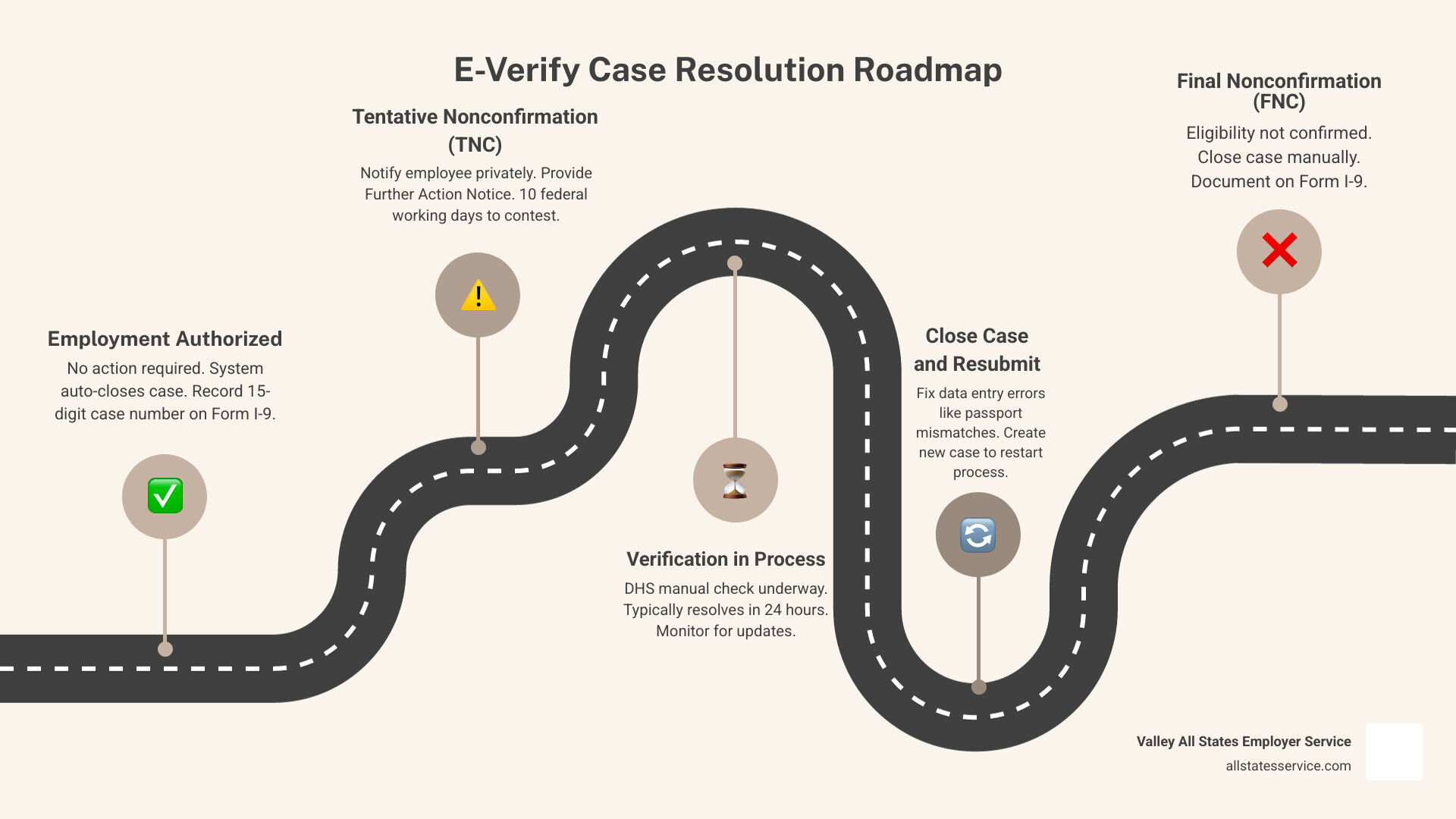
- Employment Authorized – No action needed. E-Verify auto-closes the case. Record the case number on Form I-9.
- Tentative Nonconfirmation (TNC) – Notify the employee privately. Give them the Further Action Notice. They have 10 federal working days to decide whether to contest.
- Verification in Process / Case in Continuance – Wait. DHS typically responds within 24 hours, but some cases take longer.
- Close Case and Resubmit – A data entry error occurred. Click “Close and Create New Case” to restart.
- Final Nonconfirmation (FNC) – Employment eligibility could not be confirmed. Close the case manually and document everything on Form I-9.
Getting a mismatch in E-Verify can feel alarming, especially when you’re already juggling onboarding paperwork, compliance deadlines, and a full hiring pipeline. But here’s the truth: a mismatch is not the same as a final rejection.
Most mismatches are fixable, and many resolve quickly once the right steps are taken. The E-Verify system is designed to guide both employers and employees through the process, with clear actions at every stage.
What matters most is knowing what to do, when to do it, and what you absolutely cannot do during the process.
This guide walks you through every case result and resolution path, so you can stay compliant, protect your employees’ rights, and close every case correctly.
Understanding the E-Verify Case Resolution Process
When we hit that submit button in E-Verify, we are essentially asking the Department of Homeland Security (DHS) and the Social Security Administration (SSA) to double check the info on a new hire’s Form I-9. Most of the time, we get a green checkmark almost instantly. This means the employee is Employment Authorized, and the system automatically closes the case for us.
However, sometimes the system needs a bit more time or finds a discrepancy. It is important to remember that initial results are just the beginning of the journey. If you see “Verification in Process,” it usually means DHS is doing a manual check, often resolving within 24 hours. “Case in Continuance” means the employee is already working with an agency to fix a record, and you just need to wait for the update.
To stay on top of these statuses, we recommend checking the Official E-Verify User Manual or reviewing our guide on E-Verify case status to understand exactly where your employee stands.
| Initial Case Result | What It Means | Required Employer Action |
|---|---|---|
| Employment Authorized | Info matches federal records. | None. Case auto-closes. |
| Tentative Nonconfirmation (TNC) | Info does not match records. | Notify employee and provide FAN. |
| Verification in Process | DHS needs more time to review. | Check back for updates. |
| Case in Continuance | Employee is resolving a mismatch. | Wait for final result. |
| Close Case and Resubmit | Data entry error detected. | Close and create a new case. |
Best Practices for Real-Time E-Verify Case Resolution
Efficiency is everything in HR. While the E-Verify dashboard typically refreshes every six hours, you can actually get real-time updates by opening the specific case details. This is helpful when an employee tells you they have just finished their appointment with the SSA.
Every case is assigned a unique 15-digit number. We suggest using the your-e-verify-verification-journey-explained resources to help your team track these numbers accurately. Employees can even use the myE-Verify Case Tracker tool to follow their own progress without needing a full account, which empowers them during what can be a stressful time.
Handling Close Case and Resubmit Results
Sometimes, a mismatch isn’t about the employee’s status at all, it is just a typo. If you receive a “Close Case and Resubmit” result, it usually stems from an error in the passport, passport card, or driver’s license information entered.
In these instances, E-Verify makes it easy. You simply click “Close and Create New Case.” The system will auto-close the errored case and pull the Form I-9 data into a fresh draft so you can fix the typo and try again. For a deeper dive into avoiding these common pitfalls, check out our e-verify-i-9-verification-complete-guide.
Navigating a Tentative Nonconfirmation (TNC)

A Tentative Nonconfirmation, or TNC, is simply a “mismatch.” It means the information provided on Form I-9 does not immediately align with SSA or DHS records. This could happen for many reasons, such as a name change after marriage that hasn’t been updated with Social Security, or a simple clerical error in a federal database.
When a TNC pops up, we have a specific set of responsibilities. First, we must download and print the Further Action Notice (FAN). We then need to meet with the employee privately to discuss the result. This is not the time for a public announcement or a termination notice. We give them the FAN, explain what it means, and let them decide whether they want to contest the result.
The clock starts ticking once the TNC is issued. We have 10 federal working days to notify the employee and record their decision in the system. If you need a refresher on the nuances of this step, our article on e-verify-tentative-nonconfirmation covers the details. You can also find official instructions on how to process a TNC on the USCIS website.
Steps for E-Verify Case Resolution After a TNC
If the employee decides to contest the mismatch, we must refer the case in E-Verify. This generates a Referral Date Confirmation (RDC) notice. We print this out and give it to the employee. It contains the deadline by which they must take action.
The employee then has 8 federal working days from the date of referral to contact the appropriate agency.
- For SSA TNCs: The employee usually visits a local SSA field office. However, as of March 2021, if the mismatch is specifically about citizenship, they may have the option to call DHS instead.
- For DHS TNCs: The employee contacts DHS by phone or uses the myUploads feature in myE-Verify to submit documents electronically.
During this window, we simply wait for the system to update. If you or the employee run into technical hurdles, reaching out to e-verify-customer-support can help clear things up.
Prohibited Actions During a Mismatch
This is the most critical part of E-Verify case resolution for employers. While a case is in the TNC or referral stage, you cannot take any adverse action against the employee. This includes:
- Terminating their employment
- Suspending them without pay
- Delaying their training
- Reducing their hours or pay
The law protects employees while they are resolving these mismatches. Taking action before a Final Nonconfirmation is received can open your business up to significant legal liability. If you have questions about what constitutes an adverse action, we recommend consulting e-verify-employer-customer-service for guidance.
Handling Final Nonconfirmations and Case Closures
A Final Nonconfirmation (FNC) occurs when E-Verify cannot confirm employment eligibility even after the referral process, or if the employee chooses not to contest the TNC. When this happens, the E-Verify case resolution process moves into its final phase: closure.
Every single case created in E-Verify must be closed, except for those that are automatically closed as “Employment Authorized.” To close an FNC case, you must manually select the appropriate closure statement. You will be asked whether you are continuing to employ this person or if they have been terminated.
If an employee receives an FNC, you are generally required to terminate their employment. If you choose to keep them on, you must notify DHS, but be aware that doing so may lead to additional scrutiny. Once the case is closed, you must record the E-Verify case number on the employee’s Form I-9 or print and attach the case details page to the form. Following the 4.1 Close Case instructions ensures you don’t miss any technical steps. For more on how this ties into your broader records, see our guide on e-verify-and-i-9.
Managing System Outages and Record Retention
Sometimes, the federal government makes things interesting by shutting down. During a government shutdown, E-Verify often goes offline. When this happens, the “three-day rule” for creating cases is suspended. However, your obligation to complete Form I-9 does not change. You still must complete Section 1 on the first day of work and Section 2 by the third day.
Once the system comes back online, there is usually a grace period. For example, in past outages, employers were given specific deadlines, like October 14, to catch up on all hires made during the downtime. When submitting these late cases, you should select “Other” as the reason for the delay and note “E-Verify not available” in the comments.
Beyond outages, you must also keep an eye on long-term record retention. USCIS disposes of E-Verify records that are more than 10 years old.
As noted in the E-Verify Records Retention Fact Sheet, employers have until January 22, 2026, to download the Historical Records Report for any cases last updated on or before December 31, 2015. On January 23, 2026, those old records will be gone for good. We recommend downloading this report and keeping it with your I-9 files to ensure you can always prove compliance for past employees.
Frequently Asked Questions about E-Verify
Can I fire an employee immediately if they get a TNC?
No, you absolutely cannot. You must provide the employee with the Further Action Notice and allow them the opportunity to contest the result. Taking adverse action before a Final Nonconfirmation is a violation of the E-Verify Memorandum of Understanding (MOU) and can lead to legal penalties.
What happens if an employee chooses not to contest a TNC?
If an employee decides not to contest, you should treat the result as a Final Nonconfirmation. You must close the case in the E-Verify system, selecting the reason that the employee did not contest. At that point, you may terminate the employment, and according to the MOU, you face no civil or criminal liability for that termination.
How long do I need to keep E-Verify records?
While the I-9 has its own retention rules, USCIS systematically deletes E-Verify records after 10 years. To protect your business, you should download your Historical Records Report regularly. The current deadline to save records from 2015 and earlier is January 22, 2026.
Resolve Your Compliance Challenges Today
Navigating employment eligibility doesn’t have to be a source of stress for your HR team. At Valley All States Employer Service, we specialize in taking the administrative burden off your shoulders. We provide expert, outsourced E-Verify workforce eligibility verification that is impartial, efficient, and designed to minimize errors.
By letting us handle your E-Verify case resolution, you can focus on what you do best: growing your business and supporting your team. We ensure that every mismatch is handled according to federal law, every deadline is met, and every record is properly retained.
Ready to simplify your onboarding and ensure total compliance? Start your journey with our I-9 Compliance Services Complete Guide and see how our expert services can protect your business today.