
Why Workforce Compliance Software Is Your Best Defense Against Costly Mistakes
Workforce compliance software is a digital solution that helps organizations manage and enforce labor laws, regulations, and internal policies across their entire workforce, automating tasks like time tracking, leave management, document storage, and audit preparation to reduce risk and ensure legal adherence.
Quick Answer: What Does Workforce Compliance Software Do?
- Automates regulatory updates so you’re always current with federal, state, and local laws
- Tracks employee certifications, licenses, and work eligibility with automatic expiry alerts
- Manages leave requests (FMLA, ADA, ACA) with built-in eligibility calculations
- Creates audit trails for every timecard edit, policy change, and compliance action
- Reduces manual errors through automated pay rules and scheduling guardrails
- Sends real-time alerts when employees approach overtime or miss required documentation
The employment regulatory landscape changes every week. New laws get enacted. Old rules get updated. And one inadvertent mistake can cost your organization thousands in fines, not to mention the damage to your brand reputation.
According to industry research, companies spend an average of $1,200 per employee per year on compliance-related activities. That’s a massive chunk of your HR budget going toward paperwork, manual tracking, and crossing your fingers that nothing falls through the cracks.
Here’s the reality: 75% of HR professionals believe that compliance software is essential for managing regulatory changes. They’re not wrong. Manual compliance processes expose you to human error, lack proper audit trails, and simply can’t keep pace with the constantly shifting legal requirements across different jurisdictions.
As one HR manager put it when describing their compliance tracking challenge: “I found it difficult to keep track of 500 employees’ individual safety training before using the software, and the software has simplified this process.” That’s the difference between drowning in spreadsheets and having a system that works for you.
Whether you’re navigating FMLA leave requests, ensuring FLSA pay accuracy, managing ADA accommodations, or tracking state-specific scheduling laws, the right software transforms compliance from a constant worry into a manageable, automated process.
For a plain-language overview of how a key U.S. compliance step works (and why accurate processing matters), see E-Verify.
Simple guide to workforce compliance software:
Navigating the Maze: What Is Workforce Compliance Software?
Workforce compliance software is a specialized digital tool designed to help businesses adhere to the vast array of labor laws, regulations, and internal policies governing their employees. Think of it as your digital shield, protecting your organization from the complexities of modern employment. It is an essential solution for any business, regardless of size, that wants to avoid penalties, mitigate risks, and maintain a strong reputation.
At its core, workforce compliance software helps you manage the intricacies of your workforce. It moves you away from chaotic paperwork and fragmented systems, and into a unified platform where all compliance-related activities live. This creates a single source of truth, which supports consistency and accuracy across all operations.
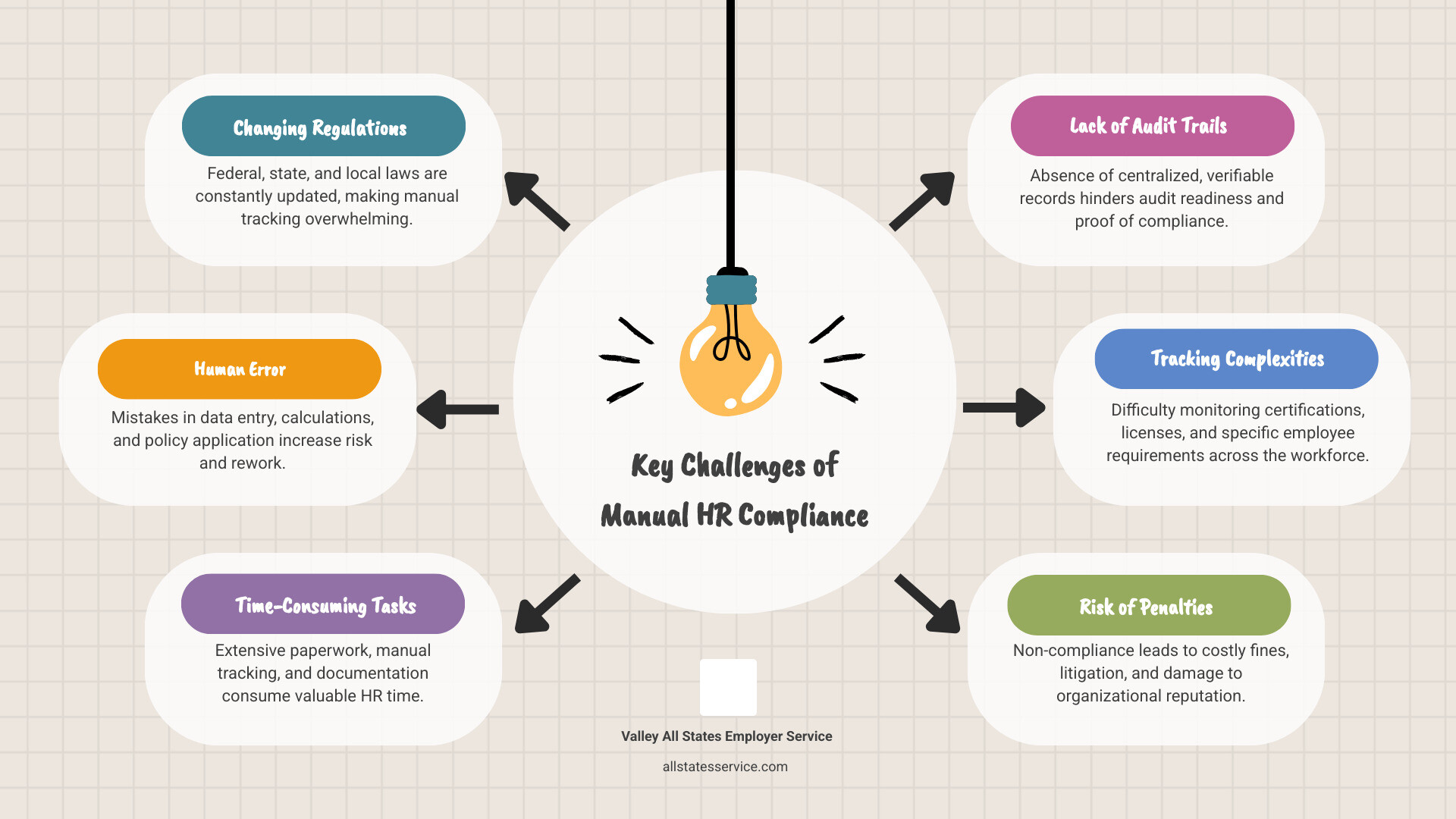
Why Manual Compliance Is No Longer Enough
The days of managing HR compliance with spreadsheets and filing cabinets are gone. The employment regulatory landscape is often described as a minefield, with new laws enacted every week and existing ones constantly updated. For businesses operating in the United States, this means juggling federal laws like FMLA, FLSA, and ADA, along with a patchwork of state and local regulations, including those found in Maryland.
Manual compliance is prone to human error, which can lead to significant financial penalties and legal repercussions. Consider the sheer volume of tasks involved, such as tracking time and attendance, calculating wages, managing leave requests, verifying certifications, and ensuring data privacy. Each of these tasks, if handled manually, consumes an immense amount of time and resources. Companies are spending an average of $1,200 per employee per year on compliance activities, much of which can be traced to inefficient, manual processes. Without a robust audit trail, proving compliance during an investigation or audit becomes an uphill battle.
How Workforce Compliance Software Provides a Solution
This is where workforce compliance software steps in, turning a daunting challenge into a manageable process. It provides a centralized system where all compliance data, policies, and workflows are integrated. This removes the need for data re-entry and reduces the risk of errors that often appear in manual systems.
The right software can deliver real-time updates on regulatory changes, so you are always current with the latest federal, state, and local laws. This proactive approach significantly reduces liability. By automating routine tasks and creating clear audit trails, it keeps you audit ready and supports confident compliance management.
The Ultimate Toolkit: Key Features of Effective Compliance Software
Effective workforce compliance software is not only about avoiding penalties, it is about building a resilient, efficient, and ethical organization. It offers an ultimate toolkit of features that work together, providing a holistic approach to managing your workforce. These integrated solutions cover everything from ensuring payroll accuracy to streamlining scheduling and detailed time tracking.
Core Functionalities for Daily Operations
To truly be effective, workforce compliance software should offer a robust set of core functionalities that support daily operations, such as:
- Time and Attendance Tracking: Accurate capture of employee hours via web-based timesheets, time clocks, mobile apps, or POS devices. This is crucial for FLSA compliance and preventing wage disputes.
- Leave Management: Comprehensive handling of employee leave requests, including eligibility determination and tracking for complex regulations like FMLA, ADA, and ACA. This helps ensure fair and consistent administration of paid and unpaid leave.
- Accommodation Requests: Managing and documenting reasonable accommodation requests under the ADA, which supports a compliant and inclusive workplace.
- Automated Pay Rules: Configuring work and pay rules within the software to align with internal policies, union contracts, and federal and state wage laws, helping to prevent litigation and fines.
- Certificate and License Management: Tracking employee qualifications, licenses, and certifications, along with their expiry dates, so employees remain properly qualified for their roles. Imagine tracking safety training for 500 employees, which can be simplified through automation.
- Automated Reporting: Setting up recurring, correctly formatted reports for internal review and for external regulatory bodies.
- Document Management: Securely storing all compliance-related documents, such as policy acknowledgments, training records, and I-9 forms, in a centralized, easily accessible location.
- Real-time Alerts: Receiving proactive notifications for approaching overtime, expiring certifications, missing compliance data, or potential policy violations.
Ensuring Audit Readiness and Documentation
In compliance, it is not enough to be compliant, you must also be able to prove it. Workforce compliance software excels at creating a clear, reliable record of your compliance efforts. This is crucial for audit readiness and for protecting your organization.
Key features that support audit readiness include:
- Complete Audit Trails: Every action, change, and approval within the system is logged, which provides an indisputable record for auditors. This covers timecard edits, policy acknowledgments, and leave request workflows.
- Centralized Document Storage: All compliance documents, from employee handbooks to I-9 forms and E-Verify records, are stored securely and systematically, which makes retrieval simple during an audit.
- Electronic Delivery of Notices: The ability to electronically send and track the receipt of important notices, such as pre-adverse and adverse action notices, that are critical for employment compliance.
- Case Management Workflows: Streamlining the handling of complex compliance issues, such as leave requests or incident reports, by guiding users through the required steps, documentation, and approvals.
These automated compliance management tools help you stay organized, consistent, and ready for any review or investigation. Leading providers offer comprehensive solutions that integrate these essential features into a single platform.
The Power of Your Workforce Compliance Software: AI and Automation
AI and automation are no longer futuristic concepts, they are central to modern workforce compliance software. These technologies turn compliance from a reactive, manual burden into a proactive, strategic advantage. They drive insights, automate workflows, reduce risks, protect your brand reputation, and deliver proactive alerts that keep you ahead. In many cases, the use of AI in HR compliance software can reduce compliance errors by up to 40%.
Using AI for Proactive Risk Detection
Imagine having a compliance expert working around the clock, scanning for potential issues before they grow. That is what AI brings to workforce compliance software. AI-driven risk detection constantly monitors your data for compliance anomalies and delivers early alerts on potential violations.
This can support:
- 24/7 Risk Scanning: AI algorithms can analyze data for patterns that might indicate non-compliance, such as scheduling conflicts that violate rest period laws or discrepancies in payroll calculations.
- AI-Suggested Corrective Actions: When an issue is flagged, the system can suggest specific actions to address the problem, guiding your team toward the correct resolution.
- Error Detection in Documents: AI can analyze uploaded documents, catch errors or missing information in compliance forms, and suggest corrections, which reduces manual review time.
- Predictive Analytics for Compliance Hotspots: By reviewing historical data, AI can highlight areas where compliance issues are likely to arise, so you can put preventative measures in place.
Trusted solutions for workforce compliance increasingly use AI to provide insights into labor laws and pay, helping reduce risk with smarter compliance tools and keeping organizations audit ready.
How Automation Saves Time and Reduces Penalties
Automation is the engine that drives efficiency in workforce compliance software. It takes over repetitive, time-consuming tasks so your HR team can focus on strategic work. Automating compliance tasks can save businesses an average of 10 hours per week, which is a significant productivity gain and a powerful tool for reducing penalties.
Key automated functions often include:
- Automated Regulatory Updates: The software can update its rule sets to reflect changes in federal, state, and local labor laws, tax codes, and leave rules. This removes the need for manual research and helps keep you aligned with the latest regulations, including Maryland-specific compliance requirements.
- Payroll Filing Automation: Automated systems can handle tax filings, wage garnishment processing, and end-of-year documentation with expert oversight, which reduces errors and potential penalties. This supports accurate and timely payments and helps avoid litigation and heavy fines.
- Eliminating Manual Data Entry: Integration across HR modules means data entered once is available everywhere, which removes repetitive, error-prone manual data entry. This full-solution automation leads to less liability and fewer manual tasks.
Choosing Your Solution: From WFM to Global and Data Security Compliance
When you explore workforce compliance software, it is important to understand the differences between types of solutions and how they match your needs. Many businesses consider Workforce Management, or WFM, software, but it is helpful to distinguish it from dedicated compliance solutions. Your choice should also reflect your industry requirements and plans for growth.
| Feature Area | Workforce Management (WFM) Software | Dedicated Workforce Compliance Software |
|---|---|---|
| Primary Focus | Optimizing workforce efficiency, scheduling, time & attendance, labor costs | Ensuring adherence to laws, regulations, policies, and risk mitigation |
| Key Capabilities | Labor forecasting, scheduling, time tracking, absence management, analytics | Regulatory updates, audit trails, document management, policy enforcement |
| Compliance Depth | Manages basic time & attendance, overtime rules, some leave | Deeper coverage of specific laws such as FMLA, ADA, FLSA, E-Verify, and data privacy |
| Risk Mitigation | Indirectly through optimized schedules and cost control | Directly through automated alerts, proactive error detection, and audit readiness |
| Integration | Often integrates with payroll | Integrates with HRIS, payroll, and other compliance-specific tools |
| Typical User | Operations managers, schedulers, payroll | HR managers, legal teams, compliance officers |
WFM software is a broader suite of tools that helps ensure employees are in the right place at the right time for maximum productivity. It is excellent for scheduling, time tracking, and labor forecasting. Dedicated workforce compliance software, on the other hand, focuses on legal adherence, risk mitigation, and audit readiness, offering more granular control and specialized features for complex regulatory requirements.
Understanding Data Security and Privacy (GDPR, CCPA)
Data security and privacy are critical. Workforce compliance software plays a major role in protecting sensitive employee data and supporting adherence to regulations such as GDPR and CCPA. Even if your primary operations are in the United States, if you handle data from individuals in the EU, GDPR compliance can still apply. For businesses operating nationwide, understanding and following state-specific privacy laws, such as the California Consumer Privacy Act (CCPA), is equally important.
Strong software solutions often include:
- Data Encryption and Secure Storage: Protecting all sensitive data, both in transit and at rest, with advanced encryption protocols.
- Role-Based User Permissions: Making sure that only authorized personnel have access to specific types of data, which helps maintain confidentiality.
- Consent Tracking: Managing and documenting employee consent for data processing, which is a key requirement under many privacy laws.
- Formal Privacy Policy Programs: Aligning with recognized standards such as ISO 27001 and SOC 1/2 certifications, which shows a commitment to data protection.
You can view detailed trust and security information from many providers to understand the security protocols, compliance frameworks, and data governance standards that safeguard employee and company data.
Managing a Global and Multi-Jurisdictional Workforce
For organizations with operations across different states or countries, managing multi-jurisdictional compliance is a significant challenge. Labor laws and contractual agreements can vary by country, state, and even local jurisdiction.
Workforce compliance software is designed to handle this complexity by providing:
- Global and Local Labor Law Coverage: Templates and rule sets for a wide range of federal laws, including FMLA, FLSA, ADA, and ACA, and state-specific regulations, so you can maintain compliance whether you are in Maryland, California, or beyond.
- Country-Specific Rules Engines: For global organizations, configuration options to automate unique compliance rules for different regions.
- Support for a Distributed Workforce: As remote and hybrid work models grow, the software helps manage compliance for employees in various jurisdictions, including local wage, hour, and leave laws.
This comprehensive approach allows you to steer workplace compliance with confidence, while your systems help you keep pace with every labor law and contractual agreement that applies to your team.
Real-World Wins and the Future of Compliance Tech
The real impact of workforce compliance software becomes clear when you look at organizations that have adopted it. These real-world wins show how technology turns compliance from a headache into a strategic asset. Looking ahead, the future of compliance technology promises even greater efficiency and predictive capabilities driven by new trends.
Case Studies: The Impact of Effective Workforce Compliance Software
You have already seen how essential this software is for managing complex tasks, but the results can be very tangible:
- Simplified Training Tracking: Many employers struggle to keep track of individual safety training for hundreds of employees. After implementing user-friendly workforce compliance tools, the process becomes far simpler, and tracking training and certificates at scale is much more manageable.
- Boosted Productivity in Education: School districts and educational institutions that adopt dedicated compliance software can streamline complex workforce requirements, freeing staff time and increasing productivity.
- Reduced Manual Work and Faster Onboarding: Organizations using compliance software often report a 60% reduction in manual compliance work and 50% faster onboarding time. Automation of document checks, consistent rule application, and less paper chasing contribute to direct cost savings and efficiency gains.
These kinds of outcomes show that workforce compliance software is not just about avoiding fines, it is about making operations smoother, faster, and more productive.
Emerging Trends: What Is Next for Compliance?
The world of workforce compliance software keeps evolving, and several trends are shaping what comes next:
- Agentic AI for Complex Tasks: Beyond simple alerts, AI will increasingly be able to perform complex compliance tasks, such as drafting reports or even initiating corrective actions under set rules, with human oversight.
- Deeper System Integrations: Expect even smoother integration between compliance software and other HR systems, such as Human Capital Management and Workforce Management platforms, creating a more unified HR ecosystem.
- Mobile-First Compliance Management: Managing compliance tasks, approvals, and document uploads from mobile devices is quickly becoming standard, which supports real-time responsiveness for distributed teams.
- Predictive Scheduling Regulations: As more regions adopt predictive scheduling laws, compliance software will help businesses create and adjust schedules that follow these complex rules, reducing fatigue risks and promoting fair work practices.
- Hyper-Personalization of Compliance Rules: Future software will apply highly detailed, personalized compliance rules based on each employee’s role, location, certifications, and even specific contractual agreements, which supports greater accuracy.
All signs point to a future where compliance is not only automated but also intelligently anticipated, and where your systems help keep your organization consistently a step ahead.
Frequently Asked Questions about Workforce Compliance
We know that exploring workforce compliance software can raise a lot of questions. Here are answers to some of the most common ones to help you steer this important topic.
What’s the main difference between WFM and dedicated compliance software?
While both are important for managing your workforce, their primary focuses are different. Workforce Management, or WFM, software offers a broader suite of tools aimed at optimizing workforce efficiency, including scheduling, time and attendance tracking, and labor forecasting. Its compliance features usually cover basic wage and hour requirements and overtime rules.
Dedicated workforce compliance software, in contrast, is focused on legal adherence, risk mitigation, and audit readiness. It provides in-depth features for specific regulations such as FMLA, ADA, E-Verify, and complex data privacy laws. You can think of WFM as the general manager of your workforce, and dedicated compliance software as your specialized legal adviser that helps keep every detail aligned with the law.
How does this software help with payroll and tax compliance?
Workforce compliance software can significantly streamline and secure payroll and tax compliance. It automates the application of complex pay rules so wages are calculated accurately according to federal, state, and local laws, as well as union or collective bargaining agreements where applicable. The software often integrates directly with payroll systems to automate tax filings, handle wage garnishments correctly, and generate year-end documentation such as W-2s. This level of automation reduces the risk of manual errors that can lead to penalties, fines, and employee disputes, and helps protect your organization from financial and reputational damage.
Can small businesses benefit from workforce compliance software?
Yes, small businesses can gain a lot from workforce compliance software. Smaller teams often operate with very lean HR resources, which makes manual compliance a heavy burden.
The software helps them:
- Avoid Costly Mistakes: Small businesses face the same types of regulatory fines as larger organizations, and those penalties can be more damaging to a smaller budget. Software helps prevent these errors.
- Manage Complexity with Lean Teams: It automates routine tasks and simplifies complex rules, so HR staff who wear many hats can stay on top of compliance.
- Build a Solid Compliance Foundation: As a business grows, its compliance needs become more complex. Adopting software early can create a scalable, robust framework for future expansion.
Scalable solutions are available for organizations of all sizes, so even the smallest businesses can maintain compliance with confidence.
Conclusion
Navigating the intricate maze of labor laws and regulations can feel overwhelming, but the right workforce compliance software can turn that challenge into one of your strengths. It is not only about avoiding penalties, it is also about gaining peace of mind, improving efficiency, and building a stronger foundation for growth.
When you accept automation and AI-driven insights, you move from a reactive posture, always scrambling to fix issues, to a proactive approach where compliance is built into daily operations. Your organization stays a step ahead, your brand is better protected, and your employees can work in a fair, secure, and productive environment.
As experts in employment compliance, Valley All States Employer Service understands how critical accuracy is in areas like E-Verify. Our team focuses on expert, impartial, and efficient E-Verify processing, which minimizes errors and takes the administrative burden off your plate.
Ready to simplify compliance and strengthen your hiring process? Explore our services today!