
How to Navigate the Electronic I-9 Verification Process Without Breaking a Sweat
Understanding the e-verify electronic i-9 employment verification process
The e-verify electronic i-9 employment verification process is a two-part federal system that confirms every new hire is legally authorized to work in the United States.
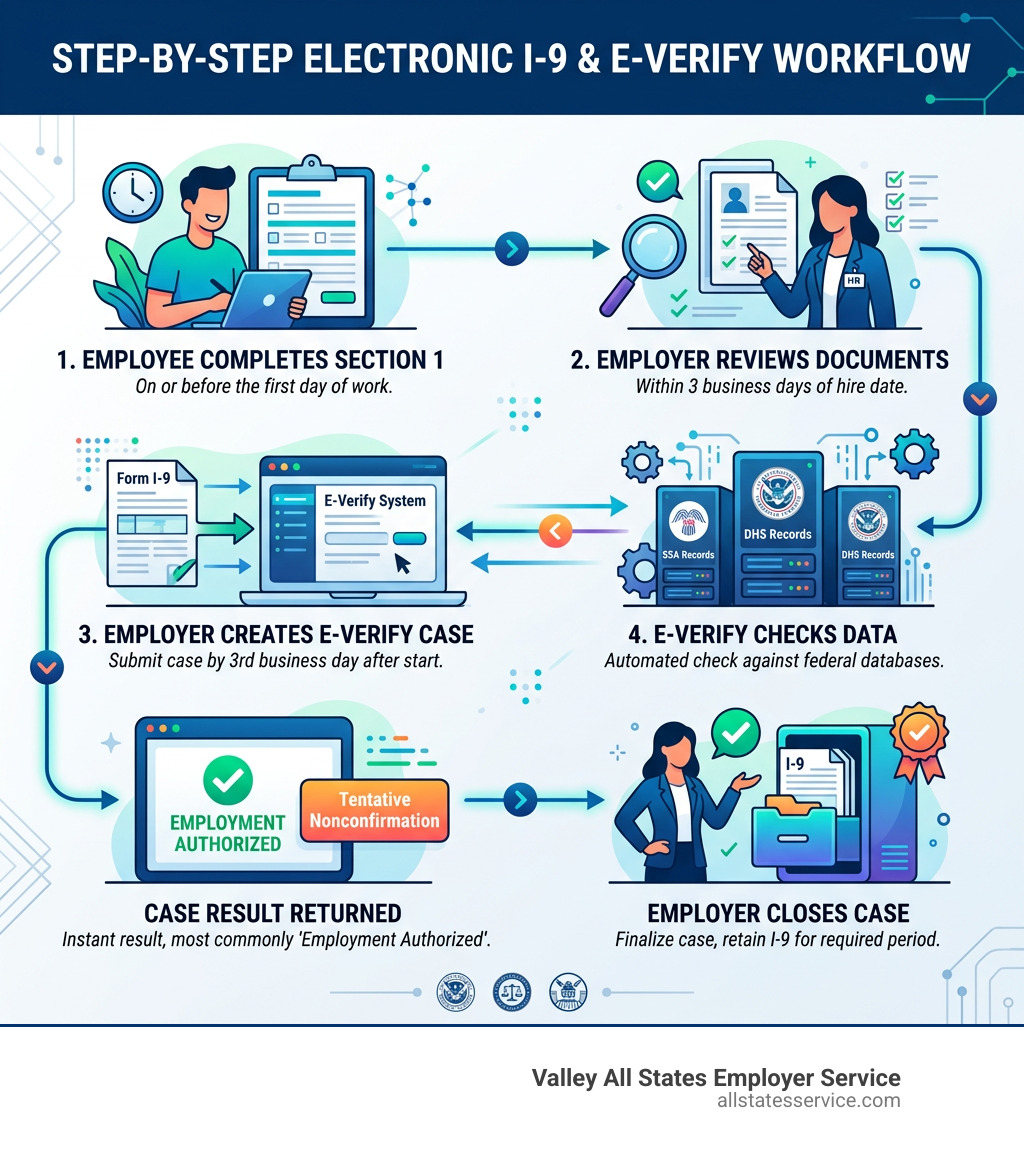
Here’s the quick version of how it works:
- Employee completes Section 1 of Form I-9 on or before their first day of work
- Employer reviews documents and completes Section 2 within three business days of the hire date
- Employer creates an E-Verify case using the Form I-9 information, no later than the third business day after the employee starts
- E-Verify checks the data against records from the Social Security Administration (SSA) and the Department of Homeland Security (DHS)
- A case result is returned, most commonly “Employment Authorized”
- Employer closes the case and retains the Form I-9 for the required period
If you’ve ever stared at a stack of new-hire paperwork and thought, “there has to be a better way,” you’re not alone.
Form I-9 has been a fixture of U.S. hiring since 1986, when the Immigration Reform and Control Act (IRCA) made it mandatory for employers to verify every new employee’s identity and work authorization. That’s nearly four decades of forms, deadlines, and compliance risk sitting on HR’s plate.
And the stakes are real. Errors, missed deadlines, or improper document handling can lead to government audits and serious penalties.
The good news? The electronic E-Verify workflow exists to make this process faster, more accurate, and far less stressful, especially for busy HR teams managing multiple hires at once. Whether you’re new to the system or looking to tighten up your current process, this guide walks you through every step clearly.
Easy e-verify electronic i-9 employment verification process word list:
At its core, the e-verify electronic i-9 employment verification process is about teamwork between two different but connected systems. First, you have Form I-9, which is the foundation. Every employer in the U.S. must complete this form for every person they hire for wages. It’s how we document that we’ve seen proof of who a person is and that they have the right to work here.
Then, there is E-Verify. Operated by U.S. Citizenship and Immigration Services (USCIS) in partnership with the Social Security Administration (SSA), E-Verify is a web-based system that takes the info from that Form I-9 and matches it against millions of government records. While Form I-9 is mandatory for everyone, E-Verify is technically voluntary for most employers, though some states and federal contracts make it a requirement.
Why use both? Because Form I-9 alone relies on your ability to spot a fake ID, which is getting harder every day. E-Verify adds a layer of digital certainty. It confirms that the Social Security number belongs to the person standing in front of you and that their immigration status, if applicable, is current.
For more detailed rules, we always recommend keeping the E-Verify Handbook for Employers M-274 bookmarked. It is the “bible” of employment eligibility, covering every “what-if” scenario you can imagine. Using these systems together helps us maintain a legal workforce while protecting American jobs and preventing unauthorized employment.

Step-by-Step: Navigating the Electronic Workflow
Transitioning to a digital workflow doesn’t just save paper, it saves time. When we use an electronic system, the software often catches simple mistakes, like a missing date or a mistyped Social Security number, before the form is even submitted.
One of the biggest updates in recent years is the introduction of “alternative procedures.” As of August 1, 2023, employers who are enrolled in E-Verify and in good standing can choose to examine I-9 documents remotely via a live video call rather than meeting every single hire in person. This is a game-changer for businesses with remote teams in Maryland or across the country.
To keep things organized, employees must present documents from the “Lists of Acceptable Documents.” Here is a quick breakdown of what those look like:
| Document Type | Purpose | Examples |
|---|---|---|
| List A | Establishes both identity and work authorization | U.S. Passport, Permanent Resident Card (Green Card) |
| List B | Establishes identity only | Driver’s license, School ID card (must have a photo for E-Verify) |
| List C | Establishes work authorization only | Social Security card, Birth certificate |
If an employee doesn’t have a List A document, they must provide one from List B and one from List C.
Initiating Section 1 within the e-verify electronic i-9 employment verification process
The process truly begins the moment a candidate accepts your job offer. In a modern e-verify electronic i-9 employment verification process, you don’t hand them a clipboard. Instead, you send them a unique link.
With the new E-Verify+ system, this is even more streamlined. The employee receives a link, creates an account (often using Login.gov for extra security), and enters their own biographic information. This includes their full legal name, address, date of birth, and citizenship status.
Here is a critical rule to remember: Section 1 must be completed by the employee’s first day of employment. They can do it earlier, but only after they have accepted the job offer. Also, for employers using E-Verify, the Social Security Number (SSN) is mandatory in Section 1, even though the form says it is optional for non-E-Verify users. This is because the system needs that SSN to talk to the Social Security Administration.
Completing Section 2 of the e-verify electronic i-9 employment verification process
Once the employee finishes their part, the ball is back in our court. As the employer, we have a strict “three-day rule.” Section 2 must be completed within three business days of the hire date. If you hire someone on a Monday, you must finish Section 2 by Thursday.
During this step, we examine the original documents the employee provides. We aren’t expected to be forensic experts, but we must accept documents that reasonably appear to be genuine and relate to the person presenting them.
For E-Verify users, there is an extra step called “Photo Matching.” If an employee presents a U.S. Passport, Passport Card, Permanent Resident Card, or Employment Authorization Document, the E-Verify system will display a digital image of the photo on file with the government. We must compare the photo on the physical document to the one on the screen to ensure they match.
If you want to see this in action, the E-Verify At-A-Glance Video provides a great eight-minute overview of how the screens look and what buttons to click.
Managing Case Results and Mismatches
After we hit “submit” in E-Verify, the system goes to work. Most of the time, within seconds, you’ll see a green checkmark and the status “Employment Authorized.” That is the finish line! You close the case, and you are done.
However, sometimes the system can’t immediately confirm a match. This results in a Tentative Nonconfirmation (TNC), often called a “mismatch.”
A TNC doesn’t mean the employee isn’t allowed to work. It just means something didn’t line up. Maybe they changed their name after getting married and didn’t update the SSA, or perhaps there was a typo in the government database.
If a TNC happens, here is what we do:
- Notify the employee privately. This is a confidential matter.
- Give them the Further Action Notice. This explains why the mismatch happened.
- Ask them if they want to contest it. If they do, they have eight federal government workdays to contact the appropriate agency (SSA or DHS).
- Let them keep working. You cannot fire, suspend, or delay training for an employee just because they have a TNC while they are resolving it.
Anti-discrimination rules are very strict here. We must treat every employee the same, regardless of their national origin or citizenship status. Using E-Verify to “pre-screen” applicants before hiring them is illegal and can lead to heavy fines.
Frequently Asked Questions
Navigating the e-verify electronic i-9 employment verification process often brings up specific technical questions. Since we handle these for clients every day at Valley All States Employer Service, we have seen it all.
What are the retention and storage requirements for completed forms?
Just because the form is digital doesn’t mean you can forget about it. The law requires us to keep a Form I-9 for:
- Three years after the date of hire, OR
- One year after employment ends, whichever is later.
If you use an electronic system, it must meet DHS standards for security and audit trails. This means the system needs to track who accessed the form and when, and it must be able to produce a clean, readable copy if a government official shows up for an inspection. We recommend keeping digital backups in a secure, encrypted environment to ensure you are always audit-ready.
How does the process change for federal contractors?
If your business has a federal contract with the FAR E-Verify clause, the rules get a bit tougher. Unlike regular employers who only verify new hires, federal contractors may be required to verify their entire existing workforce assigned to that contract.
There are specific timelines for enrollment (usually 30 days from the contract award) and for initiating cases (usually 90 days for existing employees). It is a complex layer of compliance that requires careful tracking to ensure you don’t jeopardize your government standing.
What should I do if an employee does not have a Social Security Number yet?
This happens more often than you’d think, especially with international hires or people who have recently changed their status.
If an employee has applied for an SSN but hasn’t received the card yet, you should still have them complete Section 1 of the Form I-9. You can leave the SSN field blank for the moment, but you cannot create the E-Verify case yet.
Keep the Form I-9 on file and write a note explaining why the E-Verify case is delayed. As soon as the employee gets their number, update the form and create the case immediately. As long as you have documented the reason for the delay, you are generally in the clear with compliance.
Conclusion
Mastering the e-verify electronic i-9 employment verification process is one of the best ways to protect your business from the headaches of manual paperwork and the risks of government audits. By moving to a digital workflow, you aren’t just modernizing your HR department, you are building a more secure, compliant, and efficient onboarding experience for your team.
At Valley All States Employer Service, we know that your time is better spent growing your business than worrying about “three-day rules” and document retention schedules. That is why we offer expert, impartial, and efficient E-Verify processing to take that administrative burden off your shoulders. We ensure every case is handled with precision, giving you the peace of mind that your workforce is fully authorized and your business is protected.
Ready to simplify your hiring? Learn more about our employment verification process and see how we can help you navigate compliance without breaking a sweat.