
Flawless 3-Step i 9 verification process for remote employees
The I-9 Verification Process for Remote Employees: A Complete Guide
The i 9 verification process for remote employees has a new, permanent option for employers. If you’re enrolled in E-Verify, you can now examine document copies and conduct a live video call with new hires, making remote onboarding much simpler. You’ll just need to mark that you used this alternative procedure on Form I-9 and keep clear copies of all documents.
Quick Overview: Remote I-9 Verification Steps
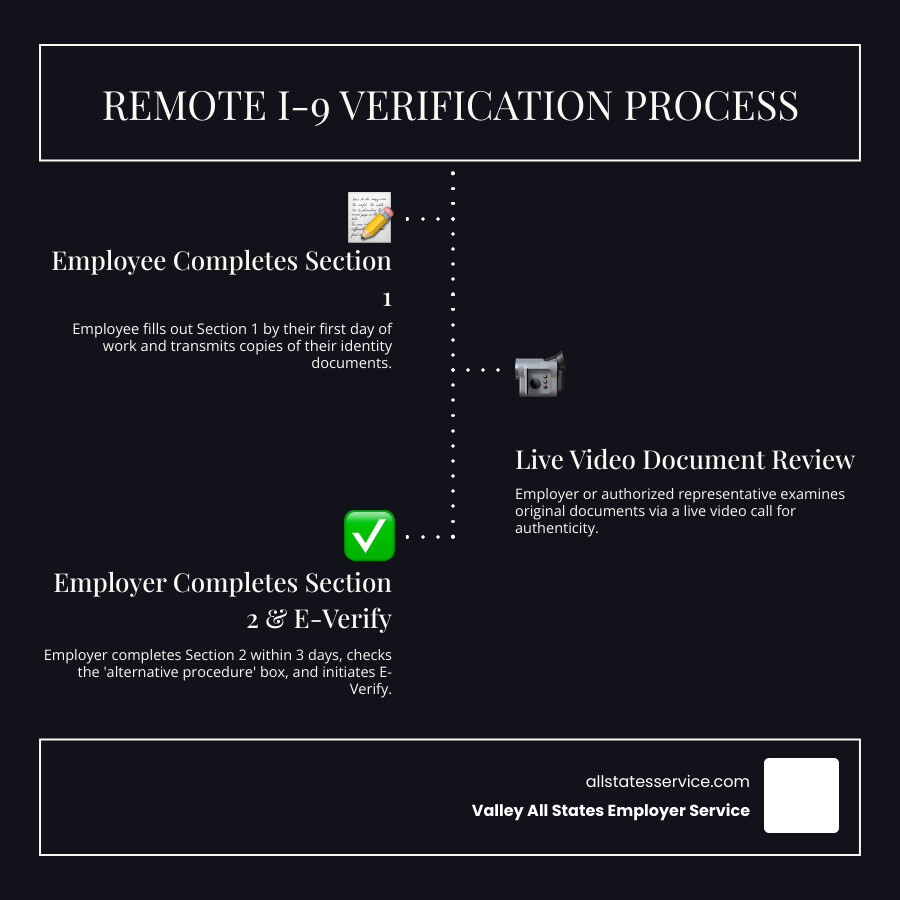
- Employee completes Section 1 by the first day of work and transmits document copies
- Employer examines copies of acceptable List A, B, or C documents via secure methods
- Live video call conducted to verify documents appear genuine and relate to the employee
- Employer completes Section 2 within three business days, checking the “alternative procedure” box
- E-Verify case created and document copies retained for compliance records
Remote work has changed how businesses hire and onboard. What used to be a simple in-person document check can now feel like a complex challenge for HR teams with distributed workforces.
The good news? You don’t need to fly employees across the country just to verify their work authorization. Since August 2023, the Department of Homeland Security has made remote I-9 verification a permanent option for employers enrolled in E-Verify.
But here’s the catch: the process has strict requirements and deadlines. Getting it wrong can lead to serious penalties. Civil fines for I-9 paperwork violations range from approximately $281 to $2,861 per violation. For knowingly hiring unauthorized workers, those penalties can escalate to tens of thousands of dollars per employee.
Whether you’re hiring your first remote employee or managing a fully distributed team, understanding the remote I-9 verification process is essential. It’s the key to staying compliant, avoiding costly audits, and building a great team without geographic limits.
What is Form I-9 and Why is it So Important?
The Form I-9, Employment Eligibility Verification, is a crucial document for every employer in the United States. Its primary purpose is to verify the identity and employment authorization of individuals hired for employment in the U.S. This requirement stems from the Immigration Reform and Control Act (IRCA) of 1986, which prohibits employers from knowingly hiring unauthorized workers.
As employers, we are legally responsible for ensuring that every new hire completes this form accurately and on time. The form is divided into sections, with Section 1 completed by the employee and Section 2 by us, the employer, or our authorized representative. This process ensures that we are building a legal workforce and upholding federal immigration laws. For a deeper dive into the official requirements, you can always refer to The official Form I-9 from USCIS.
The High Cost of Non-Compliance
Ignoring or improperly completing Form I-9 is like playing with fire, and it can lead to some serious burns. The penalties for non-compliance are steep and can significantly impact our business.
For paperwork violations alone, such as errors or omissions on the form, civil fines can range from approximately $281 to $2,861 per violation. These fines increase for repeated offenses, meaning consistency and accuracy are paramount. But it gets more serious. If an employer knowingly hires or continues to employ someone without proper work authorization, penalties can escalate significantly, from hundreds to tens of thousands of dollars per worker. In severe or repeated cases, there’s even the risk of criminal prosecution.
Immigration and Customs Enforcement (ICE) is responsible for investigating compliance, and they conduct regular audits. An ICE audit can be a disruptive and costly experience, so proactive compliance is always our best defense. To ensure our practices are robust, we consult resources like our I-9 Compliance Services Ultimate Guide.
Key Deadlines You Can’t Miss
When it comes to Form I-9, timing is everything. Missing key deadlines can quickly lead to compliance issues and potential penalties.
First, the employee must complete and sign Section 1 of the Form I-9 no later than their first day of employment for wages. This section includes their personal information and an attestation of their citizenship or immigration status.
Then, we, as the employer (or our authorized representative), must complete Section 2 within three business days of the employee’s first day of employment. This is often referred to as the “3-day rule.” If an employee works for less than three business days, Section 2 must be completed no later than the first day of employment. If an employee doesn’t provide acceptable documents within these three business days, we may terminate their employment.
Finally, proper document retention is critical. Employers must retain and store Form I-9 for three years after the date of hire, or for one year after employment is terminated, whichever is later. Keeping these records secure and accessible is vital for compliance. For more detailed guidance on these timelines, our I-9 Form Completion resource is invaluable.
The New Rules: Remote vs. In-Person I-9 Verification
The world of work has changed dramatically, and thankfully, the i 9 verification process for remote employees has adapted with it. For years, the gold standard was an in-person, physical inspection of documents. However, the COVID-19 pandemic brought about temporary flexibilities, allowing virtual inspections. What began as a temporary measure has now evolved into a permanent alternative procedure for many employers.

This new, permanent alternative procedure, authorized by the Department of Homeland Security (DHS), allows for remote document examination, but it comes with a significant condition: we must be enrolled in E-Verify and be in good standing. This is a game-changer for businesses with remote or hybrid workforces, streamlining the onboarding process without compromising compliance.
To understand how this new process stacks up against the traditional method, let’s look at a quick comparison:
| Feature | In-Person Verification | Remote Verification (Alternative Procedure) |
|---|---|---|
| Method | Physical examination of original documents by employer or authorized representative. | Remote examination of copies of documents, followed by a live video interaction with the employee presenting the original documents. |
| Requirements | No E-Verify enrollment required for physical inspection. | Requires E-Verify enrollment and good standing. |
| Document Handling | Original documents are physically held and inspected. | Employee sends copies electronically; originals are presented during a live video call. Copies are retained. |
| Pros | Traditional, straightforward for co-located teams, generally well-understood. | Flexible for remote workforces, reduces travel/logistical burdens, faster onboarding for remote hires. |
| Cons | Requires physical presence, challenging for remote hires, logistical problems. | Requires E-Verify enrollment, specific technological setup, employer liability for representative actions, strict procedural adherence. |
This shift means we can now confidently manage the i 9 verification process for remote employees without the logistical headaches of the past, provided we follow the new guidelines carefully. To learn more about this evolving landscape, check out What Is Remote I-9 Verification?.
Who Qualifies for Remote I-9 Verification?
Not every employer can simply switch to remote I-9 verification. There’s a key qualification that determines eligibility: E-Verify participation. To use the DHS-authorized alternative procedure for remote I-9 document examination, we must be actively enrolled in E-Verify and maintain “good standing” with the program.
E-Verify is an internet-based system that lets businesses confirm their employees are eligible to work in the United States. It works by comparing information from an employee’s Form I-9 to records from the U.S. Department of Homeland Security (DHS) and Social Security Administration (SSA).
If we choose to offer the alternative procedure, we must apply it consistently to all employees at a specific hiring site. However, we have the flexibility to offer the alternative procedure only for remote hires, while continuing physical examination for onsite or hybrid employees, as long as this choice is not made for discriminatory purposes. This ensures fairness and compliance across our workforce.
For any employer considering this path, enrolling in E-Verify is the first step. You can find out more about this process at Enrolling in E‑Verify. Once enrolled, we open up the ability to streamline our remote onboarding processes, as detailed in our E-Verify Remote Hiring Complete Guide.
Understanding the Latest Form I-9 Version
Staying compliant means staying current with the latest forms. The U.S. Citizenship and Immigration Services (USCIS) regularly updates Form I-9, and the most recent version is dated “08/01/23.”
Employers could begin using this new form on August 1, 2023. There was a transition period where the previous Form I-9 dated “10/19/2019” could still be used through October 31, 2023. However, beginning November 1, 2023, only the new Form I-9 dated “08/01/23” may be used. This new version is valid until May 31, 2027.
The updated form also brings some welcome changes designed to simplify the process. It’s now shortened to just one page, and the instructions have been reduced to eight pages, making it easier to steer. Crucially for us, the new Form I-9 includes a specific checkbox in Section 2 to indicate when the alternative procedure for remote document examination has been used. This makes it clear to auditors that we followed the proper remote verification steps.
Always make sure we are using the correct version of the form to avoid technical violations. For the most up-to-date information and to download the latest version, visit The latest Form I-9 information.
A Step-by-Step Guide to the I-9 Verification Process for Remote Employees
Navigating the i 9 verification process for remote employees might seem daunting, but by breaking it down into clear steps, it becomes much more manageable. Our goal is to ensure a smooth, compliant experience for both our new hires and our team.
This process involves a collaborative effort between the employee and us, the employer (or our authorized representative). Let’s walk through each stage to ensure we’re always on the right track. For more detailed insights, our guide on How to Review I-9 Documents for Remote Employees is an excellent resource.
Step 1: Employee Completes Section 1
The first step in the remote I-9 verification process begins with our new employee. They are responsible for accurately completing Section 1 of Form I-9 no later than their first day of work for pay.
In this section, the employee provides their personal information, such as their legal name, address, date of birth, and Social Security Number. They must also attest to their citizenship or immigration status by selecting one of four options: a U.S. citizen, a non-citizen national of the U.S., a lawful permanent resident, or an alien authorized to work. Depending on their status, they might need to provide additional information, such as an A-Number (Alien Registration Number) or a Form I-94 Admission Number.
If we use an electronic I-9 system, the employee can complete and digitally sign Section 1. It’s vital that this section is filled out completely and honestly, as the employee attests to its accuracy under penalty of perjury. For comprehensive details on what documents are required based on status, refer to our I-9 Document Requirements Complete Guide.
Step 2: Employee Transmits and Prepares Documents
Once Section 1 is complete, the employee moves on to the document presentation stage. They must choose which documents to present from the List of Acceptable Documents. We cannot specify which documents they provide; the choice is theirs.
The acceptable documents are categorized into three lists:
- List A: Documents that establish both identity and employment authorization (e.g., U.S. Passport or Passport Card, Permanent Resident Card, Employment Authorization Document). Only one document from List A is needed.
- List B: Documents that establish identity only (e.g., Driver’s License, State ID Card).
- List C: Documents that establish employment authorization only (e.g., Social Security Card, Birth Certificate). If presenting a List B document, they must also present one from List C.
For remote verification, the employee must first transmit clear copies (front and back, if applicable) of their chosen document(s) to us. This can be done securely via email or through our electronic I-9 platform. They must then prepare the original, unexpired version of these same documents to present during the live video examination in the next step.
Step 3: The Live Video Examination
This is where the “remote” part of the i 9 verification process for remote employees truly comes into play. Within three business days of the employee’s first day of employment, we (or our authorized representative) must conduct a live video interaction with the employee.
During this video call, the employee must physically present the original document(s) they previously sent copies of. Our role is to visually inspect these original documents to determine if they reasonably appear to be genuine and relate to the individual presenting them. We’ll compare the documents to the employee we see on screen, ensuring consistency and authenticity.
This live video interaction is crucial for meeting the “physical examination” requirement in a remote setting. It ensures that while the initial document transfer might be digital, the verification itself still involves a direct, real-time assessment of the physical documents. For assistance with this step, especially if we’re dealing with a high volume of remote hires, exploring professional Remote I-9 Services can be incredibly helpful.
Step 4: Employer Completes Section 2
After the successful live video examination, it’s our turn to complete Section 2 of Form I-9. This must be done within three business days of the employee’s first day of work.
In Section 2, we will record the details of the document(s) the employee presented. This includes the document title, issuing authority, document number, and expiration date (if applicable). We must fill in the appropriate columns based on whether the employee presented a List A document or a combination of List B and List C documents.
Crucially, for remote verification using the alternative procedure, we must indicate that we used this method. On the new Form I-9 (08/01/23 edition), there’s a specific checkbox in Section 2 to mark that an “alternative procedure” was used. If we were using an older form version during the transition period, we would have notated “Alternative Procedure” in the “Additional Information” field.
Finally, we must sign and date Section 2, attesting under penalty of perjury that we have examined the documents, that they appear genuine, and that the employee is authorized to work in the U.S. This completion of Section 2 is a critical step in ensuring USCIS I-9 Remote Verification compliance.
Best Practices for Flawless Remote I-9 Compliance
Achieving flawless compliance in the i 9 verification process for remote employees requires more than just following steps; it demands a commitment to best practices.
First and foremost, consistency is key. If we choose to offer the alternative remote examination procedure at a particular hiring site, we must apply it consistently to all employees at that site. Alternatively, we can offer it only for our remote hires while continuing physical examination for onsite/hybrid employees, as long as there is no discriminatory purpose in our decision. Treating employees differently based on protected characteristics (like national origin or citizenship status) is strictly prohibited.
Our document retention policy must be robust. We need to retain clear and legible copies (front and back) of all the identity and employment authorization documents examined during the remote verification process. These copies, along with the completed Form I-9, must be securely stored for the required period (three years from hire or one year from termination, whichever is later) and made available for inspection by authorized government officials.
Finally, if we use authorized representatives, training them thoroughly is non-negotiable. We remain liable for any violations or mistakes made by our representatives. Providing them with clear instructions, access to resources, and comprehensive I-9 Compliance Training will minimize risks and ensure they understand their responsibilities.
How to Handle E-Verify and Tentative Nonconfirmations (TNCs)
After completing Section 2 of Form I-9 for our remote employees, the next step for E-Verify participants is to create an E-Verify case. This is how we electronically confirm employment eligibility.
When we submit the employee’s information to E-Verify, the system compares it against records from the Social Security Administration (SSA) and the Department of Homeland Security (DHS). If the employee presented a photographic identification document (like a U.S. Passport or Permanent Resident Card), E-Verify will also prompt for photo matching, where we compare the photo on the document to one displayed in the system.
Most cases result in “Employment Authorized,” meaning the employee’s information matches government records. However, sometimes an E-Verify case might result in a Tentative Nonconfirmation (TNC). A TNC indicates a potential mismatch between the information provided on the Form I-9 and government records.
If a TNC occurs, we must:
- Notify the employee immediately and provide them with the TNC Notice and further instructions.
- Give the employee the opportunity to contest the TNC. They have eight federal government workdays to contact the appropriate agency (SSA or DHS) to resolve the mismatch.
- Record the TNC information on the Form I-9.
- Not take adverse action against the employee (e.g., termination, suspension) based solely on the TNC while they are contesting it.
Resolving mismatches promptly is crucial for compliance and ensures our employees can continue working without unnecessary delays. For more comprehensive information on this process, visit E-Verify and specifically the section on Tentative Nonconfirmations.
Using Technology and Authorized Representatives
In the modern remote work landscape, technology and trusted representatives are our best friends for simplifying the i 9 verification process for remote employees.
Electronic I-9 software has become indispensable. These solutions offer features like automated reminders for deadlines, built-in error-checking to catch mistakes before submission, and secure storage for digital copies of forms and documents. They can guide both employees and employers through each step, ensuring accuracy and efficiency. For example, our Automated I-9 Verification services leverage such technology to streamline the entire process.
When an employer cannot physically examine documents, they can designate an authorized representative to act on their behalf. This can be anyone we trust, such as a notary public, a family member of the employee, or a professional service provider. However, it’s critical to remember that we, the employer, remain liable for any violations or mistakes made by our authorized representative. This means choosing wisely and providing thorough instructions. When a notary public acts as an authorized representative, they perform the same duties as any other representative; they do not need to use their notary seal on the Form I-9, as their role here is not as a notary.
Leveraging Third-Party I-9 Verification services can be an excellent strategy. These providers specialize in compliance, offer trained representatives, and often integrate with electronic I-9 platforms, significantly reducing our administrative burden and compliance risk.
Frequently Asked Questions about the Remote I-9 Process
We understand you might have lingering questions about the intricacies of the i 9 verification process for remote employees. Let’s tackle some of the most common ones.
Do employers have to physically see I-9 documents for remote employees?
Traditionally, yes, employers or their authorized representatives had to physically examine original I-9 documents. However, with the new permanent alternative procedure in place since August 2023, employers who are enrolled in E-Verify and in good standing no longer solely rely on in-person physical inspection for remote employees. Instead, we can use a DHS-authorized alternative procedure that involves:
- Receiving clear copies of the documents from the employee.
- Conducting a live video interaction where the employee presents the original documents.
- Examining the documents via video to ensure they reasonably appear genuine and relate to the employee.
So, while a physical inspection in the traditional sense isn’t always required for remote employees, a live visual inspection of the original documents via video is a mandatory part of the alternative process.
What happens if a remote employee doesn’t provide their documents within three days?
The “3-day rule” is a strict federal requirement. If an employee fails to present acceptable identity and employment authorization documents (or an acceptable receipt) within three business days of their first day of employment, we, as the employer, may terminate their employment.
It’s crucial to communicate this deadline clearly to new remote hires. While we want to be supportive, federal compliance cannot be compromised. Continuously employing someone who has not completed the I-9 process within the legal timeframe can lead to significant penalties for our organization.
Can any employer use the remote I-9 verification method?
No, not every employer can use the remote I-9 verification method. The DHS-authorized alternative procedure for remote document examination is specifically available only to employers who are enrolled in E-Verify and are in good standing with the program.
If an employer is not enrolled in E-Verify, they must still adhere to the traditional in-person physical inspection requirements for all employees, including remote ones. This would typically involve designating an authorized representative (who is not the employer) to meet with the remote employee in person to physically examine their documents. This is why E-Verify enrollment is such a crucial step for any organization with a remote workforce.
Make Your Remote Onboarding Seamless and Compliant
The i 9 verification process for remote employees is no longer a temporary workaround, it’s a permanent part of modern hiring. By understanding the new DHS-authorized alternative procedure and the critical role of E-Verify, you can turn a complex compliance task into a streamlined process.
At Valley All States Employer Service, we specialize in efficient and impartial E-Verify workforce eligibility verification. We know the ins and outs of these regulations and are here to help you navigate them with confidence.
Don’t let I-9 compliance become a roadblock to building your dream remote team. By using best practices, leveraging technology, and partnering with experts, you can ensure every remote hire is onboarded seamlessly and in full compliance.