
The Perfect I-9: A Completed I 9 Form Example to Save Your Sanity
Why Every Employer Needs a Completed I 9 Form Example
A completed i 9 form example can be the difference between a smooth audit and a costly fine. Every U.S. employer must verify the identity and work authorization of every new hire, and Form I-9 is how that gets done.
Here’s a quick overview of what a properly completed Form I-9 looks like:
| Section | Who Completes It | Deadline |
|---|---|---|
| Section 1 (Employee Info & Attestation) | Employee | By the first day of work for pay |
| Section 2 (Employer Review & Verification) | Employer or authorized representative | Within 3 business days of first day of work |
| Supplement A (Preparer/Translator) | Preparer or translator | Same day as Section 1, if applicable |
| Supplement B (Reverification/Rehires) | Employer | Before work authorization expires |
The basics:
- Employees must present original, unexpired documents from List A (identity + work authorization) OR one from List B (identity) combined with one from List C (work authorization)
- Employers cannot tell employees which specific documents to bring
- Receipts for lost, stolen, or damaged documents are acceptable for up to 90 days
- Completed forms must be retained for 3 years after hire or 1 year after employment ends, whichever is later
Form I-9 has been a federal requirement since November 6, 1986, when the Immigration Reform and Control Act (IRCA) was signed into law. Yet it remains one of the most mishandled compliance tasks in HR.
The form looks simple. But the details trip people up constantly, including wrong dates, missing signatures, and improper document review.
That’s exactly what this guide is here to fix. Whether you’re onboarding a U.S. citizen, a permanent resident, or an international employee on an F-1 or H-1B visa, you’ll find a clear, real-world example to follow.
Completed i 9 form example terms at a glance:
Understanding the Basics of a Completed I 9 Form Example
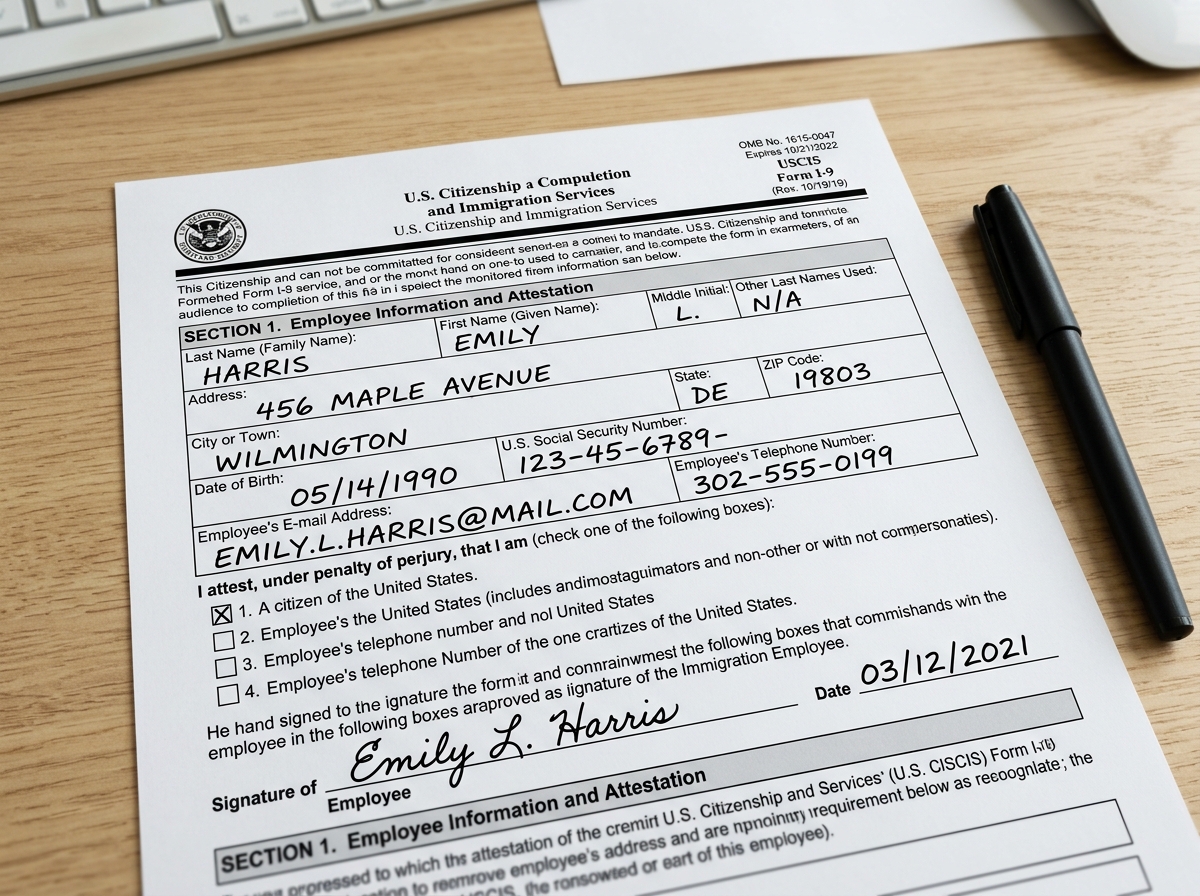
When we look at a completed i 9 form example, Section 1 is where the journey begins. This part is entirely the employee’s responsibility. They must fill this out no later than their first day of work for pay, though they can do it any time after they have accepted a job offer.
In this section, the employee provides their full legal name, current address, and date of birth. While providing a Social Security Number is generally voluntary, it becomes mandatory if we, as the employer, participate in E-Verify. We always recommend that employees use “N/A” in optional fields like email address or telephone number if they choose not to provide that information, rather than leaving the boxes bone dry.
The most critical part of Section 1 is the attestation of citizenship or immigration status. The employee must check one of four boxes:
- A citizen of the United States
- A noncitizen national of the United States
- A lawful permanent resident
- A noncitizen authorized to work
If they select the fourth option, they must provide an expiration date for their work authorization, if applicable, and one of several identification numbers, such as an Alien Registration Number (A-Number) or a Form I-94 admission number. For a deep dive into the technicalities, we always suggest keeping the Form I-9 official instructions handy during the process.
Navigating List A, List B, and List C Documents
One of the biggest headaches for HR teams is knowing which documents to accept. The law is very specific: we must see original, unexpired documents. No photocopies allowed, with the sole exception of a certified copy of a birth certificate.
The documents are divided into three lists. An employee can choose to show one document from List A, which proves both who they are and that they are allowed to work. If they don’t have a List A document, they must show one from List B (identity) and one from List C (work authorization).
| List A (Identity & Authorization) | List B (Identity Only) | List C (Authorization Only) |
|---|---|---|
| U.S. Passport or Passport Card | Driver’s license or State ID | Social Security Card (unrestricted) |
| Permanent Resident Card (Form I-551) | School ID with photo | Original or certified birth certificate |
| Employment Authorization Document (I-766) | Voter’s registration card | Consular Report of Birth Abroad |
| Foreign passport with I-94 (for specific statuses) | U.S. Military card | DHS employment authorization document |
A common trap is the “restricted” Social Security card. If a card says “NOT VALID FOR EMPLOYMENT” or “VALID FOR WORK ONLY WITH DHS AUTHORIZATION,” it is not an acceptable List C document. In these cases, the employee needs to provide a different document to prove they can work in the U.S.
We also have to handle the “receipt rule.” If an employee has lost a document or it was stolen, they can present a receipt showing they applied for a replacement. This receipt is valid for 90 days, after which they must show the actual document. For a full breakdown of what works and what doesn’t, check out the Acceptable documents guide.
How to Master Section 2 and the Three Day Rule
Section 2 is our territory as employers. We have exactly three business days from the employee’s first day of work to complete this. If Jane starts on a Monday, we need Section 2 finished and signed by Thursday. If the job is only going to last three days or less, Section 2 must be completed on the very first day.
When we examine the documents, we aren’t expected to be forensic experts. The standard is that the documents must “reasonably appear to be genuine” and relate to the person standing in front of us. We must record the document title, the issuing authority, the document number, and the expiration date.
Many businesses ask if they can use a notary public to help with remote hires. The answer is yes. A notary can act as our “authorized representative.” However, they aren’t acting as a notary in this role, so they shouldn’t use their notary seal on the form. We remain legally responsible for any mistakes they make, so choosing a reliable partner is key.
If we use E-Verify, there’s an extra step called “photo matching.” If the employee presents a U.S. Passport, Permanent Resident Card, or Employment Authorization Document, we must compare the photo on the actual document to the photo that appears on the E-Verify screen. You can learn more about this process at E-Verify photo matching.
A Completed I 9 Form Example for International Employees
Handling international hires adds a layer of complexity. For an F-1 student on Optional Practical Training (OPT), a completed i 9 form example would typically show a foreign passport, a Form I-94 showing their arrival record, and a Form I-20 endorsed by their school.
For J-1 scholars, we look for the DS-2019 form. H-1B employees usually present a foreign passport along with an I-94 indicating their specific status. Since April 2013, the I-94 has been largely automated for those arriving by air or sea. Employees can pull their records online, so don’t panic if they don’t have a paper card stapled into their passport.
Correcting Errors on a Completed I 9 Form Example
Mistakes happen. Maybe we wrote the wrong year or forgot to check a box. The golden rule for corrections is: never use white-out. If we find an error, we should draw a single line through the incorrect information, enter the correct data, and then initial and date the change.
If a signature is missing from a form completed months ago, we cannot backdate it. We should sign it with the current date and perhaps attach a note explaining why the signature was added late. This transparency is vital for audit preparation. If the Immigrant and Employee Rights Section ever comes knocking, they want to see that we are acting in good faith to maintain compliant records.
Avoiding Penalties and Anti-Discrimination Pitfalls
Compliance isn’t just about filling in boxes, it’s about following the rules of fairness. We cannot specify which documents an employee must provide. If a new hire wants to show their passport, we can’t demand to see a driver’s license and Social Security card instead. Doing so could be considered “document abuse” and lead to a discrimination claim.
We also have to be careful with Supplement B (formerly Section 3). This is used for reverification. We only reverify employees whose work authorization is expiring. We never reverify U.S. citizens or lawful permanent residents who presented a “Green Card,” even if that card has an expiration date.
Civil money penalties for I-9 violations can range from a few hundred to several thousand dollars per form. These add up fast. If we have a preparer or translator help an employee with Section 1, they must complete Supplement A to certify their assistance. Skipping these small details is often what leads to those pesky fines.
Frequently Asked Questions about I-9 Compliance
What happens if an employee loses their documents?
If an employee’s documents are lost, stolen, or damaged, they can provide a receipt for the replacement. This allows them to work for 90 days. By the end of that period, they must present the actual replacement document. A receipt for a new grant of work authorization is not acceptable, only a receipt for a replacement of a document they previously held.
Can I accept a photocopy of a birth certificate?
Generally, no. We must see original documents. The only exception is a certified copy of a birth certificate issued by a state, county, municipal authority, or outlying possession of the U.S. bearing an official seal. A plain “Xerox” copy from the employee’s home files won’t cut it.
Do I need to reverify a U.S. Passport?
No. U.S. Passports, even though they have expiration dates, do not require reverification. Once a U.S. citizen has established their identity and work authorization, we don’t need to check them again, even when the passport expires. This also applies to Permanent Resident Cards and List B identity documents.
Conclusion
Mastering the completed i 9 form example is a fundamental skill for any business owner or HR professional. While the paperwork might seem like a hurdle, it is a vital part of maintaining a legal and compliant workforce. By staying organized, respecting the three day rule, and treating every employee with the same fair documentation standards, we can protect our businesses from unnecessary risk.
At Valley All States Employer Service, we specialize in taking this burden off your shoulders. We provide expert, impartial, and efficient E-Verify processing to ensure your compliance is airtight. Integrating E-Verify with your I-9 process doesn’t just add a layer of security, it simplifies your entire onboarding workflow.
Learn more about our I-9 compliance services
Ready to simplify your hiring process and eliminate compliance headaches? Contact our team today to see how we can help.