
Understanding I-9 Section 2: What Every Employer Must Know
I-9 section 2 requirements are the employer’s responsibility to verify every new hire’s identity and work authorization within three business days of their first day of work. Here’s what you need to know:
Key Section 2 Requirements:
- Timeline: Complete within 3 business days of employee’s first day (or by first day if employment lasts less than 3 days)
- Documents: Examine original, unexpired documents from List A or a combination of List B and List C
- Examination: Physically inspect documents to ensure they appear genuine and relate to the employee
- Recording: Enter document title, issuing authority, number, and expiration date
- Attestation: Sign and date the form, certifying you examined the documents
- Liability: You remain liable even when using an authorized representative
Federal law requires all U.S. employers to complete Form I-9 for each person they hire. While employees handle Section 1, Section 2 falls squarely on your shoulders. Get it wrong, and you risk civil money penalties ranging from hundreds to thousands of dollars per violation.
The challenge? Section 2 involves strict deadlines, specific document requirements, and detailed record-keeping. You can’t ask employees for specific documents. You can’t accept copies. And you must complete everything within that tight three-day window.
Many HR managers find Section 2 the most complex part of the I-9 process. Between understanding which documents are acceptable, knowing how to examine them properly, and avoiding discrimination pitfalls, there’s a lot that can go wrong.
This guide breaks down exactly what you need to do, when you need to do it, and how to avoid the common mistakes that trigger audits and penalties.
The Core I-9 Section 2 Requirements: Deadlines and Responsibilities
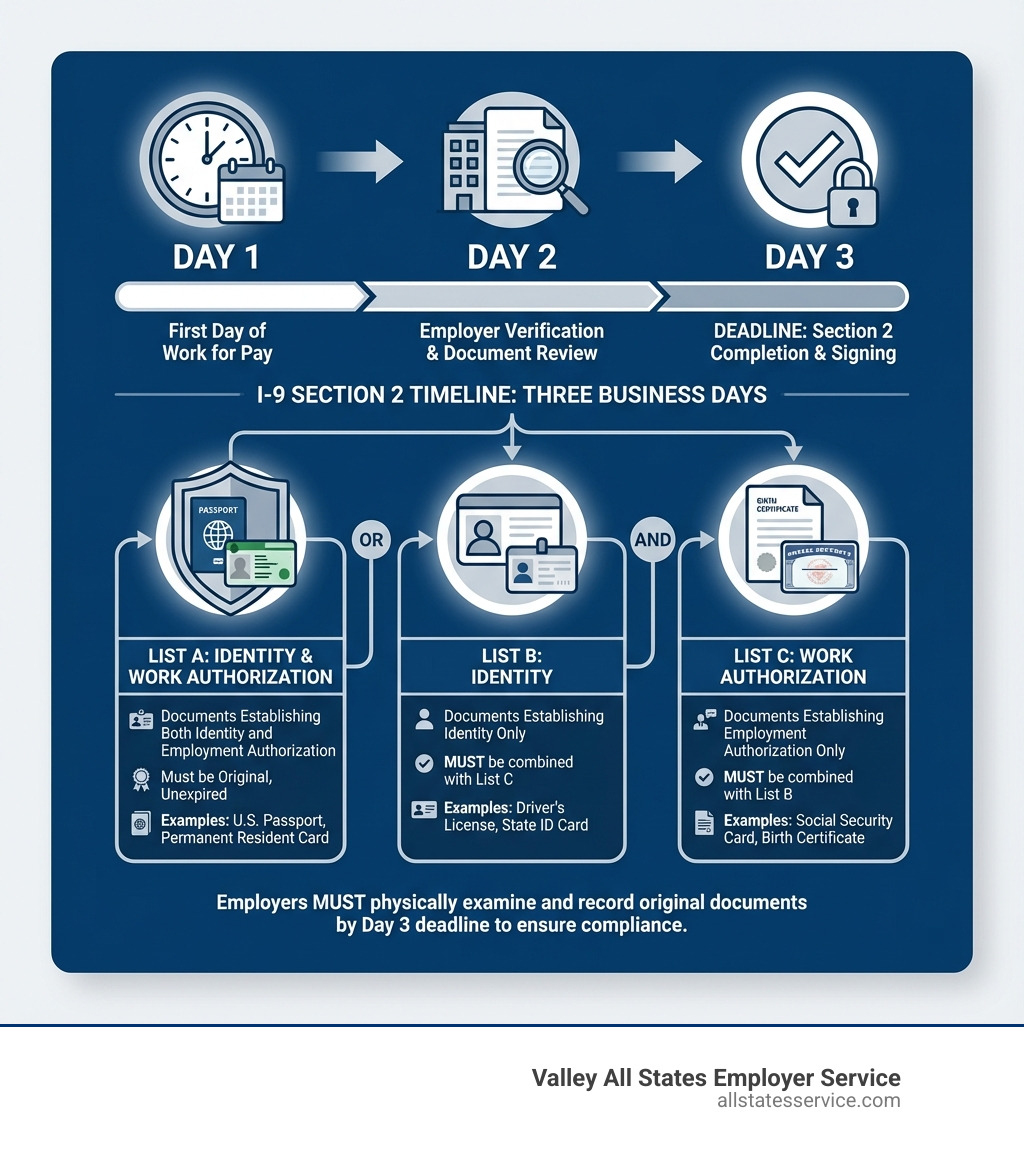
When we bring on a new team member, the clock starts ticking the moment they begin working for pay. This is where the I-9 section 2 requirements truly begin for us as employers. We must complete and sign Section 2 of Form I-9 within three business days of the employee’s first day of work for pay. For instance, if an employee starts work on a Monday, we need to have Section 2 fully completed by the close of business on Thursday of that week.

What if the job is short-term, lasting less than three business days? In such cases, the rules are even tighter. We must complete Section 2 no later than the employee’s first day of work for pay. This ensures that even for brief engagements, employment eligibility is verified immediately.
We understand that managing these deadlines can be challenging, especially for smaller businesses or those with high turnover. Sometimes, we might need to designate an authorized representative to complete Section 2 on our behalf. This could be a personnel officer, a foreman, or even a third-party agent. While someone else may complete the form, we, as the employer, remain fully liable for any errors or violations committed by that authorized representative. This means selecting our representatives carefully and providing them with clear, comprehensive instructions.
Employee Responsibilities: Presenting Acceptable Documents
The journey of I-9 verification begins with the employee in Section 1, but their crucial role continues into Section 2. Our employees are responsible for presenting acceptable documentation to us for review. The law is clear: employees decide which documents to present from the official Lists of Acceptable Documents. We cannot, under any circumstances, ask or require them to show a specific document.
The documents an employee presents must be original, unexpired, and reasonably appear to be genuine and relate to the employee. They have two main options for fulfilling this requirement:
- One document from List A: This type of document establishes both identity and employment authorization.
- One document from List B AND one document from List C: In this scenario, the List B document establishes identity, and the List C document establishes employment authorization.
We must ensure that our employees understand these options and present the correct types of documents. It is crucial for us to refer to The official Lists of Acceptable Documents to ensure we are accepting valid forms of identification and work authorization.
Employer Responsibilities: Fulfilling Your I-9 Section 2 Requirements
Our role in completing Section 2 goes beyond simply checking boxes. We have critical responsibilities to ensure compliance.
First and foremost, we must examine the employment eligibility and identity document(s) an employee presents. This examination determines whether the document(s) reasonably appear to be genuine and to relate to the employee. This is a visual inspection, and we are not expected to be document fraud experts, but we must exercise due diligence.
After examining the documents, we must accurately record the document information on the Form I-9. This includes the document title, issuing authority, document number, and expiration date (if applicable).
Finally, we must complete and sign the certification block in Section 2, attesting under penalty of perjury that we have examined the documents, that they appear genuine, and that the employee is authorized to work in the United States. This signature and date must be completed within the three-business-day timeframe.
Crucially, we must adhere to anti-discrimination laws. This means we cannot refuse to accept a valid document simply because we prefer another, nor can we specify which documents an employee must present. Our process must be consistent for all new hires in the United States, regardless of their national origin or citizenship status.
Decoding the Lists of Acceptable Documents
Understanding the Lists of Acceptable Documents is fundamental to meeting your I-9 section 2 requirements. These lists, provided by the U.S. Citizenship and Immigration Services (USCIS), categorize the types of documents employees can present to prove their identity and employment authorization. We must be familiar with these lists and their nuances.
List A: Documents That Establish Both Identity & Employment Authorization
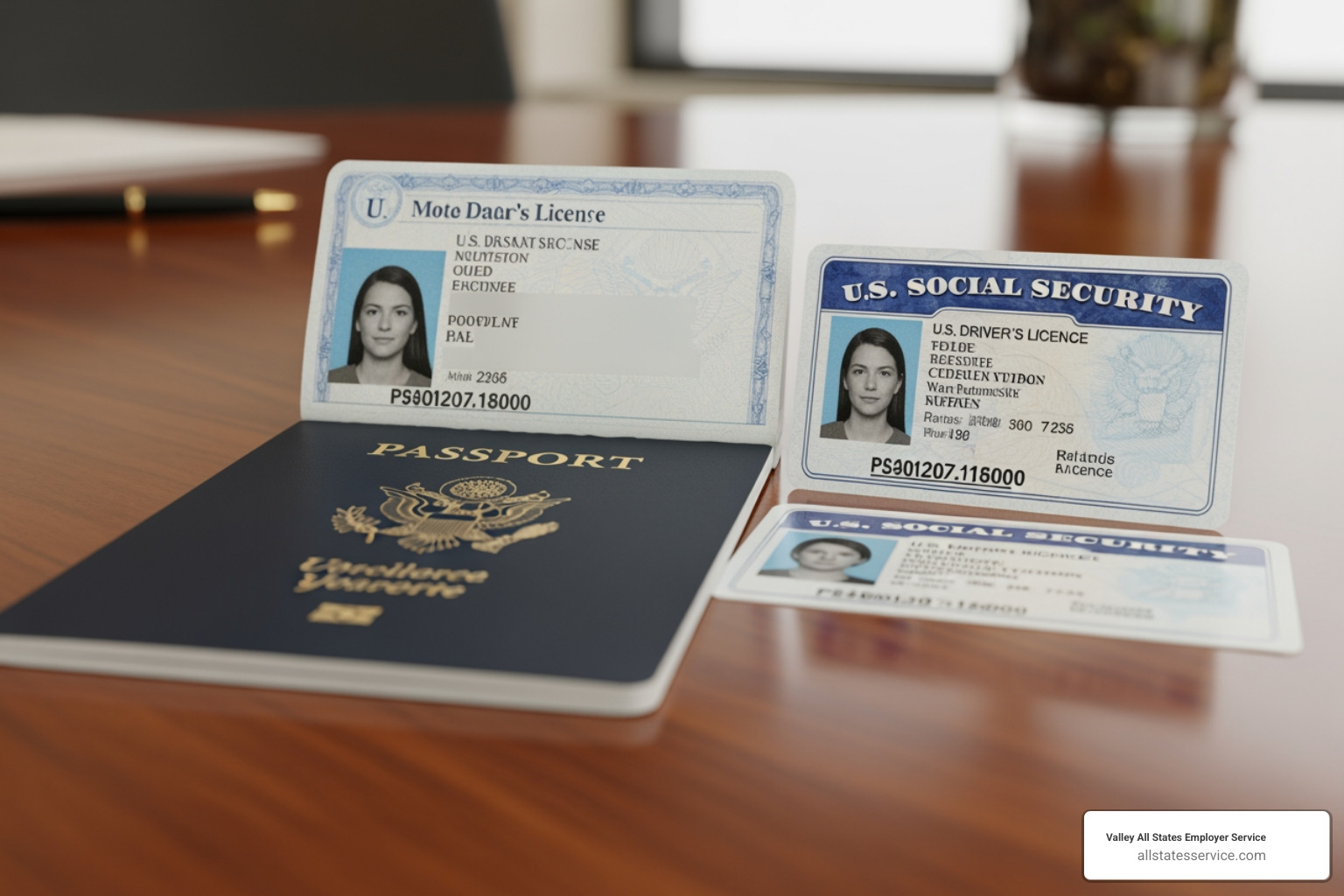
Documents in List A are powerful because they satisfy both identity and employment authorization requirements with a single document. If an employee presents a valid List A document, we should not ask for any additional documents. Examples of List A documents include:
- U.S. Passport or U.S. Passport Card: These are among the most common and straightforward List A documents.
- Permanent Resident Card (Form I-551): Often referred to as a “Green Card,” this is presented by lawful permanent residents.
- Foreign Passport with Form I-94 or Form I-94A containing an endorsement of nonimmigrant status and an attached Form I-766 (Employment Authorization Document) or other valid employment authorization document: This combination is common for certain nonimmigrant workers.
- Employment Authorization Document (Form I-766): This card is issued by USCIS to individuals authorized to work in the U.S.
When we receive a List A document, we record its details in the designated List A column of Section 2 and leave the List B and List C columns blank.
Lists B and C: The Two-Document Combination
If an employee does not have a List A document, they must present one document from List B (to establish identity) AND one document from List C (to establish employment authorization). We must ensure that both documents are original, unexpired, and appear genuine.
Here are typical documents found in each list:
Common List B Documents (Identity Only):
- Driver’s license or ID card issued by a state or outlying possession of the United States
- ID card issued by federal, state, or local government agencies
- School ID card with a photograph
- Voter’s registration card
- U.S. Military card or draft record
- Military dependent’s ID card
- U.S. Coast Guard Merchant Mariner Card
Common List C Documents (Employment Authorization Only):
- Social Security card (unrestricted)
- Certification of Birth Abroad (Form FS-545 or DS-1350)
- Original or certified copy of a birth certificate
- U.S. Citizen ID Card (Form I-197)
- Identification Card for Use of Resident Citizen in the United States (Form I-179)
- Native American tribal document
- Employment Authorization Document issued by DHS
We need to be particularly diligent when examining List B and C documents. For example, a Social Security card is generally acceptable for List C, but we must ensure it does not state “NOT VALID FOR EMPLOYMENT” or similar restrictions. For List B, a state-issued driver’s license or identification card is commonly presented.
What About Document Receipts?
Sometimes, an employee may not have an original document readily available. In specific situations, we can accept a receipt in lieu of a document. This is a temporary measure, usually for 90 days. We must understand the rules regarding receipts to avoid compliance issues:
- Acceptable Receipts: Generally, a receipt for a replacement document (like a lost, stolen, or damaged Permanent Resident Card or Employment Authorization Document) is acceptable. A receipt for the application of an initial Employment Authorization Document is not generally acceptable, but there are specific exceptions for certain foreign nationals.
- 90-Day Rule: If a receipt is accepted, the employee must present the actual document within 90 days from the date of hire (or, for reverification, 90 days from the date the previous authorization expired).
- Recording: We must record the receipt information in Section 2, noting “receipt” and the document type. Once the actual document is presented, we cross out the receipt information, enter the new document’s details, and initial and date the change.
- Following Up: It is our responsibility to remind employees to present their actual documents before the 90-day period expires. Failure to do so can lead to compliance violations.
How to Correctly Examine and Record Documents
The examination and recording process is where many employers make mistakes, inadvertently putting themselves at risk. Our meticulous attention to detail here fulfills key I-9 section 2 requirements.
Physical vs. Remote Examination
Traditionally, we’ve had to physically examine each original document in the employee’s physical presence. This allows us to determine if it reasonably appears to be genuine and relates to the employee. However, the Department of Homeland Security (DHS) has introduced an authorized alternative procedure for remote examination, particularly relevant for employers participating in E-Verify.
If we participate in E-Verify and are eligible, we may be able to remotely examine employee documents. This alternative procedure typically involves examining clear copies (front and back) of documents during a live video interaction. If we use this method, we must be sure to note this in the ‘Additional Information’ field of Section 2. We must also understand that if we use the alternative procedure, we must be consistent and apply it to all employees.
Regardless of the method, the “reasonably genuine” standard applies. We are not expected to be experts in fraudulent documents, but we should reject documents that clearly do not appear genuine (e.g., obvious alterations, incorrect security features).
Step-by-Step: Filling Out Section 2
Let’s walk through the specifics of completing Section 2:
- Employee’s First Day of Employment: This is a crucial date. We enter the date the employee began, or will begin, work for pay in the designated field. For staffing agencies, this could be the date the employee is assigned to their first job or entered into the assignment pool.
- Document Details: Based on the documents presented (either List A, or List B and List C), we must accurately record:
- Document Title: The exact name of the document (e.g., “U.S. Passport,” “Driver’s License,” “Social Security Card”).
- Issuing Authority: Who issued the document (e.g., “U.S. Department of State,” “Maryland MVA,” “Social Security Administration”).
- Document Number: The unique number found on the document.
- Expiration Date: The date the document expires (if applicable).
- Employer Attestation: After reviewing the documents and ensuring they meet the requirements, the person who examined the documents must sign and date the form. This is our attestation that we have fulfilled our obligations.
- Signature and Title: The individual who completed Section 2 must sign, print their name, and enter their title. We also enter our business name and physical address (no P.O. boxes).
Common Mistakes and ‘Do Not’ Instructions for Employers
To ensure compliance, we must be aware of critical “do not” instructions:
- Do Not Accept Copies: With the exception of certified copies of birth certificates and remote examination under the authorized alternative procedure for E-Verify employers, we must not accept photocopies, faxes, or scanned images of documents. Original documents are key.
- Do Not Accept Expired Documents: All documents presented must be unexpired. If a document has passed its expiration date, it is not acceptable.
- Do Not Specify Documents: We cannot tell an employee which specific document(s) they must present. It is their choice from the Lists of Acceptable Documents.
- Do Not Over-Document: If an employee presents a List A document, we must not ask for or accept additional documents from List B or List C. This can be viewed as discriminatory.
- Do Not Backdate the Form: The date we sign Section 2 must be the actual date we completed the verification. Backdating is a serious violation.
- Do Not Accept Invalid Social Security Cards: If a Social Security card states “NOT VALID FOR EMPLOYMENT,” “VALID FOR WORK ONLY WITH DHS AUTHORIZATION,” or “VALID FOR WORK ONLY WITH INS AUTHORIZATION,” it is not an acceptable List C document. Laminated Social Security cards are also generally not acceptable if they were laminated after the card was issued, as this can void security features.
Special Considerations and E-Verify Implications
Navigating I-9 section 2 requirements often involves special circumstances and the added layer of E-Verify participation. We need to be prepared for these nuances to maintain compliance.
Handling Unique Situations: Minors, Disabilities, and More
Certain employees may have unique circumstances that require special attention during the I-9 process:
- Minors Under 18: If an employee is under 18 and cannot present a List B document (like a driver’s license), a parent or legal guardian can complete Section 1 and present a List C document on the minor’s behalf, along with a List B document that establishes the minor’s identity (such as a school record or clinic record). The parent/guardian would also sign the Preparer/Translator certification.
- Employees with Disabilities: Similarly, if an employee with a disability cannot present a standard identity document, a state identification card for individuals with disabilities (if it contains a photograph) is an acceptable List B document. If a guardian or representative assists the employee, they would follow procedures similar to those for minors.
- Unfamiliar Documents: While we must examine documents for reasonable genuineness, we are not expected to recognize every document from every country or issuing authority. If a document seems unfamiliar but appears to be from the Lists of Acceptable Documents, it’s best to consult the USCIS Handbook for Employers (M-274) or contact USCIS for clarification.
- Automatic EAD Extensions: Sometimes, an employee’s Employment Authorization Document (EAD) may be automatically extended by USCIS due to a pending application. In these cases, the expired EAD, combined with a Form I-797C, Notice of Action, showing a timely filed application for renewal of the EAD, serves as an unexpired List A document. We must enter the appropriate notation in the ‘Additional Information’ field of Section 2.
E-Verify and the I-9 Section 2 Requirements
For employers participating in E-Verify, there are additional considerations that impact our I-9 section 2 requirements:
- List B Photo Requirement: If an employee presents a combination of List B and List C documents, and we participate in E-Verify, the List B document must contain a photograph. This is a specific E-Verify requirement, as stated on e-verify.gov.
- Alternative Procedure for Remote Examination: E-Verify participation can make us eligible for the authorized alternative procedure for remote document examination. This is a significant flexibility for remote hires. If we use this, we must ensure we check the appropriate box in the ‘Additional Information’ field of Section 2. More information is available on E-Verify.gov.
- E-Verify Case Number: While not strictly part of Form I-9 itself, after we’ve completed Section 2 and submitted the employee’s information to E-Verify, we will receive a case number. We should make a note of this case number, typically in the ‘Additional Information’ field on Form I-9, or attach the E-Verify case details to the form.
- Photocopying Documents: While photocopying documents for Form I-9 is generally voluntary for non-E-Verify employers, if we participate in E-Verify, we are required to retain copies of certain documents. Specifically, we must make a photocopy of any List A document presented. If the employee presents List B and List C documents, we must make a photocopy of the List B document. We must keep these copies with the employee’s Form I-9.
Frequently Asked Questions about I-9 Section 2
We often hear common questions about I-9 section 2 requirements. Let’s address some of these to clarify our responsibilities.
What happens if an employee fails to present documents within three days?
This is a critical point that employers often grapple with. If an employee cannot present acceptable documentation (or an acceptable receipt for a document) within three business days after their first day of employment, we may terminate their employment. It’s important for us to have a consistent policy on this and apply it uniformly to all employees to avoid any claims of discrimination. Before taking any termination action based on I-9 issues, we always recommend consulting with HR or legal counsel.
What are the consequences for failing to properly complete Form I-9?
The implications of failing to comply with I-9 section 2 requirements can be severe. We risk violating section 274A of the Immigration and Nationality Act (INA) and may be subject to civil money penalties. These penalties can range from hundreds to thousands of dollars per violation, depending on the severity and frequency of the errors. Immigration and Customs Enforcement (ICE) conducts audits, and any deficiencies found can lead to significant fines. Beyond financial penalties, non-compliance can also result in reputational damage and increased scrutiny from government agencies.
Who is liable when using an authorized representative?
As employers, we are ultimately responsible for ensuring Form I-9 is completed correctly, even if we designate an authorized representative to complete Section 2 on our behalf. This means we are liable for any violations in connection with the form or the verification process, including those committed by the authorized representative acting on our behalf.
If we choose to use a notary public as an authorized representative, it’s crucial to understand that they are acting as our agent, not in their capacity as a notary. They should not use their notary seal on Form I-9, as their role is to complete the employer’s portion of the form, not to notarize it. We must exercise due diligence in selecting and training any authorized representative, providing them with clear instructions and reviewing their work to minimize our liability.
Simplify Your I-9 and E-Verify Process
Navigating the complexities of I-9 section 2 requirements is a crucial aspect of responsible hiring. Compliance is not just about avoiding penalties; it’s about maintaining ethical employment practices and ensuring a legal workforce. Accuracy truly matters in every step of the process, from examining documents to recording information and meeting deadlines.
We understand that managing these requirements can be time-consuming and challenging, especially with evolving regulations and the intricacies of E-Verify. That’s why we at Valley All States Employer Service are dedicated to providing expert, impartial, and efficient outsourced E-Verify workforce eligibility verification. Our goal is to minimize errors and administrative burden for our clients, allowing you to focus on what you do best: growing your business.
Don’t let the nuances of I-9 compliance become a source of stress or risk for your business. Let us help you streamline your process and ensure you meet all federal mandates with confidence.